Email-Based Authentication
Escape supports authentication flows that rely on email-delivered verification codes (email TOTP) and magic links. Instead of managing a real inbox, Escape provides dedicated scan email addresses that it can read automatically during the authentication process.
How It Works
Escape provisions email addresses under the @scan.escape.tech domain that are tied to your organization. When an application sends a verification code or a magic link to one of these addresses, the scanner intercepts the message and either fills the code into the form or follows the link — exactly like a real user would.
Generating Your Scan Email Address
All scan email addresses follow this pattern:
| Part | Description |
|---|---|
<alias> | Any string composed of letters (a–z, A–Z), digits (0–9), ., and - |
<org-id-first-segment> | The first segment of your organization UUID (everything before the first -) |
@scan.escape.tech | The fixed domain |
Finding your organization ID
Go to https://app.escape.tech/organization/general/ and copy the UUID shown on that page. Take only the part before the first -.
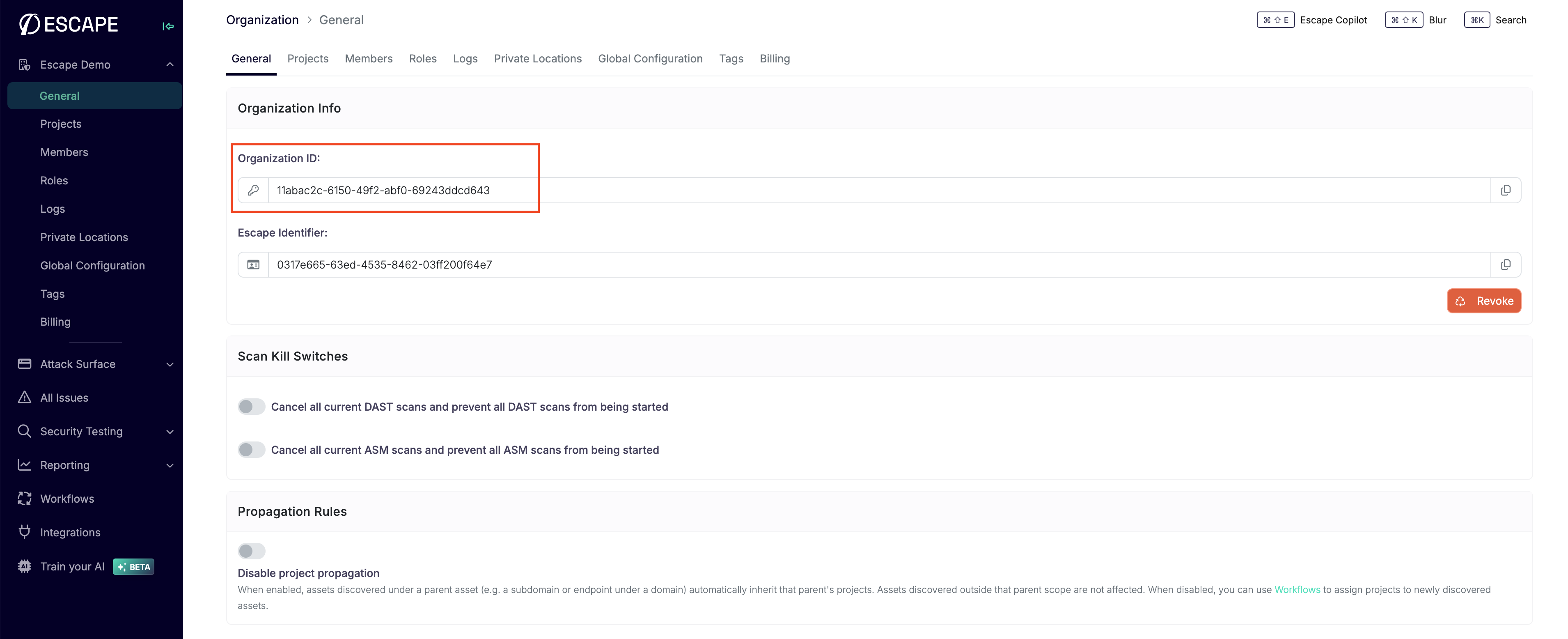
Example
Your organization UUID is a standard UUID v4 with five segments separated by dashes. You only need the first segment:
Using this first segment, valid scan email addresses for that organization are:
user1.12345678@scan.escape.techadmin.12345678@scan.escape.techtest-alice.12345678@scan.escape.tech
You can create as many aliases as you need — one per user in your scan configuration is a common pattern.
Configuration
Agentic Browser preset (recommended)
The simplest way to set up email-based authentication is to use the browser_agent preset in agentic mode. Describe the email step in plain language and the scanner will automatically handle reading the email and filling the code or following the link.
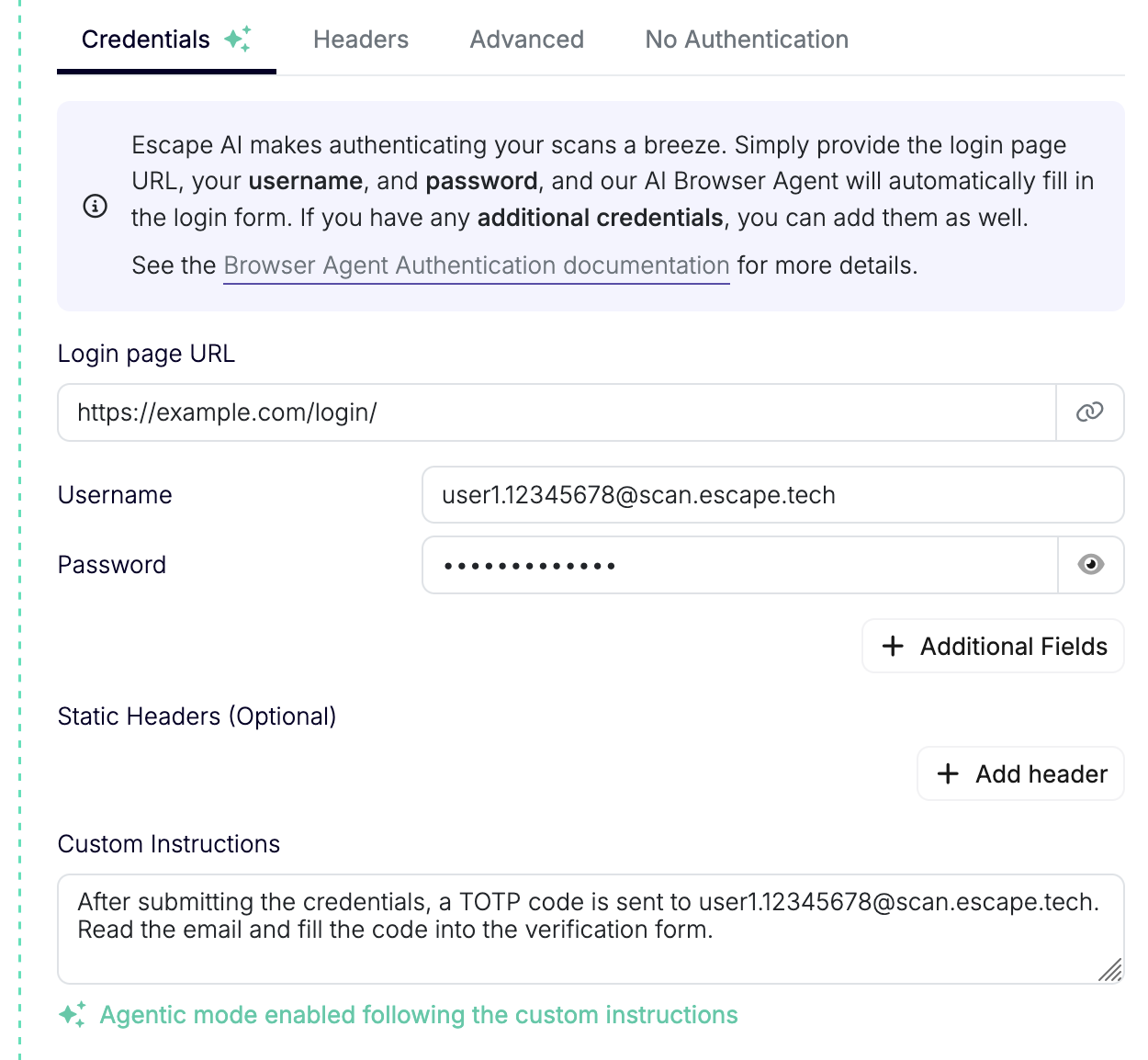
presets:
  - type: browser_agent
    login_url: https://example.com/login
    users:
      - username: user1.12345678@scan.escape.tech
        password: your-password
    agentic:
      enabled: true
      instructions: >
        After submitting the credentials, a TOTP code is sent to
        user1.12345678@scan.escape.tech. Read the email and fill
        the code into the verification form.
Instructions are optional
The agentic browser is able to detect email-based authentication steps automatically. Explicit instructions are not required but can speed up execution or help in ambiguous flows.
Browser Actions preset
If you need fine-grained control over each step of the authentication flow, use the dedicated actions inside a browser_actions preset.
Email TOTP (fill_mail_totp)
Waits for an email containing a verification code and fills it into the specified input field.
presets:
  - type: browser_actions
    login_url: https://example.com/login
    users:
      - username: user1.12345678@scan.escape.tech
        actions:
          - action: fill
            locator: input[name="email"]
            value: user1.12345678@scan.escape.tech
          - action: fill
            locator: input[name="password"]
            value: your-password
          - action: click
            locator: button[type="submit"]
          - action: fill_mail_totp
            email_address: user1.12345678@scan.escape.tech
            locator: input[name="totp_code"]
            auto_submit: true
Magic Link (click_mail_magic_link)
Waits for an email containing a magic link and navigates to it.
presets:
  - type: browser_actions
    login_url: https://example.com/login
    users:
      - username: user1.12345678@scan.escape.tech
        actions:
          - action: fill
            locator: input[name="email"]
            value: user1.12345678@scan.escape.tech
          - action: click
            locator: button[type="submit"]
          - action: click_mail_magic_link
            email_address: user1.12345678@scan.escape.tech
Multiple Users
Each user in your scan configuration should have its own alias. All aliases pointing to the same <org-id-first-segment> are automatically routed to your organization.
presets:
  - type: browser_actions
    login_url: https://example.com/login
    users:
      - username: user1.12345678@scan.escape.tech
        actions:
          - action: fill_mail_totp
            email_address: user1.12345678@scan.escape.tech
            locator: input[name="code"]
      - username: user2.12345678@scan.escape.tech
        actions:
          - action: fill_mail_totp
            email_address: user2.12345678@scan.escape.tech
            locator: input[name="code"]
Action Reference
fill_mail_totp
| Property | Type | Required | Default | Description |
|---|---|---|---|---|
action | fill_mail_totp | yes | — | Action identifier |
email_address | string | yes | — | Scan email address where the code will be sent. Must match <alias>.<org-first-segment>@scan.escape.tech |
locator | string | yes | — | Playwright locator for the code input field |
auto_submit | boolean | no | false | Automatically submit the form after filling the code |
one_by_one | boolean | no | false | Type the code character by character |
timeout | integer | no | 30 | Seconds to wait for the email to arrive |
select_first_if_multiple | boolean | no | false | If multiple input fields match the locator, select the first one |
allow_failure | boolean | no | false | If true, a missing email will not fail the scan |
click_mail_magic_link
| Property | Type | Required | Default | Description |
|---|---|---|---|---|
action | click_mail_magic_link | yes | — | Action identifier |
email_address | string | yes | — | Scan email address where the magic link will be sent. Must match <alias>.<org-first-segment>@scan.escape.tech |
new_page | boolean | no | false | Open the magic link in a new browser page |
timeout | integer | no | 60 | Seconds to wait for the email to arrive |
allow_failure | boolean | no | false | If true, a missing email will not fail the scan |
Related Documentation
- Browser Actions preset: Full reference for all browser actions
- Agentic Browser Authentication: AI-driven authentication with natural language
- MFA & Captcha: Authenticator-app TOTP and captcha support