#88 · Separate Scanning of APIs Associated with Front-Ends for Improved Efficiency
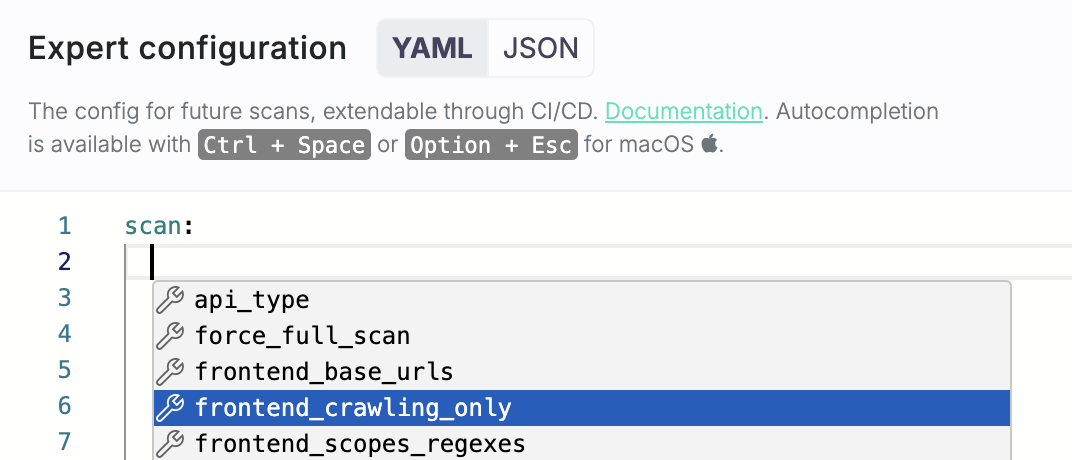
We’ve added a new option to scan APIs associated with the front-end without performing security checks on the front-end itself. If your developers update only the API without touching the front-end, you won’t want to waste time rescanning it. This new feature lets you focus on API vulnerabilities, speeding up the scanning process and avoiding unnecessary checks. To enable this, simply configure the new frontend_crawling_only boolean parameter in your advanced settings.
How to Set It Up
- Go to the settings of the relevant app.
- Navigate to Scan configuration → Expert.
-
Under Scan
-
Either type
frontend_crawling_only: true - Or use one of the shortcuts Ctrl + Space (Windows/Linux) or Option + Esc (macOS) and pick
frontend_crawling_onlyfrom the list.
Benefits
- Focused Scanning: This option helps you focus on scanning APIs without the need to repeatedly check the front-end, making the scanning process more efficient.
- Improved Efficiency: By skipping the front-end checks, the scan will be faster, allowing you to quickly analyze API behavior without unnecessary extra checks.