Skip to content

Release notes

Release Notes

Product updates shipped in Escape.

All releasesTags

Latest releases

Q4 2026

  1. #194 Secrets Vault Integration: Credentials That Stay Current
  2. #193 OSCP Certification: Sign-Off From the Team That Ran the Test
  3. #192 Issue Retest: Prove a Fix Without a Full Pentest
  4. #191 GitHub Whitebox Integration: Test the Code Where It Lives
  5. #190 MCP, API, and CLI: Run the Whole Platform From Your Agent

Q3 2026

  1. #189 Escape's AI pentesting now logs in 9x faster
  2. #188 XSS2Shell detection is live (CVE-2026-64638)
  3. #187 AI Pentest coverage now shows which persona sent each request
  4. #186 Ask anything about your AI pentest, right from the reasoning logs
  5. #185 Whitebox pentesting is now available in Escape's AI Pentesting
  6. #184 Escape's AI Pentesting now learns from your false positives
  7. #183 wp2shell detection is live (CVE-2026-63030, CVE-2026-60137)
  8. #182 One-Click Fix in Cursor: Turn Findings Into Codebase-Tailored Remediation
  9. #181 ASM now supports large IP ranges
  10. #180 AI Pentest Reasoning Logs: See Every Step Your AI Pentest Takes
  11. #179 First and last login now shown for every member
  12. #178 AI Pentest profiles now ship with default scope restrictions
  13. #177 Critical Severity: Focus on Your Most Urgent Findings First

#194 · Secrets Vault Integration: Credentials That Stay Current

Availability: General Availability

Your scan credentials now live in one place. Create a variable once, reference it as ${KEY} in any profile, and rotate it without opening a single scan configuration. Point it at Azure Key Vault and Escape reads the current secret each time a scan starts, so a rotated password stops breaking your scans.

Organization Variables list with a secret row and a plain text row Organization Variables: one list for every value your scans share.

What's New

  • Three variable types: Plain text stays readable. Secret is write-only after you save it. External is a reference to a secret that stays in your Azure Key Vault.
  • Azure Key Vault: create an Azure Key Vault integration with a tenant ID, client ID, and client secret, then pick the vault and the secret name when you create an external variable.
  • Redaction: in scan outputs, secret and external values of 6 characters or more are replaced with [REDACTED: KEY].
  • Audit trail: each scan that reads variables writes an audit log entry listing the keys it used.
  • API: /v3/vault-variables lists, creates, and deletes variables, POST /v3/vault-variables/{variableId}/rotate rotates one, and GET /v3/vaults lists linked vaults.

How It Works

Write ${KEY} anywhere a string value appears in a profile's configuration: a username, a password, a header, a URL.
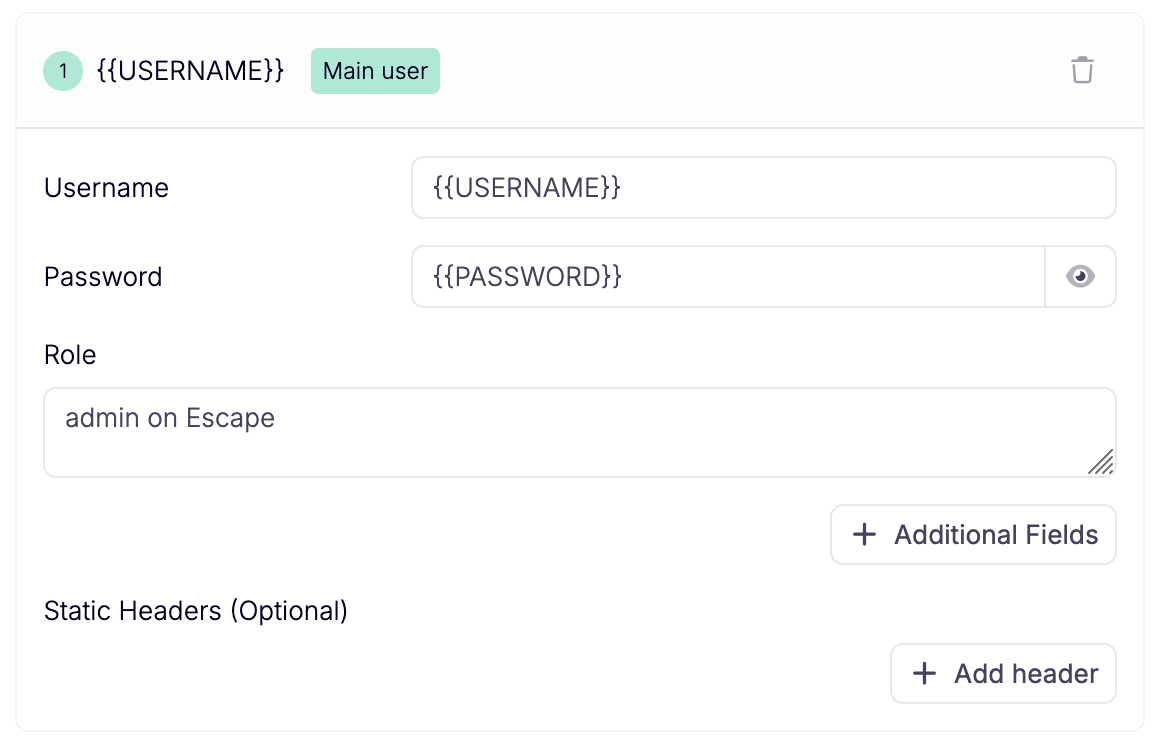
Authentication user with variable references in the username and password fields A profile user with variable references in the username and password.

When a scan starts, Escape resolves every referenced variable once and reuses those values for the whole run. External variables are read live from your vault at that moment. If Escape fails to read one (the secret was deleted or disabled, or access is refused), the scan fails at start instead of running without credentials.

Requirements and Limits

  • Managing variables and linking vaults requires Manage Vault Variables or Admin through a global role binding.
  • A key is SCREAMING_SNAKE_CASE, starts with a letter, and holds up to 128 characters.
  • Azure Key Vault is the external vault supported today. The service principal needs Reader on the subscription and Key Vault Secrets User on each vault.
  • Values are read once at scan start: a secret must stay valid for the full run.
  • Plain text values and values shorter than 6 characters aren't redacted. The variable form warns when a secret is under that length.

Variables Docs → Read the Announcement →

HashiCorp Vault is next.

Questions?

Have a question? Reach out on your dedicated support channel, or email us at support@escape.tech.
#193 · OSCP Certification: Sign-Off From the Team That Ran the Test

Availability: General Availability

When your auditor or a security questionnaire asks for a named, certified tester, you now get that from Escape. Our on-staff Offensive Security Certified Professionals (OSCP) review and certify your AI pentest results, so you don't bring in a second firm for the signature.

What's New

  • Review and certification by an OSCP: once you order a certification, one of our OSCPs is assigned to your project, completes the assessment, and delivers the documentation you need.
  • One partner, not two: we run the pentest and we sign off on it. No second contract, no second handoff, no second calendar to wait on.
  • Request it from the profile: on an AI Pentesting profile, the PDF export card on the Summary tab now carries a Contact support button that opens a conversation with us.

How It Works

  1. Run your AI pentest as usual.
  2. On the profile's Summary tab, go to the PDF export card and click Contact support to request the certification for that assessment.
  3. One of our OSCPs is assigned, reviews the results, and delivers the documentation.

Requirements and Limits

  • OSCP certification applies to AI pentests.
  • You request it per assessment.

AI Pentesting Docs → Read the Announcement →

Questions?

Have a question? Reach out on your dedicated support channel, or email us at support@escape.tech.

#192 · Issue Retest: Prove a Fix Without a Full Pentest

Availability: General Availability

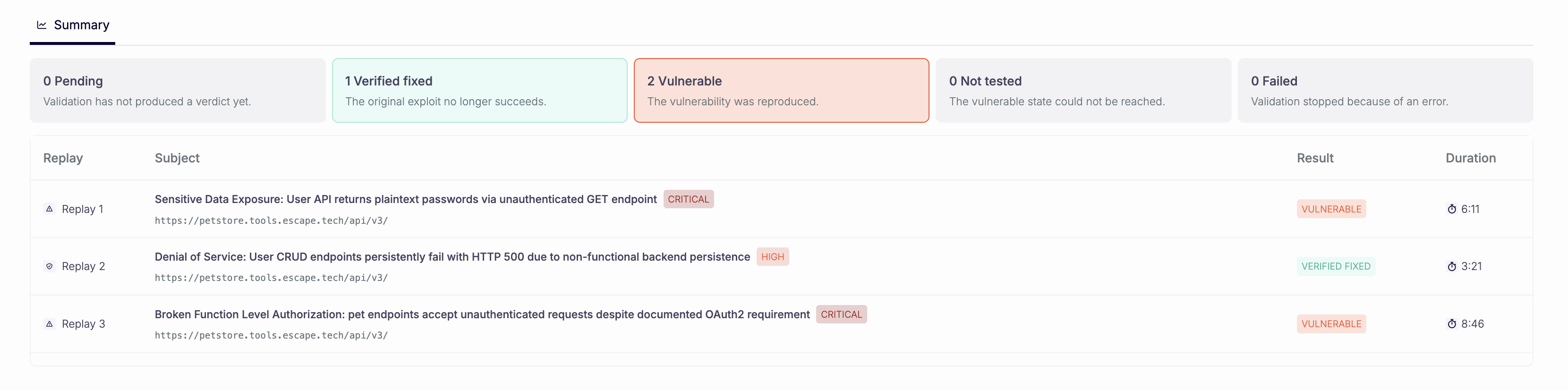
A developer tells you "we followed the remediation, is this fixed?" You now answer in one run. Issue Retest replays only the findings you pick, on the DAST or AI Pentesting profile that found them, and gives each one a verdict. Nothing else on the profile moves.

Finished retest summary with verdict counts and one row per replayed issue Each selected issue gets its own verdict on the Summary tab.
What's New

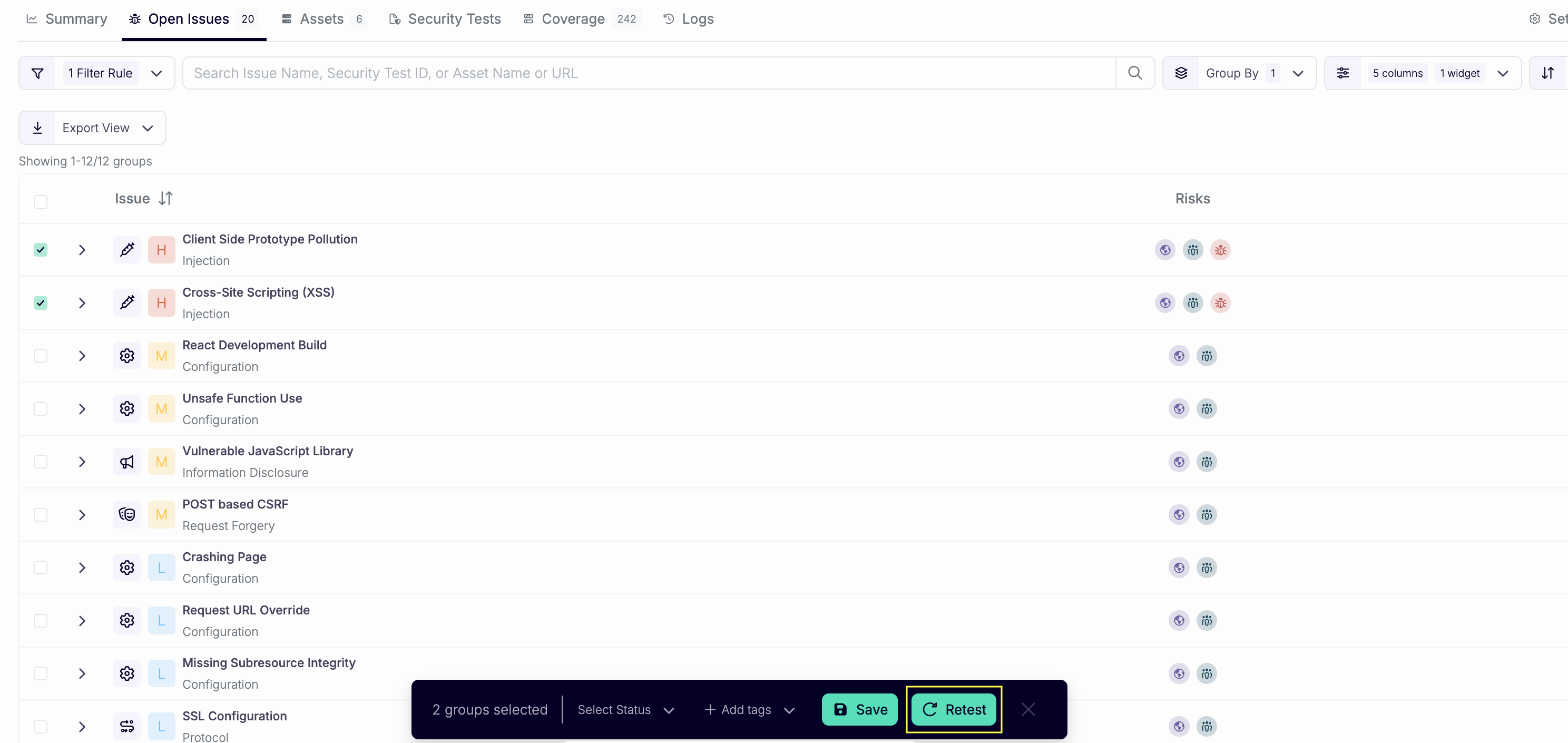
  • Retest from the issue: open an issue and choose Send to retest, or select rows in the issue table and click Retest. One run covers every issue you select on the same profile.

Issues table with several rows selected and the Retest button Batch several fixes into a single retest.

  • Four verdicts: each issue comes back Verified fixed, Vulnerable, Not tested, or Failed. Only Verified fixed resolves an Open issue.
  • Context for the agents: add up to 4000 characters on what changed (a deploy, a fix, an environment note) before you click Launch retest.
  • API and CLI: POST /v3/retests takes a profileId and either issueIds or a filter. escape-cli retests start, list, and get do the same from your pipeline.

How It Works

  1. You pick the issues and launch. Escape starts a dedicated scan that uses the profile's own configuration.
  2. One agent takes each selected issue and reports its outcome. When the replay never reaches the vulnerable state, the outcome is Not tested.
  3. The retest id is the scan id. Poll GET /v3/retests/{id} and read outcome per issue: VERIFIED_FIXED, VULNERABLE, NOT_TESTED, or FAILED.
escape-cli retests start --profile-id <profile-id> --issue-id <issue-id>
escape-cli retests get <retest-id>

To retest by filter instead of by id, swap --issue-id for filter flags such as --severity HIGH --status OPEN.

Requirements and Limits

  • Issue Retest runs on DAST and AI Pentesting profiles.
  • A retest covers issues from one profile at a time.
  • Only the selected issues change. A retest doesn't create new issues.
  • Not tested and Failed leave the issue status unchanged.
  • In the CLI, --issue-id and the filter flags are mutually exclusive.

Issue Retest Docs → Read the Announcement →

Questions?

Have a question? Reach out on your dedicated support channel, or email us at support@escape.tech.

#191 · GitHub Whitebox Integration: Test the Code Where It Lives

Availability: General Availability

Whitebox pentests now read your source straight from GitHub. Install the Escape GitHub App, pick your repositories and a branch in the pentest form, and launch. If your application spans 30 microservices, that's no longer 30 archives to download and upload.

What's New

  • GitHub App authentication: the GitHub integration has a GitHub Installation tab that takes an Installation ID and an Organization login. The Personal Access Token tab stays available.
  • Repositories in the pentest form: Whitebox Configuration (Optional) now has a Repositories tab next to Archive Upload. Select the repositories behind the application you're testing.
  • One branch per repository: each repository starts on its default branch. Change it per row.
  • API: GET /v3/integrations/github/repositories lists the repositories your integrations reach. A profile stores its selection under automated_pentesting.repositories, one entry per repository with a uri and a selected_branch.

How It Works

  1. In Integrations, open GitHub and install the Escape GitHub App on your organization.
  2. Copy two values into the GitHub Installation tab. The Installation ID is the last segment of the app's configuration page URL in your organization settings. The Organization login is your organization handle.
  3. Create or edit an AI Pentesting profile, open Whitebox Configuration (Optional), and select your repositories and branches.
  4. Launch. Cascade reads the code as context, then proves each finding against the running application.

Requirements and Limits

  • GitHub is the source code host supported today.
  • The Repositories tab appears once a GitHub App installation is connected. Until then, the form links you to the GitHub integration.
  • You still set your target URLs: source code adds context, it doesn't replace the scope.
  • Whitebox configuration isn't available on mobile application profiles.
  • Archive upload keeps working for code that isn't on GitHub.

Whitebox Agent Docs → Read the Announcement →

GitLab repositories are next.

Questions?

Have a question? Reach out on your dedicated support channel, or email us at support@escape.tech.

#190 · MCP, API, and CLI: Run the Whole Platform From Your Agent

Availability: General Availability Operations tagged Beta in the API reference, and the CLI commands and MCP tools built on them, may still change.

Your agent now runs the full fix loop in Escape. It pulls an issue with its reproduction and exploit, generates a fix, retests it, exports the results as SARIF, and fails the build on any open issue at or above the severity you set. The public API covers 326 operations, up from 186. Every MCP tool is backed by an escape-cli command, so what your agent does in a conversation, your pipeline does in a script. Tools that delete or change resources in bulk require confirm: true, and bulk issue updates support a dry run.

What's New

Findings and Remediation

  • Evidence on every issue: GET /issues/{issueId} and escape-cli issues get return the reproduction, the exploit, the attack chain, and a fix prompt.
  • Severity changes with a reason: Issue updates accept a severity object with value and reason, so you record why you changed it.
  • Bulk issue updates: POST /issues/bulk-update returns ids, count, and dryRun. Send "dryRun": true to preview the matching IDs without changing them. A partial failure reports how many issues were already updated. Preview from the CLI with escape-cli issues bulk-update --severity LOW --status IGNORED --dry-run, then drop --dry-run to apply.
  • AI remediation: POST /issues/{issueId}/ai-remediation starts a fix, and POST /issues/{issueId}/ai-remediation/feedback rates it. In the CLI: issues remediation generate, get, and feedback.
  • Retests: retests start, retests list, and retests get prove a fix without a full scan.
  • Sharper filters: GET /issues accepts projectIds, categories, assetTypes, assetStatuses, aiFalsePositive, agentic, targetIds, securityTestUids, blacklistedIds, blacklistedNames, noTags, and dnf.
  • Workflows on issues: issues trigger-workflow runs a manual workflow on one issue. POST /issues/bulk-workflow and issues bulk-workflow run it on every issue a filter matches.
  • Saved views: /views lists, creates, updates, reorders, and deletes the views you share with the UI. GET /views/{viewId}/issues lists the issues of a view.

Scans and AI Pentesting

  • What a scan did: GET /scans/{scanId}/configuration, /statistics, and /compliance, with scans configuration, scans statistics, and scans compliance.
  • Attack scenarios (Beta): GET /scans/{scanId}/scenarios and scans scenarios list the scenarios an AI pentest explored, filtered by vector and search.
  • Target filters: GET /scans/{scanId}/targets filters on coverage, issues, severities, methods, and search.
  • Scan filters: GET /scans accepts commitBranch, latestBranchScans, assetTypes, tagIds, noTags, problemCodes, problemSeverities, search, and dnf.
  • CI severity gates: scans watch --fail-on-severity HIGH and scans start --watch --fail-on-severity HIGH fail the build when a finished scan has an open issue at or above HIGH. The GitHub Action enforces fail_on_severities (default HIGH).
  • Stop and diagnose: scans cancel, scans ignore, scans problems, and profiles problems.
  • Target validation (Beta): POST /validations checks that a target is reachable and in scope before you create a profile. validations start and validations get do the same from the CLI.
  • AI pentest profiles: profiles update edits an AI pentest profile after creation and reads its settings back. POST /profiles/bulk-update and profiles bulk-update change several profiles in one call.
  • Continuous pentest (Beta): create, update, enable, and disable under /profiles/{profileId}/continuous-pentest, and with profiles continuous-pentest.
  • Regression tests (Beta): nine operations under /regression-tests cover create, update, delete, run, stop, history, and clarifications. The CLI group is regression-tests.
  • Knowledge files (Beta): /knowledge-files lists, uploads, and deletes the documents that give an AI pentest its context. Over MCP, knowledge-files upload takes text content inline with --content.

Assets and Schemas

  • Asset filters: GET /assets accepts classes, domains, environments, frameworks, integrationIds, ownerEmails, ports, risks, severities, tagIds, technologyKeys, and dnf.
  • Bulk import: POST /assets/bulk-import and assets bulk-import.
  • Asset deletion: DELETE /assets/{assetId} returns 200 with {"message": "Asset deleted successfully"}, matching the documented schema. escape-cli assets delete and the MCP server accept both the previous and current response shapes.
  • Schema download: GET /assets/{assetId}/content returns a signed URL for an uploaded schema. assets download fetches it.
  • Clear a field: assets update --description '' and empty tag, owner, project, or schema lists now clear the value. profiles update keeps an explicit null, so you clear proxyId, context.additional, and offLimitsAreas.

Reporting and Analytics

  • SARIF and CSV (Beta): GET /exports/issues/sarif, /exports/issues/csv, and /exports/assets/csv. In the CLI: issues export --format sarif|csv and assets export --format csv.
  • Security KPIs: GET /statistics/issues, /statistics/endpoints, and /statistics/trends. statistics trends --project-id scopes the trend to projects.
  • Compliance: GET /compliance, /compliance/per-application, and /compliance/enabled. compliance enable sets the frameworks you track (Beta).
  • Reports (Beta): GET /jobs lists export jobs. jobs rename and jobs send-artefacts name a report and email it.
  • Security-test catalog: GET /security-tests lists every test with its scanner, asset type, and severity. security-tests update and bulk-update tune them for the organization (Beta).

Integrations and Workflows

  • Run and inspect: POST /integrations/{kind}/{id}/test and /sync, GET /integrations/{kind}/{id}/runs, with integrations test, sync, and runs.
  • Ticket lookups: GET /integrations/jira/{id}/projects, /integrations/jira/{id}/issue-types, and /integrations/azure-boards/{id}/areas return what you need to configure a ticket workflow. In the CLI: integrations jira-projects, jira-issue-types, and azure-areas.
  • Repositories and vaults: integrations repositories lists the repositories granted to the GitHub App. integrations vaults lists the vaults a provider exposes.
  • Vault variables (Beta): /vault-variables and /vaults manage the secret references your authentication uses. Values are write-only: the API never returns them.
  • Workflows: workflows pause, workflows executions, and GET /workflows/{id}/executions.

Organization Administration

  • Settings: GET /organization-settings reads the SLA policy and AI system prompt. org-settings update and org-settings scanner-configuration create change them (Beta).
  • People and access: PUT /users/{userId} and users deactivate deactivate a user. GET /permissions lists the permission catalog. DELETE /projects/{projectId} and DELETE /roles/{roleId} now respond.
  • Pagination and search: /roles, /custom-rules, /users, and /tags accept cursor and size. The array body stays, and the next cursor comes back in the X-Next-Cursor header.
  • Audit logs: GET /audit/logs filters by target, alongside action, actor, and search.
  • Private locations: GET /locations/{locationId}/logs and PUT /locations/{locationId}/tags, with locations logs and locations tags.
  • Account state: GET /me reports subscription and trial state.
  • Copilot chats (Beta): five operations under /ai-chats, and the ai-chats CLI group.

MCP Server

  • More administration tools: Stats, audit logs, tags, asset updates, and role bindings are available from your agent.
  • A confirmation gate: tools that delete or change resources in bulk require confirm: true.
  • Paged results: list tools return 50 results and a nextCursor. scans list, scans agents, and scans targets page with --cursor and --size.
  • Truthful schemas: tool inputs and outputs match what the tools accept and return, dry runs included. -o schema never calls the API.
  • Bounded waits: emails_wait returns a pending result when no email arrives before its deadline. Resume with the returned after and seenIds, or poll with emails_list.
  • Filters that filter: array filters such as --project-id, --target-id, and --name on issues list and scans list now reach the API as real values.
  • Room for slow work: assets create waits up to 15 minutes for a schema build instead of 30 seconds.

Requirements and Limits

  • PUT /organization-settings, PUT /compliance/enabled, and the security-test updates require an administrator.
  • An inline export larger than the MCP response limit fails with a message asking you to narrow where. Use jobs trigger-export for full reports.
  • GET /integrations/jira/{id}/projects returns up to 1,000 projects per call without parameters, then X-Next-Cursor.
  • Every CLI command listed here ships in escape-cli 1.12.0.

Compatibility

Hard-breaking

  • Tags (API): PUT /tags/{tagId}/{tagId} is gone. Use PUT /tags/{tagId}. Upgrade the CLI if escape-cli tags update returns 404.
  • Audit logs (API): action and actor on GET /audit/logs match exactly, and actor matches the ID, not the email. Filters combine, so calls return fewer rows. Move partial and email searches to search.
  • Projects (API): PUT /projects/{id} now validates slug: lowercase alphanumerics and hyphens, up to 256 characters. It used to ignore it.
  • Bulk issue update (API and CLI): POST /issues/bulk-update requires a non-empty where or "all": true, mutually exclusive. More than 10,000 matches return 400 instead of being silently truncated. escape-cli issues bulk-update requires at least one of --issue-id, --asset-id, --severity, --profile-id, --tag-id, --scanner-kind, or --all. --all is mutually exclusive with filter flags.
  • Integrations (API): GET, PUT, and DELETE /integrations/{kind}/{id} return 404 when the integration is of another kind than the URL.
  • AI pentest profiles (API): PUT /profiles/{id} and POST /profiles/bulk-update return 400 for a recurring schedule (cron or schedule.cron), useAllAvailableExtraAssets, or defaultProxyType: ESCAPE. Recurrence is continuous pentest.
  • Asset update (API): PUT /assets/{id} returns 400 when the body carries a field the asset class ignores, and 404 for an unknown asset.
  • Asset delete (API): DELETE /assets/{assetId} returns an object with a message string instead of a bare true. If your script parsed the body as a boolean, check the status code instead: 200 means the asset was deleted.
  • Profile list (API): the asset on each GET /profiles row no longer carries children, sources, statistics, or rawData. Read them from GET /assets/{assetId}.
  • Wiz workflow action (API): a Wiz export action requires integrationId.
  • Scan watching (CLI): scans watch and scans start --watch exit non-zero on failed, canceled, or unfinished scans, and errors print to stderr.
  • Job watching (CLI): jobs get --watch and jobs trigger-export --watch print one final state, fail on FAILED or CANCELLED, and stop after --timeout (default 15 minutes). --stream restores the per-poll output.
  • Tools (MCP): scans_watch is removed. Poll with scans_get.

Soft-breaking

  • AI pentest profiles: GET reports schedule and cron as null.
  • Profile schemas: isActive is true for every schema attached to a profile.
  • Beta tags: 74 operations carry the Beta tag, up from 5. Regenerated clients see the new tag.

Non-breaking

  • Every new operation, query parameter, response field, CLI command, and CLI flag listed above.

MCP Server Docs → Public API Docs → Scans CLI Docs →

Questions?

Have a question? Reach out on your dedicated support channel, or email us at support@escape.tech.

#189 · Escape's AI pentesting now logs in 9x faster

Escape's AI Pentesting now gets through login flows in about 20 seconds on average, roughly 9x faster than before.

Login is where automated pentesting usually stalls. A brittle auth pass blocks everything behind it, so time lost at the front of a scan is coverage lost everywhere else.

Faster, more reliable auth means more of each run is spent on your application.

We also built a dedicated benchmark set for login and auth patterns. Regressions surface immediately, and every change is measured against the same baseline.

If you have an auth flow that Escape struggles with, send it to your customer success manager and we'll add it to the benchmark set.

#188 · XSS2Shell detection is live (CVE-2026-64638)

Availability: General Availability

XSS2Shell is a pre-authentication reflected XSS in WordPress Core, tracked as CVE-2026-64638 with a CVSS 4.0 score of 8.9. A crafted username reaching the failed-login error page runs attacker JavaScript in the site's origin, with no authentication and no further interaction on that page. Against an administrator who is already logged in, the chain escalates to PHP code execution, though that step needs social engineering and a deliberate click. The fix shipped in WordPress 7.0.3 on August 6, backported through the 4.7 branch.

Escape now detects it across DAST and AI Pentesting. Escape now detects it across DAST and AI Pentesting. DAST confirms the injection by sending a single crafted failed login and matching the clobbered DOM elements in the error response, so the result is behavioural evidence rather than a version guess, and it needs no credentials. AI Pentesting walks the full chain and returns proof of exploitation.

Recommended action: connect to your Escape account to verify whether you've been affected, then patch to the security release for your branch. The login screen is internet facing by design, so exposure is broad.

We proactively reach out to our current customers who might have been affected by this issue.

See your exposure in one view

  • Open All Issues.
  • Search for "XSS2Shell".
  • Save as a new view.

You get a live view of every affected asset, with the exposed and unauthenticated counts broken out for triage.

Questions?

Have a question? Reach out on your dedicated support channel, or email us at support@escape.tech.

#187 · AI Pentest coverage now shows which persona sent each request

Escape's AI Pentesting scans log in as personas. Until now, every request they made after logging in showed up in the Coverage tab under a single authenticated label, and only when we spotted auth-like headers. You could see that the agents were logged in. You could not see who they were logged in as.

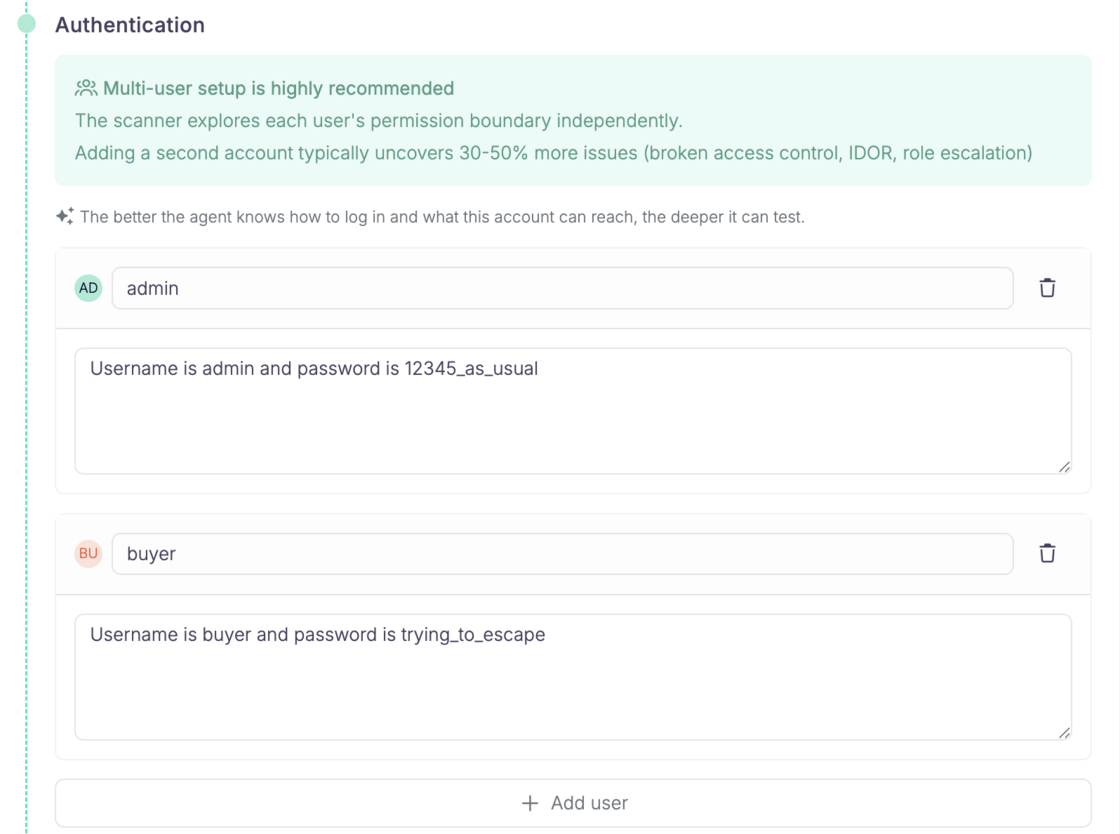
Now, when a Cascade agent authenticates as a persona, the traffic captured through the companion is attributed to that persona in Coverage. Same Bearer token, same cookies, but the User column reads admin or buyer instead of authenticated.

Define your personas separately during scan setup:

Screenshot 2026-08-12 at 13.04.50.png

What you'll see in the Coverage tab: Screenshot 2026-08-12 at 13.08.44.png

What this gives you

  • Proof of per-role work. You can confirm the agent actually tested the app as admin, not just as buyer. Role coverage stops being something you take on faith.
  • A lead worth pulling. If buyer has an OK (✔️❌) exchange on a route meant for admins, that is a good reason to look closer. It is a signal, not a finding. HTTP alone cannot tell you whether the 200 returned privileged data or an empty shell.
  • Testing gaps you can trust. If an endpoint has no successful exchange under any user, something is missing: credentials, a login step that broke, a flow the agents never reached.

Known limits

Some exchanges still fall back to authenticatedwhen we cannot match a persona uniquely: shared credentials across personas, anonymous sessions that carry auth-like cookies, and long runs where an agent goes a while without re-authenticating.

Questions?

Have a question? Reach out on your dedicated support channel, or email us at support@escape.tech

#186 · Ask anything about your AI pentest, right from the reasoning logs

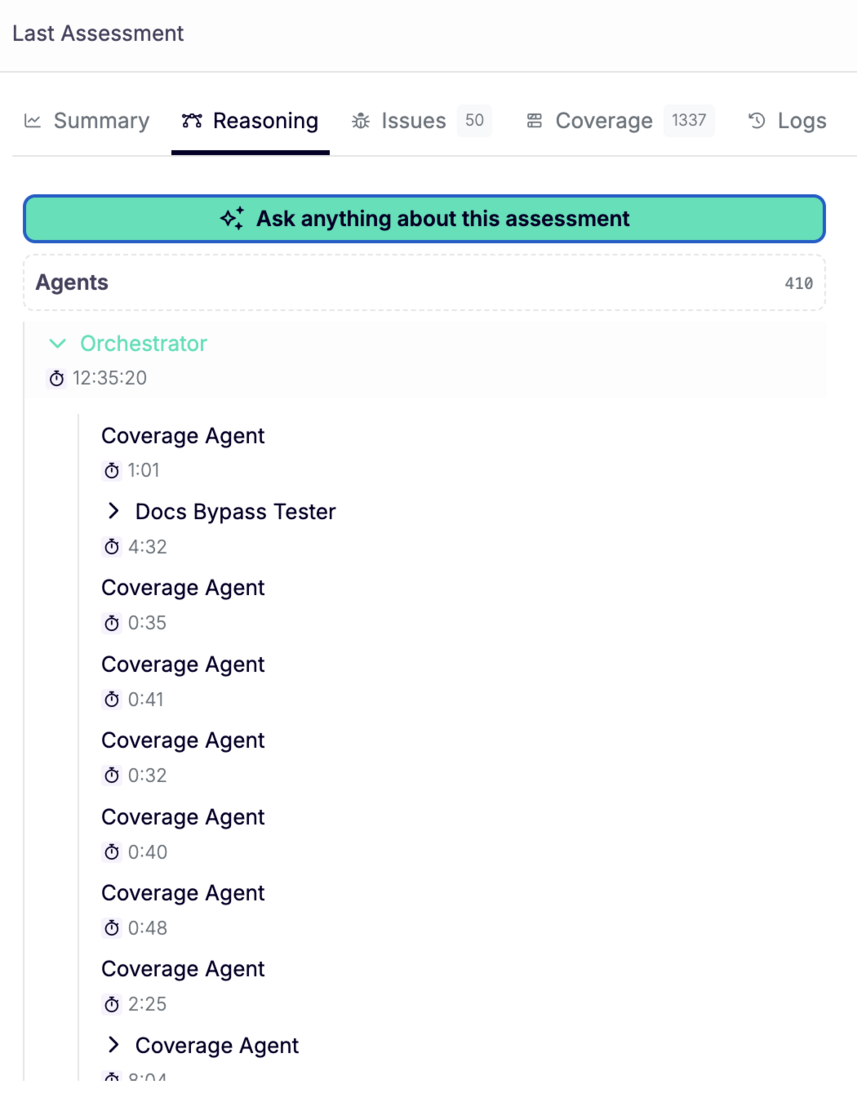
A Cascade assessment produces hundreds of agent steps: orchestrator decisions, coverage passes, worker findings. Reading through all of it to answer one question is slow.

Now you can just ask.

Availability: beta. Ask your customer success manager to turn it on for your workspace.

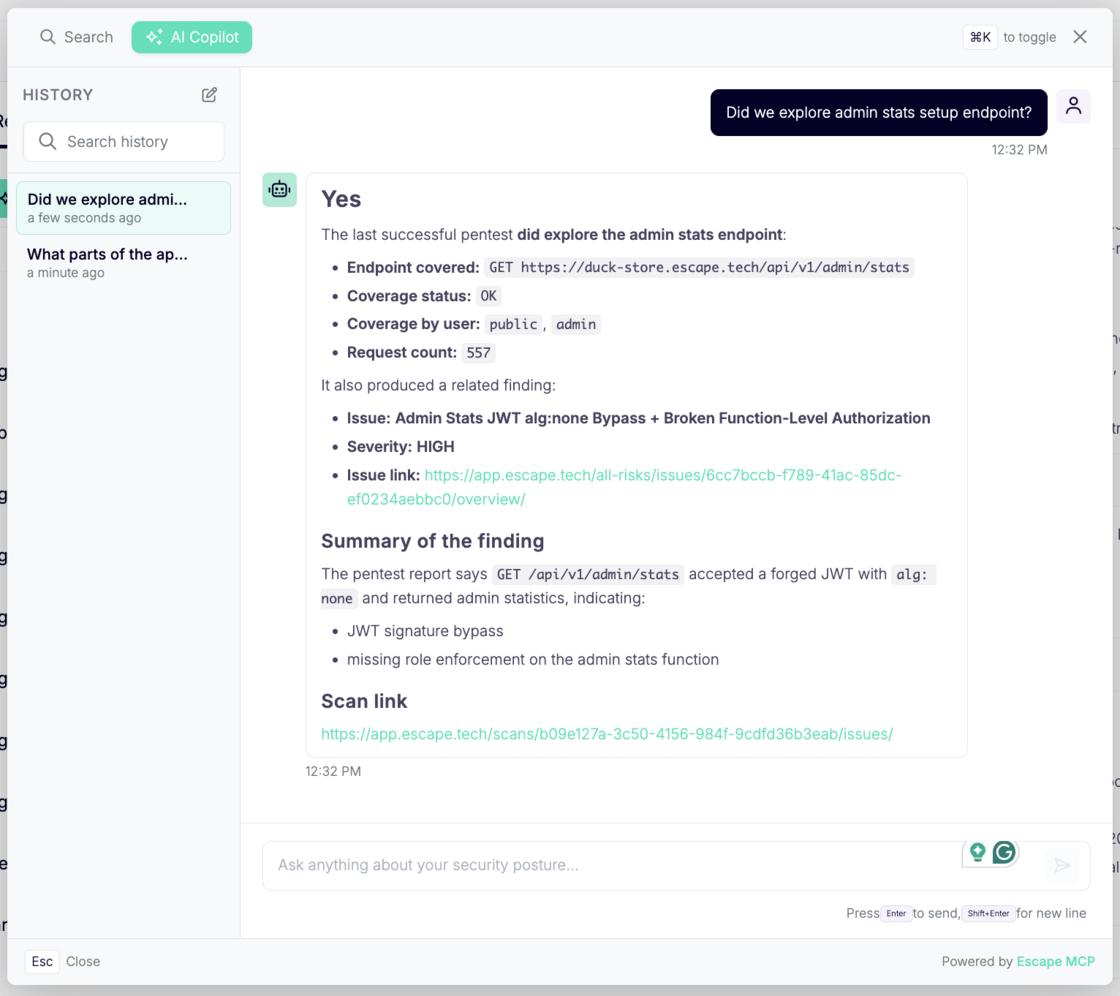
Escape Copilot opens directly from the AI reasoning logs page. Ask why an agent chose a path, what a worker concluded, or which tests didn't run and get an answer without leaving the assessment.

Screenshot 2026-08-10 at 14.19.40.png

What changed:

  • Copilot CTA on the reasoning logs page. One click from the Reasoning tab of any assessment.
  • Contextual quick questions. Suggested prompts adapt to where you are. On an AI pentest, they're about that pentest. For example, you can ask What did the agents try that didn't work? What parts of the app weren't reached?

Screenshot 2026-08-10 at 14.34.15.png

  • Answers grounded in your assessment. Copilot reads the actual agent logs, so it answers from what the agents did and recorded, not from a general guess about what a pentest usually looks like.
  • Your questions stay with the assessment. Everything you ask is saved, so you can come back to a scan later or hand it to a teammate without re-asking.
  • Take the logs elsewhere. Reasoning logs are available through the Public API or via Escape MCP, so you can pull them into your own reporting, ticketing, or analysis: GET /scans/{scanId}/agents/{agentId}/logs.

#185 · Whitebox pentesting is now available in Escape's AI Pentesting

Every yearly pentest opens the same way: the first hours go to mapping what you already know. Cascade can now start from the code instead.

image.png

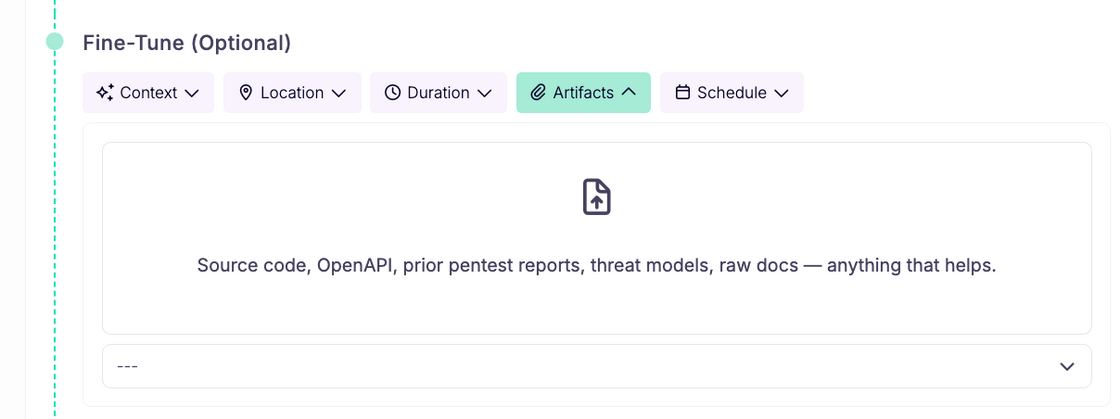
Attach your repository as a .zip under Fine-Tune (Optional) then Artifacts when you launch a pentest.

image.png

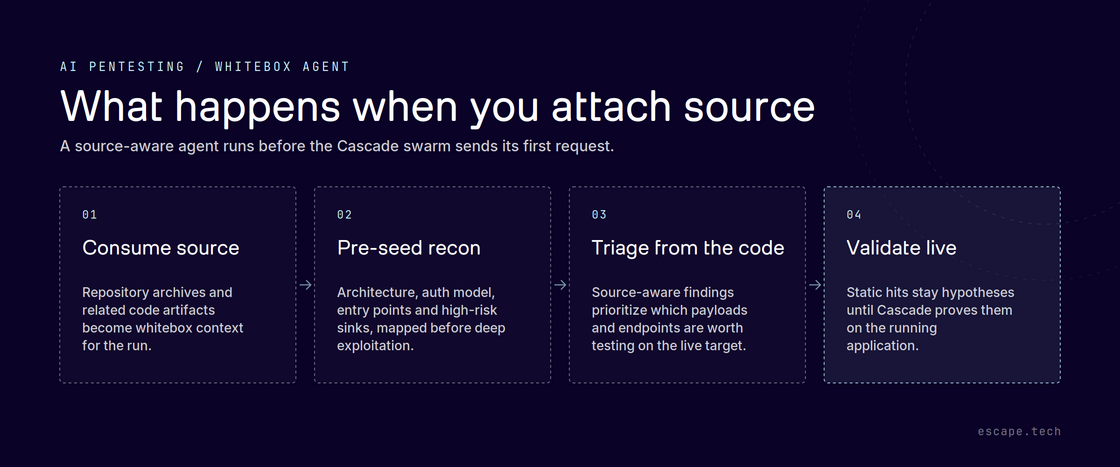
The whitebox agent reads it before the swarm sends its first request, mapping architecture, auth model, entry points and high-risk sinks, and every later agent inherits that context. Findings can now point at the exact file and function behind a vulnerability, with the code attached as evidence.

Static hits stay hypotheses. Source-derived leads are still validated against the running application before anything reaches your report, so report quality is unchanged.

Across our internal benchmarks, detection improves by 32% on average.

Archives get a larger ceiling, 200 MB per archive and 250 MB per run, and are routed to the whitebox agent automatically with no toggle to set. Secrets found in code are never reported as findings or persisted un-redacted, and only reusable architecture carries between scans.

Available on demand. You can learn more about Cascade's whitebox agent in our documentation.