Skip to content

ASM

#181 · ASM now supports large IP ranges

Attack surface discovery can now run across IP ranges up to /16. That's roughly 65,000 addresses in a single scope, which covers most corporate netblocks in one pass instead of splitting them into fragments.

Available on request. Contact your account team or support to enable it for your workspace.

#175 · AWS Integration IAM Roles: Connect Accounts Without Long-Lived Access Keys

Availability: General Availability

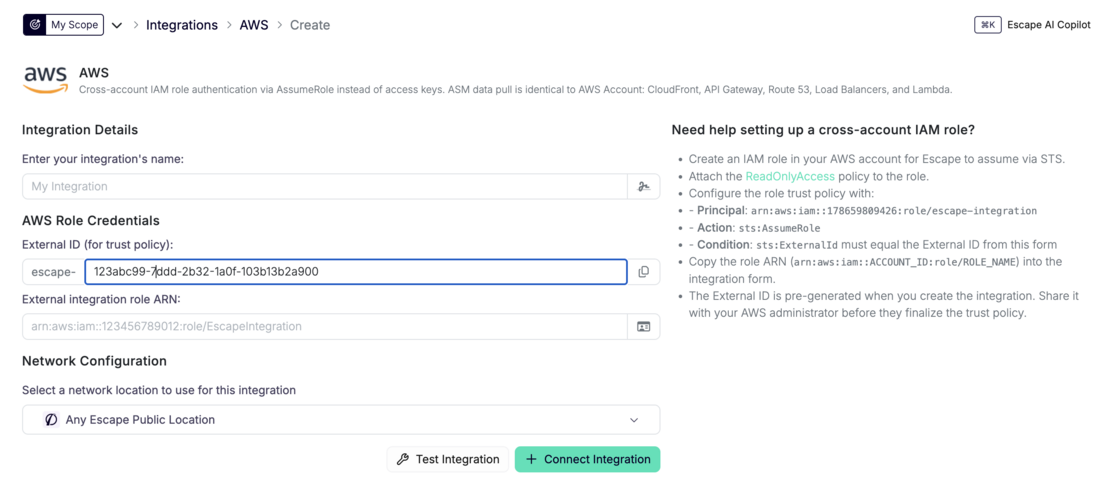
Escape connects to your AWS accounts through IAM role assumption and an External ID. You grant access with a role trust policy instead of storing long-lived access keys, the same short-lived credential pattern you use for other enterprise SaaS integrations at scale. Add the new AWS integration type from the integrations page; the legacy access-key path stays available.

AWS integration setup form with External ID and role ARN fields

What's new:

  • AWS integration type: Add an integration that authenticates through STS AssumeRole with an External ID instead of static credentials.
  • No long-lived keys: Grant access through a role trust policy instead of static credentials stored in Escape.
  • Legacy path preserved: The existing AWS_ACCOUNT integration (access keys) remains for backward compatibility and is marked as legacy in the UI.

AWS integration documentation →

Questions?

Have a question? Reach out on your dedicated support channel, or email us at support@escape.tech.

#173 · ASM Technology Detection: Map Every Asset to Known CVEs

Availability: General Availability

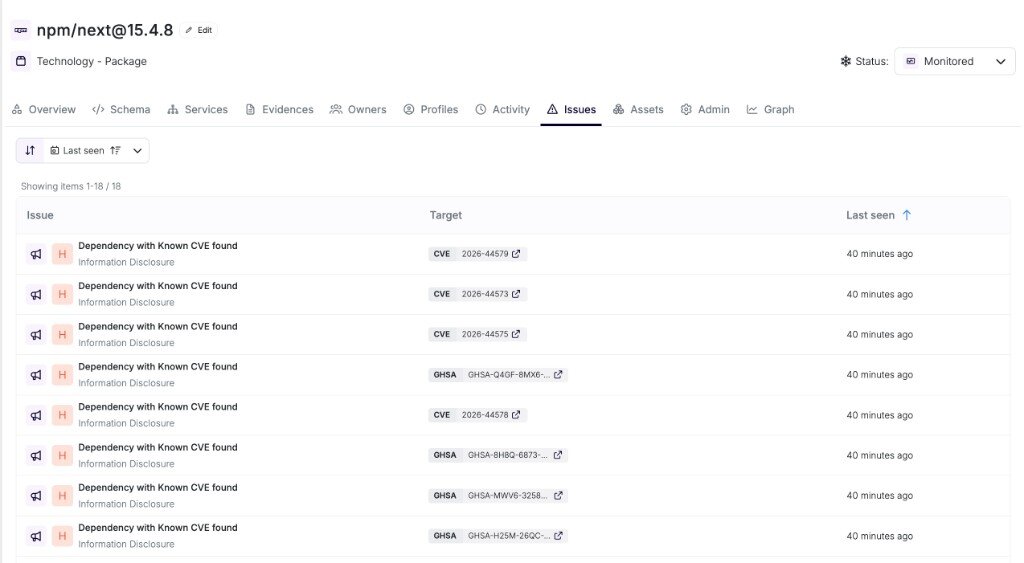
Escape ASM fingerprints the software on each asset: packages, frameworks, and infrastructure components, with versions when the stack exposes them. You get a live technology inventory across web apps, APIs, and connected repositories, matched to known CVEs so you trace a vulnerable dependency to every asset that runs it. Issues tab on a versioned npm package listing matched CVE and GHSA findings Known CVEs matched to a detected package version.

What's new:

  • Multi-source fingerprinting: HTTP response analysis, source maps, stack traces, protocol-level signals, and repository manifest parsing identify packages and deployed software without installing agents on your infrastructure.
  • Packages and software: libraries from npm, PyPI, and other ecosystems sit alongside web servers, CMS platforms, and reverse proxies, each linked back to the parent asset.
  • Version-aware CVE matching: versioned technologies match against affected ranges at high confidence; versionless detections still map through standard product identifiers at adjusted confidence.
  • Actionable findings: matches become Vulnerable Dependency Detected issues with severity, affected versions, fix version when available, and advisory links.

Technology Detection documentation →

CVE Scanning documentation →

Questions?

Have a question? Reach out on your dedicated support channel, or email us at support@escape.tech.

#172 · ASM Port Scanning: Map Every Open Service on Your Attack Surface

Availability: General Availability

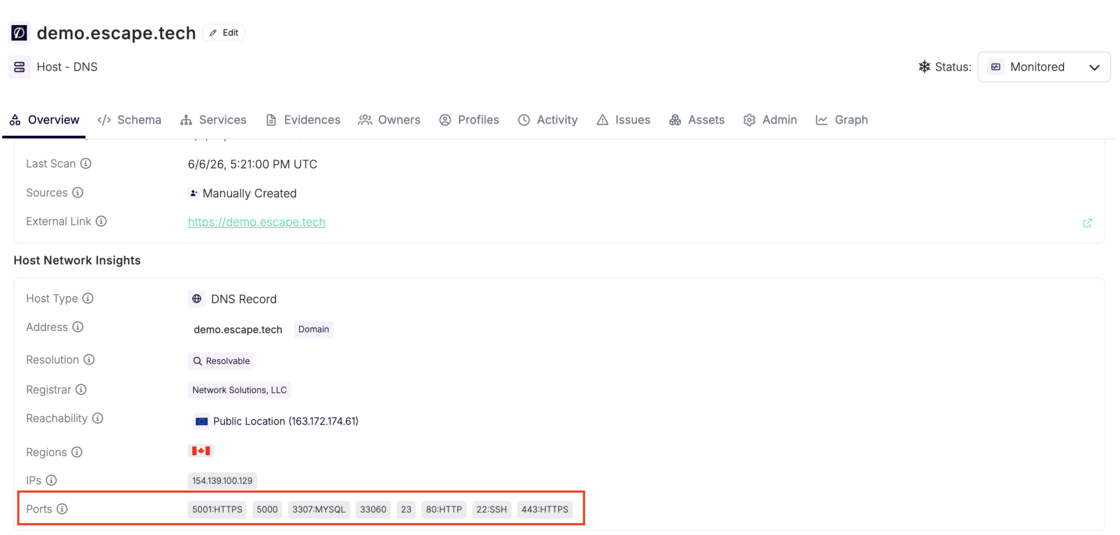
Every ASM host scan probes over 1,400 commonly observed TCP ports and feeds what it finds straight into your inventory. You see open ports on each host, the services behind them, and security issues before you dig into API endpoint mapping. Teams closing shadow IT gaps told us they need internet-facing port exposure visible up front, not buried behind extra clicks.

Host overview panel showing open ports including 443, 80, 22, 3307, and 5000 with detected protocols in Host Network Insights Open ports and detected protocols on a monitored DNS host.

What's new:

  • Broad TCP coverage: when ASM scans a DNS, IPv4, or IPv6 host, Escape probes the default port set across web services, databases, remote access, message brokers, and more. Set port_scanning.ports in Global Configuration to replace that default list:
port_scanning:
  ports:
    - 80
    - 443
    - 8080
    - 8443
  • Service fingerprinting: confirmed open ports get protocol and technology fingerprinting, then land on the host asset before downstream discovery runs.
  • Discovery pipeline: open ports feed service discovery that maps REST, GraphQL, gRPC, SOAP, web apps, and OpenAPI candidates.
  • Insecure protocol detection: cleartext services like FTP and Telnet raise insecure_technology_used findings with remediation guidance.
  • Default credential checks: active probes against detected services (FTP, Telnet, MongoDB, Redis, and others) raise default_credentials_used when authentication succeeds.
  • Exposure guardrails: the unusually_high_open_ports check flags hosts that expose more open ports than your threshold through a public Escape proxy (default: 5).

Network Scanning documentation →

Questions?

Have a question? Reach out on your dedicated support channel, or email us at support@escape.tech.

#166 · Smarter Tables: Saved Views, Grouping, and Column Control

Availability: General Availability

Your tables now remember you. Name a view, pick your columns, set your filters, group by what matters to your team. Come back tomorrow and it's all exactly where you left it. Wire any view into a workflow trigger and your automation runs on the same scope your team sees every day.

What's new:

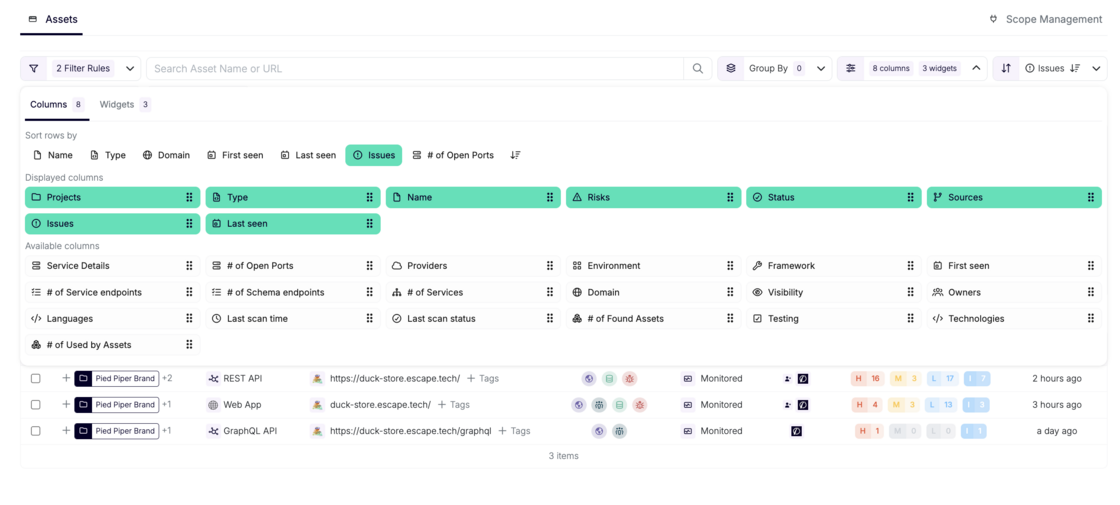
  • Saved views: name your setup and own it. Filters, columns, grouping, chart selection, and sort order: all saved. Set a default that loads when you open the page. Pre-built views for Web Applications, API Services, Hosts, and more come included.
  • Advanced filtering: build exactly the query you mean: AND, OR, nested groups. Like "(Project A OR Project B) AND Status = Monitored". Charts always reflect the active filter state.
  • Column control: show what's relevant, hide what isn't. Each view has its own column set, so your "Web Applications" and "API Services" views look exactly right for what they are.
  • Grouping: group by project, tag, asset type, or source, with multi-level grouping. Each group shows aggregated counts; expand it to see what's inside.
  • Workflow integration: views wire directly into workflow triggers. Your automation runs on the exact slice of your attack surface your team already works with.

Column configuration panel showing displayed and available columns in the Assets table

Questions?

Have a question? Reach out on your dedicated support channel, or email us at support@escape.tech.

#159 · 04-15-2026 — Public API Release Notes

This release expands the v3 Public API with new endpoints for reporting, issue operations, asset workflows, tags, and ASM automation. It also enriches several existing response schemas with additional metadata to support deeper integrations and better visibility.

Hard-breaking changes

None.

Soft-breaking changes

These changes are additive and backward-compatible for most clients, but may affect consumers using strict schema validation.

  • Asset responses now include owners email addresses.
  • Profile summary responses now include:
    • score
    • coverage
    • openIssueCount
    • lastScanStatus
  • Location summary responses now include:
    • lastSeenAt

Non-breaking changes

New endpoints

  • GET /v3/statistics

    • Returns high-level organization statistics for applications, monitored assets, and issues by severity.
  • GET /v3/issues/funnel

    • Returns issue funnel data to help track issue progression and exposure.
  • GET /v3/issues/trends

    • Returns time-series issue severity trends.
  • POST /v3/issues/bulk-update

    • Bulk update issue status across multiple matching issues.
  • POST /v3/issues/{issueId}/notify

    • Notify asset owners about a specific issue.
  • POST /v3/assets/bulk-update

    • Bulk update assets.
  • POST /v3/assets/bulk-delete

    • Bulk schedule assets for deletion.
  • GET /v3/tags/{tagId}

    • Retrieve a tag by ID.
  • PUT /v3/tags/{tagId}

    • Update a tag.
  • GET /v3/assets/{assetId}/activities

    • List activities for an asset.
  • POST /v3/assets/{assetId}/activities

    • Add a comment/activity to an asset.
  • POST /v3/asm/scans

    • Trigger ASM scans programmatically.

Existing endpoint improvements

  • GET /v3/scans

    • Added support for filtering by assetIds.
  • GET /v3/custom-rules

    • Added support for filtering by context.

Summary

This release is focused on expanding the v3 Public API without introducing hard-breaking changes. It adds new operational and reporting endpoints, improves filtering capabilities, and enriches existing resource payloads with more useful metadata for customer integrations.

#157 · Better asset filtering & bug fixes

We've made significant improvements to how asset sources are handled across the Attack Surface Management module, with better filtering, bug fixes, and a more consistent experience throughout.

What's new

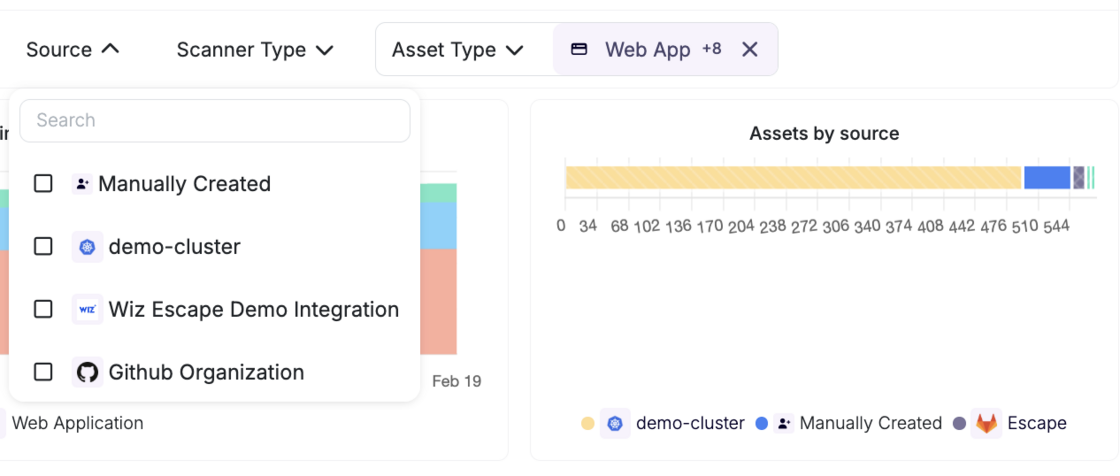
You can now filter assets in tables by their source type — currently Manually created and Integration are supported, with filtering by specific asset source coming soon.

Screenshot 2026-02-20 at 09.37.15.png

Behind the scenes, we've centralized and reworked the sources logic, ensuring that source information is coherent and consistent across all views. This also came with a large number of bug fixes that were causing sources to display incorrectly in certain contexts.

Bug fixes & improvements

Fixed multiple inconsistencies in how sources were displayed across different views Centralized source logic to ensure reliability and consistency going forward Added table filtering by source type (Manual / Integration)

#156 · Private Asset Detection Now Available in Escape ASM

We've expanded our risk detection capabilities to identify private assets across your attack surface — assets whose addresses are not resolvable on the public internet.
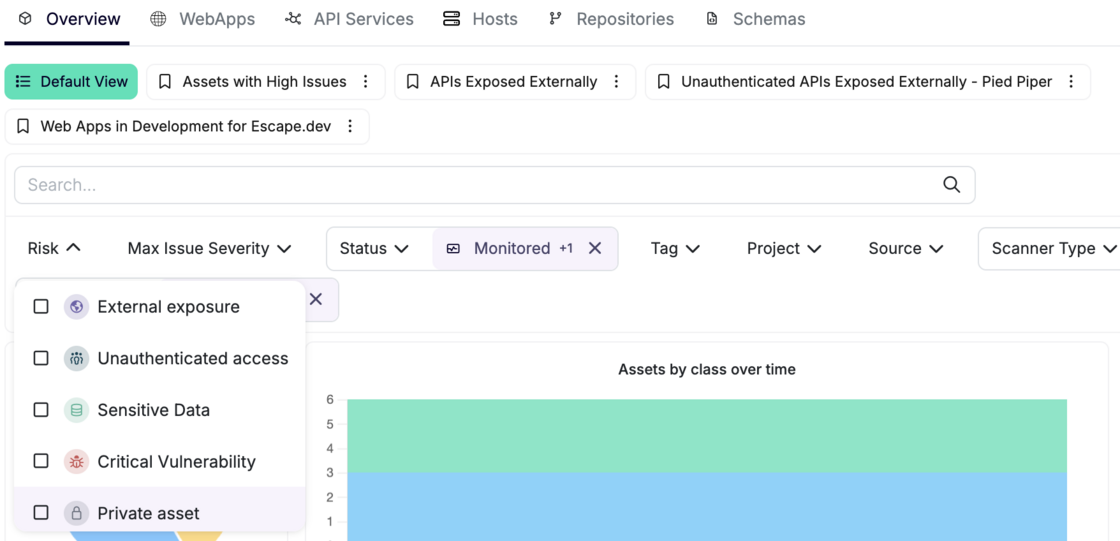
Screenshot 2026-02-20 at 09.17.18.png

What's new

When scanning your assets, we now automatically flag any asset whose IP address or domain name resolves to a private or non-routable address. These assets will appear in your ASM dashboard, so your team can review and act on them.

What counts as a private asset

An asset is considered private if its address falls into any of the following categories:

  • Local domains — any .local domain, including Kubernetes services (.svc.cluster.local)
  • Private IP ranges — 10.0.0.0/8, 172.16.0.0/12, and 192.168.0.0/16, as well as their IPv6 equivalents
  • Loopback addresses — localhost, 127.0.0.0/8, and ::1
  • CGNAT range — 100.64.0.0/10

Why it matters

Private assets appearing in your external attack surface can indicate misconfigured services, unintended internal exposure, or infrastructure leaking details about your internal network topology. Identifying them early helps your team prioritize remediation and reduce the risk of internal systems being inadvertently reachable or discoverable.

What to do

Review any private assets flagged in your ASM (Attack Surface Management) dashboard and assess whether their presence is expected. If not, investigate the underlying service configuration and ensure internal resources are not inadvertently exposed.
#153 · Deeper Attack Surface Detection

Knowing your attack surface starts with finding everything that's exposed. Subdomains are often one of the entry points for attackers.

We've integrated new provider sources and a caching mechanism into our detection engine to address exactly that.

Early results confirm we are now surfacing significantly more subdomains that were previously invisible, with detection increases ranging from 3% to over 229% depending on the end-user environment.

If you're on the ASM product, the new detection logic has already been automatically applied. Nothing to configure!

#148 · New: Network Monitoring via IPv4 Ranges in Escape Attack Surface Management

Escape ASM now supports Network Monitoring through IPv4 (CIDR) ranges. This allows you to continuously scan an entire network range and automatically detect exposed assets based on their corresponding IP ranges - something that wasn’t possible before.

Modern infrastructure doesn’t always expose services via domains. Developers may deploy services directly over IPs—intentionally or accidentally—creating blind spots in asset discovery and security monitoring. With this capability, if a developer deploys a service directly over an IP address, Escape ASM will now detect it and alert you, even if it’s not tied to a known domain or hostname.

This feature will be in general availability for current ASM users and is included in your current ASM pricing plan. If you wish to learn more, feel free to reach out to your dedicated Escape contact.

How it works

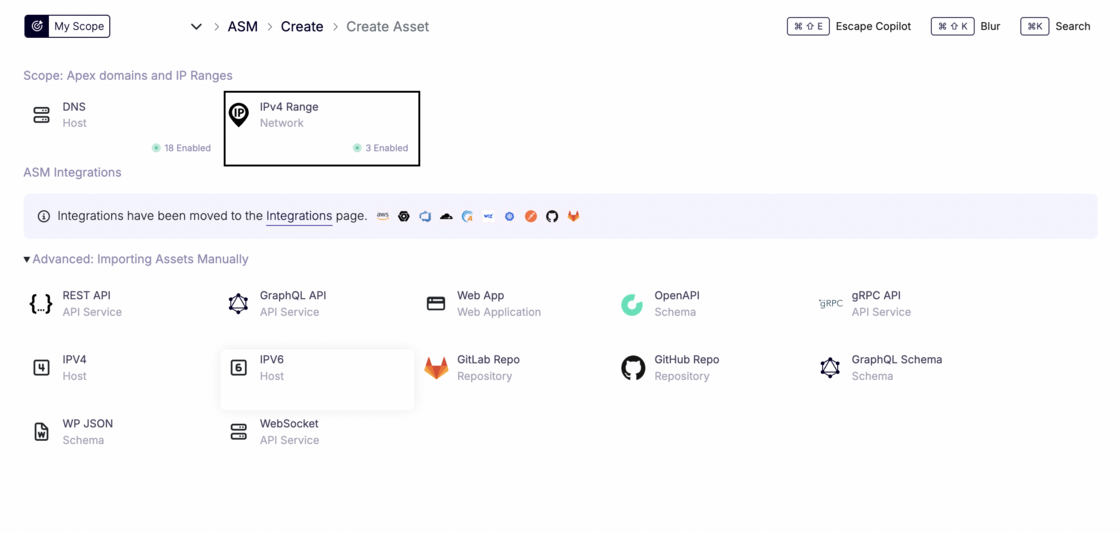
  1. Go to ASM → Scope Management → Configure scope

Screenshot 2026-01-15 at 11.07.10.png

  1. Select IPv4 Range to set IPV4 range up Screenshot 2026-01-15 at 11.08.27.png
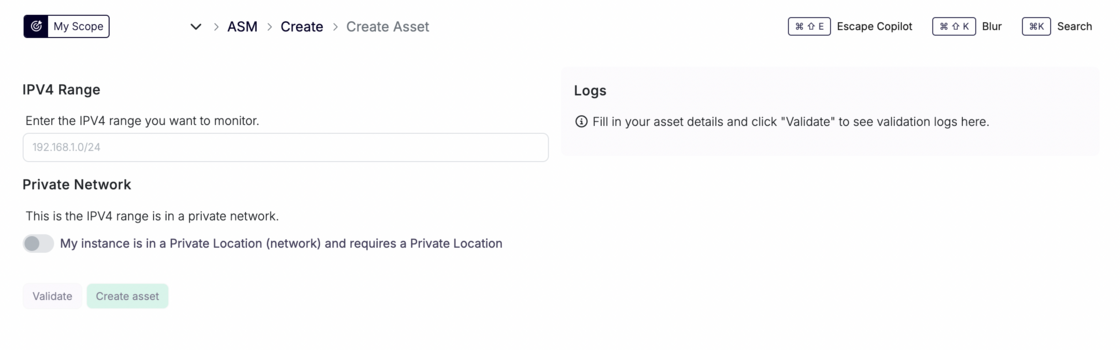
  2. Create a Network asset: Add an IPv4 CIDR range (e.g., 192.168.1.0/24) as a new asset in Escape ASM.

Screenshot 2026-01-15 at 11.10.09.png

  1. Private network support (optional)

    • If the IPV4 belongs to a private network, enable the Private Network option.
    • Select a Private Location so the scan is executed from within your infrastructure.
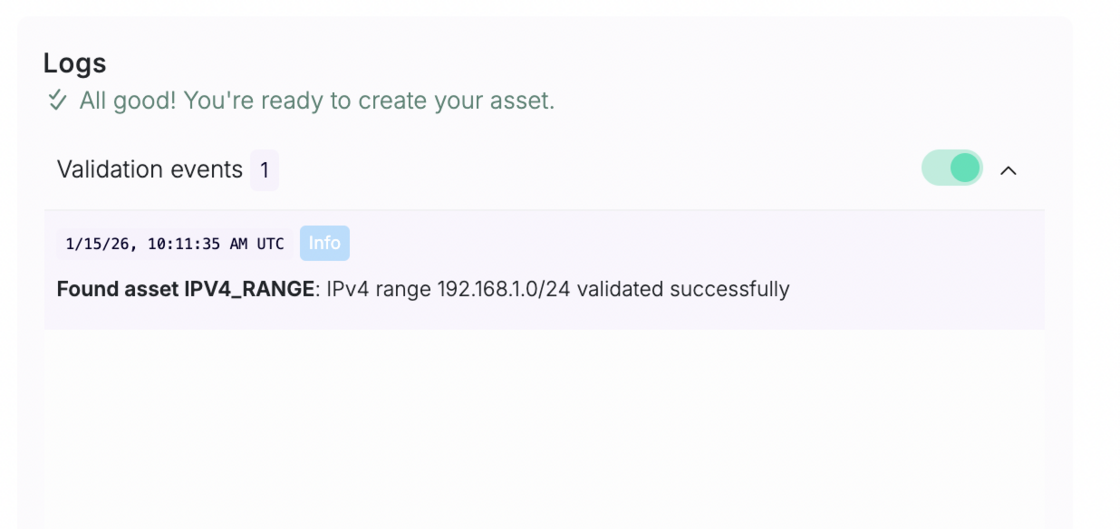
  2. Click on Validate to view whether the corresponding asset can be found

Screenshot 2026-01-15 at 11.12.00.png

  1. Network scanning & asset discovery
    • Escape scans all IPs in the range.
    • For each IP with at least one open port (based on your configuration), a new asset is automatically created.
  2. Full ASM coverage
    • Discovered IP assets are added to your ASM inventory.
    • They are scanned like any other asset, allowing ASM to:
      • Discover web applications, APIs, and services
      • Perform vulnerability scanning
      • Run security and exposure checks and set up alerting workflows based on a specific asset, a tag or a project they’re associated with

Important notes & limitations

  • ⚠️ CIDR size limit
    • Currently, Escape ASM supports network ranges up to /24 (256 IPs).
    • Larger networks can be scanned by splitting them into multiple /24 ranges.
  • If scanning larger ranges becomes a recurring need, reach out, this is something we can discuss.
  • Looking ahead: Scanning entire Autonomous Systems (AS) will be supported easily in the future.

Why this matters

With Network Monitoring, Escape ASM now covers one of the most common blind spots in asset discovery: IP-based deployments. This ensures that anything exposed on your network—whether intentional or accidental—is detected, inventoried, and continuously secured.