Skip to content

2026

#189 · Escape's AI pentesting now logs in 9x faster

Escape's AI Pentesting now gets through login flows in about 20 seconds on average, roughly 9x faster than before.

Login is where automated pentesting usually stalls. A brittle auth pass blocks everything behind it, so time lost at the front of a scan is coverage lost everywhere else.

Faster, more reliable auth means more of each run is spent on your application.

We also built a dedicated benchmark set for login and auth patterns. Regressions surface immediately, and every change is measured against the same baseline.

If you have an auth flow that Escape struggles with, send it to your customer success manager and we'll add it to the benchmark set.

#188 · XSS2Shell detection is live (CVE-2026-64638)

Availability: General Availability

XSS2Shell is a pre-authentication reflected XSS in WordPress Core, tracked as CVE-2026-64638 with a CVSS 4.0 score of 8.9. A crafted username reaching the failed-login error page runs attacker JavaScript in the site's origin, with no authentication and no further interaction on that page. Against an administrator who is already logged in, the chain escalates to PHP code execution, though that step needs social engineering and a deliberate click. The fix shipped in WordPress 7.0.3 on August 6, backported through the 4.7 branch.

Escape now detects it across DAST and AI Pentesting. Escape now detects it across DAST and AI Pentesting. DAST confirms the injection by sending a single crafted failed login and matching the clobbered DOM elements in the error response, so the result is behavioural evidence rather than a version guess, and it needs no credentials. AI Pentesting walks the full chain and returns proof of exploitation.

Recommended action: connect to your Escape account to verify whether you've been affected, then patch to the security release for your branch. The login screen is internet facing by design, so exposure is broad.

We proactively reach out to our current customers who might have been affected by this issue.

See your exposure in one view

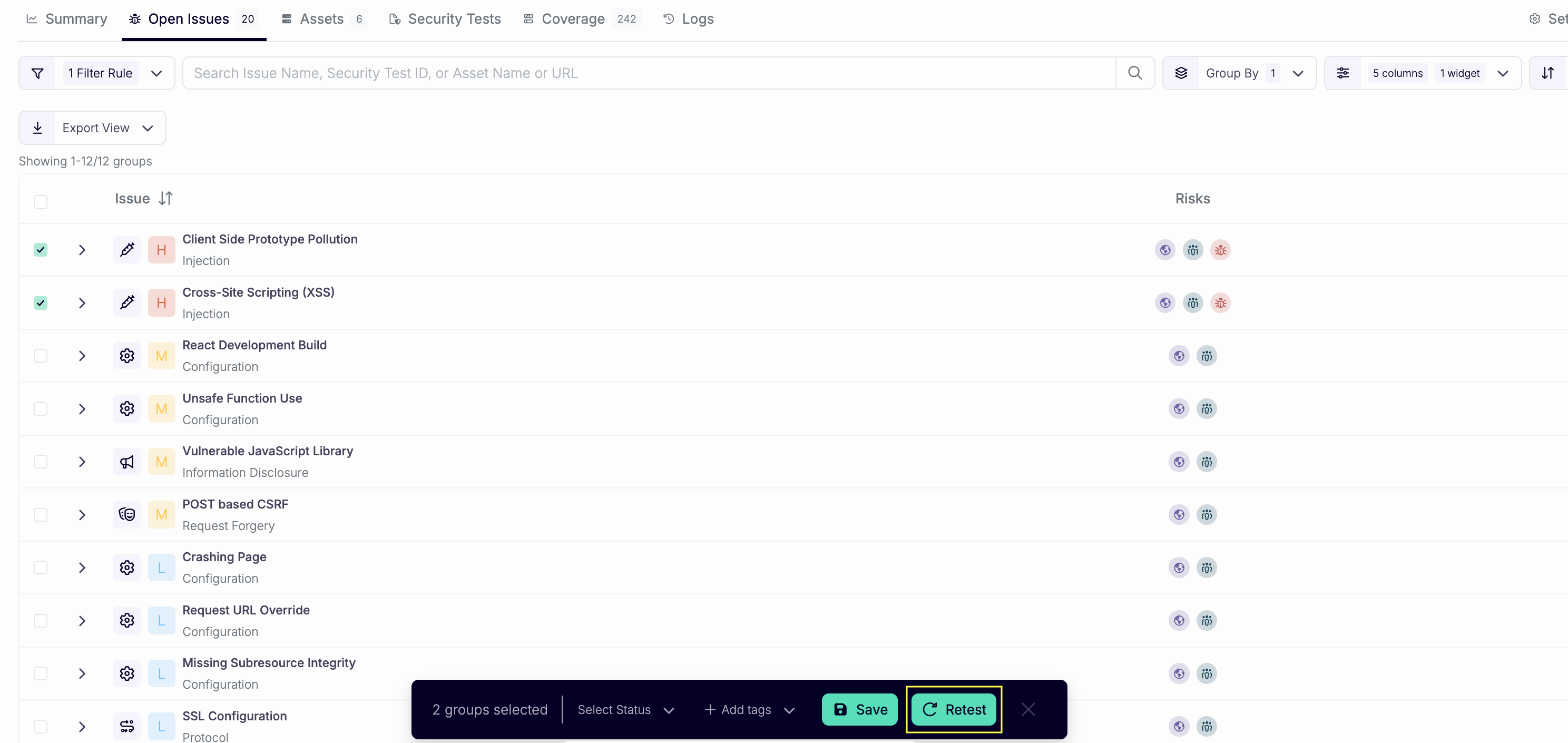
  • Open All Issues.
  • Search for "XSS2Shell".
  • Save as a new view.

You get a live view of every affected asset, with the exposed and unauthenticated counts broken out for triage.

Questions?

Have a question? Reach out on your dedicated support channel, or email us at support@escape.tech.
#187 · AI Pentest coverage now shows which persona sent each request

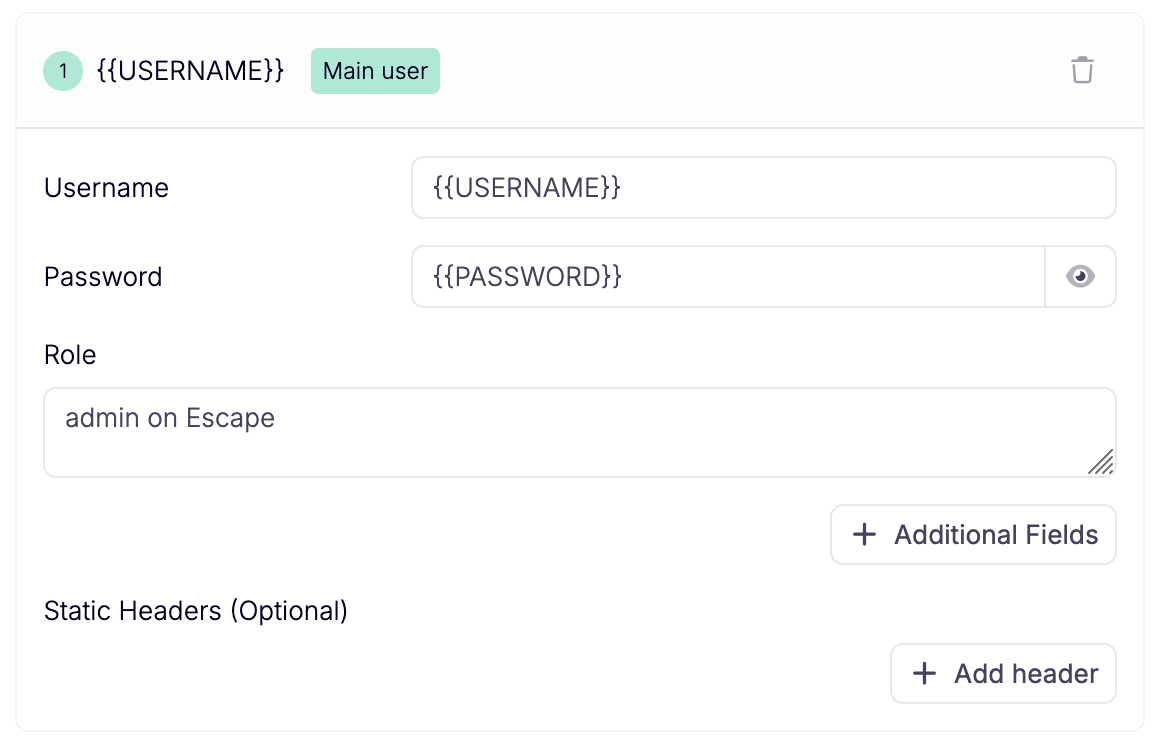
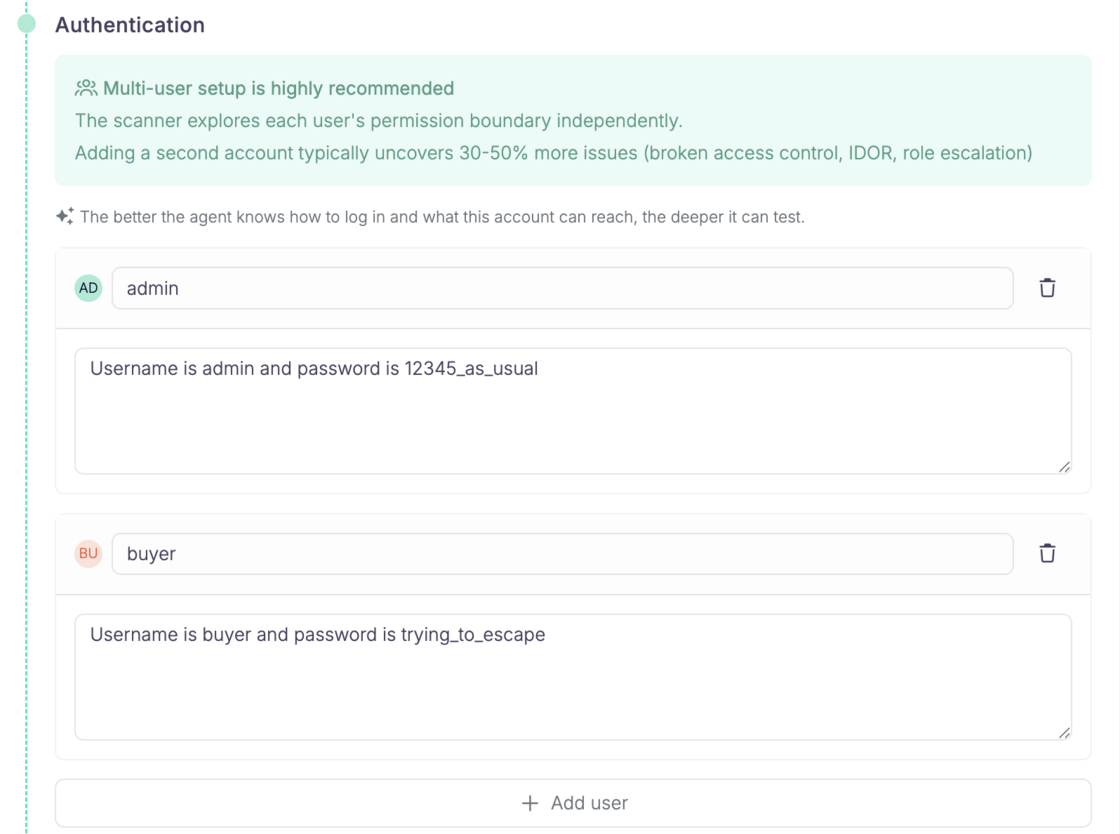
Escape's AI Pentesting scans log in as personas. Until now, every request they made after logging in showed up in the Coverage tab under a single authenticated label, and only when we spotted auth-like headers. You could see that the agents were logged in. You could not see who they were logged in as.

Now, when a Cascade agent authenticates as a persona, the traffic captured through the companion is attributed to that persona in Coverage. Same Bearer token, same cookies, but the User column reads admin or buyer instead of authenticated.

Define your personas separately during scan setup:

Screenshot 2026-08-12 at 13.04.50.png

What you'll see in the Coverage tab: Screenshot 2026-08-12 at 13.08.44.png

What this gives you

  • Proof of per-role work. You can confirm the agent actually tested the app as admin, not just as buyer. Role coverage stops being something you take on faith.
  • A lead worth pulling. If buyer has an OK (✔️❌) exchange on a route meant for admins, that is a good reason to look closer. It is a signal, not a finding. HTTP alone cannot tell you whether the 200 returned privileged data or an empty shell.
  • Testing gaps you can trust. If an endpoint has no successful exchange under any user, something is missing: credentials, a login step that broke, a flow the agents never reached.

Known limits

Some exchanges still fall back to authenticatedwhen we cannot match a persona uniquely: shared credentials across personas, anonymous sessions that carry auth-like cookies, and long runs where an agent goes a while without re-authenticating.

Questions?

Have a question? Reach out on your dedicated support channel, or email us at support@escape.tech

#186 · Ask anything about your AI pentest, right from the reasoning logs

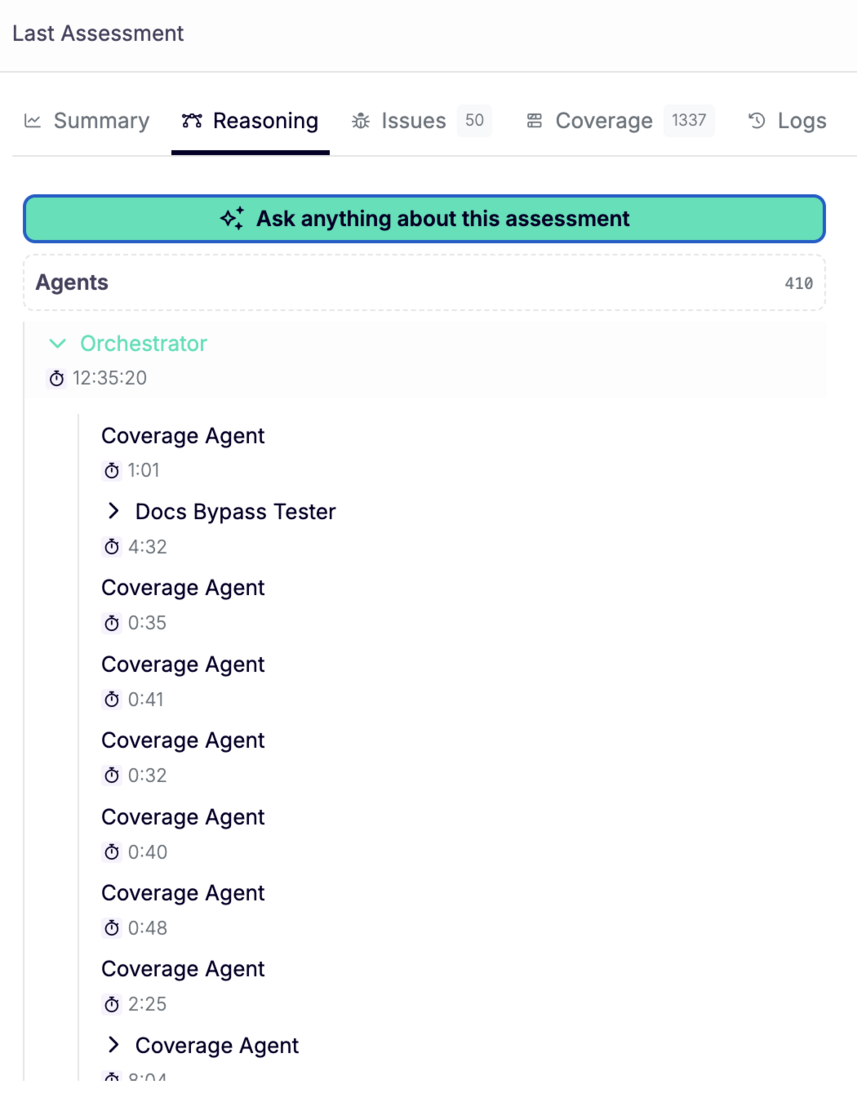
A Cascade assessment produces hundreds of agent steps: orchestrator decisions, coverage passes, worker findings. Reading through all of it to answer one question is slow.

Now you can just ask.

Availability: beta. Ask your customer success manager to turn it on for your workspace.

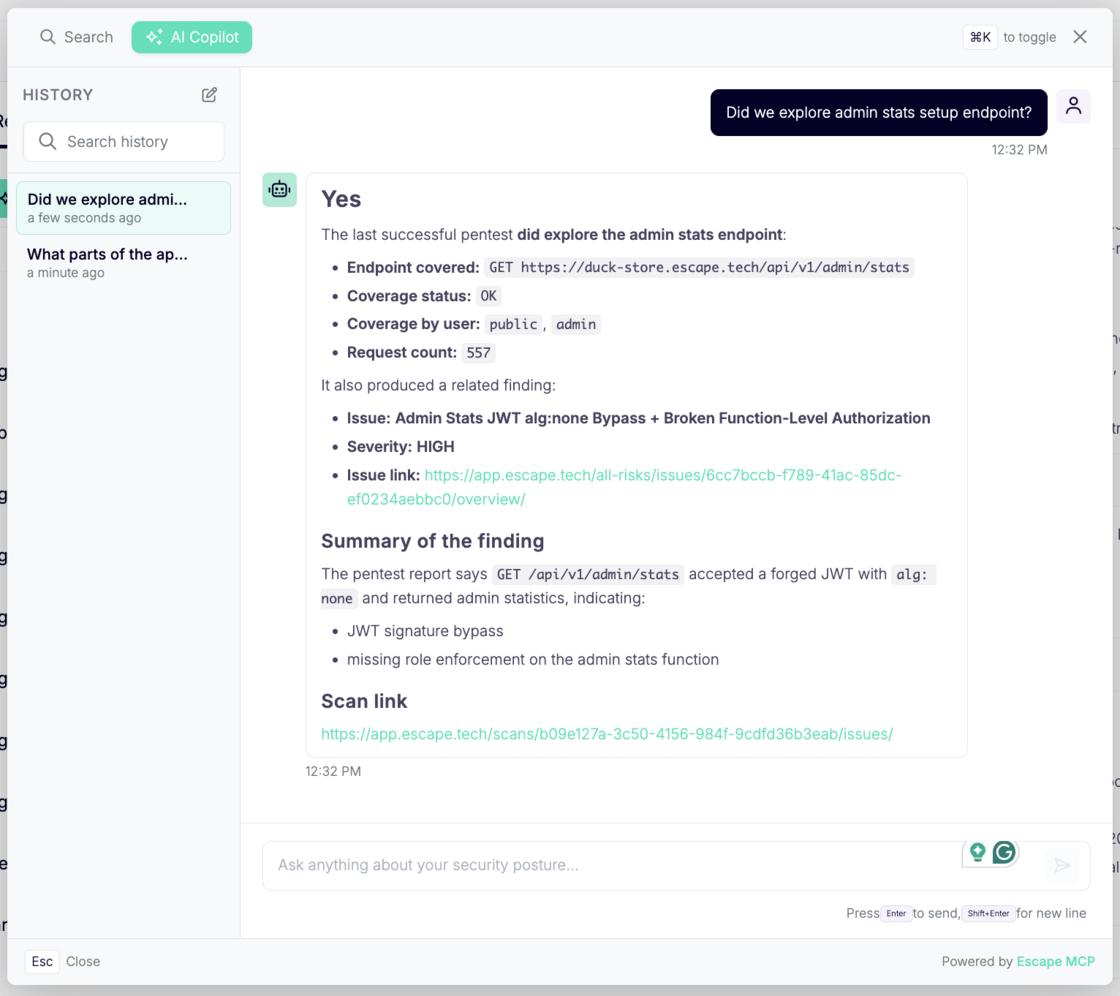
Escape Copilot opens directly from the AI reasoning logs page. Ask why an agent chose a path, what a worker concluded, or which tests didn't run and get an answer without leaving the assessment.

Screenshot 2026-08-10 at 14.19.40.png

What changed:

  • Copilot CTA on the reasoning logs page. One click from the Reasoning tab of any assessment.
  • Contextual quick questions. Suggested prompts adapt to where you are. On an AI pentest, they're about that pentest. For example, you can ask What did the agents try that didn't work? What parts of the app weren't reached?

Screenshot 2026-08-10 at 14.34.15.png

  • Answers grounded in your assessment. Copilot reads the actual agent logs, so it answers from what the agents did and recorded, not from a general guess about what a pentest usually looks like.
  • Your questions stay with the assessment. Everything you ask is saved, so you can come back to a scan later or hand it to a teammate without re-asking.
  • Take the logs elsewhere. Reasoning logs are available through the Public API or via Escape MCP, so you can pull them into your own reporting, ticketing, or analysis: GET /scans/{scanId}/agents/{agentId}/logs.

#185 · Whitebox pentesting is now available in Escape's AI Pentesting

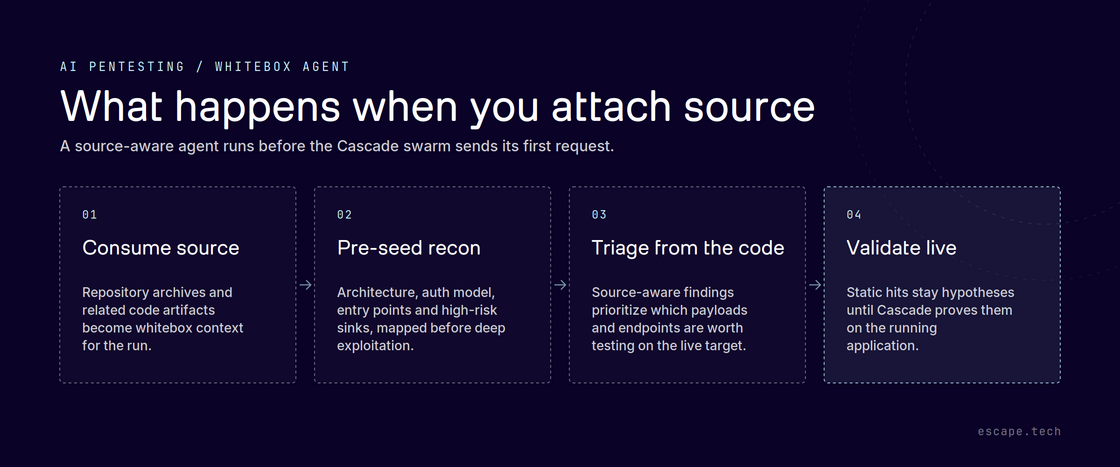
Every yearly pentest opens the same way: the first hours go to mapping what you already know. Cascade can now start from the code instead.

image.png

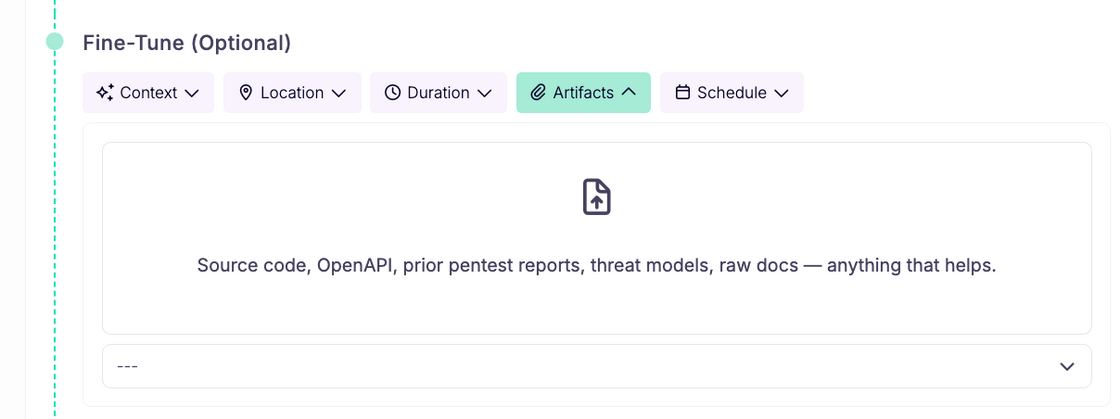
Attach your repository as a .zip under Fine-Tune (Optional) then Artifacts when you launch a pentest.

image.png

The whitebox agent reads it before the swarm sends its first request, mapping architecture, auth model, entry points and high-risk sinks, and every later agent inherits that context. Findings can now point at the exact file and function behind a vulnerability, with the code attached as evidence.

Static hits stay hypotheses. Source-derived leads are still validated against the running application before anything reaches your report, so report quality is unchanged.

Across our internal benchmarks, detection improves by 32% on average.

Archives get a larger ceiling, 200 MB per archive and 250 MB per run, and are routed to the whitebox agent automatically with no toggle to set. Secrets found in code are never reported as findings or persisted un-redacted, and only reusable architecture carries between scans.

Available on demand. You can learn more about Cascade's whitebox agent in our documentation.

#184 · Escape's AI Pentesting now learns from your false positives

Escape's AI pentesting engine "Cascade" already flags very few false positives. The ones that slip through are almost always context problems, not detection problems: a pattern that looks exploitable everywhere except in your app, for reasons only your team knows.

Now you only have to explain that once.

What's new

When an issue is marked as a false positive, either manually by your team or by Cascade's AI false positive detection, Cascade extracts the underlying pattern and carries it into every future assessment. Triage one instance, and every other issue sharing that vulnerability pattern stops being reported.

How it works

Cascade treats manually-triaged and AI-flagged false positives as the only source of truth for suppression. Nothing else feeds the model, which keeps the blast radius tight and predictable. Pattern extraction happens per assessment target, so business context stays where it belongs. Your triage decisions compound. The tenth assessment costs less review time than the first.

Why it matters

Triage is where continuous security programs slow down. Every repeated "we already looked at this" is time your team spends re-litigating a decision it already made. Cascade now remembers so you don't have to.

Available now for all Cascade assessments. No configuration required.

#183 · wp2shell detection is live (CVE-2026-63030, CVE-2026-60137)

Availability: General Availability

wp2shell is an unauthenticated RCE chain in WordPress core. A REST batch route-confusion flaw (CVE-2026-63030) skips authentication and feeds a SQL injection in WP_Query (CVE-2026-60137). No plugins, no login. It affects WordPress 6.9.0 to 6.9.4 and 7.0.0 to 7.0.1, is already being exploited in the wild, and is fixed in 6.9.5 and 7.0.2.

Escape now detects it across DAST and AI Pentesting. DAST confirms the injection with a time-based oracle instead of guessing from a version string, and AI Pentesting walks the full chain and returns proof of exploitation.

wordpress-vuln-dast.png

Recommended action: connect to your Escape account to verify whether you've been affected, update to 6.9.5 or 7.0.2, and confirm the auto-update actually applied.

We proactively reach out to our current customers who might have been affected by this issue.

See your exposure in one view

  • Open All Issues.
  • Search for "WordPress Core - Pre-Authentication".
  • Save as a new view.

Screenshot 2026-07-21 at 12.23.19.png

You get a live view of every affected asset, with the exposed and unauthenticated counts broken out for triage.

Questions?

Have a question? Reach out on your dedicated support channel, or email us at support@escape.tech.

#182 · One-Click Fix in Cursor: Turn Findings Into Codebase-Tailored Remediation

Availability: General Availability

Escape closes the loop between triage and fix. When you see a finding, you no longer copy details into your IDE and rebuild context from scratch: one click from the issue side panel sends a remediation prompt straight to Cursor, Claude Code, or Codex. The prompt carries your finding so your coding agent starts with everything it needs.

Fix this finding menu on an issue side panel with Open in Cursor, Claude Code, Codex, and Copy as prompt options

What's new:

  • Fix this finding: Start remediation from any issue side panel with a single action.
  • IDE choice: Open in Cursor, Claude Code, Codex, or copy the prompt to your clipboard.
  • Deep links: Cursor opens with the full prompt preloaded through a native deep link.

IDE integrations documentation →

Questions?

Have a question? Reach out on your dedicated support channel, or email us at support@escape.tech.

#181 · ASM now supports large IP ranges

Attack surface discovery can now run across IP ranges up to /16. That's roughly 65,000 addresses in a single scope, which covers most corporate netblocks in one pass instead of splitting them into fragments.

Available on request. Contact your account team or support to enable it for your workspace.

#180 · AI Pentest Reasoning Logs: See Every Step Your AI Pentest Takes

Availability: General Availability

Reasoning Logs give you a live, navigable view of your AI pentest while it runs. You open the agent tree, pick any agent, and read its reasoning, the tools it called, the findings it raised, and how long each step took. Security teams told us they want a full audit trail of what the agent tried, what it skipped, and what it proved. That's what you get now.

image.png

What's new:

  • Live agent tree: the orchestrator and every sub-agent (BOLA, business logic, XSS, SQL injection, and more) appear as a tree you expand and navigate.
  • Full step detail: each agent exposes its reasoning, tool calls, findings count, and run duration, so you follow how one signal escalates into an attack chain.
  • Live during the scan: activity streams in as the pentest runs. You don't wait for the final report to see what's happening.
  • Cleaner and more readable: jump straight to the latest activity, with the noise stripped out so the trace stays easy to follow.

Questions?

Have a question? Reach out on your dedicated support channel, or email us at support@escape.tech.