Skip to content

Platform

#182 · One-Click Fix in Cursor: Turn Findings Into Codebase-Tailored Remediation

Availability: General Availability

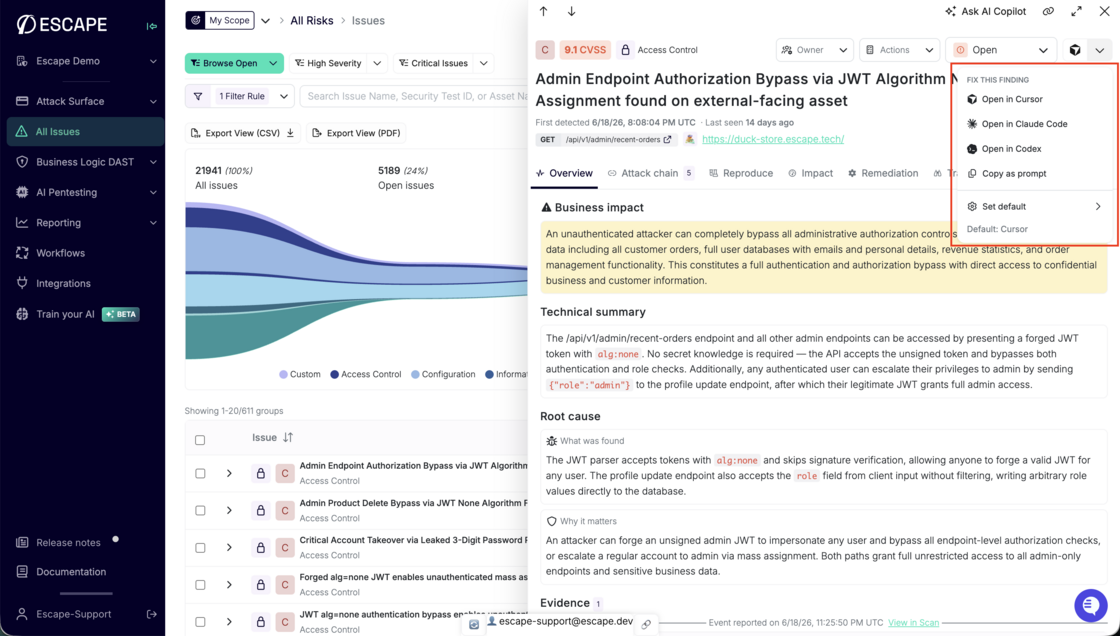
Escape closes the loop between triage and fix. When you see a finding, you no longer copy details into your IDE and rebuild context from scratch: one click from the issue side panel sends a remediation prompt straight to Cursor, Claude Code, or Codex. The prompt carries your finding so your coding agent starts with everything it needs.

Fix this finding menu on an issue side panel with Open in Cursor, Claude Code, Codex, and Copy as prompt options

What's new:

  • Fix this finding: Start remediation from any issue side panel with a single action.
  • IDE choice: Open in Cursor, Claude Code, Codex, or copy the prompt to your clipboard.
  • Deep links: Cursor opens with the full prompt preloaded through a native deep link.

IDE integrations documentation →

Questions?

Have a question? Reach out on your dedicated support channel, or email us at support@escape.tech.
#179 · First and last login now shown for every member

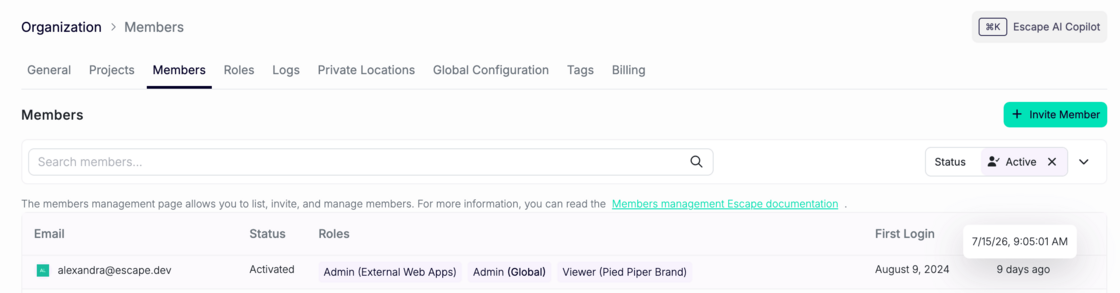
The org members page now shows a first login and last login column for every member. Screenshot 2026-07-24 at 11.55.05.png

Together they answer the three questions admins actually ask: when did this person activate, are they using the platform consistently, and are they still around?

First login shows an absolute date, like "Jan 12, 2025." Last login shows relative time, like "3 days ago."

At a glance, you can find members who were invited but never logged in, spot accounts that have gone quiet, and check seat usage before a renewal conversation.

Status labels are also simpler now: invited, activated, deactivated.

#167 · Jira Integration: Custom Fields, Two-Way Status Sync, and Workflow Ticketing

Availability: General Availability

Run triage where your team already works: map Escape findings into the Jira fields your process depends on, keep ticket and finding status aligned when work closes on either side, and open issues from workflows with the right project, filters, and field values filled in automatically.

What's new:

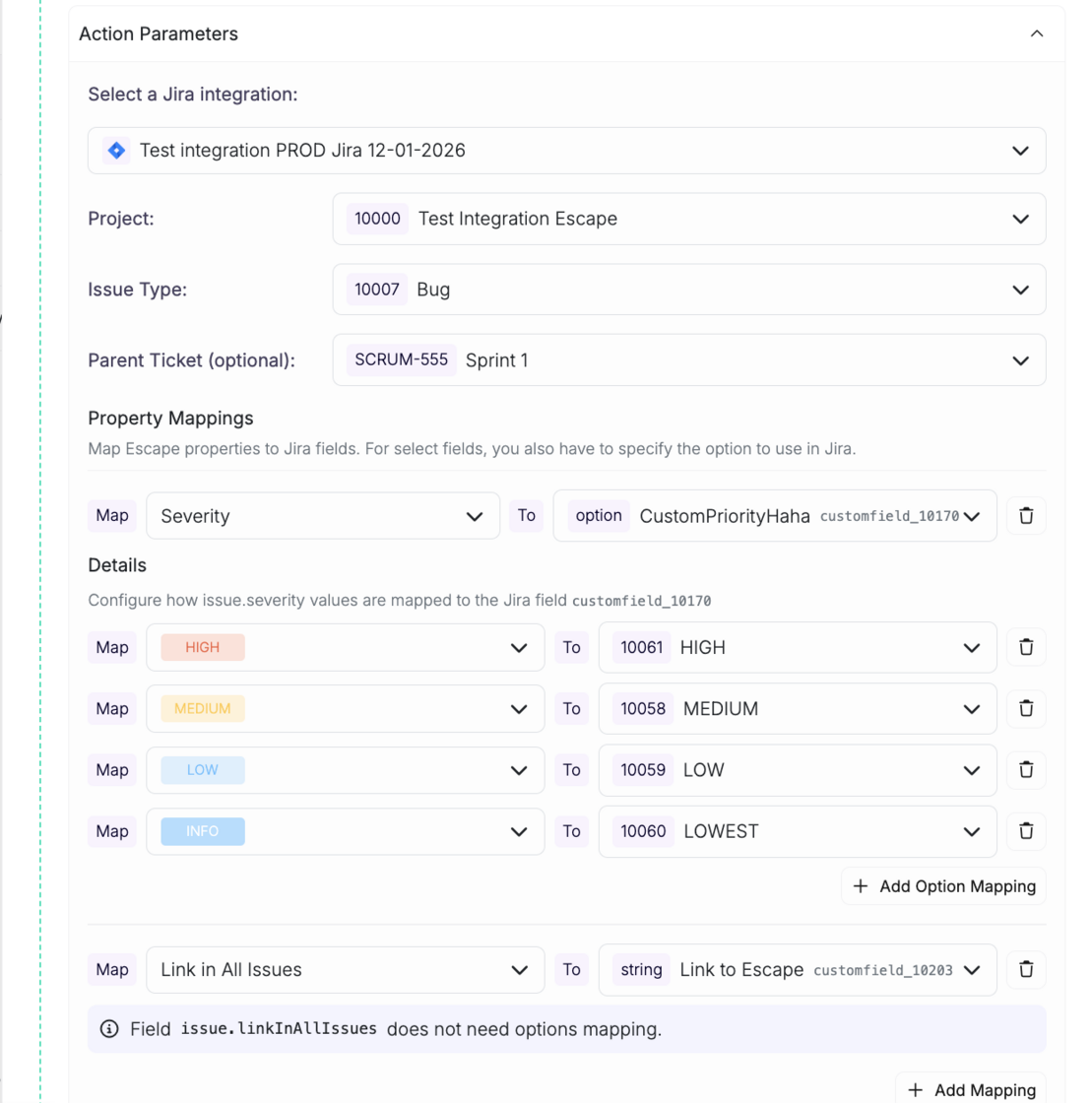
  • Custom field mapping: map any Escape property to any Jira field, including custom fields specific to your schema.
  • Two-way status sync: resolving a finding in Escape closes the Jira ticket, and vice versa. A manual "Close in Jira" action is available from the issue view too.
  • Workflow-based ticketing: create tickets straight from workflows. Filter by severity or saved view, route to the right project, and populate fields automatically.

Workflow builder with custom Jira field mappings including dynamic properties and static values configured

Questions?

Have a question? Reach out on your dedicated support channel, or email us at support@escape.tech.
#165 · New Report Template: Executive Summary and Redesigned Issue Layout

Availability: General Availability

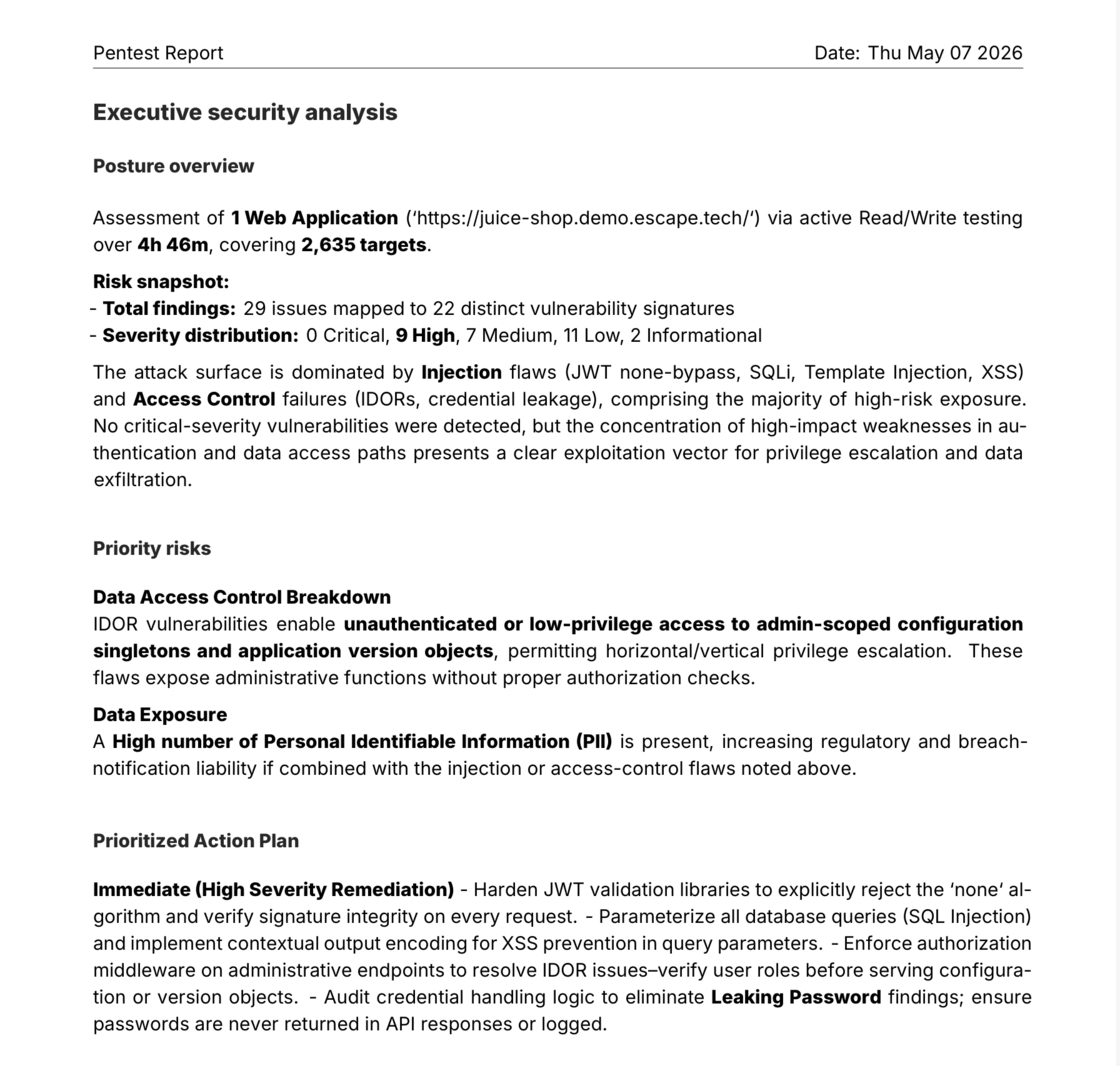
Your security report now serves the full room. A new executive summary gives leadership a clear read on your security posture and the actions worth prioritizing. A redesigned issue layout makes findings faster to triage for the engineers doing the work.

What's new:

  • Executive summary: a dedicated section that distills your security posture into clear signals: risk level, trend, and the top actions worth taking, sharable to leadership without writing a separate briefing.
  • Redesigned issue layout: findings are structured for triage, with evidence, severity, and remediation steps in a consistent, scannable format so you spend less time parsing and more time fixing.

Report and export documentation →

New report template showing the executive summary and redesigned issue layout

Questions?

Have a question? Reach out on your dedicated support channel, or email us at support@escape.tech.
#163 · Asset Project IDs in the Escape Public API and CLI

Availability: General Availability. Discover project IDs on every asset response in Escape's public API and CLI: map findings to your portal without extra round trips.

You can already assign assets to projects on writes. Reads stayed silent: asset payloads came back without their project assignments, so anything round-tripping through the API or escape-cli had to call /v3/projects separately to place findings in the right product bucket. Asset payloads now carry projectIds on every read endpoint, and GET /v3/assets accepts a projectIds filter for parity with /v3/scans.

What's New

  • projectIds on every asset payload: returned by GET /v3/assets, GET /v3/assets/:assetId, and every endpoint that embeds an asset (issues, profiles, events, scan issues). Empty array when no project is assigned, never null.
  • projectIds filter on GET /v3/assets: ?projectIds=A,B scopes a list to assets in any of those projects, mirroring the semantics already on /v3/scans.
  • escape-cli assets list --project-id <uuid>: repeatable flag plumbed through to the same filter.
  • PROJECTS count column in escape-cli assets list and escape-cli assets get table output. JSON output is unchanged and now includes the full projectIds array.

Why It Matters

Customer AppSec teams plugging Escape into their internal product portals told us they were running extra /v3/projects lookups just to figure out which product each issue belonged to. That's a small tax that adds up across thousands of findings. Round-tripping is now lossless: write projectIds on an asset, read them straight back. Pipelines consuming issues, profiles, or events get the project context on the first response, so you can route findings into the right bucket without a second hop.

How to Get Started

  • API: read projectIds from any asset response. Filter lists with GET /v3/assets?projectIds=<uuid>,<uuid>.
  • CLI: escape-cli assets list --project-id <uuid> -o json scopes the list. escape-cli assets get <id> -o json includes projectIds on every detail payload.
  • SDKs: regenerate from services/public-api/v3.openapi.json to pick up the new field and query parameter.

Compatibility

Hard-Breaking Changes

None.

Soft-Breaking Changes

  • Public API and CLI assets list and assets get table columns: a new PROJECTS count column sits between OWNERS and NAME. Scripts that parse the human-readable table by tab-column index need to shift their NAME index by one. JSON output (-o json) is unchanged and is the recommended target for automation.

Non-Breaking Changes

  • projectIds: string[] on AssetSummarized and AssetDetailed: present on every asset returned by the public API, including embedded assets in issues, profiles, events, and scan issues. SDKs that ignore unknown response keys keep working unchanged.
  • projectIds query parameter on GET /v3/assets: optional, comma-separated, OR semantics. Existing callers that don't pass it see no change.
  • --project-id flag on escape-cli assets list: new optional flag, repeatable. Existing invocations are unaffected.

Questions?

Have a question? Reach out on your dedicated support channel (Slack, Microsoft Teams, or whichever channel we've set up with your team), or email us at support@escape.tech.
#161 · Public API: Clearer Error Types in Generated SDKs

Availability: General Availability

Error responses across the Escape Public API (v3) now carry explicit, semantic schema names. Every endpoint returns the same JSON payloads it always did, so direct HTTP integrations need no changes. If you regenerate an SDK from the updated OpenAPI spec, you'll see a handful of error-type renames that make decoded errors easier to read and reuse.

What's New

  • Named error schemas: the 400, 404, 409, and 500 responses now expose BadRequest, PaginationError, NotFound, Conflict, and InternalServerError as semantic schema names in the spec.
  • Consistent types across endpoints: regenerated SDKs use one semantic type per error shape, so you can share error-handling code across every endpoint that returns the same error.
  • Spec matches reality on GET /scans/{scanId}/targets: the declared 400 schema is now a single PaginationError, matching what the server actually returns.

Why It Matters

Until today, SDKs generated from our spec produced awkward error types like ListProfiles400Response or UpdateProfile400Response, one per operation, even when the payload was identical. Writing shared error-handling meant juggling a dozen near-duplicate types. With semantic names, one handler can cover every list endpoint's pagination error, another can cover every validation error, and so on. AppSec tooling that wraps the SDK ends up with cleaner imports, fewer surprises during audits, and fewer places to update when a new endpoint shows up.

How to Get Started

  • Call the API directly with JSON: nothing to do. Payloads are byte-for-byte identical.
  • Use an SDK and don't regenerate: nothing to do.
  • Use an SDK and regenerate from the new spec: update imports to the new type names. See the Compatibility section below for the exact renames.

Compatibility

Hard-breaking changes

None.

Soft-breaking changes

Wire payloads and HTTP status codes are unchanged. Regenerated SDKs and strongly-typed consumers will see type names and shapes change.

  • SDK error-type renames: identical inline error schemas used to produce one Go, TypeScript, or Python type per operation, with names derived from the alphabetically-first operation that referenced them. They now collapse into one semantic type per error shape. Typical renames you'll see after regeneration:

    Before (example) After
    ListProfiles400Response PaginationError
    UpdateProfile400Response BadRequest
    GetProfile404Response NotFound
    IgnoreScan409Response Conflict
    CreateAssetComment500Response InternalServerError

    Update imports and type references to the new names. Payload fields are unchanged.

  • GET /scans/{scanId}/targets 400 schema narrowed: the declared 400 used to be a union of BadRequest and PaginationError. The server has only ever returned the pagination variant on this endpoint, so the spec now declares a single PaginationError. Regenerated SDKs drop the union wrapper. Hand-written error handlers only need to match on "Invalid cursor" for this endpoint. Runtime responses don't change.

Non-breaking changes

  • Named schemas in the OpenAPI spec: every 400, 404, 409, and 500 response now carries an explicit title and description for BadRequest, PaginationError, NotFound, Conflict, and InternalServerError. Payload shapes for reference:

    HTTP Schema Shape
    400 BadRequest { "message": "Bad Request", "details": string }
    400 PaginationError { "message": "Invalid cursor", "details": string }
    404 NotFound { "message": "Not found" }
    409 Conflict { "message": "Conflict on the following field", "field": string, "instanceId": uuid }
    500 InternalServerError { "message": "Internal Server Error", "details": string }
  • No changes to operations, paths, methods, parameters, request bodies, success responses, or authentication.

What's Next

We keep improving the Public API, and there's more on the way.

Learn More

Questions?

Have a question? Reach out on your dedicated support channel (Slack, Microsoft Teams, or whichever channel we've set up with your team), or email us at support@escape.tech.
#158 · Workflows API OpenAPI v3.1

Breaking changes

Workflows API restructured

The single-workflow endpoints have been replaced with a resource-oriented API. You will need to update any integration that calls the workflows endpoints.

┌───────────────────┬────────────────────────┐ │ Old │ New │ ├───────────────────┼────────────────────────┤ │ GET /workflows │ GET /workflows/{id} │ ├───────────────────┼────────────────────────┤ │ PUT /workflows │ PUT /workflows/{id} │ ├───────────────────┼────────────────────────┤ │ DELETE /workflows │ DELETE /workflows/{id} │ └───────────────────┴────────────────────────┘

A new GET /workflows endpoint now returns a paginated list of all your workflows (instead of a single workflow object).


Non-breaking changes

  • OpenAPI spec upgraded to 3.1 — the spec served at /v3/openapi.json now uses the OpenAPI 3.1 format. Nullable fields are now expressed as type: ["X", "null"] instead of nullable: true. This is semantically equivalent; most client generators handle both.
  • New POST /workflows endpoint added to create workflows programmatically.
  • Automated Pentest GraphQL profile (POST /profiles/ai-pentesting/graphql) — internal stability metadata removed from the spec; no functional change.

#154 · Updated Escape Copilot — Smarter, Faster, More Actionable

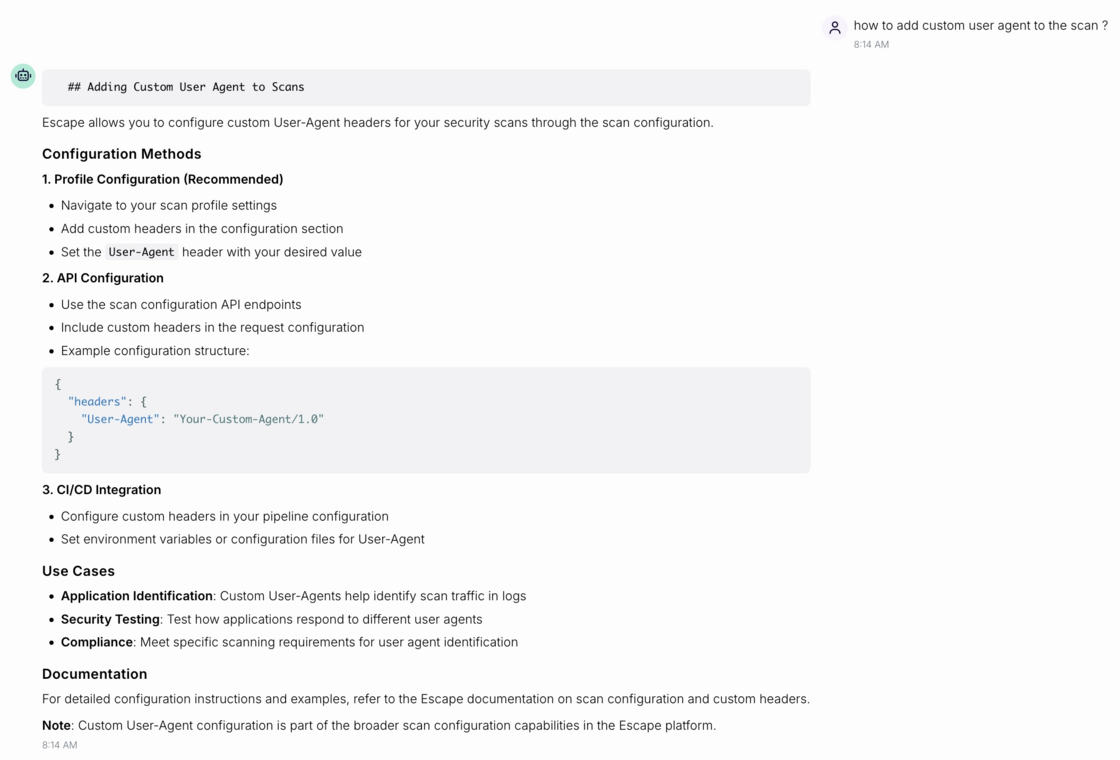
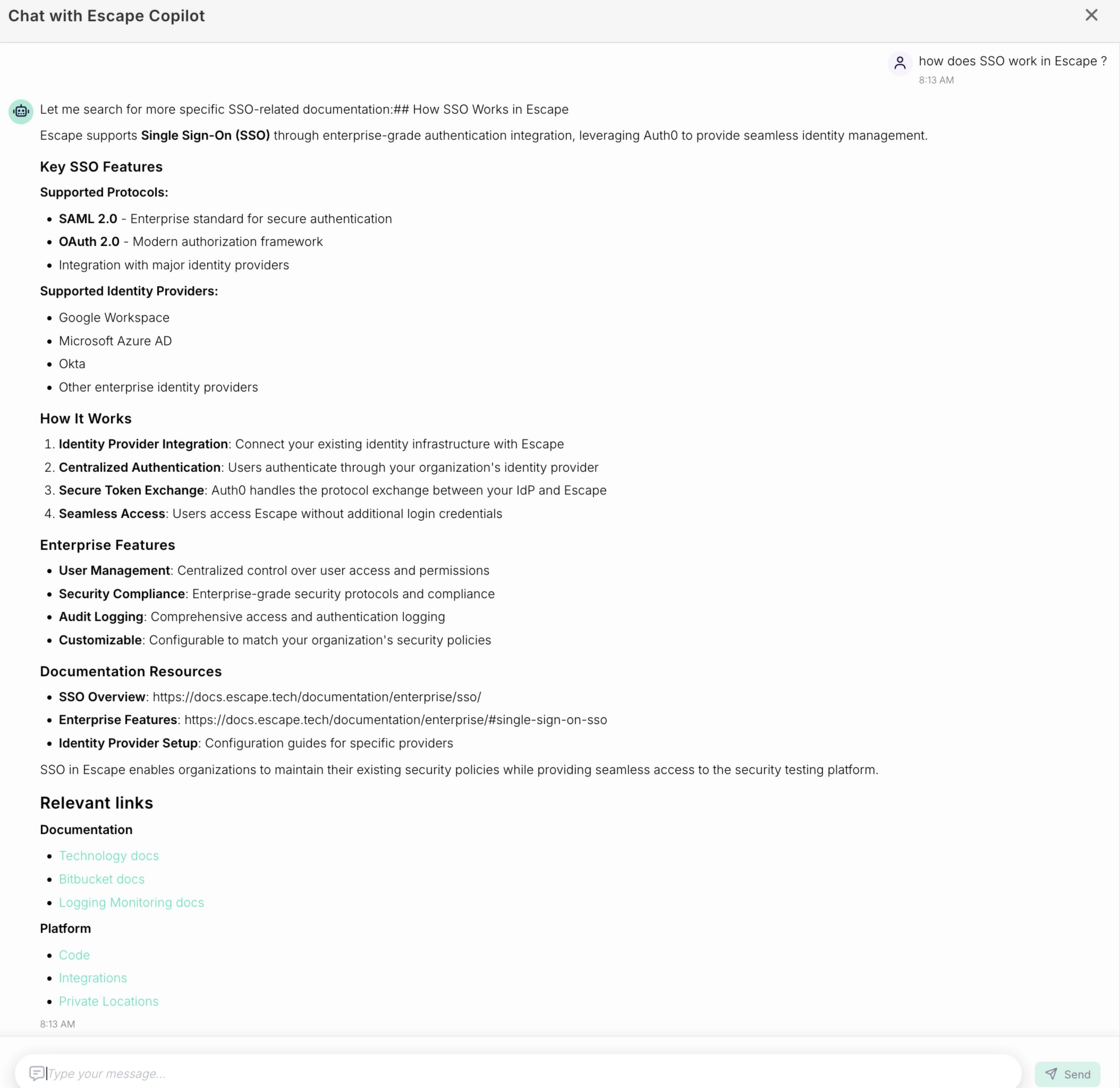
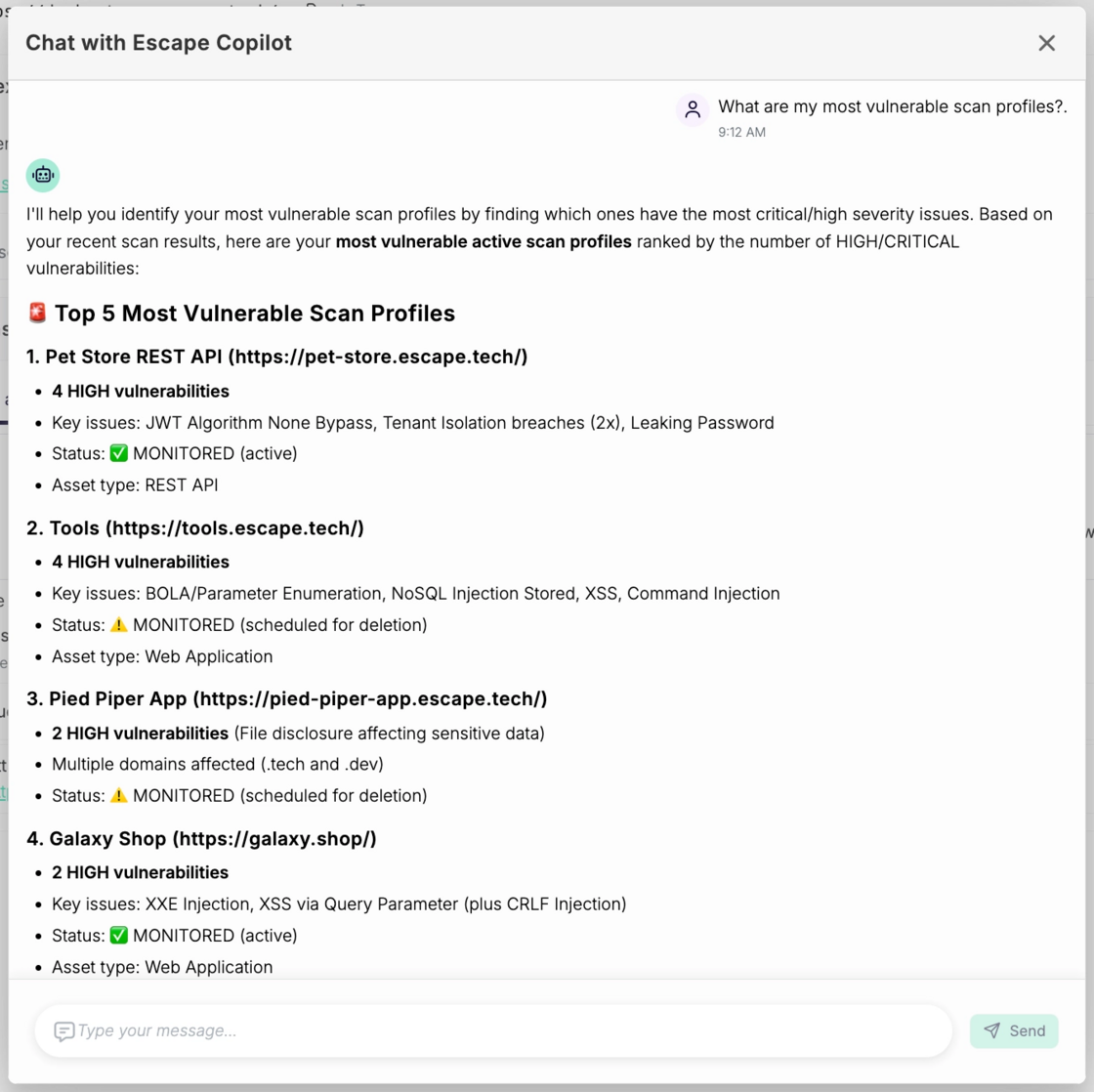
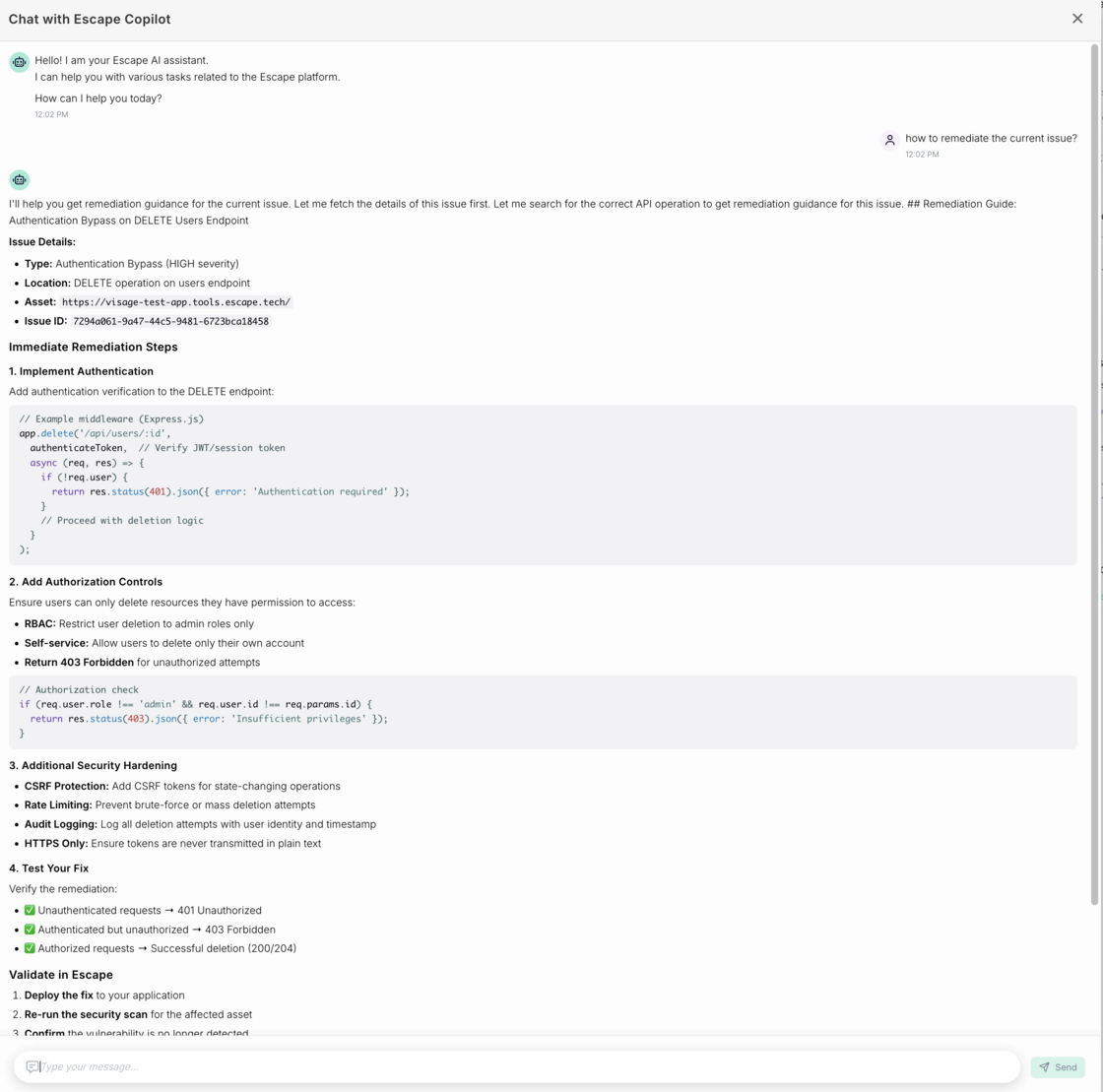
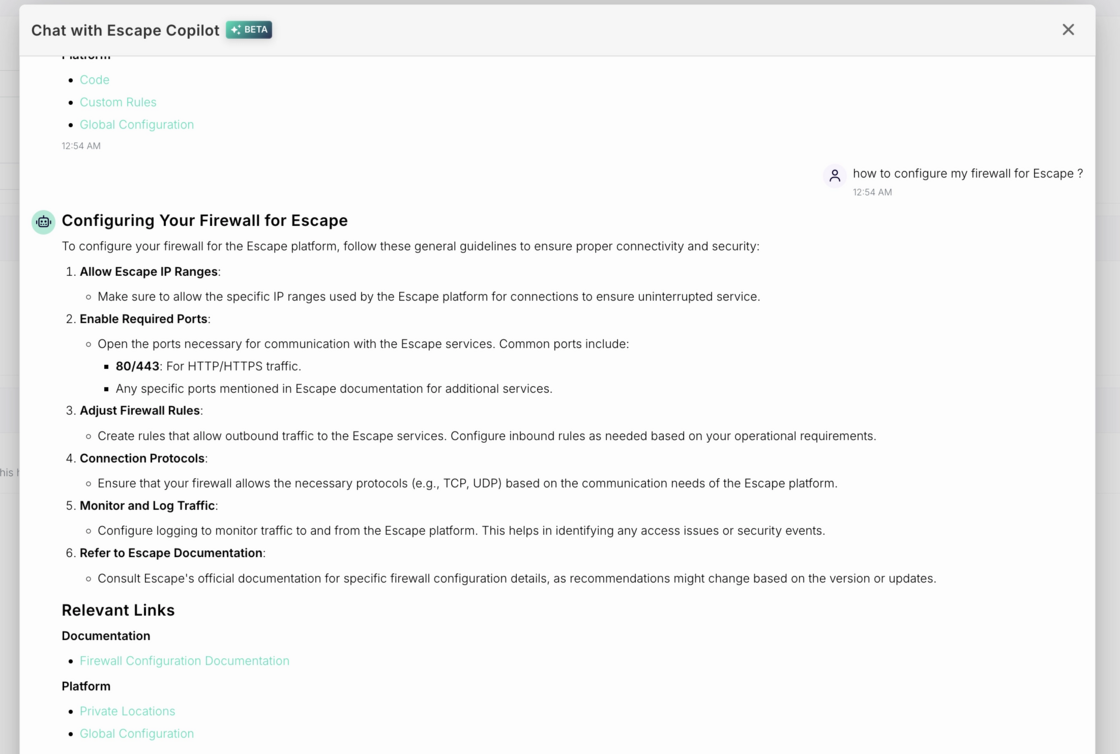
Escape Copilot just got a significant upgrade. It now understands your current context, pulls from Escape's documentation, and guides you directly to the right place in the platform.

What's new

  • Page-aware context. Copilot reads your current page. Ask about a vulnerability, a scan, or how to remediate a specific issue you’re reviewing— it already knows which one you mean:

image.png

Grounded in Escape's documentation. Ask anything about the platform and Copilot pulls the answer directly from the official docs. You’ll be always working from accurate, up-to-date guidance:

image.png

image.png

  • Direct links inside the platform. Copilot points you to the exact setting, result, or configuration you need:

image.png

**- Always up to date. **Copilot automatically picks up new Public API features as they ship.

How to use it:

Open Copilot from any page. Just press Cmd + Shift + E (or Ctrl + Shift + E on Windows) to activate Copilot in-app.

Ask in plain language — "what are my most vulnerable profiles?", "how do I remediate this issue?", "how do I configure my firewall?" — and get answers tied to where you are right now.

image.png

We’ve implemented a new thinking model that can perform more complex actions to ensure utmost accuracy. You might experience slower reasoning times but better output.

Try it our now!

#145 · Escape Projects Now Generally Available

Escape Projects, our feature for organizing assets and assigning clear ownership so teams can act on the findings that matter to them, is now generally available for all customers.

image.png

Projects let you map assets to logical ownership boundaries, scope access to the right users, reduce noise by filtering out unrelated findings, and accelerate remediation loops by giving teams the context they need to fix issues efficiently.

You can learn more about the feature in our documentation and how to use it efficiently in this article.

Want to set it up?

Go to Organization Settings → Projects: This is where you create, edit, and manage Escape Projects.

Happy organizing!

#139 · Introducing Projects: Turn Visibility Into Action With Clear Ownership

Today, we’re releasing Escape Projects, a new way to organize your assets within Escape platform and assign access so teams can quickly act on the findings that matter to them.

For companies operating across multiple brands, managing acquisitions, or running split engineering teams, the old tag-based RBAC model made it hard to know what assets belong to what team, who should have access to it, and who should fix what. Too many people had access to too many assets, saw too many findings, and not enough action followed.

Projects change that.

“We’re looking forward to this because it will be easier for us to add the right people, put the assets in the right project, and let them start reviewing findings and patching what they need to patch.”

Why This Matters (the real problem we’re solving)

Security teams can have great overall visibility — but ownership isn’t clear, which means findings linger.

Projects give you:

1. Clear ownership

Teams see the assets and findings they’re actually responsible for.

2. Less noise, more action

Engineers stop sifting through information that doesn’t belong to them.

3. Faster remediation loops

By mapping subdomains, apps, or brands to their owners, teams can act immediately and remediation progress over time.

4. Enterprise-scale flexibility

Perfect for companies with multiple brands, complex org charts, or frequent M&A activity.

In short:

You turn visibility into action. And action into real security improvements.

What’s New

1. Project-Based Access Control

Create Projects that map directly to your real-world structure (brands, business units, product teams, regions, etc.).

Assign assets to Projects and bind the right users with scoped permissions.

2. Tags Are No Longer Used for RBAC

Tags stay in the product for filtering and scanning logic—but they no longer control access.

3. Old Team Roles Have Been Removed

We’ve replaced legacy team roles with clearer, more predictable project-scoped roles.

4. Assets Drive Access, Not Profiles

Profiles themselves aren’t tied to Projects.

Their assets are — giving you flexibility as your org evolves.

5. Global Elements Stay Global

For compatibility:

  • Custom Rules remain global and need a global role binding to edit
  • Workflows also remain global
  • During scans, existing tag-based rules still apply

How It Works

  1. Go to Organization Settings → Projects: This is where you create, edit, and manage Escape Projects.
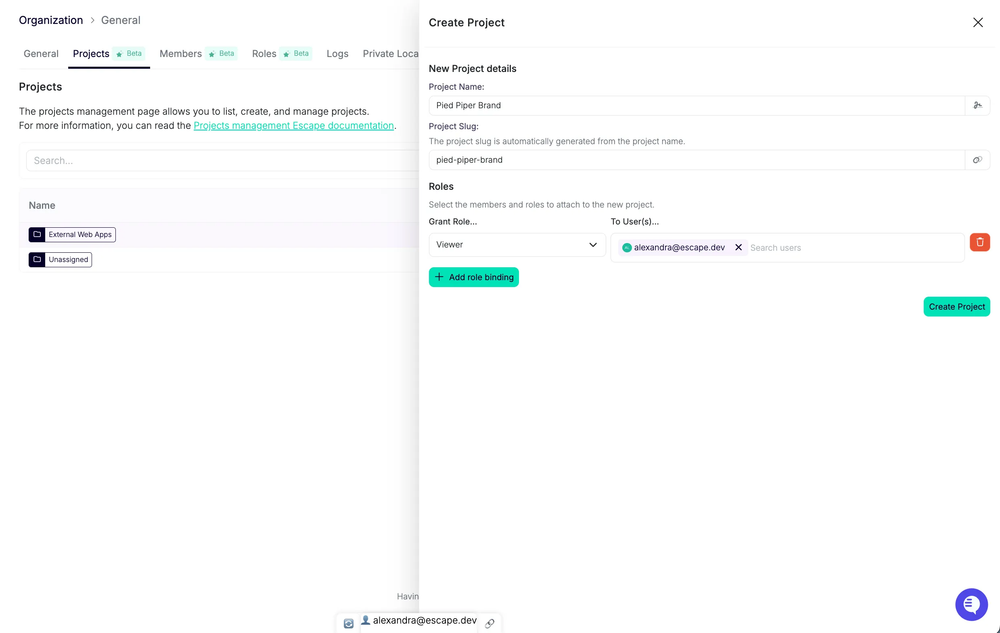
  2. Create a Project:

Projects can represent brands, teams, BU's, regions, or any logical ownership boundary. Examples: “Brand A”, “Payments”, “EU Web Team”, “Team A”.

image.png

  1. Bind users to the Project with the appropriate role: Give team members the right level of access: Viewer, Editor, Admin, etc.

image.png

  1. View All Members of a Project: Under the Members tab, you can see who has access and with which role.

admin-users.png

  1. Assign assets to that Project:

Projects are powered by the assets they contain. Assign domains, subdomains, schemas, and profiles to each Project. All associated scan profiles and issues will be auto-assigned as a result.

image.png It is possible to bulk assign par domain name or other filter of your preference:

image.png

  1. Teams can now filter on the assets and findings they own:

image.png

  1. Critical operations happening on projects (creating, editing, deleting) are audited and can be viewed in the audit logs page:

image.png

Assigning “Unclassified” Assets — Important

Every asset must belong to a Project.

If you have assets that are not yet classified, we recommend creating a dedicated Project such as: “Not Assigned”

You can bulk-assign these assets later from the Inventory. image.png

Use the Project filter and select “No project” to filter on any assets that are not yet assigned to a specific scope.

image.png

Why this matters:

Assets not assigned to any Project are visible org-wide, which breaks scoped visibility.

If you want clean, project-based access, everything must be assigned.

Concrete Example of How Projects Can Fit into Your Workflows

Let’s say you want a specific software engineer to only view vulnerabilities for the assets they work on — nothing else.

You would:

  1. Create a Project called “Team A”
  2. Assign the relevant assets to that Project
  3. Bind the engineer to the Project with
    • View Reporting
    • Manage Reporting
  4. When they log in, they will only see
    • The assets they own
    • The vulnerabilities and findings related to those assets
    • Their filtered list inside the All Issues tab

If the engineer works across multiple projects, their scope will simply be the union of those Projects, and they can still filter down to a single Project when needed.

⚠️ Important Note About Deleting Projects

Deleting a Project currently deletes all assets it contains.

This will change in an upcoming update.

For now, please unlink assets before deleting a Project.

What’s Coming Next

We're already working on scoping more functionality to Projects, so teams can operate independently end-to-end.

Coming soon:

  • Workflows scoped to Projects
  • Integrations scoped to Projects (Slack, Jira, etc.)
  • Project-scoped reporting
  • Automated alerts for each team, routed only to the relevant Project
  • More granular API support

For now, automated workflows can be built through the Escape API (Beta): https://public.escape.tech/v3/#tag/beta/post/projects

image.png

To sum up, with Projects in place, your organization gains:

  • Deeper visibility into ownership
  • Clearer accountability across teams and brands
  • Actual action on findings — not just reporting
  • A scalable RBAC model that grows with your environment

It’s a practical step toward helping teams move from simply seeing issues to actually addressing them — with the right people looking at the right assets from day one.

Want to make sure Escape Projects are available on your account? Reach out to your dedicated Escape representative.