#124 · Global Configuration for Scan Profiles
Escape now allows you to define global configurations that apply to all your scan profiles, streamlining the setup process across your organization. These configurations can be set at the organizational level, providing consistency and ease of management for repeated scan types.
Key Features of Global Configurations:
-
Apply Defaults Across Scan Profiles
For example, you can define what custom data types (named scalars) should be internal to your company and should never be exposed by any APIs by default and raise an issue if the scalar is found in a git repository in every scan.
-
Network Configuration: Custom Headers & Timeouts
On the network side, you can now define custom headers and timeouts globally. This provides better control over request configurations across your scans.
-
Rate Limiting for APIs
Rate limiting for APIs is now configurable at the global level. The way it is defined, however, has changed. Now you need to use the following variables to define the required parameters:
max_duration in s -
Override Settings in Individual Scan Profiles
For enhanced flexibility, you can override global configurations within specific scan profiles. This means:
- If you need to set a different request timeout for a particular scan, you can now do so.
- If you need to block specific routes during a scan, you can now easily blacklist pages (e.g., we’re blocking crawling of the "logout" page by default which you can override, or you can customize avoiding other specific routes).
How to Set Up Global Configurations:
To configure these settings, navigate to your Organization Page > General Settings and open the Global Configuration tab. From there, you can define, adjust, and manage your global scan settings.
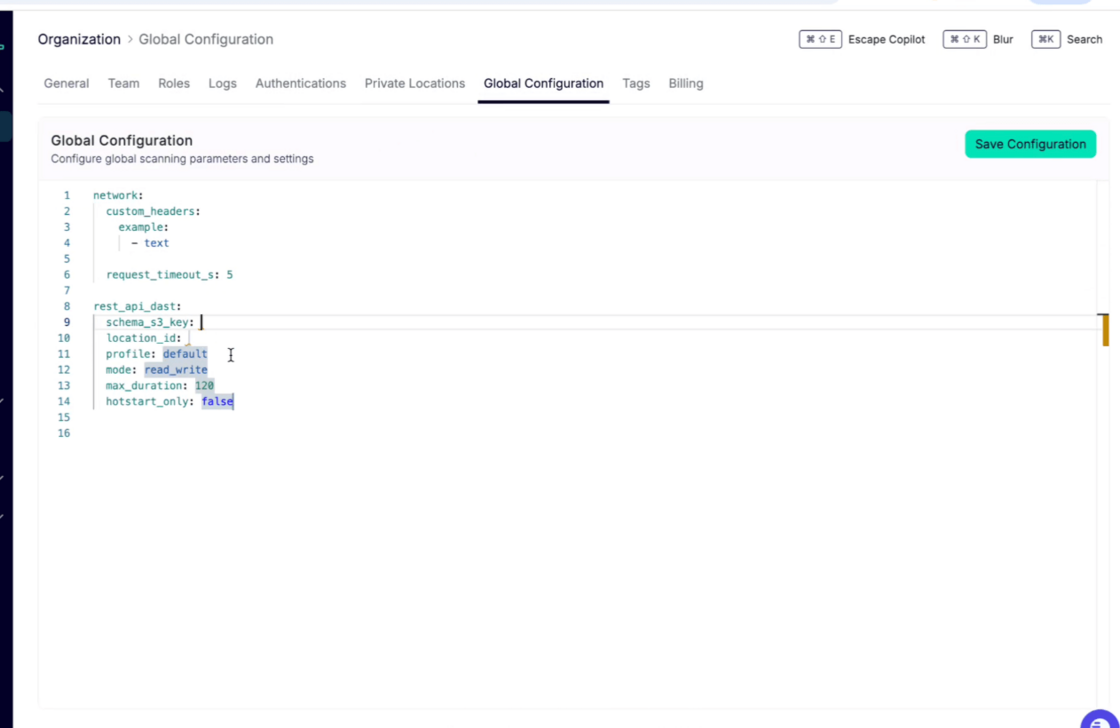
For more information on how to set Global Configurations up, check out our documentation: