#166 · Smarter Tables: Saved Views, Grouping, and Column Control
Availability: General Availability
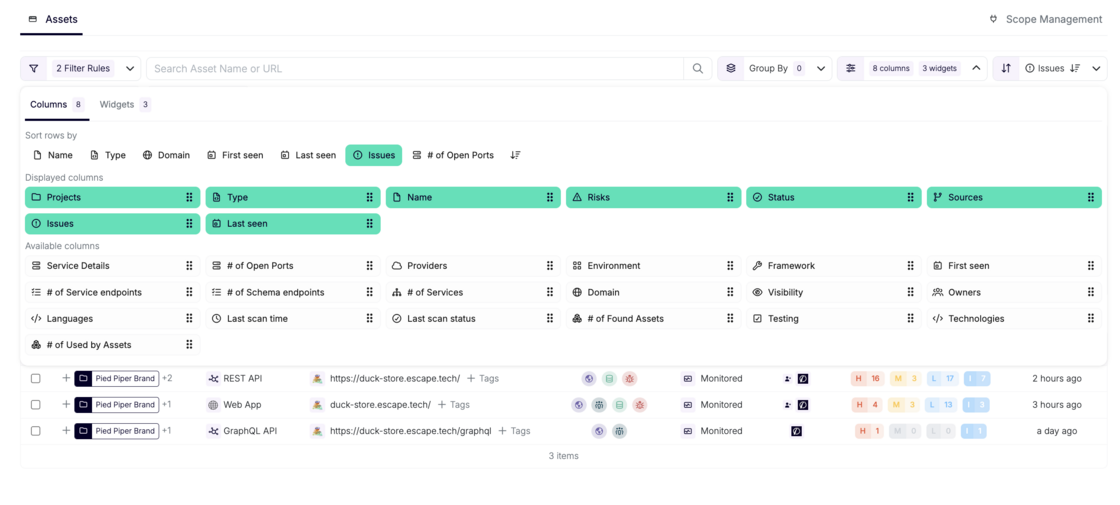
Your tables now remember you. Name a view, pick your columns, set your filters, group by what matters to your team. Come back tomorrow and it's all exactly where you left it. Wire any view into a workflow trigger and your automation runs on the same scope your team sees every day.
What's new:
- Saved views: name your setup and own it. Filters, columns, grouping, chart selection, and sort order: all saved. Set a default that loads when you open the page. Pre-built views for Web Applications, API Services, Hosts, and more come included.
- Advanced filtering: build exactly the query you mean: AND, OR, nested groups. Like "(Project A OR Project B) AND Status = Monitored". Charts always reflect the active filter state.
- Column control: show what's relevant, hide what isn't. Each view has its own column set, so your "Web Applications" and "API Services" views look exactly right for what they are.
- Grouping: group by project, tag, asset type, or source, with multi-level grouping. Each group shows aggregated counts; expand it to see what's inside.
- Workflow integration: views wire directly into workflow triggers. Your automation runs on the exact slice of your attack surface your team already works with.
Questions?
Have a question? Reach out on your dedicated support channel, or email us at support@escape.tech.