#169 · AI Pentesting Deferred Start: Schedule Assessments for the Right Window
Availability: General Availability
You set when an AI Pentesting assessment starts instead of launching the moment you confirm the profile. Pick a future date and time from the create or edit flow, save a validated configuration, and Escape starts the run on your schedule. That fits release windows and off-hours test beds.
What's new:
- Deferred start on create and edit: Choose "Schedule for later" and set date and time in your local timezone, or save a reviewed configuration as draft and queue the run for later. Escape holds the profile until the clock hits.
- Scheduled profile card: Open a profile with a queued run and you see when the next assessment starts, with a shortcut to edit the schedule.
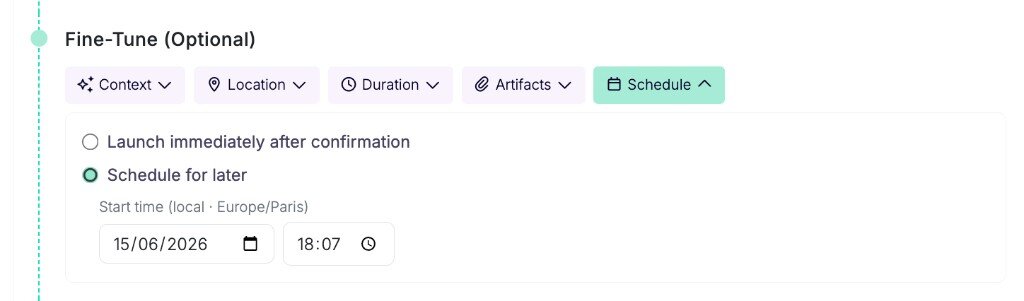 Set the deferred start from the Schedule tab on profile create or edit.
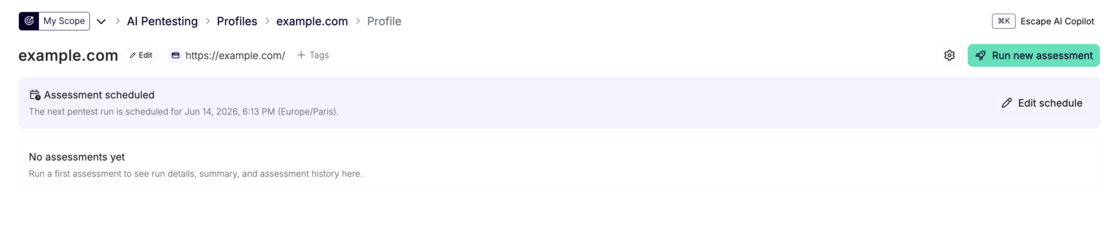 The profile shows the queued run and links straight to edit the schedule.
Questions?
Have a question? Reach out on your dedicated support channel, or email us at support@escape.tech.