#182 · One-Click Fix in Cursor: Turn Findings Into Codebase-Tailored Remediation
Availability: General Availability
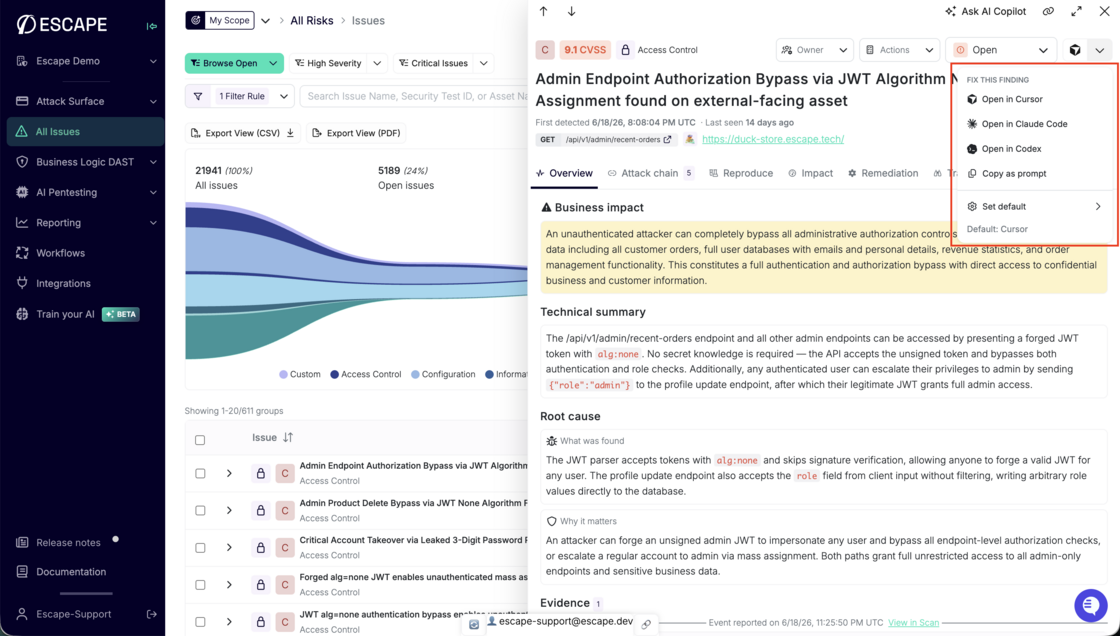
Escape closes the loop between triage and fix. When you see a finding, you no longer copy details into your IDE and rebuild context from scratch: one click from the issue side panel sends a remediation prompt straight to Cursor, Claude Code, or Codex. The prompt carries your finding so your coding agent starts with everything it needs.
What's new:
- Fix this finding: Start remediation from any issue side panel with a single action.
- IDE choice: Open in Cursor, Claude Code, Codex, or copy the prompt to your clipboard.
- Deep links: Cursor opens with the full prompt preloaded through a native deep link.
IDE integrations documentation →
Questions?
Have a question? Reach out on your dedicated support channel, or email us at support@escape.tech.