Skip to content

Platform

#80 · Disable Private Locations

We've improved the private location selector, giving you more control over where your scans run:

Screenshot 2025-02-20 at 18.11.31.png

You can now disable specific locations, ensuring your tests only execute in the private networks that matter at this moment to you.

Need to disable any private locations? Go to -> Organization -> Private Locations.

#77 · Jira Integration Fix

We've fixed a bug in our Jira integration that was preventing proper functionality.

As part of this fix, the integration now fully supports API keys, ensuring a more secure and reliable connection. This update improves authentication and overall stability, making your Jira experience smoother than ever.

Don’t wait—connect your Jira account today and start automatically providing developers with the remediation information and code snippets they need, tailored to their framework!

#76 · Remediations Update

We've revamped remediations for all frameworks to deliver clearer, more actionable guidance. This update aims to improve the accuracy and usability of remediation steps, making it easier to identify and resolve issues efficiently.

With more detailed insights and practical recommendations, you can now take faster, more informed actions. We hope this helps you fix critical issues more quickly and build even greater trust with developers!

#75 · More Detailed Information About Frontend Apps in Inventory

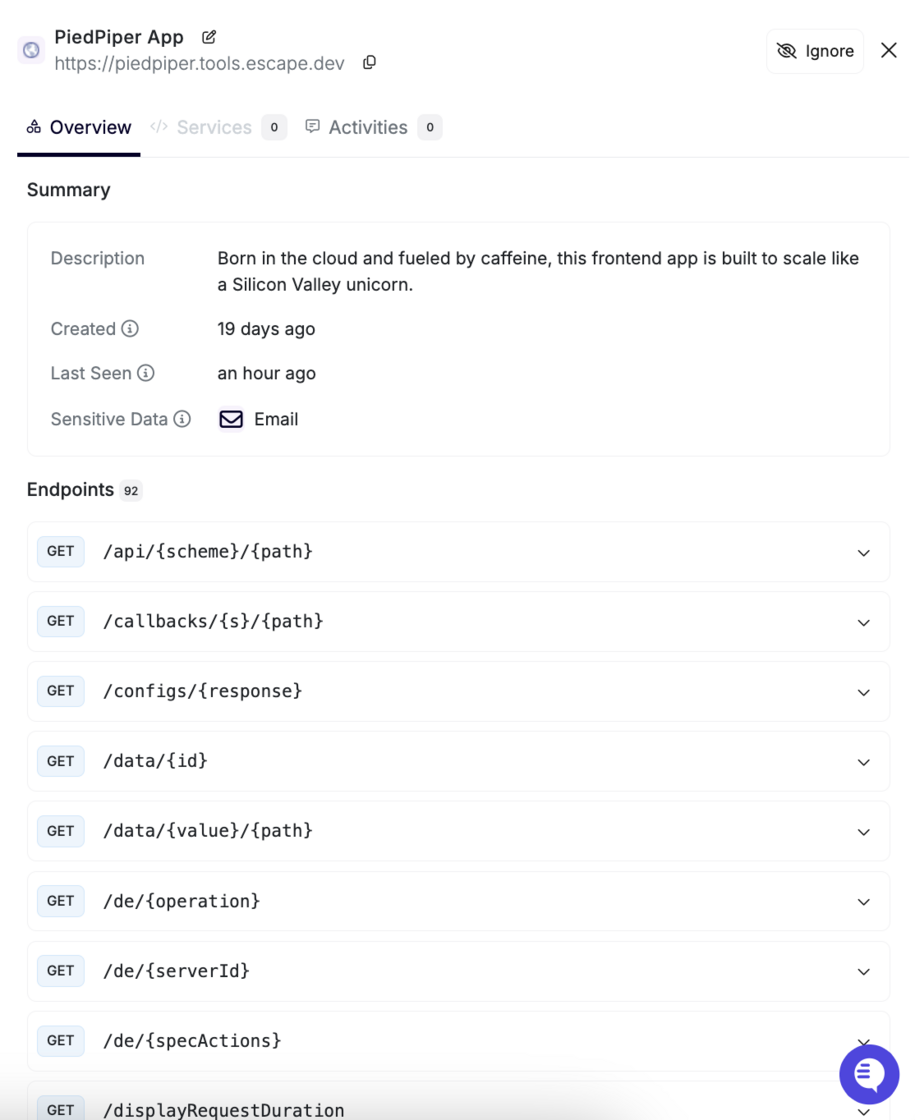
We’ve enhanced the Inventory section to provide more detailed insights about your front-end applications!

Screenshot 2025-02-04 at 11.47.46.png

How to Access

Navigate to:\ Inventory → All Services → Frontends → Click on the app in question

What's New?

Each frontend app now includes a comprehensive information card with the following details:

Description

  • Provides a quick overview of your frontend app.

Key Metadata

  • Created: Displays when the frontend app was added (e.g., 5 months ago).
  • Last Seen: Shows the most recent activity (e.g., an hour ago).

Sensitive Data

  • Highlights potential security risks by identifying exposed sensitive data and its type.

Endpoints Consumed by the Frontend App

  • Displays a list of API endpoints the frontend app interacts with, providing better visibility into dependencies and integrations.

Activity Log & Comments

  • Under the Activities tab, you can now add and view comments related to the app, ensuring better collaboration and tracking.

We hope this update will help you gain better insights into your frontend applications!

#74 · Automatic Private Location Deployment Now Available

We’re excited to introduce automatic Private Location deployment with our new auto-provisioning feature.

What's New?

With this update, you can now automatically provision private locations. You just need to write one line of command, and that's it!

How It Works?

You can deploy the Repeater automatically using an API Key and providing it's name. At the program's start, it will automatically retrieve the location ID from the Escape API or create it if it doesn't exist.

You can find the Helm chart in the Repeater repository:

helm repo add escape https://escape-technologies.github.io/repeater/ helm repo update

Set a unique location name, for example the name of the Kubernetes cluster export ESCAPE_REPEATER_NAME="k8s-$(kubectl config current-context)"

Set your API key from User Profile:

export ESCAPE_API_KEY=...

Then use the following command:

helm install escape-test-helm escape/escape-repeater --set ESCAPE_REPEATER_NAME="${ESCAPE_REPEATER_NAME}" --set ESCAPE_API_KEY="${ESCAPE_API_KEY}"

Why This Matters?

  • Fully automated setup of private locations, reducing manual work.
  • Scalable deployment across multiple clusters with minimal effort.

This update is live now! We hope you enjoy a more streamlined experience.

For detailed setup instructions, check out our documentation.

#73 · Enhanced Inventory Settings

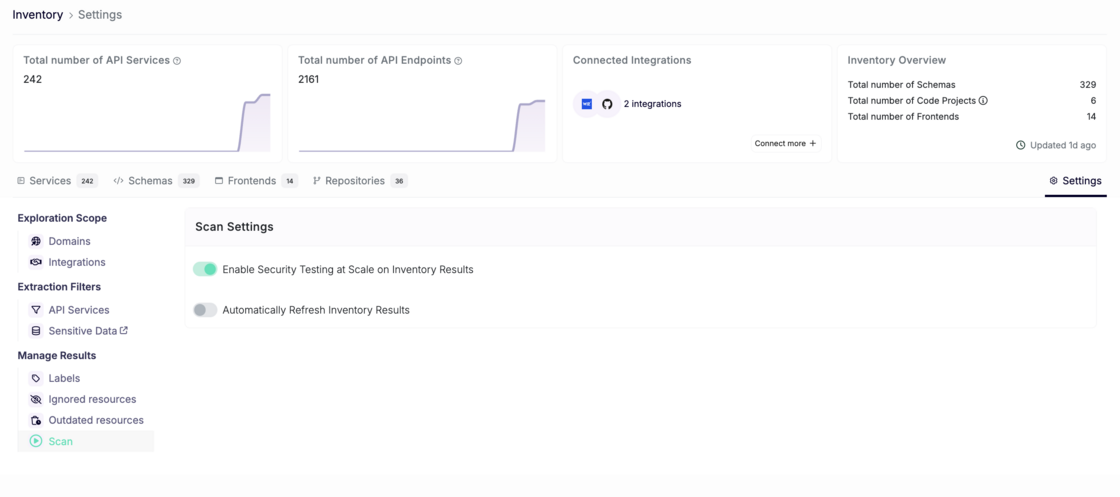
We’ve added new settings to your Inventory Settings page, enabling you to customize two powerful features:

  • Automatic Security Scan Creation: Allow Escape to automatically run security scans for newly discovered applications in your inventory, streamlining your security workflows and notifying you whenever new applications built by your developers or exposed online are detected. With Escape’s ability to build documentation programmatically, this feature operates at scale effortlessly.
  • Automatic Inventory Data Refresh: Gain control over when Escape runs its scans to build your inventory without requiring agents. Enabling this feature ensures you always have access to up-to-date data about your exposed and vulnerable applications.

Screenshot 2025-01-20 at 11.49.28.png

How to Configure

  1. Go to the Inventory Settings page.
  2. Go to Manage Results -> Scan
  3. Adjust the toggles for "Enabling Security Testing at Scale on Inventory Results" and "Automatically Refresh Inventory Results" to fit your needs.

These enhancements give you more flexibility and control over your inventory management processes, empowering you to tailor the platform to your workflow.

#72 · New "Delete" Endpoint for Applications in Public API

We’ve just added a delete endpoint for applications in our public API, making it easier to manage your resources programmatically.

Key Highlights

  • Endpoint: https://public.escape.tech/v1/#tag/applications/DELETE/application/{id}
  • Functionality: Remove applications programmatically for greater control and flexibility.

#70 · Faster Page Load Times

A quick heads up: We’ve made significant optimizations to our platform, resulting in faster page load times across the board. Your workflows will now be more seamless, with less time spent waiting and more time focused on what matters most.

#69 · Automated API Schema Generation for C#

Automated API Schema Generation is now possible from C#!

Building APIs in C#? No need to worry about maintaining your API specifications anymore. You can effortlessly generate API specifications directly from your C# code.

Escape scans your codebase, analyzes your API's code, and generates precise specifications, saving you time and effort while ensuring accuracy.

To learn more about how automated API specification generation works, visit our documentation: Code to Cloud: API Schema Generation.

We look forward to seeing how this helps streamline your API development and security workflows. As always, your feedback is welcome!

#63 · Manage Labels at the Org Level

We have enhanced the existing app label management functionality to provide better organization-level control and scalability. Previously, labels were managed on a per-service basis, but now you can define and update labels centrally at the organization level while still retaining the flexibility to assign and customize labels at the service level.

What are Labels?

Service labels are custom tags that help you categorize, filter, and organize your applications. They are especially useful for teams managing large numbers of apps or workflows.

How it works

  1. Navigate to the Organization Settings by clicking on the name of your org.
  2. Select the Labels section. Screenshot 2024-12-17 at 14.53.22.png
  3. Create or update org-level labels with names and dedicated colors.
  4. Go back to Inventory -> All Services, click on the Service, and assign a dedicated label to the service in question. Screenshot 2024-12-17 at 14.54.19.png
  5. You can also add a label to each scanned application by going to the Security Scan -> Tested Applications page and clicking on the plus button. Add as many labels as you want! Screenshot 2024-12-17 at 14.57.27.png

Improvement Highlights

Org-Level Label Management

You can now create and update standardized labels at the organization level. Existing app-level labels will remain unaffected unless explicitly overridden.

Permissions Control

Organization admins and editors retain exclusive permissions to manage org-level labels.

Users with viewer permissions can view or use these labels without altering org-level definitions.

Simplified Bulk Updates

Modifications made to org-level labels automatically propagate to all associated apps, reducing manual updates.

Now it's the perfect time to organize your inventory 😉