Skip to content

Release Notes

#94 · Long Scan Stability Improvement

Stability for extended scans has been significantly improved: We've resolved an issue caused by a Python bug that randomly interrupted and killed long scans. We’re confident this fix will ensure a smoother experience with Escape!

#93 · Authentication Improvements in DAST Scanning

We know how frustrating the authentication process in DAST scans can be, which is why we've made several key updates to streamline it! Our goal is to provide you with better flexibility and efficiency for your security testing needs.

Here's the full list:

1. Support for complex authentication scenarios

We now support more complex authentication processes through the new Browser Actions Authentication Preset. This is especially useful for scenarios where traditional authentication methods don’t work well. With Browser Actions, you can customize your authentication flow using browser actions rather than relying on Escape's AI agent. This is ideal for form-based authentication where inputs are provided directly by users.

The Browser Actions preset uses Playwright for browser automation actions, such as filling in forms and clicking buttons. By default, it extracts cookies, localStorage, and sessionStorage from the browser, injecting them into the scan engine for frontend scans. For API scans, only cookies are injected.

Key benefits:

  • Customize authentication flows using direct browser actions.
  • Automatically extract and inject cookies and storage (for frontend scans).
  • Configure extractions and injections for specific storage needs (e.g., local/session storage).

For detailed documentation and some examples of how you can set it up, visit: Browser Actions Authentication Preset.

2. Single Page Mode for Enterprise Applications

We’ve introduced a new Single Page Mode to handle use cases where enterprise applications allow only one user to be logged in at a time. This feature ensures that authentication is managed seamlessly in environments with strict session controls, eliminating the need for additional configurations or manual intervention. Once authenticated, the system will maintain that connection throughout the scan.

3. Automatic Reauthentication When the Tab Is Closed

For applications that automatically log users out when the tab is closed, our system now ensures that reauthentication is handled automatically. There's no need to reconfigure your DAST scan setup or manually log in again—everything is managed in the background, allowing for a smooth and uninterrupted scanning process.

4. Handling Applications with Single Tab Login Restrictions

In cases where applications do not allow multiple tabs to be logged in simultaneously, our updated DAST scanning process automatically manages reauthentication. This removes the hassle of managing tab states and ensures that your scan continues without the need to manually re-authenticate across multiple tabs.

The improvements we've made to our DAST scanning authentication process addressed the specific pain points our customers face, especially for complex or custom authentication systems! With these updates, you can now handle advanced authentication workflows, such as the one described above, without losing session continuity or compromising on scan effectiveness!
#92 · Added Graph Visualization in the Inventory

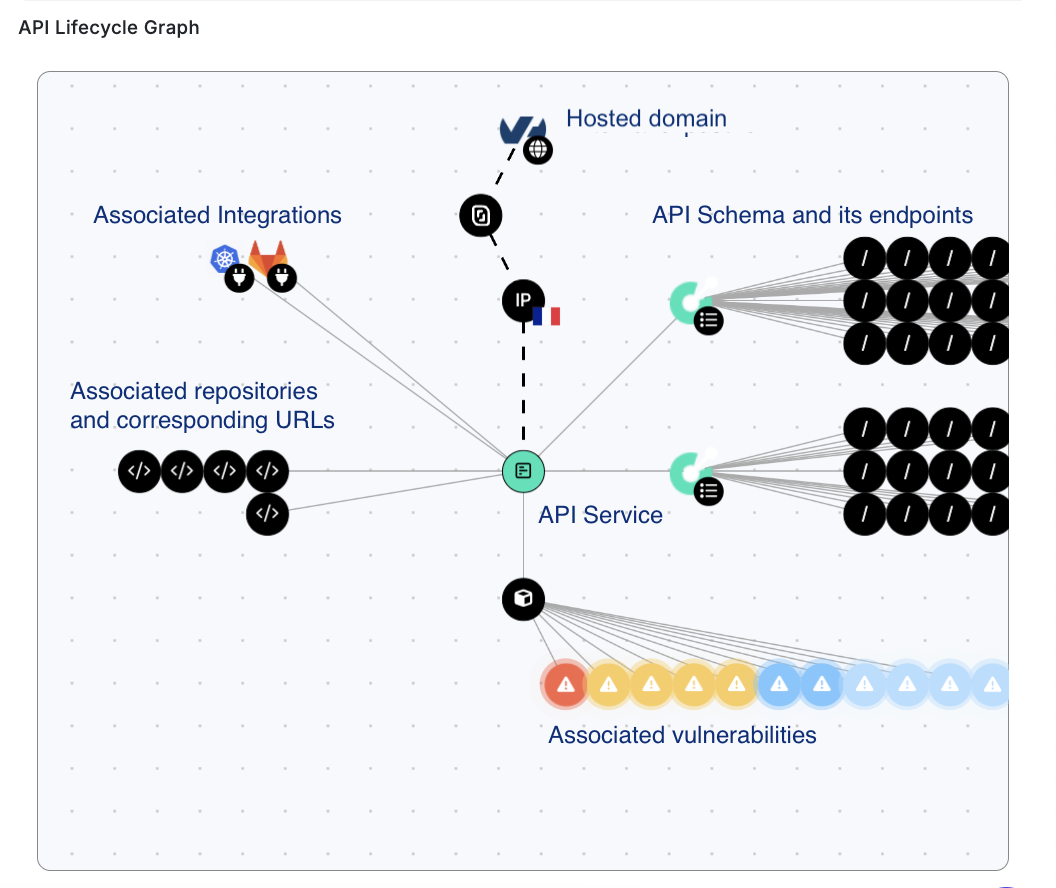
We’ve added a powerful new feature: the API Lifecycle Graph within the Inventory. This visualization allows you to see an in-depth view of your API service, including its lifecycle and key integration details.

api-lifecycle-graph.png

What you can view:

  • API Lifecycle Graph: View the full lifecycle of the API service.
  • Hosting Details: Know the domain where the API service is hosted, the cloud provider, the associated IP address, and the country where it’s hosted.
  • Service Integration: See the integration with Wiz, GitHub, GitLab, Kubernetes or others and how it was set up (e.g., via GitLab API key).
  • Repository Info: Identify the repository and associated URL where the service is hosted.
  • API Schema: View the associated API schema, how it was generated or found, and its endpoints with the methods linked to each endpoint.
  • Application Scan: See which application scan is associated with the service and view alerts linked to that application. Each alert is color-coded depending on its severity.

How to view:

  • Go to Inventory → All Services.
  • Click on the service you want to inspect.
  • You'll find the API Lifecycle Graph at the bottom of the Overview tab.

Benefits:

  • Complete Lifecycle Visibility: The API Lifecycle Graph provides a comprehensive view of your API’s entire journey, from integration to deployment.
  • Simplified Troubleshooting: By visualizing the API's integration and hosting details, you can easily identify potential points of failure or misconfigurations.
  • Better Monitoring and Tracking: Track the service repository, schema, and its endpoints efficiently in one place, making it easier to manage and secure your APIs.
  • Contextual Insights: View associated scans, vulnerabilities, and alerts in context, allowing you to quickly assess the security posture of your API services.

We hope that visually representing all relevant information helps you make informed decisions faster and improves your ability to monitor, manage, and secure your APIs effectively!

#91 · Advanced Configuration: Configure Headers in Playwright Authentication

We’ve added the PlaywrightUserPreset option to the advanced configuration settings. This allows you to inject optional headers during the authentication process and for authenticated requests, giving you more flexibility when setting up tests.

How to Set It Up:

  1. Go to the settings of the relevant app.
  2. Navigate to Scan configuration → Expert.
  3. Under presets,

use the following structure:

 presets: type: playwright
 type: playwright
 login_url: https://auth.example.com/login`
 users:
   header:

Benefits:

  • The preset feature makes it easier to configure authentication in Playwright-based testing, saving time and improving accuracy.
  • It allows you to inject custom headers, making it easier to handle complex authentication flows.
  • With the ability to configure headers, you can fine-tune authentication behavior to match your exact requirements.
  • Ensures that authenticated requests during scanning will include the necessary headers, reducing the chance of skipped or incorrect tests.

#90 · Enhanced "Visited Pages" Tab for Front-End Applications

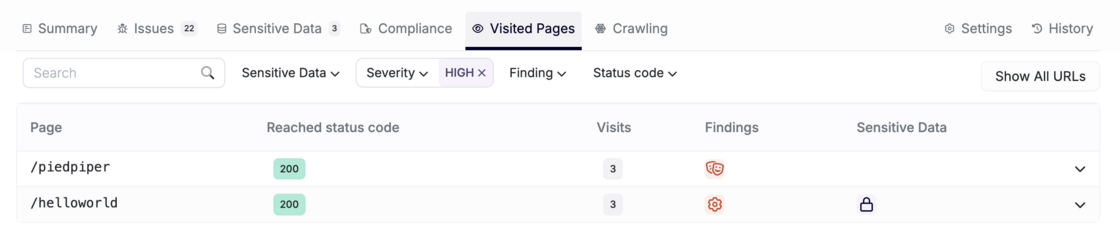
For each tested front-end application, our "Visited Pages" tab has received an upgrade!

The Visited Pages tab plays a crucial role in your scan results. Unlike API scans, where there is a predefined list of endpoints, front-end scanning relies on a crawling system and security checks engine. This allows you to validate which pages were visited and the issues found on each crawl.

Screenshot 2025-03-07 at 16.41.45.png

What's New:

  • Grouping of Similar Pages: Pages are now grouped by default, helping you focus on key pages and reducing noise for more efficient analysis.

  • Improved Page Organization: Each visited group includes:

    • Page Name
    • Reached Status Code
    • Number of Visits by Scanner
    • Associated Findings (vulnerabilities in the page)
    • Sensitive Data Found
  • Filters: You can filter by:

    • Sensitive Data
    • Severity
    • Associated Vulnerability
    • Type of Finding (Vulnerability)
    • Status Code

If you prefer to see everything, you can still click on Show All for the full view.

This update brings improved efficiency and better organization, allowing you to focus on critical findings and reduce unnecessary noise!

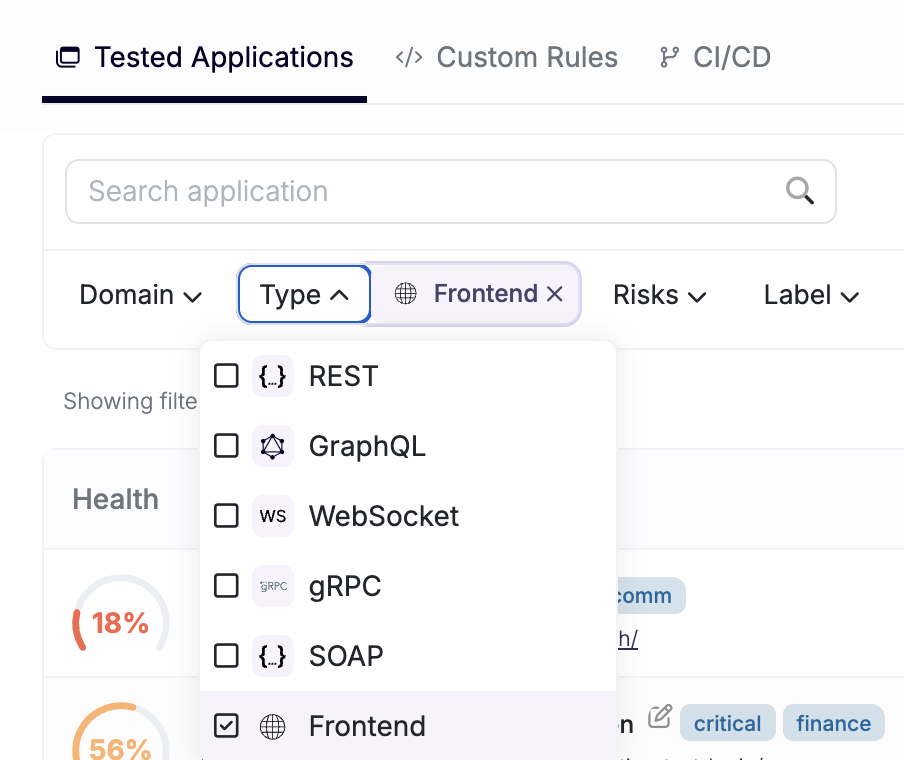
#89 · Added Filter by Front-End in Scanned Applications Tab

We’ve added a new filter to the Scanned Applications tab, allowing you to filter and view scanned front-end applications easily.

Screenshot 2025-03-07 at 16.30.13.png

This makes organizing and accessing relevant applications easier, improving your overall testing workflow!

#88 · Separate Scanning of APIs Associated with Front-Ends for Improved Efficiency

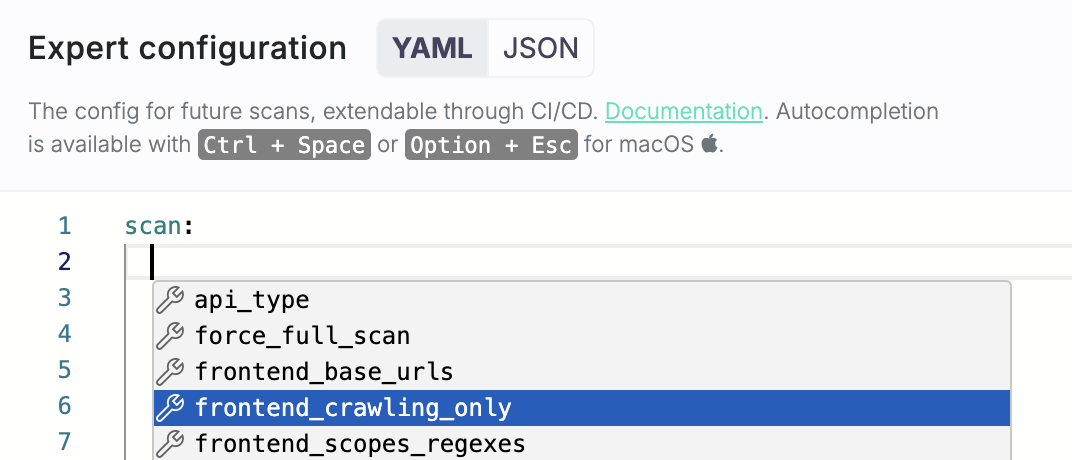
We’ve added a new option to scan APIs associated with the front-end without performing security checks on the front-end itself. If your developers update only the API without touching the front-end, you won’t want to waste time rescanning it. This new feature lets you focus on API vulnerabilities, speeding up the scanning process and avoiding unnecessary checks. To enable this, simply configure the new frontend_crawling_only boolean parameter in your advanced settings.

How to Set It Up

  1. Go to the settings of the relevant app.
  2. Navigate to Scan configuration → Expert.
  3. Under Scan

  4. Either type frontend_crawling_only: true

  5. Or use one of the shortcuts Ctrl + Space (Windows/Linux) or Option + Esc (macOS) and pick frontend_crawling_only from the list.

Screenshot 2025-03-07 at 16.17.33.png

Benefits

  • Focused Scanning: This option helps you focus on scanning APIs without the need to repeatedly check the front-end, making the scanning process more efficient.
  • Improved Efficiency: By skipping the front-end checks, the scan will be faster, allowing you to quickly analyze API behavior without unnecessary extra checks.

#87 · Visualizing Generated API Schema Components

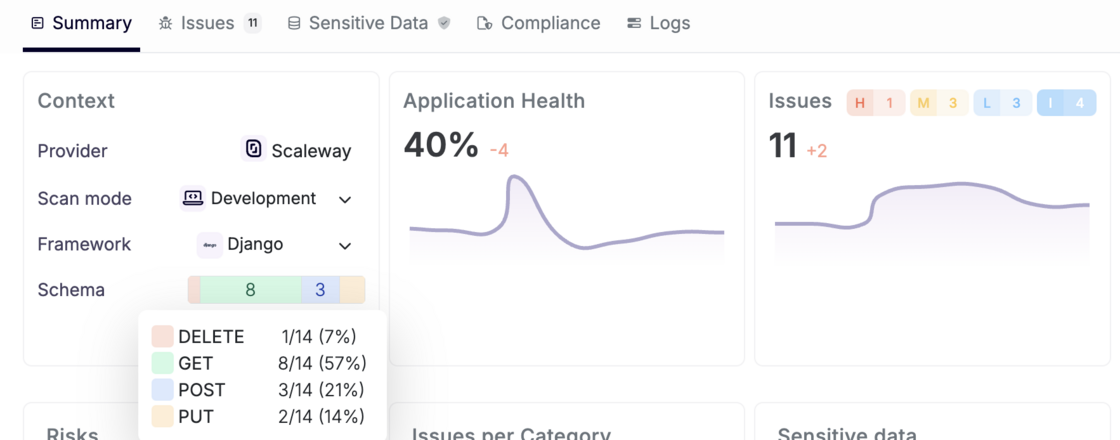
As you know, one of Escape's native capabilities is the ability to generate API schemas for APIs without an associated specification. Escape reconstructs API schemas by parsing the Abstract Syntax Tree (AST) of both frontend and backend source code. Now, we’ve added the ability to visualize the components of the generated schema directly in the Summary tab within the context window for each app.

Screenshot 2025-03-07 at 16.12.17.png

For example, you can now easily see details such as number of GET, POST, PUT, and DELETE methods for REST APIs.

This visualization provides clearer insights into how an API function and whether schema was correctly generated, making it easier for users to spot potential issues and inconsistencies, especially with complex APIs.

For more details on how the generated OpenAPI schema connects to the API service, check out our documentation.

#86 · REST APIs & Front-end Apps: Enhanced Business Logic Vulnerability Detection

We’ve improved Escape’s DAST scanner with better coverage and detection of business logic vulnerabilities.

This improvement focuses on REST APIs or front-end applications. Whether you’re scanning one or the other, our enhanced scanner now provides deeper insights and more accurate detection, helping you to identify and address even more complex vulnerabilities.

#85 · Bi-directional Integration with Wiz

Our bi-directional integration with Wiz is now live!

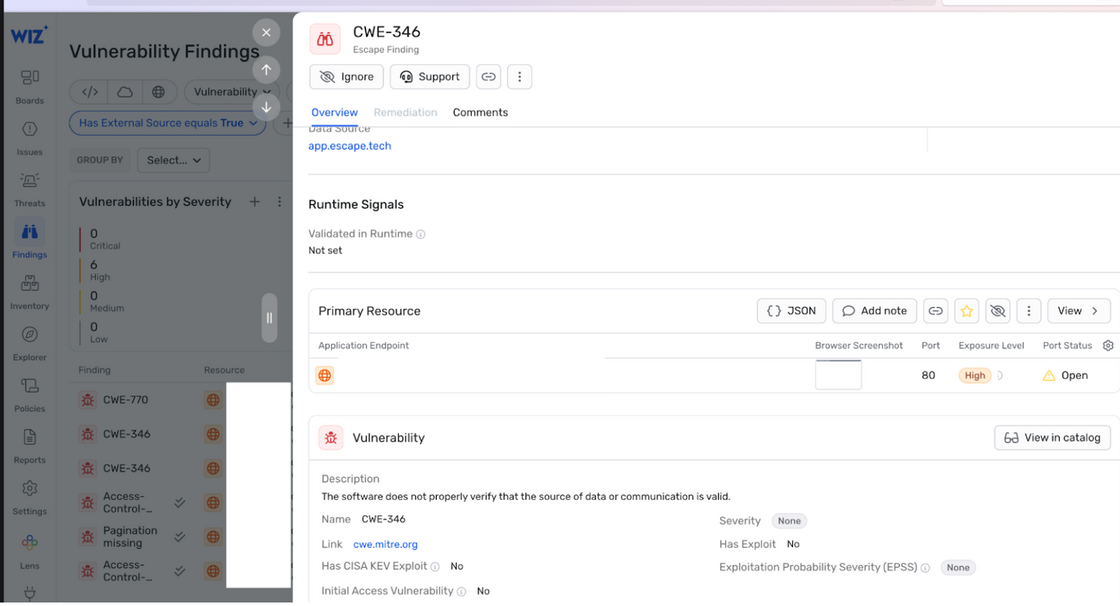
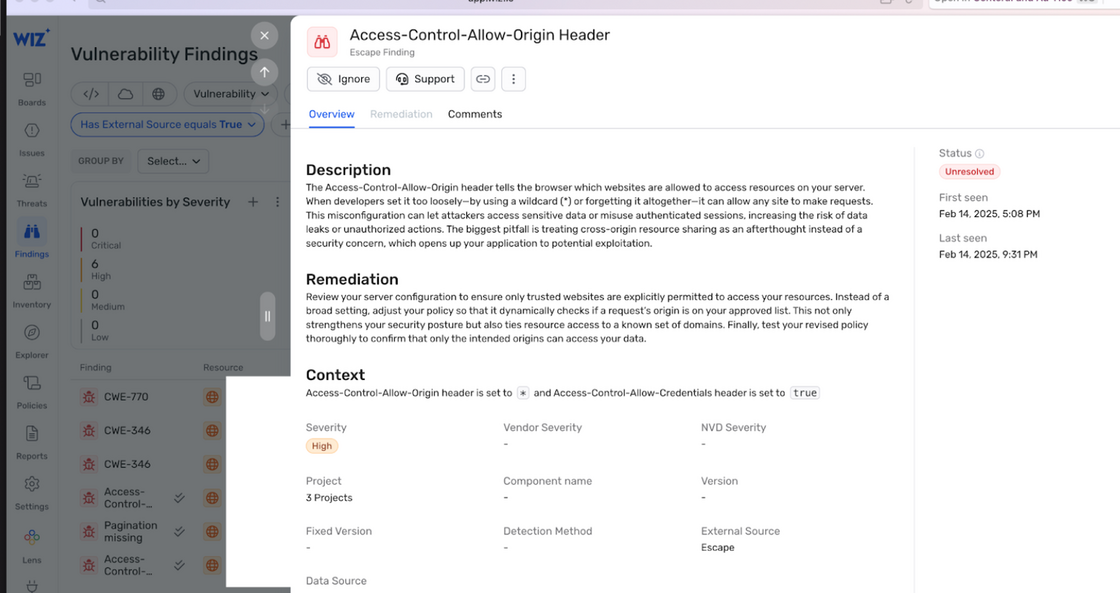
Using previously ingested and enriched Wiz resources, Escape DAST identifies business logic vulnerabilities, API misconfigurations, and sensitive data leaks, then feeds these findings—including CWE classifications and remediations—directly into Wiz.

This integration enriches security teams with valuable context and ownership data, enabling them to prioritize and remediate vulnerabilities more effectively. With this unified solution, organizations can detect risks quickly, gain clear ownership insights, and confidently embed security early in the development lifecycle.

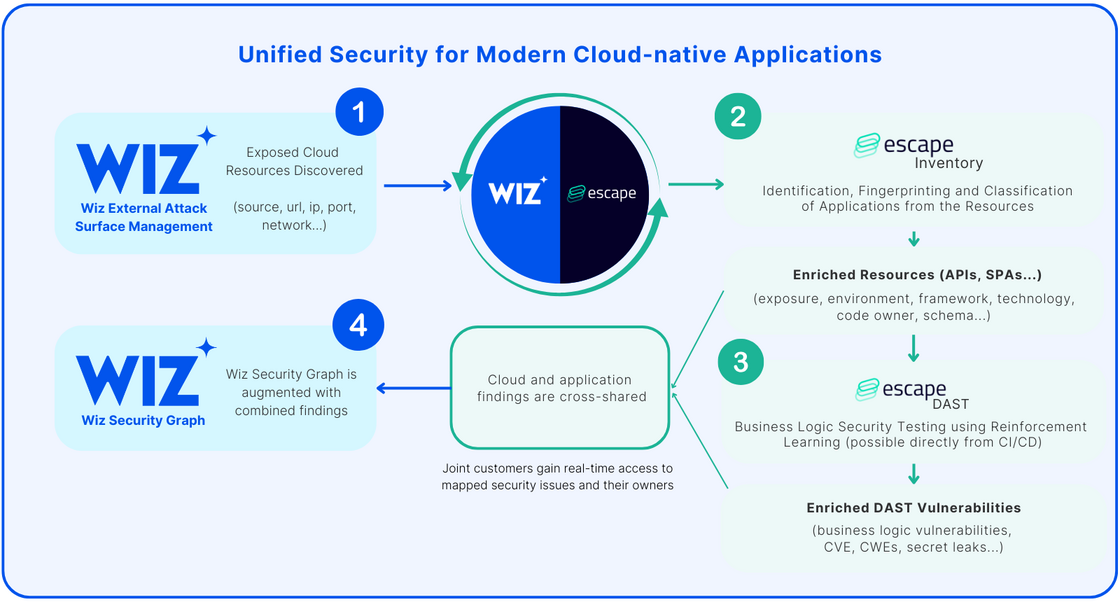
Here's how it works:

image.png

  1. Wiz's Dynamic Scanner finds exposed cloud resources and hands them over to Escape.
  2. Escape Inventory then identifies, fingerprints, and classifies these resources as specific application assets—such as APIs, Single-Page Applications (SPAs), and more.
  3. With this enriched information, Escape DAST runs at scale on the identified applications, including APIs, without needing any network interception or agent installation. If you're a joint Wiz and Escape customer, you can find step-by-step instructions on how to set up Wiz integration in Escape's official documentation
  4. All the vulnerabilities, exposed secrets, findings, and remediations are fed back into the Wiz using DAST & ASM Vulnerability Findings enrichment and Escape's workflows, merging both infrastructure and application-level insights into a single, unified view:

image.png

image.png

Want to benefit from the integration?Learn here how to set it up.