Skip to content

Release Notes

#79 · Playwright Authentication Improved

The Playwright authentication preset is designed for scenarios where traditional authentication methods fall short, leveraging browser automation to handle logins seamlessly.

Instead of manually opening your app’s login window and entering credentials, Escape’s proprietary AI agent detects login fields, fills them in automatically, and logs in for you—enabling fully authenticated DAST scans without extra steps.

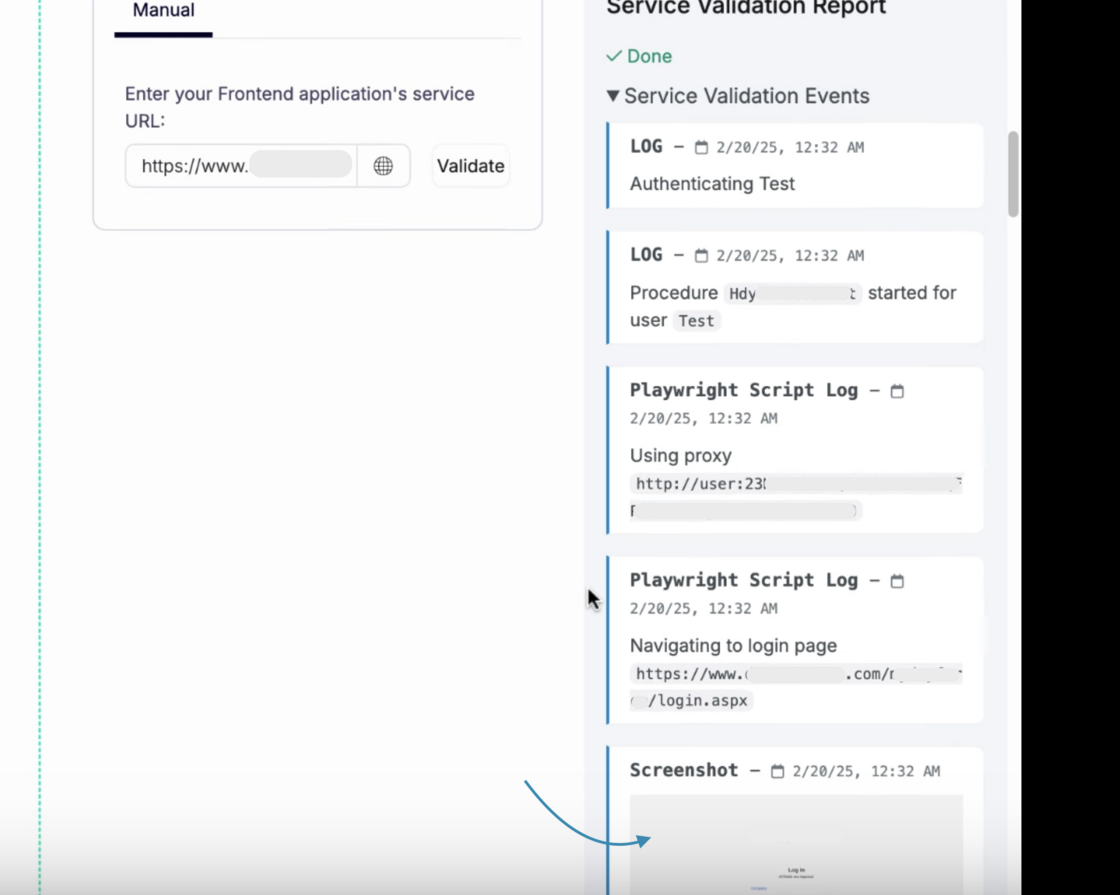
Once the login process is complete, you can now view screenshots at each step, helping you verify success or quickly troubleshoot any issues:

playwright.png

Be certain — with this internal and secure technology, credentials are never sent to any external AI provider, ensuring complete privacy.

This is an exciting step forward in making authenticated DAST scans more seamless and efficient!

Learn more about Playwright authentication here 🚀

#78 · Frontend DAST Improvements

We've made several improvements to Escape's Frontend DAST to enhance its accuracy and reliability. One key update is the addition of an HTML injection check that helps identify vulnerabilities where an attacker can inject malicious HTML code into a web application.

Usually, this can lead to issues like:

  • Content Manipulation – Attackers can modify the page’s content, affecting how it looks and functions.
  • Phishing Attacks – Malicious forms or fake login pages can be injected to steal user credentials.
  • Session Hijacking – Attackers can insert scripts that steal session cookies.

By adding an HTML injection check to Frontend DAST, the scanner can now detect these vulnerabilities before they become a real threat, helping you secure your applications more effectively.

#77 · Jira Integration Fix

We've fixed a bug in our Jira integration that was preventing proper functionality.

As part of this fix, the integration now fully supports API keys, ensuring a more secure and reliable connection. This update improves authentication and overall stability, making your Jira experience smoother than ever.

Don’t wait—connect your Jira account today and start automatically providing developers with the remediation information and code snippets they need, tailored to their framework!

#76 · Remediations Update

We've revamped remediations for all frameworks to deliver clearer, more actionable guidance. This update aims to improve the accuracy and usability of remediation steps, making it easier to identify and resolve issues efficiently.

With more detailed insights and practical recommendations, you can now take faster, more informed actions. We hope this helps you fix critical issues more quickly and build even greater trust with developers!

#75 · More Detailed Information About Frontend Apps in Inventory

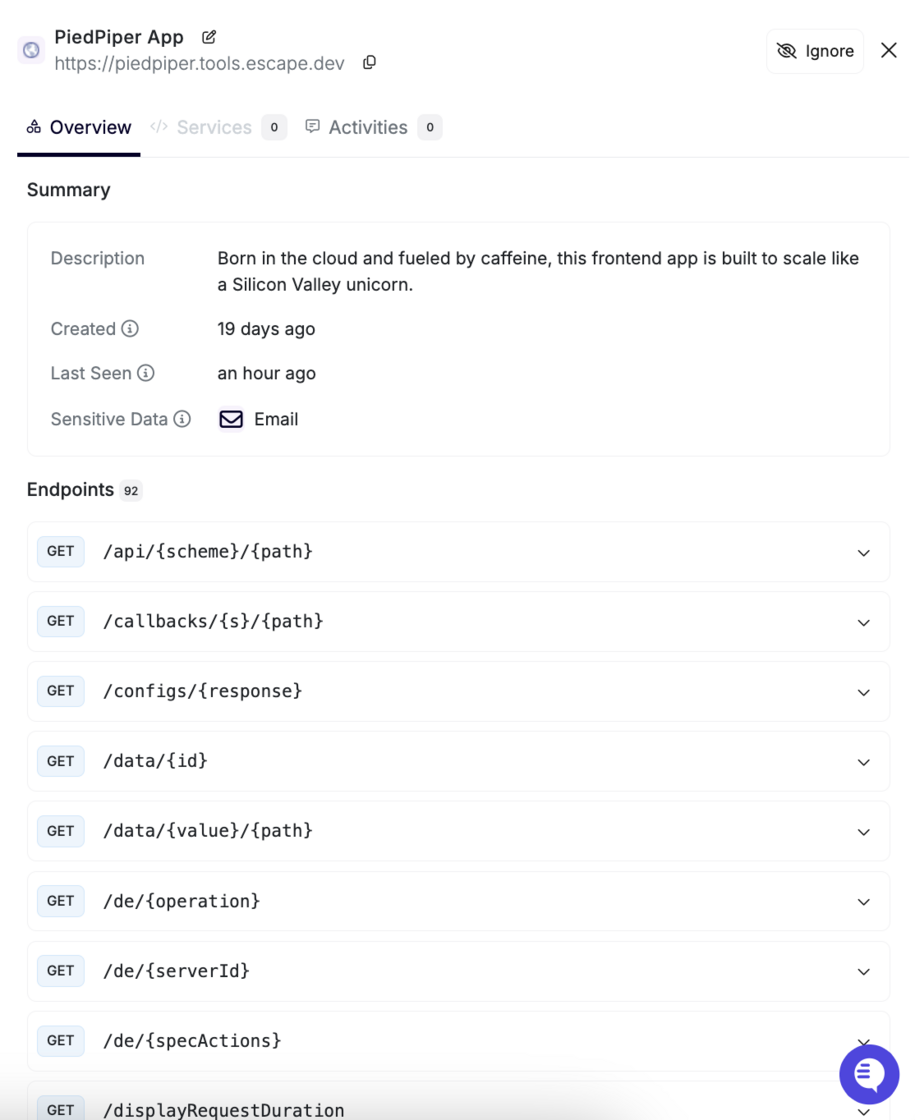
We’ve enhanced the Inventory section to provide more detailed insights about your front-end applications!

Screenshot 2025-02-04 at 11.47.46.png

How to Access

Navigate to:\ Inventory → All Services → Frontends → Click on the app in question

What's New?

Each frontend app now includes a comprehensive information card with the following details:

Description

  • Provides a quick overview of your frontend app.

Key Metadata

  • Created: Displays when the frontend app was added (e.g., 5 months ago).
  • Last Seen: Shows the most recent activity (e.g., an hour ago).

Sensitive Data

  • Highlights potential security risks by identifying exposed sensitive data and its type.

Endpoints Consumed by the Frontend App

  • Displays a list of API endpoints the frontend app interacts with, providing better visibility into dependencies and integrations.

Activity Log & Comments

  • Under the Activities tab, you can now add and view comments related to the app, ensuring better collaboration and tracking.

We hope this update will help you gain better insights into your frontend applications!

#74 · Automatic Private Location Deployment Now Available

We’re excited to introduce automatic Private Location deployment with our new auto-provisioning feature.

What's New?

With this update, you can now automatically provision private locations. You just need to write one line of command, and that's it!

How It Works?

You can deploy the Repeater automatically using an API Key and providing it's name. At the program's start, it will automatically retrieve the location ID from the Escape API or create it if it doesn't exist.

You can find the Helm chart in the Repeater repository:

helm repo add escape https://escape-technologies.github.io/repeater/ helm repo update

Set a unique location name, for example the name of the Kubernetes cluster export ESCAPE_REPEATER_NAME="k8s-$(kubectl config current-context)"

Set your API key from User Profile:

export ESCAPE_API_KEY=...

Then use the following command:

helm install escape-test-helm escape/escape-repeater --set ESCAPE_REPEATER_NAME="${ESCAPE_REPEATER_NAME}" --set ESCAPE_API_KEY="${ESCAPE_API_KEY}"

Why This Matters?

  • Fully automated setup of private locations, reducing manual work.
  • Scalable deployment across multiple clusters with minimal effort.

This update is live now! We hope you enjoy a more streamlined experience.

For detailed setup instructions, check out our documentation.

#73 · Enhanced Inventory Settings

We’ve added new settings to your Inventory Settings page, enabling you to customize two powerful features:

  • Automatic Security Scan Creation: Allow Escape to automatically run security scans for newly discovered applications in your inventory, streamlining your security workflows and notifying you whenever new applications built by your developers or exposed online are detected. With Escape’s ability to build documentation programmatically, this feature operates at scale effortlessly.
  • Automatic Inventory Data Refresh: Gain control over when Escape runs its scans to build your inventory without requiring agents. Enabling this feature ensures you always have access to up-to-date data about your exposed and vulnerable applications.

Screenshot 2025-01-20 at 11.49.28.png

How to Configure

  1. Go to the Inventory Settings page.
  2. Go to Manage Results -> Scan
  3. Adjust the toggles for "Enabling Security Testing at Scale on Inventory Results" and "Automatically Refresh Inventory Results" to fit your needs.

These enhancements give you more flexibility and control over your inventory management processes, empowering you to tailor the platform to your workflow.

#72 · New "Delete" Endpoint for Applications in Public API

We’ve just added a delete endpoint for applications in our public API, making it easier to manage your resources programmatically.

Key Highlights

  • Endpoint: https://public.escape.tech/v1/#tag/applications/DELETE/application/{id}
  • Functionality: Remove applications programmatically for greater control and flexibility.

#71 · Frontend SPAs Now Available in Inventory

We’re excited to introduce Frontend SPAs (Single Page Applications) as part of your Application Inventory. This enhancement allows you to track and manage your SPAs with the same level of detail and efficiency you expect from our platform.

If you have access to the DAST feature, this functionality is already available to you. For users without DAST access, reach out to your account manager to enable this feature.

How to access your Frontend SPAs inventory:

  1. Go to the Inventory section.
  2. Navigate to All Services.
  3. Go to Frontends tab:

Screenshot 2025-01-20 at 10.55.35.png

By providing better visibility into your frontend applications, we aim to enhance your ability to manage, secure, and monitor all your modern applications effectively!

#70 · Faster Page Load Times

A quick heads up: We’ve made significant optimizations to our platform, resulting in faster page load times across the board. Your workflows will now be more seamless, with less time spent waiting and more time focused on what matters most.