Skip to content

Release Notes

#169 · AI Pentesting Deferred Start: Schedule Assessments for the Right Window

Availability: General Availability

You set when an AI Pentesting assessment starts instead of launching the moment you confirm the profile. Pick a future date and time from the create or edit flow, save a validated configuration, and Escape starts the run on your schedule. That fits release windows and off-hours test beds.

What's new:

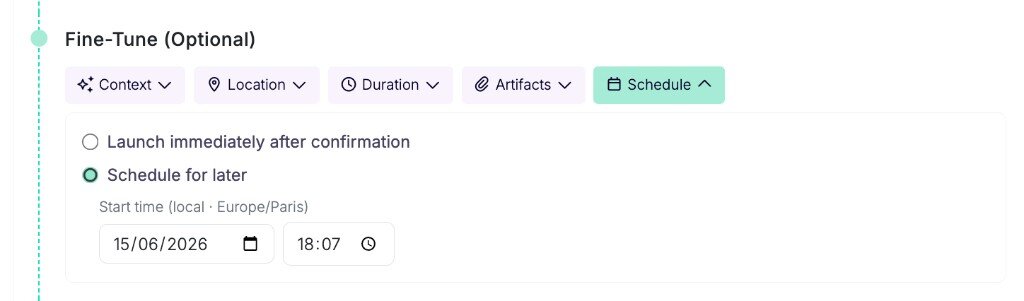
  • Deferred start on create and edit: Choose "Schedule for later" and set date and time in your local timezone, or save a reviewed configuration as draft and queue the run for later. Escape holds the profile until the clock hits.
  • Scheduled profile card: Open a profile with a queued run and you see when the next assessment starts, with a shortcut to edit the schedule.

AI Pentest profile form with Schedule tab open, Schedule for later selected, and date and time pickers visible Set the deferred start from the Schedule tab on profile create or edit.
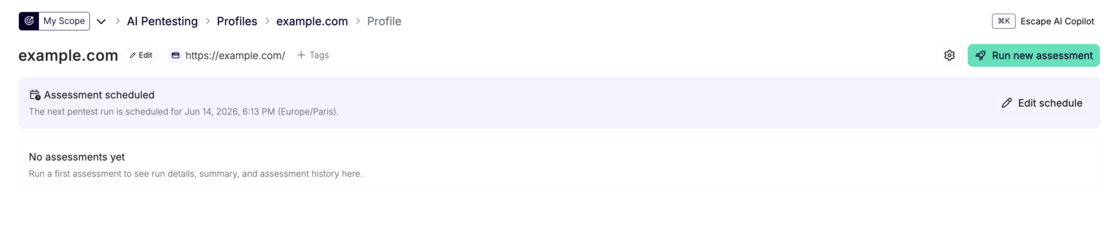
Profile page with Assessment scheduled banner showing the next pentest run date and time The profile shows the queued run and links straight to edit the schedule.
AI Pentesting documentation →

Questions?

Have a question? Reach out on your dedicated support channel, or email us at support@escape.tech.

#168 · Introducing Cascade: Penetration Testing That Becomes an Expert in Your Business

Availability: General Availability

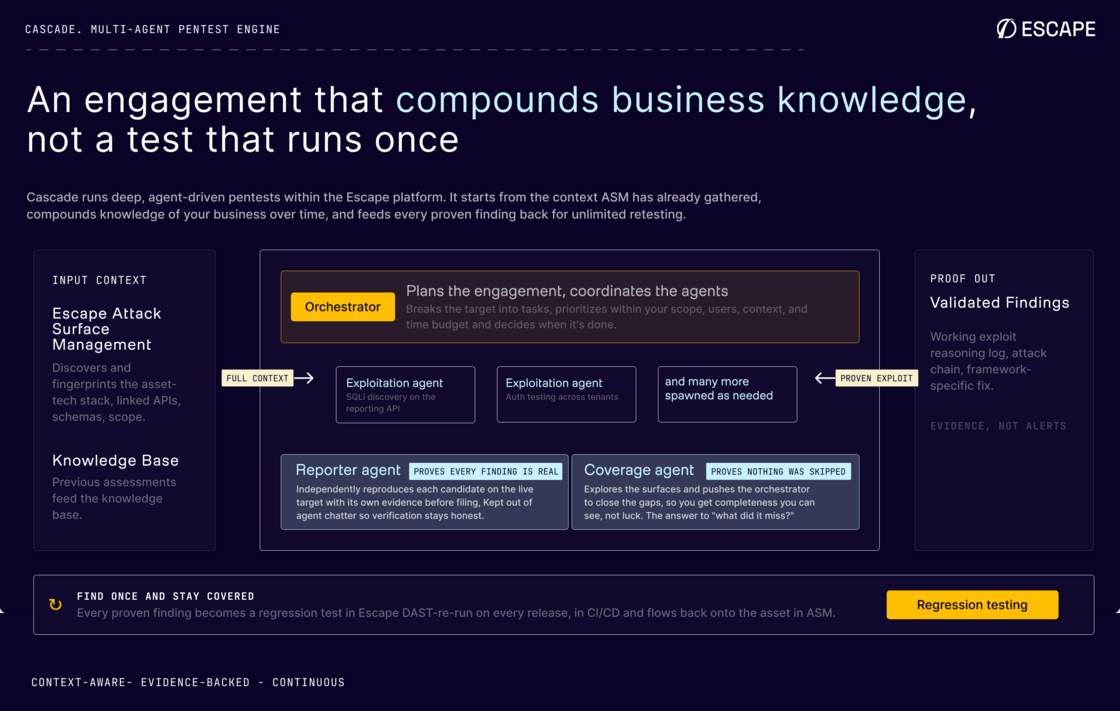
Cascade is Escape's multi-agent AI pentest engine. It starts every engagement with what the platform already knows about your attack surface: APIs, web apps, schemas, tech stack, and scope from ASM and DAST. You're not pointing a stranger at a URL. You're running an assessment that compounds context across releases and gets sharper about how your business actually works.

Cascade multi-agent pentest engine architecture diagram showing ASM context flowing into the orchestrator, exploitation agents, reporter, and coverage agent Cascade starts from ASM context, coordinates a multi-agent swarm, and ships every finding with proof.
What's new:

  • Multi-agent swarm: An orchestrator plans the engagement and spawns focused exploitation agents on demand. A coverage agent closes gaps. A reporter independently reproduces every candidate before it's filed.
  • Proof of exploit: Every finding ships with the attack chain, request sequence, screenshots where relevant, and framework-specific remediation. Unproven candidates don't pollute your queue.
  • Auditable scope: Discovery maps your full configured scope before exploitation. You see exactly which endpoints, pages, and assets were assessed.

AI Pentesting documentation →\ Introducing Cascade on the Escape blog →

Questions?

Have a question? Reach out on your dedicated support channel, or email us at support@escape.tech.

#167 · Jira Integration: Custom Fields, Two-Way Status Sync, and Workflow Ticketing

Availability: General Availability

Run triage where your team already works: map Escape findings into the Jira fields your process depends on, keep ticket and finding status aligned when work closes on either side, and open issues from workflows with the right project, filters, and field values filled in automatically.

What's new:

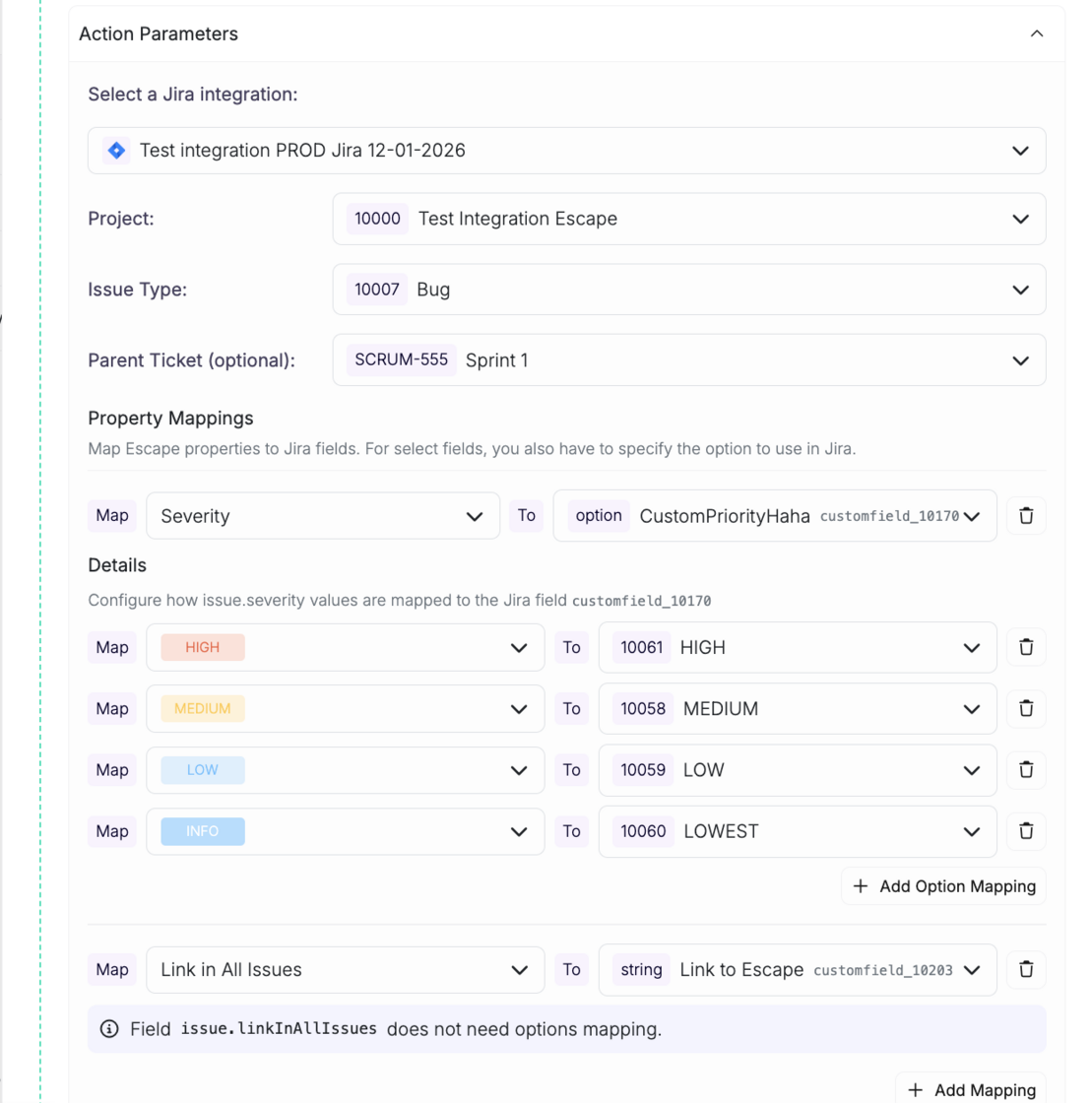
  • Custom field mapping: map any Escape property to any Jira field, including custom fields specific to your schema.
  • Two-way status sync: resolving a finding in Escape closes the Jira ticket, and vice versa. A manual "Close in Jira" action is available from the issue view too.
  • Workflow-based ticketing: create tickets straight from workflows. Filter by severity or saved view, route to the right project, and populate fields automatically.

Workflow builder with custom Jira field mappings including dynamic properties and static values configured

Questions?

Have a question? Reach out on your dedicated support channel, or email us at support@escape.tech.

#166 · Smarter Tables: Saved Views, Grouping, and Column Control

Availability: General Availability

Your tables now remember you. Name a view, pick your columns, set your filters, group by what matters to your team. Come back tomorrow and it's all exactly where you left it. Wire any view into a workflow trigger and your automation runs on the same scope your team sees every day.

What's new:

  • Saved views: name your setup and own it. Filters, columns, grouping, chart selection, and sort order: all saved. Set a default that loads when you open the page. Pre-built views for Web Applications, API Services, Hosts, and more come included.
  • Advanced filtering: build exactly the query you mean: AND, OR, nested groups. Like "(Project A OR Project B) AND Status = Monitored". Charts always reflect the active filter state.
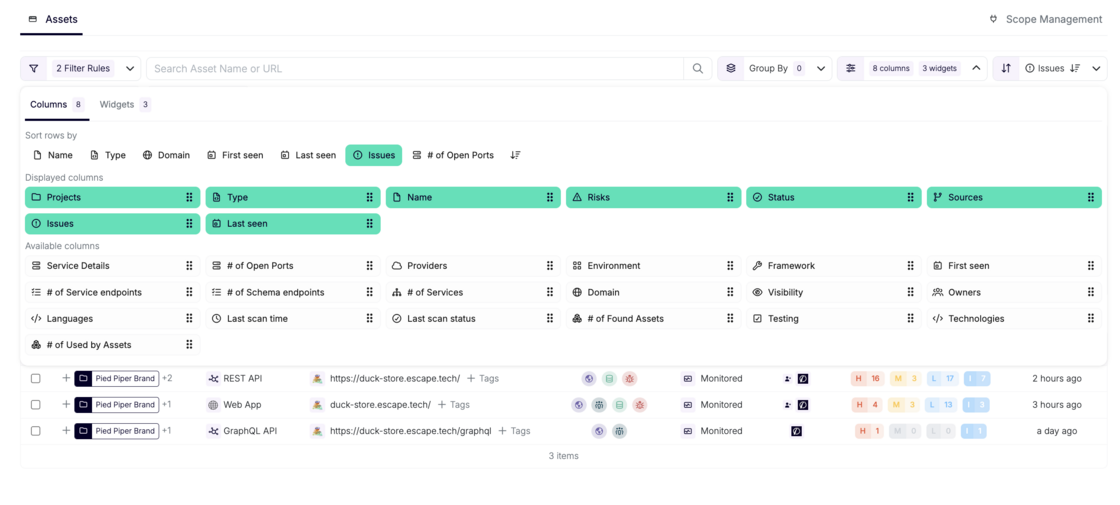
  • Column control: show what's relevant, hide what isn't. Each view has its own column set, so your "Web Applications" and "API Services" views look exactly right for what they are.
  • Grouping: group by project, tag, asset type, or source, with multi-level grouping. Each group shows aggregated counts; expand it to see what's inside.
  • Workflow integration: views wire directly into workflow triggers. Your automation runs on the exact slice of your attack surface your team already works with.

Column configuration panel showing displayed and available columns in the Assets table

Questions?

Have a question? Reach out on your dedicated support channel, or email us at support@escape.tech.

#165 · New Report Template: Executive Summary and Redesigned Issue Layout

Availability: General Availability

Your security report now serves the full room. A new executive summary gives leadership a clear read on your security posture and the actions worth prioritizing. A redesigned issue layout makes findings faster to triage for the engineers doing the work.

What's new:

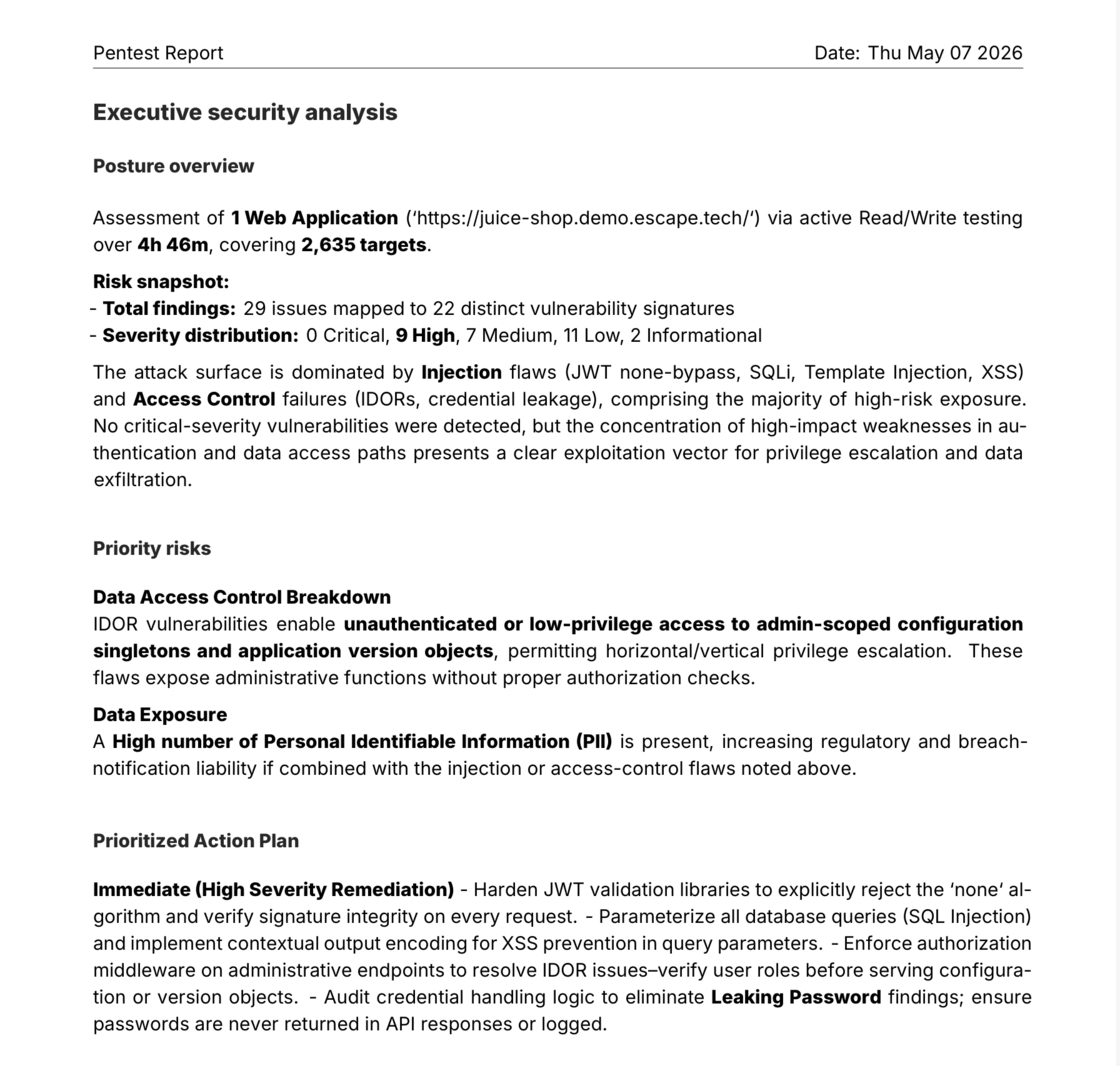
  • Executive summary: a dedicated section that distills your security posture into clear signals: risk level, trend, and the top actions worth taking, sharable to leadership without writing a separate briefing.
  • Redesigned issue layout: findings are structured for triage, with evidence, severity, and remediation steps in a consistent, scannable format so you spend less time parsing and more time fixing.

Report and export documentation →

New report template showing the executive summary and redesigned issue layout

Questions?

Have a question? Reach out on your dedicated support channel, or email us at support@escape.tech.

#164 · Email-Based Authentication: Cover Logins Behind Email OTPs

Availability: General Availability

Many apps send a one-time code or a magic link by email at sign-in. Until now, that single step was enough to keep an authenticated DAST scan stuck at the login page. Escape now provisions managed scan email addresses the scanner reads on its own, so the rest of your application finally becomes testable end-to-end.

What's New

  • Managed scan inboxes: Escape provisions email addresses under @scan.escape.tech tied to your organization, so you don't have to share a real inbox with the scanner.
  • Email OTP support: the scanner waits for the email, extracts the verification code, and types it into the login form without manual help.
  • Magic link support: when the app sends a clickable sign-in link, the scanner follows it the way a real user would.
  • Works with the Agentic Browser: plain-language instructions are enough, and they're even optional. The AI browser detects the email step on its own.

Why It Matters

Email-gated logins are everywhere: SaaS portals, internal admin consoles, and any flow built around passwordless sign-in. Without managed inboxes, AppSec teams either kept these apps out of scope or fell back on test accounts with static codes, leaving real authenticated paths untested. Now that Escape reads the inbox for you, you don't lose coverage every time an app sends a code by email, and authenticated business-logic findings surface where they actually hide: behind the login.

How to Get Started

  • Pick a scan email address: <alias>.<your-org-id-first-segment>@scan.escape.tech. You'll find your organization ID on the Organization general settings page.
  • Reference it as the username in your authentication preset. With the Agentic Browser, plain-language instructions handle the rest. With Browser Actions, use fill_email_totp for codes or click_mail_magic_link for magic links.

Learn More

Questions?

Have a question? Reach out on your dedicated support channel (Slack, Microsoft Teams, or whichever channel we've set up with your team), or email us at support@escape.tech.

#163 · Asset Project IDs in the Escape Public API and CLI

Availability: General Availability. Discover project IDs on every asset response in Escape's public API and CLI: map findings to your portal without extra round trips.

You can already assign assets to projects on writes. Reads stayed silent: asset payloads came back without their project assignments, so anything round-tripping through the API or escape-cli had to call /v3/projects separately to place findings in the right product bucket. Asset payloads now carry projectIds on every read endpoint, and GET /v3/assets accepts a projectIds filter for parity with /v3/scans.

What's New

  • projectIds on every asset payload: returned by GET /v3/assets, GET /v3/assets/:assetId, and every endpoint that embeds an asset (issues, profiles, events, scan issues). Empty array when no project is assigned, never null.
  • projectIds filter on GET /v3/assets: ?projectIds=A,B scopes a list to assets in any of those projects, mirroring the semantics already on /v3/scans.
  • escape-cli assets list --project-id <uuid>: repeatable flag plumbed through to the same filter.
  • PROJECTS count column in escape-cli assets list and escape-cli assets get table output. JSON output is unchanged and now includes the full projectIds array.

Why It Matters

Customer AppSec teams plugging Escape into their internal product portals told us they were running extra /v3/projects lookups just to figure out which product each issue belonged to. That's a small tax that adds up across thousands of findings. Round-tripping is now lossless: write projectIds on an asset, read them straight back. Pipelines consuming issues, profiles, or events get the project context on the first response, so you can route findings into the right bucket without a second hop.

How to Get Started

  • API: read projectIds from any asset response. Filter lists with GET /v3/assets?projectIds=<uuid>,<uuid>.
  • CLI: escape-cli assets list --project-id <uuid> -o json scopes the list. escape-cli assets get <id> -o json includes projectIds on every detail payload.
  • SDKs: regenerate from services/public-api/v3.openapi.json to pick up the new field and query parameter.

Compatibility

Hard-Breaking Changes

None.

Soft-Breaking Changes

  • Public API and CLI assets list and assets get table columns: a new PROJECTS count column sits between OWNERS and NAME. Scripts that parse the human-readable table by tab-column index need to shift their NAME index by one. JSON output (-o json) is unchanged and is the recommended target for automation.

Non-Breaking Changes

  • projectIds: string[] on AssetSummarized and AssetDetailed: present on every asset returned by the public API, including embedded assets in issues, profiles, events, and scan issues. SDKs that ignore unknown response keys keep working unchanged.
  • projectIds query parameter on GET /v3/assets: optional, comma-separated, OR semantics. Existing callers that don't pass it see no change.
  • --project-id flag on escape-cli assets list: new optional flag, repeatable. Existing invocations are unaffected.

Questions?

Have a question? Reach out on your dedicated support channel (Slack, Microsoft Teams, or whichever channel we've set up with your team), or email us at support@escape.tech.

TLDR: General Availability: Discover how AI agents can now list DAST schemas with signed URLs and jump from any issue to its latest events in one Public API call.

AI agents that drive DAST through Escape's Public API used to lose two hops on the most basic questions: "where's the schema for this profile?" and "what events produced this issue?". Starting today, the profile detail carries the schema's signed URL alongside its metadata, and the issue detail links straight to the latest events from the scan that surfaced it. The CLI ships matching one-command wrappers so an agent can go from profile to schema, or from issue to full request-response evidence, in a single call.

What's New

  • Schemas on the profile detail: GET /v3/profiles/:profileId now returns signedUrl and isActive on every extraAssets[] entry. No more re-fetching each asset just to get a download link.
  • Issue to events link on the issue detail: GET /v3/issues/:issueId now returns latestEventIds (up to five, newest-first, from the issue's last-seen scan) and latestEventsTruncated so agents know when to paginate.
  • One CLI command per intent:
    • escape-cli profiles get-schema <profile-id> prints the active schema's metadata; add -f <file> to download the bytes via the signed URL in the same call.
    • escape-cli profiles upload-schema <profile-id> --file <path> uploads, creates the schema asset, and attaches it to the profile in one shot.
    • escape-cli issues get-with-events <issue-id> hydrates every latest event, including the full request-response Exchange, in a single MCP tool call.

Why It Matters

Customers who drive Escape at scale do it programmatically, and the feedback we hear most often on customer calls is consistent: agents and CI pipelines want handy commands that wrap multiple steps, not granular flows that mirror the database. Getting a schema used to take two round trips per asset. Attaching a freshly uploaded schema to a profile used to take three different surfaces, one of them undocumented. Navigating from an issue to the events that produced it used to require knowing the event IDs up front.

That's fixed. An agent can now go from a profile id to a downloadable schema in one call, and from an issue id to the actual request-response evidence in one MCP tool call. Triage gets shorter. CI jobs get simpler. MCP-powered tools get to answer real questions instead of stitching together two or three lookups.

The changes land on the detail endpoints only. List endpoints stay unchanged, so there's no fan-out on GET /v3/profiles or GET /v3/issues, no per-profile signed-URL minting on list calls, and no surprise cost or exposure bump for callers that page through collections.

How to Get Started

No flag, no toggle, no configuration: both changes are on for every organization.

  • Public API: fetch a profile with GET /v3/profiles/:profileId and read the new signedUrl and isActive fields on each extraAssets[] entry (signedUrl is non-null only for class === 'SCHEMA'). Fetch an issue with GET /v3/issues/:issueId and read latestEventIds and latestEventsTruncated; hydrate each event with GET /v3/events/:id to get the Exchange.
  • CLI: upgrade to the latest escape-cli. The new commands are profiles get-schema, profiles upload-schema, and issues get-with-events. The existing escape-cli issues get table also gains a LATEST EVENTS column.
  • MCP: the Escape MCP server picks up issues_get_with_events automatically, so agents get the one-call hydration path without any configuration.

Compatibility

Scoped to the Public API wire contract and OpenAPI spec.

Hard-breaking changes

None.

Soft-breaking changes

Wire payloads and HTTP status codes are unchanged. Regenerated SDKs and strongly-typed consumers will see new optional fields.

  • GET /v3/profiles/:profileId response: ProfileExtraAsset now includes two additive fields, signedUrl (nullable string, non-null only for class === 'SCHEMA') and isActive (boolean). Regenerated SDKs expose new accessors. Existing hand-written parsers keep working; the fields are additive.
  • GET /v3/issues/:issueId response: IssueDetailed gains two optional fields, latestEventIds (array of opaque string IDs, GraphQL ID scalars, not guaranteed UUIDs, maximum five, newest-first) and latestEventsTruncated (boolean). Because IssueDetailed is reused inside EventDetailed.issues[], strongly-typed SDK consumers of GET /v3/events/:id will see the typed surface widen. The wire payload of GET /v3/events/:id stays byte-identical: the route never sets these fields.

Non-breaking changes

  • List endpoints untouched: GET /v3/profiles and GET /v3/issues return the same payloads as before. The enrichment is deliberately scoped to the single-resource detail endpoints to avoid fan-out.
  • No new routes, no authentication changes, no status-code changes, no new top-level resource group. Schemas remain modeled as assets.

What's Next?

Regular improvements to the Public API and the CLI, guided by what we hear on customer calls.

Learn More

Questions?

Have a question? Reach out on your dedicated support channel (Slack, Microsoft Teams, or whichever channel we've set up with your team), or email us at support@escape.tech.

#161 · Public API: Clearer Error Types in Generated SDKs

Availability: General Availability

Error responses across the Escape Public API (v3) now carry explicit, semantic schema names. Every endpoint returns the same JSON payloads it always did, so direct HTTP integrations need no changes. If you regenerate an SDK from the updated OpenAPI spec, you'll see a handful of error-type renames that make decoded errors easier to read and reuse.

What's New

  • Named error schemas: the 400, 404, 409, and 500 responses now expose BadRequest, PaginationError, NotFound, Conflict, and InternalServerError as semantic schema names in the spec.
  • Consistent types across endpoints: regenerated SDKs use one semantic type per error shape, so you can share error-handling code across every endpoint that returns the same error.
  • Spec matches reality on GET /scans/{scanId}/targets: the declared 400 schema is now a single PaginationError, matching what the server actually returns.

Why It Matters

Until today, SDKs generated from our spec produced awkward error types like ListProfiles400Response or UpdateProfile400Response, one per operation, even when the payload was identical. Writing shared error-handling meant juggling a dozen near-duplicate types. With semantic names, one handler can cover every list endpoint's pagination error, another can cover every validation error, and so on. AppSec tooling that wraps the SDK ends up with cleaner imports, fewer surprises during audits, and fewer places to update when a new endpoint shows up.

How to Get Started

  • Call the API directly with JSON: nothing to do. Payloads are byte-for-byte identical.
  • Use an SDK and don't regenerate: nothing to do.
  • Use an SDK and regenerate from the new spec: update imports to the new type names. See the Compatibility section below for the exact renames.

Compatibility

Hard-breaking changes

None.

Soft-breaking changes

Wire payloads and HTTP status codes are unchanged. Regenerated SDKs and strongly-typed consumers will see type names and shapes change.

  • SDK error-type renames: identical inline error schemas used to produce one Go, TypeScript, or Python type per operation, with names derived from the alphabetically-first operation that referenced them. They now collapse into one semantic type per error shape. Typical renames you'll see after regeneration:

    Before (example) After
    ListProfiles400Response PaginationError
    UpdateProfile400Response BadRequest
    GetProfile404Response NotFound
    IgnoreScan409Response Conflict
    CreateAssetComment500Response InternalServerError

    Update imports and type references to the new names. Payload fields are unchanged.

  • GET /scans/{scanId}/targets 400 schema narrowed: the declared 400 used to be a union of BadRequest and PaginationError. The server has only ever returned the pagination variant on this endpoint, so the spec now declares a single PaginationError. Regenerated SDKs drop the union wrapper. Hand-written error handlers only need to match on "Invalid cursor" for this endpoint. Runtime responses don't change.

Non-breaking changes

  • Named schemas in the OpenAPI spec: every 400, 404, 409, and 500 response now carries an explicit title and description for BadRequest, PaginationError, NotFound, Conflict, and InternalServerError. Payload shapes for reference:

    HTTP Schema Shape
    400 BadRequest { "message": "Bad Request", "details": string }
    400 PaginationError { "message": "Invalid cursor", "details": string }
    404 NotFound { "message": "Not found" }
    409 Conflict { "message": "Conflict on the following field", "field": string, "instanceId": uuid }
    500 InternalServerError { "message": "Internal Server Error", "details": string }
  • No changes to operations, paths, methods, parameters, request bodies, success responses, or authentication.

What's Next

We keep improving the Public API, and there's more on the way.

Learn More

Questions?

Have a question? Reach out on your dedicated support channel (Slack, Microsoft Teams, or whichever channel we've set up with your team), or email us at support@escape.tech.

#160 · LLM Security Testing in DAST: Find AI Vulnerabilities in the Scan You Already Run

Availability: Beta General Availability planned for end of April 2026.

Modern apps ship chatbots, AI agents, RAG endpoints, and copilot features faster than security teams can audit them. Each one is a new attack surface: prompt injection, system prompt leakage, tool exposure, SSRF through model-driven HTTP calls. A traditional DAST scan can't see any of it. LLM Security Testing closes that gap, with automatic discovery and deterministic OWASP LLM Top 10 checks that run inside your existing WebApp, REST API, and GraphQL DAST scans.

What's New

  • Automatic LLM endpoint discovery: Escape fingerprints LLM traffic from network signals (SSE streaming, OpenAI / Anthropic / Gemini response shapes, token-usage fields), JavaScript source (openai, @anthropic-ai/sdk, langchain, Vercel AI SDK), and GraphQL operation patterns. No allow-listing, no manual configuration.
  • Six active OWASP LLM Top 10 checks: prompt injection (LLM01), insecure output handling (LLM02), system prompt leakage (LLM01 + LLM06), LLM command injection (LLM07), LLM-enabled SSRF (LLM07), and tool / function-calling exposure (LLM08).
  • Always-on AI inventory: an ISSUE_LLM_DETECTED finding maps every AI endpoint we see, with model, provider, framework, auth posture, and tool exposure. You know where AI lives in your stack before any active probe runs.
  • Deterministic verification, not an LLM judge: every finding is confirmed by a canary substring, an out-of-band callback, a cloud-metadata marker, or a JSON-schema match. Reproducible, auditable results with no model-driven false positives.
  • Runs in the scan you already have: zero new scan profile, zero new infrastructure. Reuses your authenticated session (cookies, bearer tokens, CSRF nonces, persisted GraphQL queries).

Why It Matters

"We've got a lot of AI stuff going on, chatbots, AI agents, will that be tested?" is how AppSec leads have been describing their world on our calls. Until now, the honest answer inside a DAST scan was no: prompt injection, system-prompt leakage, and tool exposure don't fall out of standard test catalogues, and AI-judge verification swaps one triage headache for another (non-deterministic AI-vs-AI verdicts). LLM Security Testing gives you a deterministic floor: high-confidence OWASP LLM Top 10 detections, one finding per confirmed issue, with the raw HTTP request and response shipped as audit evidence.

How to Get Started

LLM Security Testing is opt-in during the Beta. Reach out through your support channel, the contact form, or support@escape.tech and we'll help you enable it on your scan profile. The knob lives under experimental.llm_security_testing:

experimental:
  llm_security_testing: true

On your next scan, every confirmed OWASP LLM Top 10 issue lands in your results with full evidence: prompt sent, response excerpt, matched canary or out-of-band callback, remediation guidance. LLM-enabled SSRF and command injection are confirmed through ssrf.tools.escape.tech, the same out-of-band collector that powers Escape's existing SSRF checks, with per-scan and per-probe identifiers so callbacks are never ambiguous.

By design, no synthetic traffic. Endpoints discovered only via static JavaScript analysis (never exercised by the crawler or recorded in a BLST exchange) get the inventory finding, but the six active checks don't run against them. You only ever see probes against endpoints your application actually serves.

With the knob off, the module adds zero overhead to your normal scan time. Existing DAST scans are unaffected until you opt in.

Compatibility

Non-breaking changes

  • New issue types in scan results: ISSUE_LLM_DETECTED, prompt injection (LLM01), insecure output handling (LLM02), system prompt leakage (LLM01 + LLM06), LLM command injection (LLM07), LLM-enabled SSRF (LLM07), and tool / function-calling exposure (LLM08). Existing schemas and fields are unchanged; integrations with open-enum issue-type matching pick them up automatically.

What's Next

The deterministic module catches what's broken. The other half of AI security is adversarial depth: multi-turn jailbreaks, escalating from a leaked tool schema into a real RCE, pivoting through agent memory, and proving full business-impact exploitation on the most stubborn targets. That's coming to AI Pentesting as the LLM Security Testing Agent, an autonomous, goal-driven adversary that picks up where the deterministic checks leave off, generates new payloads on the fly, and targets RAG pipelines, function-calling chains, MCP servers, and multi-agent orchestrations end-to-end. Want early access? Talk to our team.

Learn More

Questions?

Have a question? Reach out on your dedicated support channel (Slack, Microsoft Teams, or whichever channel we've set up with your team), or email us at support@escape.tech.