Skip to content

Release Notes

#179 · First and last login now shown for every member

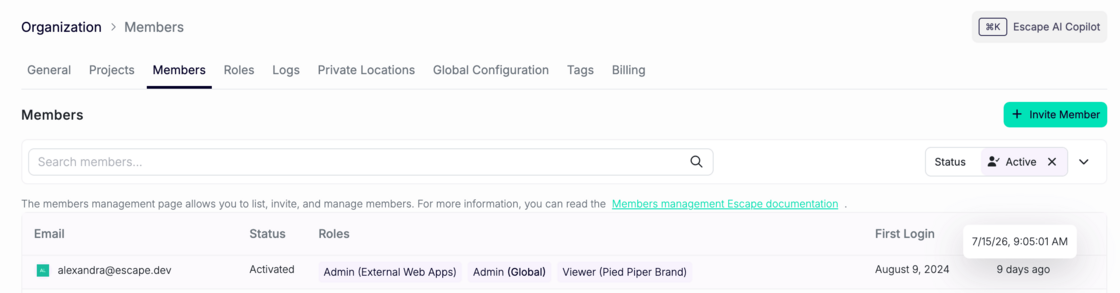
The org members page now shows a first login and last login column for every member. Screenshot 2026-07-24 at 11.55.05.png

Together they answer the three questions admins actually ask: when did this person activate, are they using the platform consistently, and are they still around?

First login shows an absolute date, like "Jan 12, 2025." Last login shows relative time, like "3 days ago."

At a glance, you can find members who were invited but never logged in, spot accounts that have gone quiet, and check seat usage before a renewal conversation.

Status labels are also simpler now: invited, activated, deactivated.

#178 · AI Pentest profiles now ship with default scope restrictions

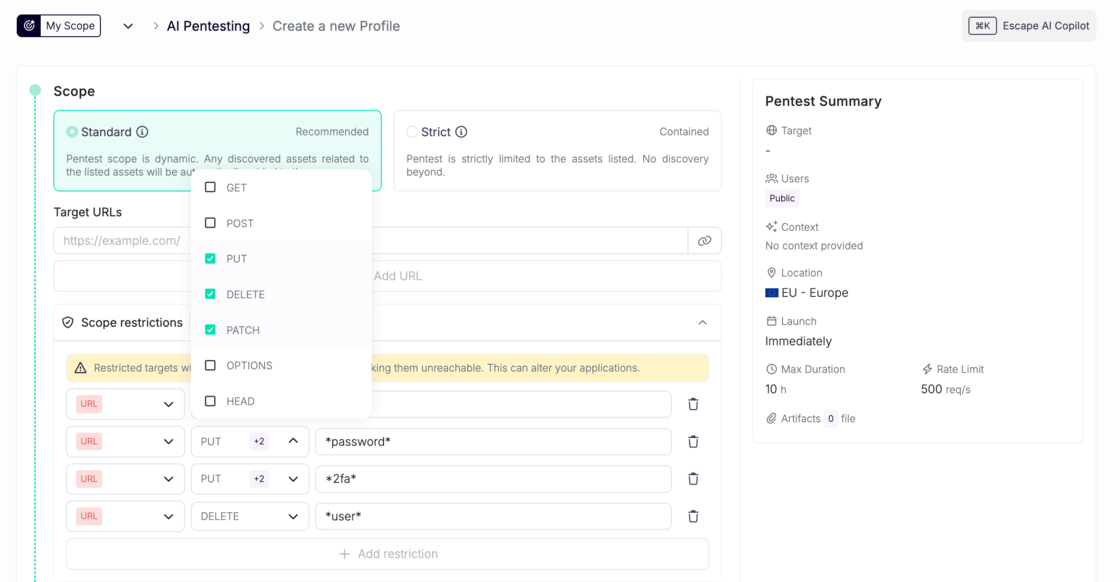
Escape's AI Pentesting runs a multi-agent harness that explores your app the way an attacker would. Scope restrictions are how you tell it where not to go. Until now, that list started empty on every new profile, which meant configuring it before the first run, or letting an autonomous agent loose on your app with no guardrails at all.

Now it comes pre-filled.

What's new

scope-ai-pentesting.png

Every new AI Pentest profile now starts with a curated blocklist of URL patterns, covering destructive and sensitive routes like delete, admin, and auth endpoints. It's the same default blocklist behavior DAST profiles have had, now applied to AI Pentesting.

Why it matters

  • A sensible baseline with no configuration. Create a profile, run it, and the obvious foot-guns are already out of scope.
  • Lower risk of accidental damage during a run. Autonomous agents are good at finding paths you didn't think to exclude, which is the point of them and also the problem.

And of course, you can add, remove, or replace patterns as you learn your own app's shape.

Applies to all newly created AI Pentest profiles. Existing profiles are unchanged.

#177 · Critical Severity: Focus on Your Most Urgent Findings First

Availability: General Availability

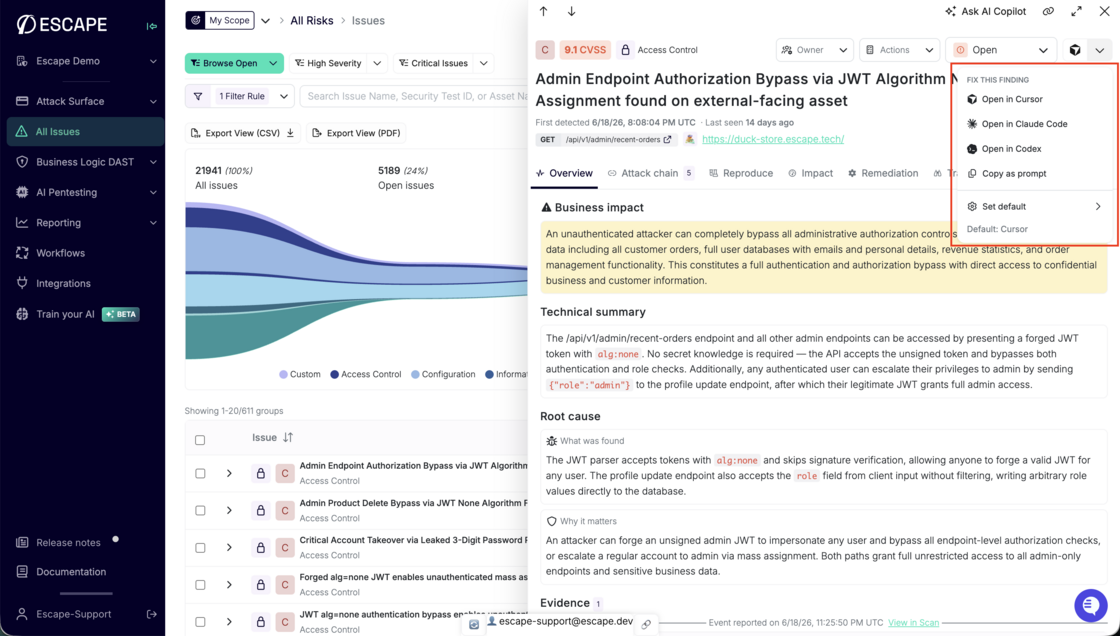
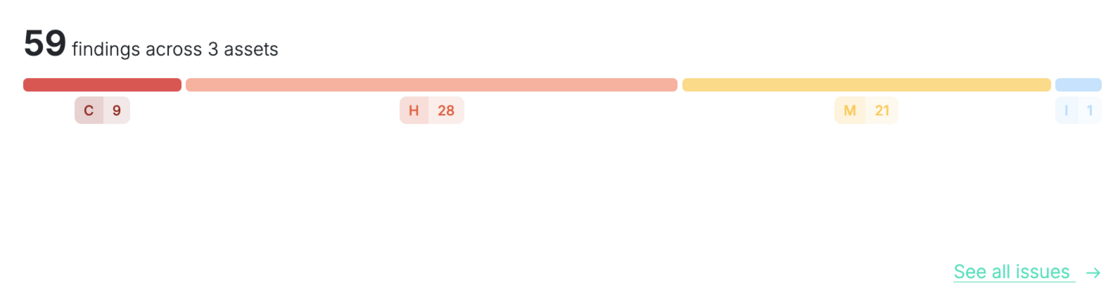
Your findings now carry a Critical rating, the tier above High. Escape derives Critical from the CVSS score, so your severities line up with the frameworks your remediation cycles already run on. Security teams told us a missing Critical tier kept Escape findings out of their global vulnerability reporting, so this closes that gap and lets you surface what needs attention first.

image.png

What's new:

  • Critical tier: A new top severity above High. The findings that matter most stand out at a glance.
  • CVSS-aligned: Critical is derived from the CVSS score, matching the standard the rest of your stack already uses.
  • High-confidence coverage: Critical appears on AI pentest findings and technology CVEs, where Escape validates before rating a finding Critical.
  • Drives your workflows: Filter, alert, and route Critical findings into Slack, Jira, and your other integrations.

What's next: Critical severity for DAST findings is coming next.

Questions?

Have a question? Reach out on your dedicated support channel, or email us at support@escape.tech.

#176 · Upload any artifact to an AI Pentest

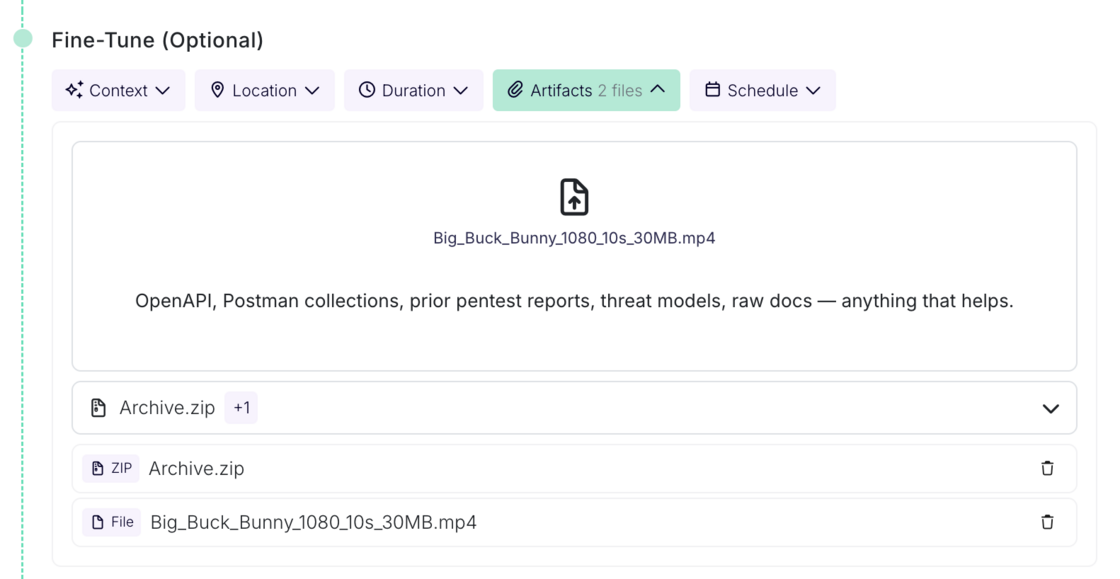
The artifacts step now accepts any file type. OpenAPI specs, Postman collections, prior pentest reports, threat models, archives, images, whatever context you have. No format restrictions to work around before a run.

artifacts.png

Uploaded artifacts are also picked up during review configuration, so the context you provide informs setup, not just the run itself.

#175 · AWS Integration IAM Roles: Connect Accounts Without Long-Lived Access Keys

Availability: General Availability

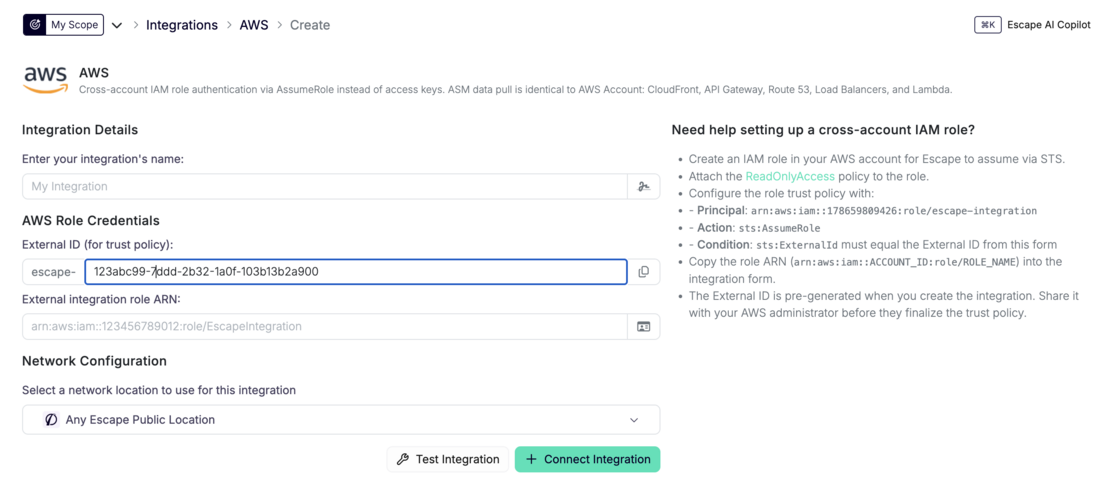
Escape connects to your AWS accounts through IAM role assumption and an External ID. You grant access with a role trust policy instead of storing long-lived access keys, the same short-lived credential pattern you use for other enterprise SaaS integrations at scale. Add the new AWS integration type from the integrations page; the legacy access-key path stays available.

AWS integration setup form with External ID and role ARN fields

What's new:

  • AWS integration type: Add an integration that authenticates through STS AssumeRole with an External ID instead of static credentials.
  • No long-lived keys: Grant access through a role trust policy instead of static credentials stored in Escape.
  • Legacy path preserved: The existing AWS_ACCOUNT integration (access keys) remains for backward compatibility and is marked as legacy in the UI.

AWS integration documentation →

Questions?

Have a question? Reach out on your dedicated support channel, or email us at support@escape.tech.

Getting past custom authentication is where most automated testing stops short. Sometimes a hardcoded value is the only way through. Now it's one line of text.

You can now hand the Escape's AI Pentesting agent a session directly. Paste your cookie, headers, or local storage values into the authentication instructions as plain text, and the agent starts the run already authenticated.

What's new

In the user authentication instructions, write your session details as plain text. For example:

Use the session cookie session=abc123 for https://app.customer.com. It's already valid, no need to log in.

cookie.png

Escape extracts the cookie, along with any request headers or local storage values you include, and injects them into the agent's browser before the run starts. The agent lands already authenticated.

This works per user, so each role you configure in the scan setup flow can carry its own session. Available in both AI Pentesting and pentest target validation, so behavior is consistent across the product. Describing a login flow still works and stays the default.

Why it matters

  • Works for the hard cases: SSO, MFA, custom tracing header. Sometimes a hardcoded value is required to bypass things.
  • No setup overhead. It's the existing instructions field, in plain text. No new form, no config, no onboarding change.

Security & safety

This handles live credentials, so we were deliberate:

  • Extracted secrets are not sent to asset or reporting events. Session values don't appear in logs or reports.
  • A dedicated extractor model parses only what you explicitly write. It never invents credentials.

#173 · ASM Technology Detection: Map Every Asset to Known CVEs

Availability: General Availability

Escape ASM fingerprints the software on each asset: packages, frameworks, and infrastructure components, with versions when the stack exposes them. You get a live technology inventory across web apps, APIs, and connected repositories, matched to known CVEs so you trace a vulnerable dependency to every asset that runs it. Issues tab on a versioned npm package listing matched CVE and GHSA findings Known CVEs matched to a detected package version.

What's new:

  • Multi-source fingerprinting: HTTP response analysis, source maps, stack traces, protocol-level signals, and repository manifest parsing identify packages and deployed software without installing agents on your infrastructure.
  • Packages and software: libraries from npm, PyPI, and other ecosystems sit alongside web servers, CMS platforms, and reverse proxies, each linked back to the parent asset.
  • Version-aware CVE matching: versioned technologies match against affected ranges at high confidence; versionless detections still map through standard product identifiers at adjusted confidence.
  • Actionable findings: matches become Vulnerable Dependency Detected issues with severity, affected versions, fix version when available, and advisory links.

Technology Detection documentation →

CVE Scanning documentation →

Questions?

Have a question? Reach out on your dedicated support channel, or email us at support@escape.tech.

#172 · ASM Port Scanning: Map Every Open Service on Your Attack Surface

Availability: General Availability

Every ASM host scan probes over 1,400 commonly observed TCP ports and feeds what it finds straight into your inventory. You see open ports on each host, the services behind them, and security issues before you dig into API endpoint mapping. Teams closing shadow IT gaps told us they need internet-facing port exposure visible up front, not buried behind extra clicks.

Host overview panel showing open ports including 443, 80, 22, 3307, and 5000 with detected protocols in Host Network Insights Open ports and detected protocols on a monitored DNS host.

What's new:

  • Broad TCP coverage: when ASM scans a DNS, IPv4, or IPv6 host, Escape probes the default port set across web services, databases, remote access, message brokers, and more. Set port_scanning.ports in Global Configuration to replace that default list:
port_scanning:
  ports:
    - 80
    - 443
    - 8080
    - 8443
  • Service fingerprinting: confirmed open ports get protocol and technology fingerprinting, then land on the host asset before downstream discovery runs.
  • Discovery pipeline: open ports feed service discovery that maps REST, GraphQL, gRPC, SOAP, web apps, and OpenAPI candidates.
  • Insecure protocol detection: cleartext services like FTP and Telnet raise insecure_technology_used findings with remediation guidance.
  • Default credential checks: active probes against detected services (FTP, Telnet, MongoDB, Redis, and others) raise default_credentials_used when authentication succeeds.
  • Exposure guardrails: the unusually_high_open_ports check flags hosts that expose more open ports than your threshold through a public Escape proxy (default: 5).

Network Scanning documentation →

Questions?

Have a question? Reach out on your dedicated support channel, or email us at support@escape.tech.

#171 · ASM Login and CAPTCHA Detection: See Auth Friction on Every Web App

Availability: General Availability

Every ASM web app scan now fingerprints the login surface before you touch scan profiles. You get the login requirement, login page URL, registration path, SSO providers, auth protocol, auth technology, and CAPTCHA provider on each asset. AppSec teams told us they need this context upfront: which apps gate sign-in with MFA or CAPTCHA, and where SSO redirects land, before they configure authenticated DAST or plan allowlists.

What's new:

  • Login page discovery: an agent browses each web app and records whether login is mandatory, optional, or absent, plus the login page URL and detected SSO providers. Asset overview panel showing mandatory login form with login page URL and detected SSO providers GitHub and Google

  • Auth fingerprinting: HTTP probing and redirect analysis classify auth protocol and technology (OAuth, OIDC, Auth0, Cognito, and similar) on web apps, REST APIs, and GraphQL APIs.

  • CAPTCHA provider detection: dual fingerprinting via HTTP technology signatures and browser rendering flags reCAPTCHA, hCaptcha, Cloudflare Turnstile, and other providers on each frontend.

    Asset overview panel showing reCAPTCHA listed as the captcha provider in Host Network Insights

  • Filters: filter web apps by CAPTCHA provider and review login and auth fields from the asset side panel.

Asset Management documentation →

Questions?

Have a question? Reach out on your dedicated support channel, or email us at support@escape.tech.

#170 · Consistent Issue Finding: DAST and AI Pentesting Share One Security Story

Availability: General Availability

Most automated pentests or DAST treat your application like a stranger: point, scan, report, start over. Escape AI Pentesting and DAST do not start from zero. They store the previously found vulnerabilities in their context, and make sure to test them out during the next engagements. Every run compounds context instead of rediscovering the app, giving you less overhead and consistent issue finding across executions.

What's new:

  • Prior findings in every engagement: Previously found vulnerabilities stay in context on the asset. DAST and AI Pentesting pull them into the next run and actively retest them, so open issues stay validated instead of vanishing between scans.
  • Less execution overhead: You compound context run to run instead of re-triaging the same weakness or wondering whether last week's finding still holds.

AI Pentesting documentation →

Introducing Cascade on the Escape blog →

Questions?

Have a question? Reach out on your dedicated support channel, or email us at support@escape.tech.