Public API
To automate your Escape scans, you can use the Escape REST API.
API Base URL & OpenAPI Documentation (V3)
The Escape REST public API documentation is available at https://public.escape.tech/v3/.
The OpenAPI specification is also downloadable from https://public.escape.tech/v3/openapi.json.
Breaking Payload Migration Notice
Upcoming input format changes
The following request fields are migrating from JSON-encoded strings to JSON objects:
POST /v3/profiles/*->configurationObject(preferred, object)POST /v3/assets/schema->authentication(preferred, object)POST /v3/scans->configurationOverride
Compatibility note for POST /v3/profiles/*: both object configurationObject and legacy JSON-string configuration are accepted for now.
Compatibility note for POST /v3/assets/schema: both authentication and legacy authenticationStr are accepted for now.
Please migrate to object payloads and treat legacy string fields as deprecated.
Legacy string fields will be removed in a future API version.
Authentication Using API Key
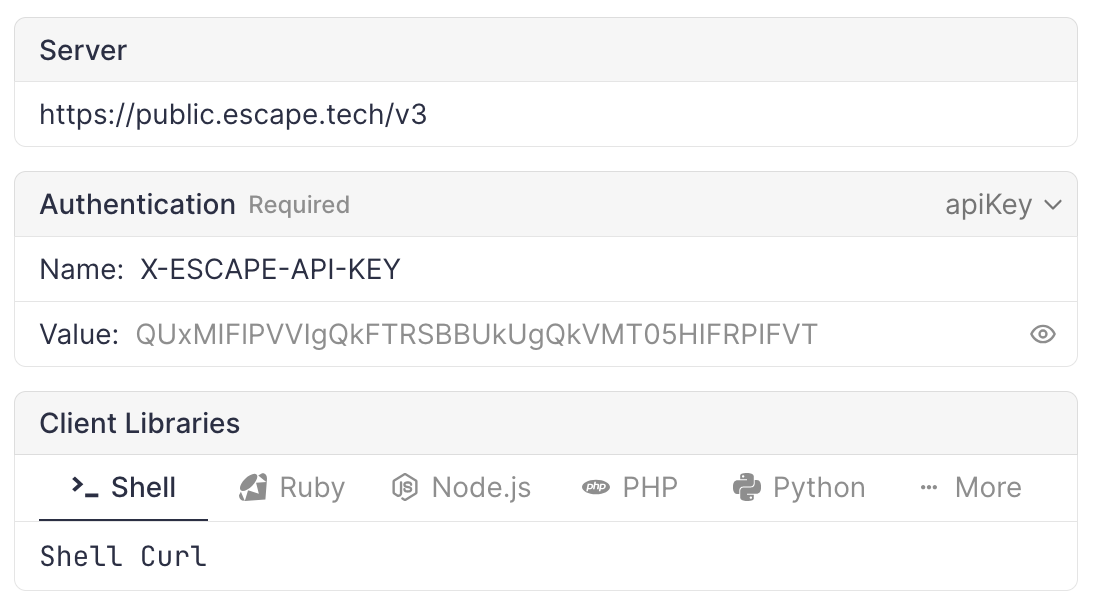
To authenticate your requests, you need to pass your API key as headers.
You can find your API key in your Escape settings.
Now you can add the following header to your requests:
Authorization: Key <api-key> is also accepted. If both headers are supplied, Authorization takes precedence.
In the web UI, you can set the API key in the top section of the page, it will be used for all your requests.
Basic Example
export API_KEY=<YOUR API KEY>

# List profiles
curl -H "X-ESCAPE-API-KEY: $API_KEY" https://public.escape.tech/v3/profiles
Retrieving API Coverage in CI/CD
You can use the Public API to read aggregate coverage for a finished scan and per-endpoint coverage for automation (for example, failing a pipeline when coverage is below a threshold or when critical operations stay UNAUTHORIZED).
-
Aggregate ratio: After the scan has finished,
GET /v3/scans/{scanId}andGET /v3/scansreturn a nullablecoveragefield (0 to 1) when Escape has computed scan-level coverage for that run. Profile detail (GET /v3/profiles/{profileId}) still exposes the application’s currentcoverageand embeds the last scans as today. -
Endpoint-level detail:
GET /v3/scans/{scanId}/targetsreturns paginated targets. For REST and GraphQL API targets, the nestedapiRouteandgraphqlResolverobjects includecoverage, optionalcoverageByUser, andmeanDuration. Use query parameterscursor,size, optionallytypes(for exampleAPI_ROUTEorGRAPHQL_RESOLVER), and optionallysources(SOURCE_SPECIFICATIONfrom the schema, orSOURCE_INFERREDdiscovered during the scan) to page and filter.
The meaning of each coverage status (OK, UNAUTHORIZED, BLOCKLISTED, and so on) is documented in Analyze Coverage. The full request and response shapes are in the OpenAPI specification and interactive docs at public.escape.tech/v3.
Listing Scans with Problems
GET /v3/scans/problems returns scans together with the validation problems surfaced by the scanner during execution (such as broken authentication, unreachable targets, or invalid schemas). It's the scan-indexed counterpart of GET /v3/profiles/problems, which groups problems by profile.
The response is a paginated list of scans, each decorated with a problems array. You can filter by assetIds, profileIds, projectIds, status, kinds, initiator, after, before, and ignored. Pagination uses cursor and size. See the OpenAPI specification for the full request and response schemas.
The equivalent CLI command is escape-cli scans problems.
Retesting Issues
Issue retest is a dedicated scan that re-validates selected findings on a DAST or AI pentest profile. The retest id is the scan id. Cancel with PUT /v3/scans/{scanId}/cancel.
POST /v3/retests takes profileId and exactly one of issueIds or filter. filter uses a subset of the issue list filters (ids, assetIds, severities, tagIds, scannerKinds, status, search). Optional context (max 4000 characters) is passed to the retest agents. Optional initiator defaults to MANUAL.
curl -X POST https://public.escape.tech/v3/retests \
  -H "X-ESCAPE-API-KEY: $API_KEY" \
  -H "Content-Type: application/json" \
  -d '{
    "profileId": "<PROFILE_ID>",
    "issueIds": ["<ISSUE_ID>"],
    "context": "Verify the auth bypass fix on checkout."
  }'
curl -X POST https://public.escape.tech/v3/retests \
  -H "X-ESCAPE-API-KEY: $API_KEY" \
  -H "Content-Type: application/json" \
  -d '{
    "profileId": "<PROFILE_ID>",
    "filter": { "status": ["OPEN", "MANUAL_REVIEW"] }
  }'
List and poll:
curl -H "X-ESCAPE-API-KEY: $API_KEY" \
  "https://public.escape.tech/v3/retests?profileIds=<PROFILE_ID>"

curl -H "X-ESCAPE-API-KEY: $API_KEY" \
  "https://public.escape.tech/v3/retests/<SCAN_ID>?size=50"
The detail payload includes status, progressRatio, optional context, agents, and nextCursor for the reports page. Pass cursor (and optional size, 1 to 100, default 50) to page reports. Each agent has id, issueId, status (RUNNING, FINISHED, FAILED, or null before start), and outcome (VERIFIED_FIXED, VULNERABLE, NOT_TESTED, FAILED, or null while pending). Agent logs aren't included. Full request and response schemas are in the OpenAPI specification.
Creating AI Pentesting Profiles (Beta)
Beta
The AI Pentesting profile endpoint is in beta and may change.
You can create AI Pentesting profiles via the API, in addition to the existing DAST profile types. The endpoint accepts multiple asset IDs in one profile.
| Endpoint | Description |
|---|---|
POST /v3/profiles/ai-pentest |
Create an AI Pentesting profile (all supported targets) |
The required fields are a nonempty assetIds array and name. mode accepts STANDARD (the default) or STRICT. Optional fields include context, users (each with name and instructions), rules (URL or GRAPHQL restrictions), artefactIds, maxDurationMinutes, rateLimitReqPerSec, and location (an id or a region with optional type).
start defaults to false. Set it to true to schedule an immediate scan, or supply an ISO 8601 startAt to schedule a scan for later. If both are supplied, startAt takes precedence.
curl -X POST https://public.escape.tech/v3/profiles/ai-pentest \
  -H "X-ESCAPE-API-KEY: $API_KEY" \
  -H "Content-Type: application/json" \
  -d '{
    "assetIds": ["00000000-0000-0000-0000-000000000000"],
    "name": "AI Pentest - Production WebApp",
    "mode": "STRICT",
    "start": false
  }'
The full request and response schemas are available in the OpenAPI specification.
Enforcing a Rate Limit Across Many Profiles
For DAST and ASM scanner configuration, set network.requests_per_second (1 to 1000, schema default 100) with PUT /v3/profiles/{profileId}/configuration. This setting applies to API DAST requests, ASM HTTP requests, and port scanner probes. Browser crawling isn’t limited by it. For AI Pentesting, set the rateLimitReqPerSec profile parameter.
Use paginated GET /v3/profiles to select the profiles you want to update.
The Rate Limiting Private Location Scans cookbook walks through a minimal script, a scheduled re-enforcement workflow, and the equivalent one-shot MCP tool.
PUT replaces the full configuration body
Always read the existing configuration with GET /v3/profiles/{profileId} first, patch only the fields you want to change, and PUT it back inside the required envelope: {"configuration": <merged configuration>}. Sending a partial body replaces every other scan setting (scope, authentication, custom headers, …) with defaults.
Updating Issue Status and Severity
Update an issue's status or severity via the API. When your organization enforces change reasons, you must provide a reason string.
Update Issue Status
curl -X PUT https://public.escape.tech/v3/issues/<ISSUE_ID> \
  -H "X-ESCAPE-API-KEY: $API_KEY" \
  -H "Content-Type: application/json" \
  -d '{
    "status": {
      "value": "RESOLVED",
      "reason": "Fix deployed to production"
    }
  }'
The status field accepts either a status string (deprecated) or an object with value and optional reason. Supported status values: OPEN, RESOLVED, FALSE_POSITIVE, IGNORED, MANUAL_REVIEW.
Update Issue Severity
curl -X PUT https://public.escape.tech/v3/issues/<ISSUE_ID> \
  -H "X-ESCAPE-API-KEY: $API_KEY" \
  -H "Content-Type: application/json" \
  -d '{
    "severity": {
      "value": "HIGH",
      "reason": "Updated based on CVSS reassessment"
    }
  }'
The severity field accepts either a severity string (deprecated) or an object with value and optional reason. Supported severity values: CRITICAL, HIGH, MEDIUM, LOW, INFO. Pass null to reset to the scanner default.
Bulk Update Issues
Update multiple issues at once:
curl -X POST https://public.escape.tech/v3/issues/bulk-update \
  -H "X-ESCAPE-API-KEY: $API_KEY" \
  -H "Content-Type: application/json" \
  -d '{
    "where": {"ids": ["<ISSUE_ID_1>", "<ISSUE_ID_2>"]},
    "patch": {
      "status": {
        "value": "RESOLVED",
        "reason": "Batch fix for identified pattern"
      }
    }
  }'
The reason field:
- Is required if your organization has the
require_change_reasonsetting enabled - Accepts 1 to 512 characters
- Is optional but recommended for audit trails and team coordination
The full request and response schemas are available in the OpenAPI specification.
Validating Authentication Configuration
You can validate an authentication configuration without running a full scan. This is useful in CI/CD pipelines to verify credentials before triggering a scan.
-
Start a check:
POST /v3/authenticationswith either aprofileId(to reuse saved authentication from that profile) or a directauthenticationobject (or both: the object overrides the profile). You can optionally passproxyIdordefaultProxyTypeto control which location runs the check.curl -X POST https://public.escape.tech/v3/authentications \ -H "X-ESCAPE-API-KEY: $API_KEY" \ -H "Content-Type: application/json" \ -d '{"profileId": "<PROFILE_ID>"}'The response contains an
idand initialstatus(STARTING). -
Poll for results:
GET /v3/authentications/{id}returnsstatus,progressRatio, chronologicalevents, and (when status isFINISHED) the structuredauthenticationresults.Poll until
statusisFINISHED,FAILED, orCANCELED.
Commenting on Issues
Add a comment to an existing issue via the API:
curl -X POST https://public.escape.tech/v3/issues/<ISSUE_ID>/activities \
  -H "X-ESCAPE-API-KEY: $API_KEY" \
  -H "Content-Type: application/json" \
  -d '{"comment": "Verified fix deployed to staging"}'
The comment field accepts up to 512 characters. The response returns the created activity with its id, createdAt, kind, and author.
Exporting Reports (Beta)
Beta
The export endpoints are in beta and may change.
You can programmatically trigger PDF/report exports using the supported report block kinds in the OpenAPI specification. METHODOLOGY isn’t accepted by this endpoint.
-
Trigger an export:
POST /v3/jobswith a list of reportblocks(each with akind). You can scope the export withscanId,assetWhere,profileWhere, orissueWherefilters. Setnotifytofalseto skip the email when the report is ready. By default, the API user receives that email with the generated artefacts.curl -X POST https://public.escape.tech/v3/jobs \ -H "X-ESCAPE-API-KEY: $API_KEY" \ -H "Content-Type: application/json" \ -d '{"blocks": [{"kind": "ISSUE_LIST"}], "scanId": "<SCAN_ID>", "notify": false}'The response returns a job
id. To validate the selection without scheduling a job, add"dry": true. A successful dry run returns anid, but doesn’t create a job to poll. -
Poll for completion:
GET /v3/jobs/{jobId}returns the jobstatus, parameters, and once complete,artefactswithsignedUrldownload links for the generated files.