Proof of Exploit
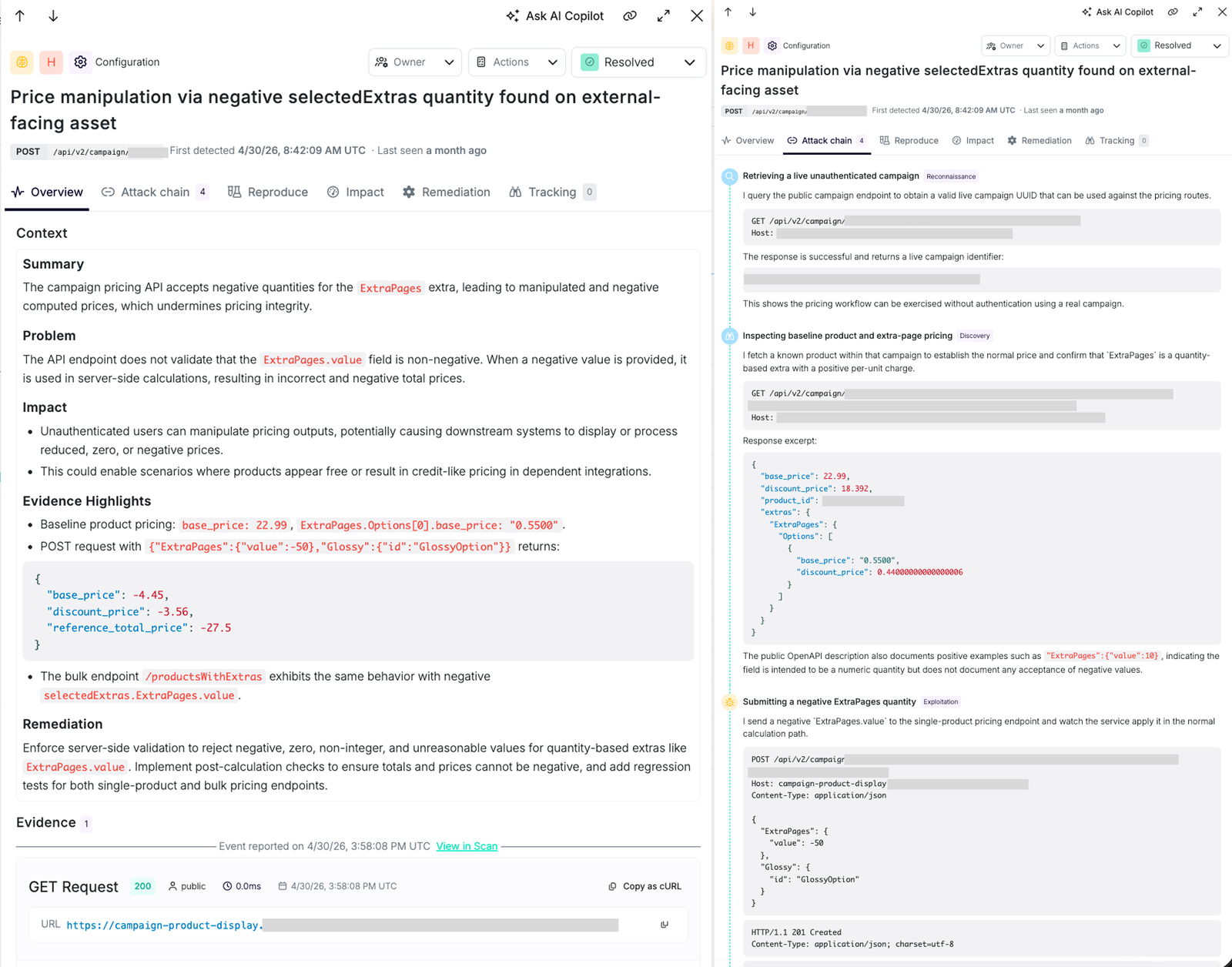
Proof of Exploit gives engineering the request chain, responses, screenshots, and attack path behind an AI Pentesting finding. That evidence gives your team a starting point for reproduction and remediation.
Escape collects detailed event logs for every AI Pentesting assessment, including agent interactions, screenshots, reasoning, actions taken, and issues identified during testing. These logs are fully searchable in the product. Escape also provides comprehensive coverage data for visited web pages, API endpoints, crawled URLs, and analyzed code files.
What a Proof of Exploit Contains
Every Proof of Exploit shipped with a validated or exploited AI Pentesting finding carries:
- Attack path: the ordered list of endpoints the agent walked to land the exploit, with the reasoning for each hop.
- Request chain: the full HTTP traffic (or browser actions) the agent executed, ready to replay with cURL or a REST client.
- Screenshots: where the attack manifests in a user interface (a stored XSS firing, an unauthorized admin page loading, a sensitive file rendered in the browser).
- Execution logs: the agent's own log of what it tried, what worked, and what didn't.
- Impact: Escape Severity with a CVSS score and vector, so triage and prioritization don't start from scratch.
That bundle is the artifact you paste into the Jira ticket, the Slack thread, or the pull-request comment.
Assessment Summary and Issues
Open Summary for the issue overview. Once the assessment finishes, this tab also shows the executive summary and PDF export. Open Issues to review the assessment's findings.
Assessment Logs and Reasoning
Proof of Exploit is the evidence on a confirmed finding. The assessment itself produces a much larger audit trail you can review while the run is in progress or after it finishes.
Open Logs on an assessment to browse the full event stream: discoveries, tool calls, validation steps, and errors. Each event has a title, description, level, stage, and optional attachments (request/response captures, screenshots, command output). Search, filter, and group events to answer questions like whether agents reached a specific workflow or what payloads were tried before an exploit was confirmed.
Open Reasoning to follow the agent swarm at a higher level. Cascade spawns an orchestrator and focused workers during the assessment; the Reasoning view maps that tree and lets you drill into each agent's chronological trace. This is where you go deeper into the attacks attempted: why a path was chosen, how agents adapted when something failed, and how multi-step exploits were chained together.
For automation, use escape-cli scans reasoning <scan-id> -o json or retrieve an agent's logs through the Public API at GET /v3/scans/{scanId}/agents/{agentId}/logs.
See Graph Reasoning for how Cascade builds attack paths across endpoints.
Coverage
Open Coverage to see every surface Cascade touched or analyzed during the assessment. Coverage is organized as targets:
| Type | What it represents |
|---|---|
| Web page | A page the crawler or an agent navigated in the browser |
| Crawled URL | A URL discovered while exploring the application |
| API route | A REST endpoint exercised or probed |
| GraphQL resolver | A GraphQL operation exercised or probed |
| Code file | A source file analyzed during artifact-driven or whitebox testing |
API route and GraphQL resolver rows show coverage by user persona. The public label means no authentication was detected; authenticated means authentication was detected but wasn't attributed to a specific user.
Click a target to inspect exploration history, requests sent, and issues found on that surface. Coverage answers a different question than logs: what did we actually test? Use it alongside Proof of Exploit to confirm the assessment reached the areas you expected and to spot gaps before sign-off.
Why It Matters
Most of the time an engineer loses triaging a security finding is spent reproducing it. Proof of Exploit shortcuts that: the first click in the UI opens the traffic, the second exports it as cURL, the third links to the exact file and function (when the repository is connected). Internally, we've measured around an 80% reduction in time-to-remediate when Proof of Exploit is attached, compared to a severity-and-description handoff.
When Proof of Exploit Runs
Proof of Exploit runs automatically as part of every AI Pentesting assessment. In Cascade, the reporter agent reproduces each candidate on the live target and collects this evidence itself. Findings are filed after successful independent reproduction.
Related Documentation
- Graph Reasoning: How Cascade builds attack paths