Technology
WebApp Testing Technology
Escape uses browser-based Dynamic Application Security Testing (DAST) to test web applications and the APIs they call. This page describes browser behavior, test families and authenticated scanning.
Testing Hybrid Web Applications
Hybrid web applications combine server-rendered pages, client-side routing, and dynamic interactions. Escape explores these interactions in a browser and captures the API requests they generate for security testing.
Frontend and API Security Testing
Escape DAST tests web applications and their underlying APIs. It explores traditional multi-page applications, SPAs, and PWAs to identify security weaknesses across the frontend and API layers.
The Single Page Apps Challenge
Applications built using React can load content without full-page reloads. Escape explores dynamically rendered content and interactions as part of WebApp Testing.
Web applications can include dynamic content, real-time updates and complex user flows. Review the scan's coverage to see which pages and interactions Escape reached.
Controlling Exploration
Escape explores page interactions and reduces repetitive crawling. Use visit limits to control how many URL variations it explores.
Avoid Repetitive Crawling
Use visit limits to control exploration of repeated product pages, search results, or other parameterized content.
Chromium Browser Engine
Escape DAST uses a Chromium browser to execute JavaScript and interact with pages.
The browser:
- Executes application JavaScript, including React, Angular, Vue, Svelte, and Solid, to explore dynamic content, client-side routing, and XHR/
fetchrequests triggered by user interaction. - Loads the application's real assets (scripts, stylesheets, images, web workers, service workers) from their real origins, giving accurate visibility into third-party integrations and CSP behavior.
- Uses browser cookies and storage for authentication flows and session renewal.
- Captures API traffic generated during browsing for API security testing.
Desktop Browser Configuration
The browser Escape launches is configured as a desktop Chromium session. Concretely, that means:
- A standard desktop viewport (fixed, not dynamically sized per device profile).
- A desktop Chromium user agent, unless overridden through
network.custom_headers.user-agent. - The
en-USlocale, with HTTPS certificate errors ignored. - No touch event emulation, no device scale factor override, no mobile-specific media query matching.
Review coverage if your application serves different content to desktop and mobile browsers.
Mobile Experience Scope
WebApp scans run in desktop Chromium. Mobile device emulation (touch inputs, mobile viewport, device-specific User-Agent, navigator.maxTouchPoints, and orientation) isn't supported. Review these mobile-specific features when defining scan scope:
- Conditional mobile bundles: A desktop scan receives the bundle selected for its
User-Agentand viewport. To serve a mobile bundle selected by the header, override theUser-Agentas described below. APIs called exclusively by a mobile bundle remain outside discovery until that bundle runs. - Mobile-only routes: Routes that render only when a mobile media query matches (for example, a mobile-first navigation drawer or a swipe-based multi-step flow).
- Touch-gated interactions: Flows that require
touchstart/touchendevents need touch emulation to progress.
What to Do If Your App Has a Distinct Mobile Experience
If your application serves meaningfully different markup, APIs, or workflows to mobile browsers, two options are available today:
-
Override the
User-Agentvianetwork.custom_headers. For applications that choose their bundle server-side from theUser-Agentheader, setting a mobile-like user agent is enough to make the server deliver the mobile bundle, which the desktop Chromium will then execute normally. JavaScript-side feature detection that checks viewport,navigator.maxTouchPoints, orwindow.matchMediawill still see a desktop environment, so this works best when the mobile-vs-desktop switch is purely header-driven. -
Scan the mobile web endpoint as a separate profile when the mobile experience is served from a distinct subdomain (for example,
m.example.com). Create a dedicated WebApp profile pointing at the mobile host, with its own authentication and scope configuration. See Issue Deduplication.
WebApp Testing covers browser-based applications. Native iOS and Android applications are outside its scope.
Compatibility with Modern Web Apps: SPAs, PWAs, and More
Escape supports SPAs and PWAs, where content can change without a new URL. Its crawler explores page interactions as well as links.
Escape analyzes static pages and dynamic, client-side rendered content, including applications built with React or Angular.
Focus on the Real Business Logic
In a multi-step registration form, each step can reveal new fields without changing the URL. Escape explores page interactions to discover those states and test their inputs.
Security Test Families
Escape DAST supports four families of security tests. Scope, check selection and scan duration determine which tests run. See Test Selection.
| Security-Test Family | What It Does | Typical Findings | Speed Impact | Key Customer Benefit |
|---|---|---|---|---|
| 1 · Active Page Tests (interactive) | Actively manipulates the page in a real browser, testing page inputs and interactions. | XSS, SQLi/NoSQLi, DOM-based vulns, CSRF, auth bypass | Higher | Provides reproduction evidence for findings. |
| 2 · Passive Page Tests (non-interactive) | Reads the rendered DOM, console logs, headers, and cookies without altering state. | Misconfigured CSP, insecure cookies, mixed-content, client-side secrets | Fast | Finds issues in rendered content and browser state. |
| 3 · Network Tests | Checks responses, redirects, headers and connection security. | Open redirects, subdomain takeover vectors, weak TLS, cookie scope leaks | Fast | Finds network and infrastructure security issues. |
| 4 · External API-Traffic Tests | Sends captured, eligible API traffic to Escape's API engine. | Broken object-level authorization, mass-assignment, GraphQL over-fetching | Fast | Tests API requests discovered during browsing. |
You Keep the Control
Use scope rules and crawling instructions to focus exploration on the features and workflows you want to test.
How It Works
Modern Web Application Architectures Challenges
Web applications have undergone significant evolution, transitioning from basic Multi-Page Applications (MPAs) to more sophisticated Single-Page Applications (SPAs), and even hybrid models that integrate both. While these advancements have greatly improved user experience, they have also expanded the attack surface and introduced new, more complex security challenges.
In MPAs, each interaction with the application triggers a full page reload from the server. While this architecture remains simple, it comes with performance drawbacks, particularly as the application grows in size. In contrast, SPAs load a single page and dynamically update content in response to user actions. This approach enhances performance and overall user experience but creates new hurdles, including managing complex client-side routing and maintaining state across diverse user interactions. SPAs are typically built using JavaScript frameworks like React or Angular, adding layers of complexity to both the application itself and the testing processes.
The attack surface includes server-side behavior, client-side logic, and dynamically loaded content. Cross-Site Scripting (XSS), for example, is a prevalent vulnerability in modern applications, particularly those built with JavaScript. XSS allows attackers to inject malicious scripts into web pages, posing serious threats to user security and data integrity. Similarly, vulnerabilities such as Insecure Direct Object References (IDOR) and Open Redirects can enable attackers to exploit weaknesses and gain unauthorized access to data or redirect users to malicious sites.
The widespread use of third-party libraries and external resources in modern web applications also brings new risks. Dependency and supply chain risks are becoming increasingly critical, as attackers may target commonly used packages, affecting a wide range of applications. These risks underscore the importance of thorough security testing, which must account not only for the core application code but also for the libraries and dependencies it incorporates.
Crawling and Testing Features
State-Aware Web Application Crawling
Escape's crawler explores links and page interactions to discover different application states, including content that appears without a URL change.
Escape reduces repeated exploration of similar content and interactions so the scan can spend more time on other parts of the application.
This FSM-based crawling enables Escape DAST to perform a more intelligent exploration. It can recognize when the application is in the same or a functionally similar state, thereby reducing unnecessary processing. Moreover, by identifying and prioritizing high-risk actions for user interactions, Escape DAST ensures better scan efficiency and relevance.
FSM-based crawling also allows Escape DAST to emulate realistic user behavior. This feature not only improves scan efficiency but also generates more accurate and easy-to-reproduce reports by tracking the exact navigation path to vulnerable states. Additionally, the scan coverage can be easily represented in a graph-based format.
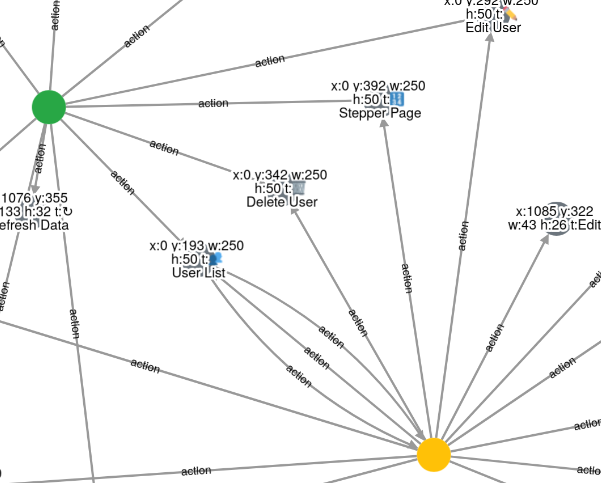 \
Figure 1: Graph-based scanner coverage view
\
Figure 1: Graph-based scanner coverage view
In Figure 1, we see two states: one fully tested (shown in green) and one not yet tested (shown in yellow). The gray circles represent the actions identified. An arrow pointing from a state to an action indicates that the action exists in the state and can be shared across other states, such as Stepper Page or Delete User. The opposite direction indicates navigation by interacting with an action to transition to a new state.
Authenticated Scanning
Escape DAST supports authenticated scanning with one or multiple users. Multi-user tests replay requests across configured user contexts to detect access control flaws, including cross-tenant data access.
Escape DAST supports multiple authentication methods, such as OAuth, header, token, cookie, and local/session storage injections. Use logout detection to detect session loss and attempt reauthentication.
Before every scan, Escape DAST automatically validates the provided scan configuration and after every update. Additionally, the user can visually track the authentication flow through screenshots and event logs, which show the steps taken, tokens identified, and more.
Adaptive Learning Scanner
Using the FSM abstraction, Escape DAST not only performs the scanning but also optimizes the scanning process by intelligently prioritizing paths based on the score assigned to them. This adaptive scanning method ensures that higher-risk paths are tested first, maximizing coverage while minimizing time spent on low-value areas.
The FSM model generated during the scan can be persisted and reused for future scans, making the scanning process much faster and more efficient. With each new scan, Escape DAST optimizes the scanning process, adapting to any changes made since the last scan. This adaptive approach allows Escape DAST to detect changes across different versions of the application with minimal overhead.
The system also allows experimentation with various state identification techniques, such as using interactive elements, visual similarity, and AI classification models, ensuring that Escape DAST remains flexible, accurate, and adaptable to different scanning needs. The ability to create a specific model for each target, which can be saved and reused in subsequent scans, increases the precision of vulnerability detection.
Integration with API Scanner
Escape WebApp Testing tests the application's pages and eligible API requests captured during browsing.
Captured traffic gives the API scanner request examples from application workflows, including endpoints discovered during browser interaction.
Automatic OpenAPI Spec Generation
As part of the crawling and scanning process, Escape DAST automatically generates OpenAPI (Swagger) documentation by analyzing API interactions and JavaScript code used within the web application. This automatic process helps provide better visibility into undocumented systems and gives developers accurate and up-to-date API specifications without the need for manual input or the interception of production traffic.
With the integration of multi-user scanning, Escape DAST can map different API actions to specific user roles. This allows the API scanner to more precisely test for role-based access control (RBAC) issues, generating richer and more detailed specifications that aid in identifying potential vulnerabilities related to unauthorized access.
Escape DAST's Advantages
Escape Security Testing introduces a fundamentally different approach to dynamic application security testing by modeling the application as a state machine. Rather than blindly interacting with the application, Escape DAST focuses on identifying interactive elements and simulating realistic user actions. This state-based approach allows Escape DAST to present each state in the coverage report with screenshots, available actions, and possible interactions required to reach specific states.
This representation makes it easier to map the attack surface and interaction flow of an application. It also provides the benefit of reusability for future scans, allowing Escape DAST to optimize scan durations and maximize coverage. By integrating AI components, Escape DAST enhances the testing process through better crawling, state detection, more precise security testing, filtering false positives, and providing more accurate and actionable remediation steps.