MFA
Use this page when your login flow asks for a second factor after the username and password step, or when it sends a login link by email.
Escape supports these browser-based authentication steps:
- Authenticator-app TOTP codes, generated from a shared secret with
fill_totp - Email verification codes, read from an Escape scan mailbox with
fill_email_totp - Magic links, opened from an Escape scan mailbox with
click_mail_magic_link
For captchas, see Captcha Authentication.
Choose the Right Action
| Challenge or flow | Use | Required input |
|---|---|---|
| Authenticator app, like Google Authenticator/Authy | fill_totp |
TOTP secret and input locator |
| Email-delivered verification code | fill_email_totp |
Scan email_address and input locator |
| Passwordless magic link sent by email | click_mail_magic_link |
Scan email_address |
Authenticator-App TOTP
The fill_totp browser action generates the current Time-based One-Time Password from the secret you provide, then fills that code into the target input field.
Browser Actions Example
presets:
  - type: browser_actions
    login_url: https://example.com/login
    users:
      - username: user@example.com
        actions:
          - action: fill
            locator: input[name="username"]
            value: user@example.com
          - action: fill
            locator: input[name="password"]
            value: password123
          - action: click
            locator: button[type="submit"]
          - action: wait_element
            locator: input[name="totp_code"]
            timeout: 10
          - action: fill_totp
            locator: input[name="totp_code"]
            secret: JBSWY3DPEHPK3PXP
            auto_submit: true
Browser Agent Example
With the browser_agent preset, add fill_totp as a post_login_actions step when the base login is handled by the browser agent but the second factor still needs an explicit action.
presets:
  - type: browser_agent
    login_url: https://example.com/login
    users:
      - username: user@example.com
        password: password123
        post_login_actions:
          - action: fill_totp
            locator: input[name="totp_code"]
            secret: JBSWY3DPEHPK3PXP
            auto_submit: true
fill_totp Reference
In agentic mode (agentic.enabled: true), the browser agent can also generate TOTP codes from a base32 shared secret supplied in agentic.instructions or the user's instructions. Tell it which authenticator challenge to complete. The instructions, including that secret, are sent to the AI model. Use fill_totp when you want to configure the action explicitly.
| Property | Type | Required | Default | Description |
|---|---|---|---|---|
action |
fill_totp |
yes | fill_totp |
Action identifier |
locator |
string |
yes | Playwright locator to fill | |
secret |
string |
yes | Secret used to generate the TOTP code | |
auto_submit |
boolean |
no | false |
Submit the form automatically after the TOTP code is filled |
allow_failure |
boolean |
no | false |
Allow this action to fail without breaking authentication |
Email-Based Authentication
Use this section when the application sends a verification code or magic link by email.
Escape provides scan email addresses under @scan.escape.tech. The scanner can read messages sent to those addresses during authentication, then fill the email code into the form or open the magic link.
Scan Email Addresses
Each scan email address belongs to your organization and follows this format:
| Part | Description |
|---|---|
<alias> |
1 to 27 ASCII letters, digits, and hyphens; dots allowed only between characters |
<mailboxId> |
Your organization's 6-character mailbox ID |
@scan.escape.tech |
Fixed domain |
Open Organization > General in the Escape app. The Scan Email Address field shows how your inbox address is built:
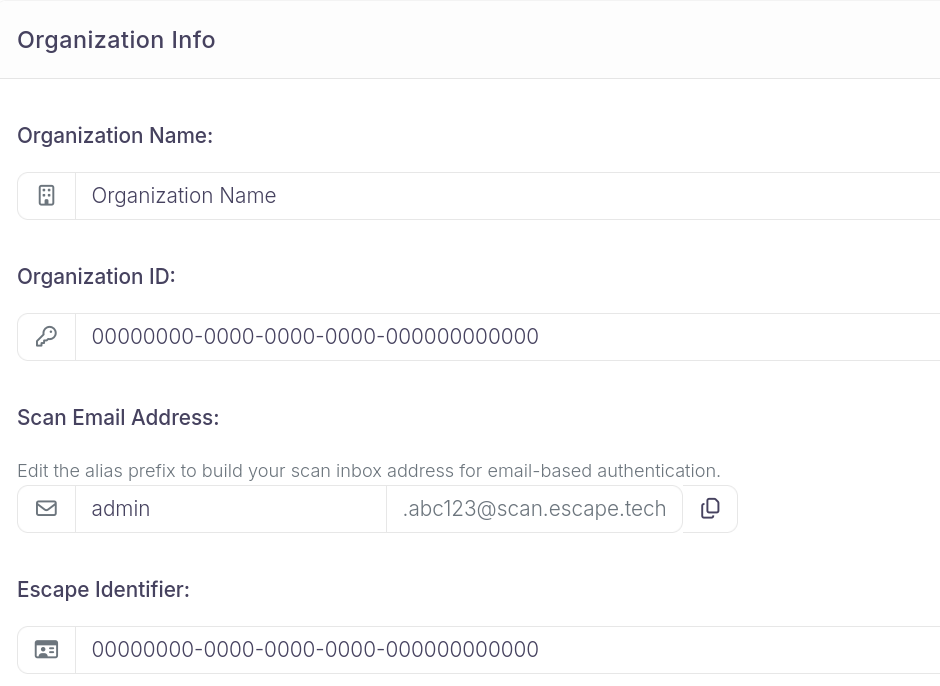
- Alias (left, editable): choose a short label for the user or flow (for example
adminoruser1). This becomes the part before the dot in your scan config. - Suffix (right, fixed): your organization's mailbox ID and domain (for example
.abc123@scan.escape.tech). The six characters before@are your mailboxId. - Copy button: copies the full address ready to paste (for example
admin.abc123@scan.escape.tech).
Use one alias per configured user. You don't need to look up or paste the organization UUID anymore.
The full organization UUID suffix and its first UUID block are still accepted for existing configurations.
With mailbox ID abc123, these addresses are valid:
user1.abc123@scan.escape.techadmin.abc123@scan.escape.techtest-alice.abc123@scan.escape.tech
Use a different alias for each configured user.
You can also list, read, and wait for messages at these addresses from the command line. See Scan Inbox Emails.
Email Verification Code Example
Use fill_email_totp when the application sends a one-time MFA code by email.
presets:
  - type: browser_actions
    login_url: https://example.com/login
    users:
      - username: user1.abc123@scan.escape.tech
        actions:
          - action: fill
            locator: input[name="email"]
            value: user1.abc123@scan.escape.tech
          - action: fill
            locator: input[name="password"]
            value: your-password
          - action: click
            locator: button[type="submit"]
          - action: fill_email_totp
            email_address: user1.abc123@scan.escape.tech
            locator: input[name="verification_code"]
            auto_submit: true
Agentic Browser Example
The browser_agent preset in agentic mode can use the mailbox while following the login flow.
presets:
  - type: browser_agent
    login_url: https://example.com/login
    users:
      - username: user1.abc123@scan.escape.tech
        password: your-password
    agentic:
      enabled: true
      instructions: >
        After submitting the credentials, a verification code is sent to
        user1.abc123@scan.escape.tech. Read the email and fill the code
        into the verification form.
Instructions are optional
The agentic browser can detect email-based authentication steps automatically. Explicit instructions can still help when the flow is ambiguous.
Magic Link Example
Use click_mail_magic_link when the application sends a passwordless login link by email.
presets:
  - type: browser_actions
    login_url: https://example.com/login
    users:
      - username: user1.abc123@scan.escape.tech
        actions:
          - action: fill
            locator: input[name="email"]
            value: user1.abc123@scan.escape.tech
          - action: click
            locator: button[type="submit"]
          - action: click_mail_magic_link
            email_address: user1.abc123@scan.escape.tech
Multiple Users
Use one scan email alias per user.
presets:
  - type: browser_actions
    login_url: https://example.com/login
    users:
      - username: user1.abc123@scan.escape.tech
        actions:
          - action: fill_email_totp
            email_address: user1.abc123@scan.escape.tech
            locator: input[name="code"]
      - username: user2.abc123@scan.escape.tech
        actions:
          - action: fill_email_totp
            email_address: user2.abc123@scan.escape.tech
            locator: input[name="code"]
fill_email_totp Reference
| Property | Type | Required | Default | Description |
|---|---|---|---|---|
action |
fill_email_totp or fill_mail_totp |
no | fill_email_totp |
Use fill_email_totp. fill_mail_totp is deprecated. |
email_address |
string |
yes | Scan email address where the code is sent | |
locator |
string |
yes | Playwright locator to fill | |
auto_submit |
boolean |
no | false |
Submit the form automatically after filling the code |
one_by_one |
boolean |
no | false |
Type the code one character at a time |
timeout |
integer |
no | 30 |
Timeout in seconds for the input filling action |
select_first_if_multiple |
boolean |
no | false |
Select the first matching element when several elements match the locator |
allow_failure |
boolean |
no | false |
Allow this action to fail without breaking authentication |
click_mail_magic_link Reference
| Property | Type | Required | Default | Description |
|---|---|---|---|---|
action |
click_mail_magic_link |
yes | click_mail_magic_link |
Action identifier |
email_address |
string |
yes | Scan email address where the magic link is sent | |
new_page |
boolean |
no | false |
Open the magic link in a new browser page |
timeout |
integer |
no | 60 |
Timeout in seconds for the page to load |
allow_failure |
boolean |
no | false |
Allow this action to fail without breaking authentication |
Related Documentation
- Scan Inbox Emails: List, read, and wait for scan inbox messages with
escape-cli - Captcha Authentication: Simple text captcha solving during login
- Browser Actions: Full reference for browser actions
- Agentic Mode: AI-driven browser authentication