Reporting in Business Logic Aware DAST
One of the key features of the Reporting section of a Business Logic Aware DAST scan is its ease of exportability. Security reports can be exported to PDF and shared with stakeholders, for internal reviews, leadership updates, or audits, so everyone stays aligned on API security posture.
Modular Template Reporting
Reporting is context-aware and modular. You start an export from the area that defines scope, for example Assets, Issues, an Application (profile), or a Scan, then choose which blocks (block kinds) to assemble into the PDF. That replaces a single fixed "executive vs technical" split: you tailor the same engine for management summaries, engineering detail, or auditor-ready evidence by selecting the right blocks.
The main block groups are:
- Asset context: in-scope assets in tabular form (names, types, first seen and last seen).
- Scan Executive Summary: high-level scan overview (scope, timing, Security Score, authentication, findings, and related statistics). Offered when exporting from a scan context.
- Profile Executive Summary: high-level profile overview (in-scope asset, testing period, Health Score, and active findings). Offered when exporting from an application (profile) or pentest profile context. Default pentest profile templates use this block instead of a per-scan summary.
- Scan History and Trend: recent scan history and severity trend for the selected profile. Offered with profile-scoped exports when history is available.
- Issue summary: findings summarized by severity.
- Issue list: issues in scope as a list.
- Issue details: full write-up per finding (context, remediation, reproduction evidence such as cURL where available). Intended for narrow scope, in practice when tied to a single scan; very large asset or issue selections may disable this block to protect performance.
- Compliance Coverage: passed versus total checks for each enabled framework.
- Compliance: dedicated compliance sections for supported frameworks enabled for your organization. SecurityScorecard and Bitsight mappings don't have dedicated PDF sections.
Choose compliance sections for the frameworks you need alongside context and issue blocks. Every PDF also includes methodology.
When issue SLAs are enabled for your organization, the Issue details block includes SLA badges showing the due date or breach date.
Export a Single Issue as PDF
When you need to share one finding with a developer, auditor, or stakeholder who isn't on Escape, export it directly from the issue side panel without running a bulk report across a folder or project.
- Open the issue you want to share.
- Open the Actions menu in the issue side panel.
- Under Export, click Export as PDF.
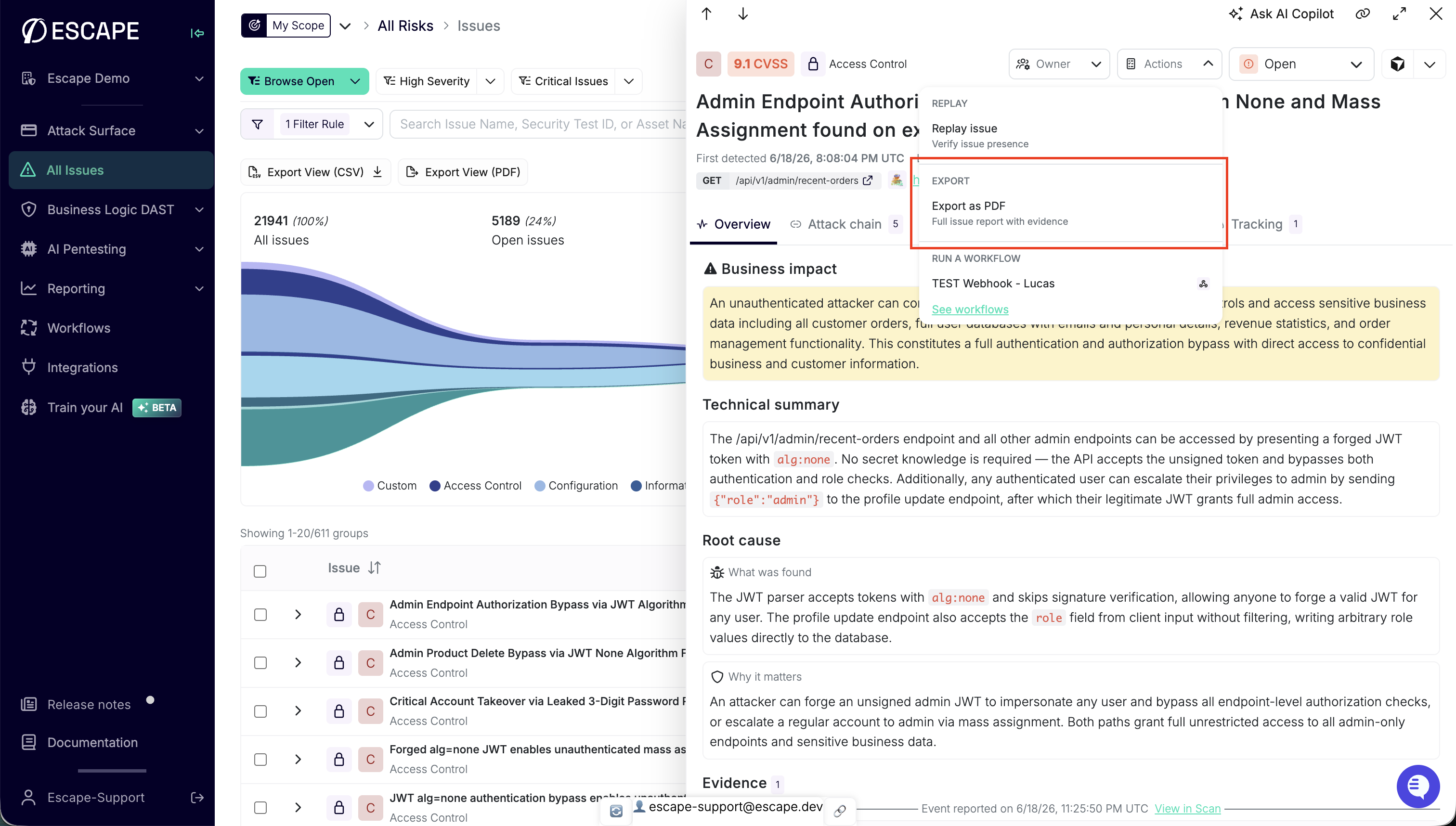 Export as PDF from the issue side panel Actions menu: one finding, full report with evidence.
The PDF covers the issue you're viewing. It uses the same reporting engine as bulk exports, with the Issue details block scoped to that single finding: severity, context, remediation guidance, and reproduction evidence (including cURL where available).
The file downloads when generation completes. The UI shows progress while the export job runs.
Understanding Severity Levels
Escape Severity considers these factors, with CVSS data where available:
- The type of vulnerability
- Its exploitability in the context of your API
- CVSS score
- Other risk factors specific to your application
Use severity and the finding’s evidence together when reviewing potential impact.
Reporting at Scale
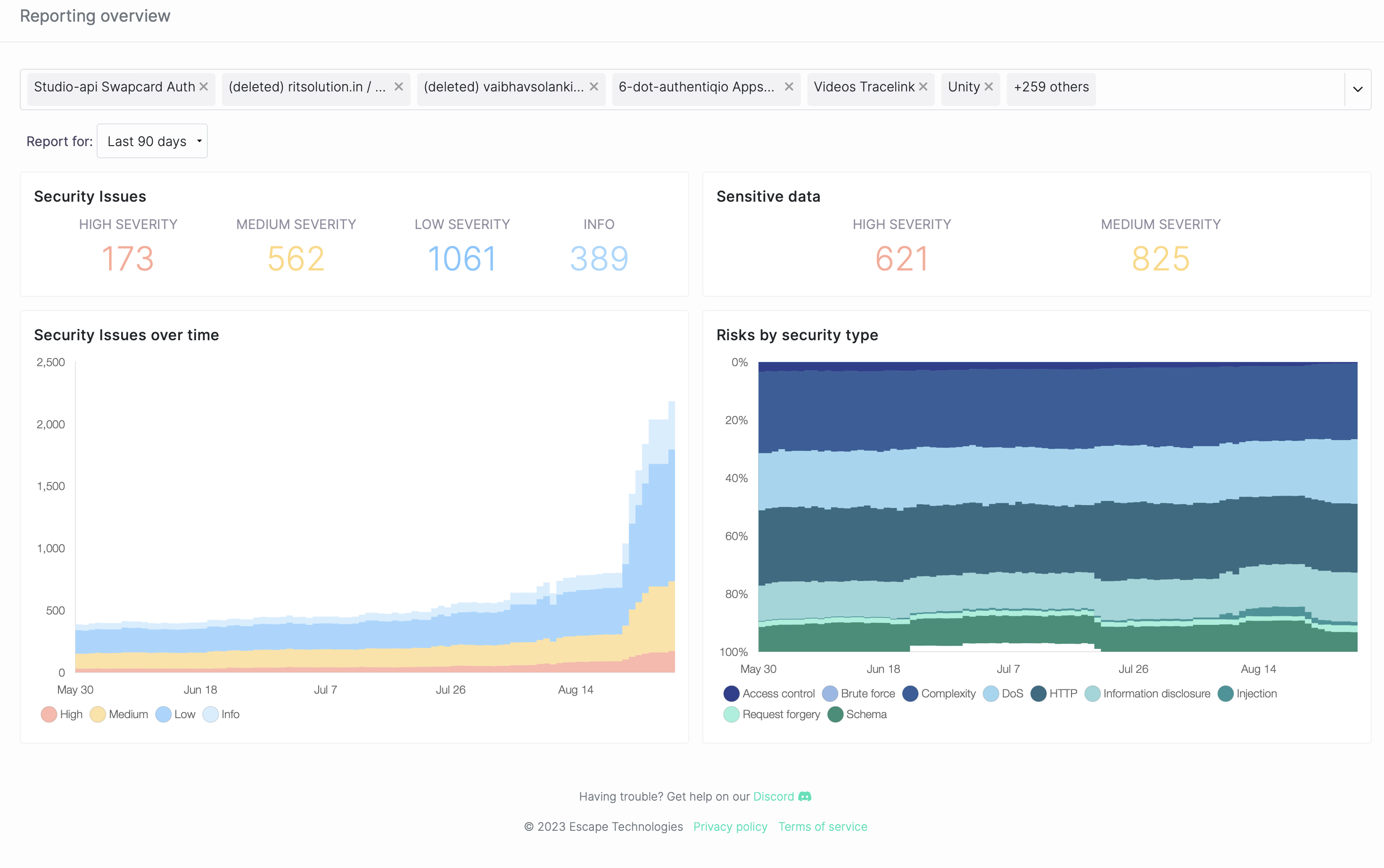
Escape's Security Reporting feature provides essential visibility into your organization's security posture. As applications and updates are continuously deployed, our system:
-
Tracks and analyzes potential security vulnerabilities
-
Generates security reports
-
Keeps security teams informed and proactive
-
Trend Analysis: With the increasing complexities of applications, tracking vulnerabilities over time becomes crucial. Our reporting module provides a chronological overview of detected issues, enabling your team to identify patterns, peak vulnerability periods, and measure the efficacy of remediation strategies.
-
Categorization of Risks: Not all vulnerabilities bear the same weight. We categorize risks by their type, ensuring that high-priority threats don't get lost in the noise. This categorization enables teams to allocate resources efficiently and address critical vulnerabilities on a priority basis.