Workflow Conditions
Set filters that must be met before the action runs. Available filters depend on the trigger type you selected.
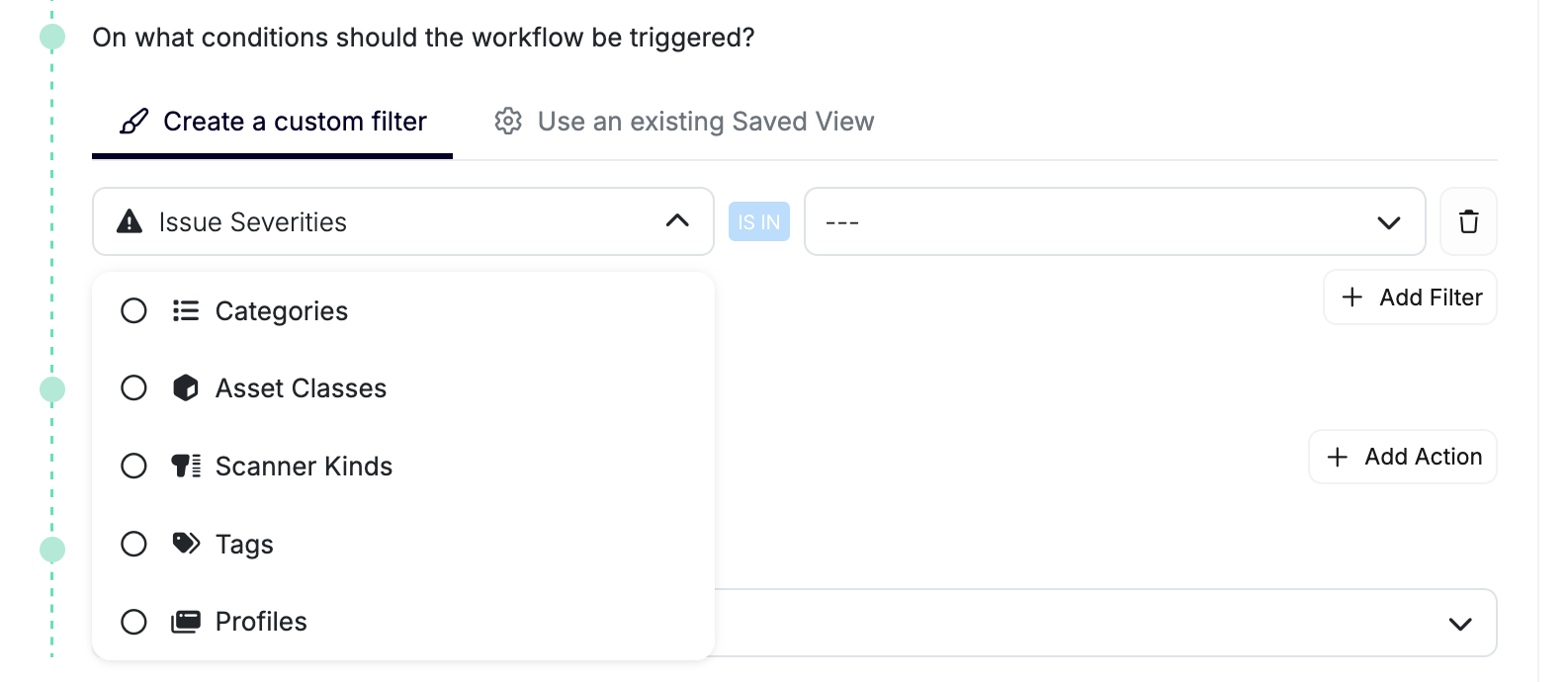
Issue Filters
Common controls include severity, category, status, scanner kind, associated profiles, and asset tags. Asset Class describes a grouping, such as API_SERVICE or FRONTEND. Asset Type describes a type, such as REST, GRAPHQL, or WEBSOCKET.
You can also use a saved table view to apply its filters. The tables below use configuration field identifiers, which can differ from UI labels.
| Fields | Values |
|---|---|
SEVERITY, CATEGORY, STATUS, RISKS, SCANNER_KINDS |
Lists of the corresponding enum values |
NAME, DOMAINS |
Text |
ID, SECURITY_TEST_UID, SECURITY_TEST_UIDS, SCAN_IDS, TARGET_IDS |
Lists of issue, security-test, scan, or target identifiers |
ASSET_CLASS, ASSET_TYPE, ASSET_STATUS |
Lists of asset enum values |
ASSET_ID, PROJECTS, TAGS, PROFILES |
Lists of asset, project, tag, or profile IDs |
JIRA_TICKET, AI_FALSE_POSITIVE, AGENTIC |
Booleans |
LAST_SEEN_AT |
Date/time string |
Issue TAGS match tags on the associated asset. Has Ticket (JIRA_TICKET) checks linked-ticket presence across supported providers.
Asset Filters
| Fields | Values |
|---|---|
CLASS, TYPE, STATUS |
Lists of asset class, type, or status values |
ID, PROJECTS, TAGS, INTEGRATIONS, PROFILES |
Lists of identifiers |
NAME, DOMAINS |
Text |
MANUALLY_CREATED, REPOSITORY_ARCHIVED |
Booleans; archived state applies to repositories |
CHILD_OF, PARENT_OF |
Related-asset filter with a nullable relationship verb |
RISKS, SCANNER_KINDS, ENVIRONMENTS |
Lists of risk, scanner-kind, or environment enum values |
CLOUD_PROVIDERS, WAF_PROVIDERS, CAPTCHA_PROVIDERS |
Lists of provider enum values |
VISIBILITY |
Repository visibility values |
APEX_DOMAIN |
List of domains |
FOUND_BY_PROFILE, FOUND_BY_INTEGRATION |
Lists of discovery profile or integration IDs |
PORTS |
List of numbers |
SEVERITIES, FRAMEWORKS |
Lists of severity or framework enum values |
LANGUAGES, TECHNOLOGY_KEYS |
Lists of strings |
Environment, cloud-provider, WAF, and framework filters apply to services or web applications. CAPTCHA filters apply to web applications. Visibility, archived state, and language filters apply to repositories. Port filters apply to hosts. Use SEVERITIES to select assets with issues of the specified severities, and TECHNOLOGY_KEYS to select assets using the specified technologies.
Scan Filters
| Fields | Values |
|---|---|
STATUS |
List of STARTING, RUNNING, CANCELED, FINISHED, FAILED |
INITIATOR |
List of APPLICATION_CREATION, CI, MANUAL, SCHEDULED, INVENTORY, UNKNOWN |
KIND, ASSET_TYPE |
Lists of scanner-kind or asset-type values |
PROBLEM_SEVERITY |
List of ERROR, WARNING, INFO |
PROBLEM_CODE |
List of scan problem codes |
PROFILES, PROJECTS, TAGS |
Lists of identifiers |
CREATED_AT |
Date/time string |
SEARCH |
Text matched against the profile name or asset name, case-insensitively |
IGNORED |
Boolean |
Scan TAGS match tags on the profile’s associated asset. Use PROFILES in issue or scan filters to select profiles; no workflow trigger targets standalone profile filters.
Operators and Groups
Combine conditions with AND when all must match, or OR when any can match. Groups can contain nested AND/OR groups. For example, use AND to select High-severity Open issues, or OR to select High or Critical issues.
Operators depend on the field and resource:
| Fields | Supported Operators |
|---|---|
| List fields above | IS_IN, IS_NOT_IN |
Issue NAME |
MATCHES, DOES_NOT_MATCH, IS, IS_NOT |
Issue DOMAINS; asset NAME, DOMAINS; scan SEARCH |
MATCHES, DOES_NOT_MATCH |
| Boolean fields | IS, IS_NOT |
Issue LAST_SEEN_AT; scan CREATED_AT |
IS_BEFORE, IS_AFTER |
Issue/asset PROJECTS, TAGS |
Membership operators plus IS, IS_EMPTY, IS_NOT_EMPTY |
Issue/asset PROFILES; asset INTEGRATIONS |
Membership operators plus IS_EMPTY |
Scan PROJECTS, TAGS |
Membership operators plus IS_EMPTY |
Asset CHILD_OF, PARENT_OF |
IS, IS_NOT |
Asset APEX_DOMAIN |
Membership operators plus IS_EMPTY, IS_NOT_NULL |
Use the operators offered for each condition; supported operators vary by field.
Integration Filters
For Integration Failed, saved-view/API filter configuration supports search (integration name), kinds, projectIds, ids, locationIds, and github.hasInstallation. The GitHub option selects integrations with an App installation when set to true. The workflow form supports saved-view selection but doesn't expose an integration condition editor.
Manual Workflows
Manual workflows don't support filtering since they're triggered manually.