Skip to content

Release Notes

#29 · Enhanced Application Management with Search, Filtering, and Tagging!

As we continue to grow and serve larger organizations, we've recognized the need for more advanced application management features. With a vast number of apps, sifting through to find what you're looking for can be cumbersome. Enter our new suite of tools designed to simplify and enhance your application management experience!

🌟 Key Highlights:

  1. Powerful Search Capabilities: Quickly find the application you're looking for with our optimized search function. Never lose sight of any app again!

  2. Dynamic Filtering:

    • By Technology: Easily categorize and view applications based on their technology stack.
    • By Risk: Prioritize and manage apps based on their risk levels to ensure you're focusing on what matters most.
  3. Custom Tagging: Beyond the default filters, tag your applications with custom labels that matter to your organization. It provides advanced filtering options tailored just for you!

🚀 Why It Matters:

With an increasing number of applications, ensuring that you can easily access, manage, and categorize them is essential. These new features not only help declutter and organize your apps but also streamline workflows and improve overall productivity.

📚 Dive Deeper:

Dive into the specifics of these new features and learn how to leverage them to their full potential by checking out our comprehensive guide (link to be added).

📢 We're Listening:

Your input is invaluable. Let us know how these new application management tools are enhancing your experience, and share any additional features or tweaks you'd like to see in future updates!

#28 · 📄 Export Compliance Reports as PDF

Taking another leap forward, we're thrilled to present the PDF Compliance Report feature in Escape. The capability to seamlessly export and manage compliance reports is an essential tool for organizations, and we've made it even more streamlined and efficient!

🌟 Key Highlights:

  1. Individual Export: Navigate to the Compliance Tab and instantly export individual compliance reports as PDFs. Quick, efficient, and hassle-free!
  2. Bulk Download: Time is valuable! Directly download all the reports in one go under the Pentesting Report. No more waiting or multiple clicks!
  3. Compliance Coverage: We're rolling out with support for prominent compliances including OWASP TOP 10, CWE, PCI-DSS, and WASC. This ensures you're aligned with industry benchmarks and best practices.
  4. Stay Tuned: Our commitment to enhancing the user experience is unwavering. Expect more compliance reports to be added in the near future!

🚀 Why It Matters:

Compliance isn't just about checking boxes; it's about ensuring the security and trustworthiness of your systems. With the PDF Compliance Report feature, not only can you efficiently track and manage your compliance status, but also easily share and communicate these reports within your organization or with external stakeholders such as auditors or customers.

📚 Dive Deeper:

To explore further and understand the intricacies and benefits of the PDF Compliance Report feature, head to our detailed documentation (link to be added).

📢 We're Listening:

Your insights and feedback have always been the cornerstone of our continuous evolution. Share your thoughts on the PDF Compliance Report feature, and together, let's make the digital landscape more secure and compliant!

#27 · [Enterprise] Scan Internal APIs with Elevated Ease Using Escape's Repeater Agent

Dive into an advanced layer of internal API scanning with the introduction of Escape’s Repeater Agent. While the proxy method for scanning internal APIs has been steadfast, our advancement to enhance your experience, especially for our Enterprise customers, has brought forth the Agent.

🏹 Repeater Agent: Your Gateway to Robust Internal API Scanning

The Repeater Agent serves as a powerful facilitator to scan Internal Apps, securely situated behind your organization’s firewall or VPN, by forming a private tunnel between Escape and one of your servers. This means all the requests from Escape are strategically channelled through your server, offering you a seamless, secure, and highly efficient internal API scanning mechanism.

🌐 Workflow Insight:

  1. Repeater Client Connection: Your locally deployed repeater client connects to the repeater manager.
  2. Scan Initiation: When a scan kicks off on Escape, requests are sent to the repeater manager, instead of directly to your server.
  3. Request Transfer: Your client receives and forwards them to your server.
  4. Result Transmission: Scan results are transmitted back to Escape, ensuring you have a clear view and control of your scans’ outcomes.

🛠️ Setup and Utilization:

  • Efficient Setup: Craft a new repeater through the Escape interface and retrieve its repeater ID for setup.
  • Repeater Client Configuration: Employ the repeater client on your server, following the guidelines provided in the readme of the repeater client.
  • Application Configuration: Adapt your applications with a simple configuration snippet, utilizing the repeater ID.

📘 Dive into the Documentation:

Navigate through a detailed guide on leveraging the Escape Repeater Agent for meticulous internal API scanning by visiting our documentation. Your path to understanding and implementing this feature adeptly begins here!

🚀 Propel Forward:

With the Repeater Agent, drive your security scanning into a domain of enhanced control, efficiency, and security. Your journey towards fortified application security is robustly supported with features that prioritize your organizational needs and challenges.

Your feedback fuels our innovations. Share your experiences and journey with the Repeater Agent, and let’s continue advancing towards a secure digital horizon together!

#26 · 🎯 Elevate Your Security Focus with Risk Contextualisation and Prioritization

Introducing a pivotal feature in Escape that transforms your security management strategy: Risk Contextualization and Prioritization. Merging the power of Escape’s distinctive Inventory and DAST features, we’re enabling AppSec Engineers to pinpoint and prioritize what genuinely requires immediate attention.

🙉 The Objective:

Ensure that your focus and remediation efforts are efficiently targeted. An SQL Injection on a route manipulating sensitive data, especially when exposed to the internet, demands priority – and we ensure you recognize such issues upfront.

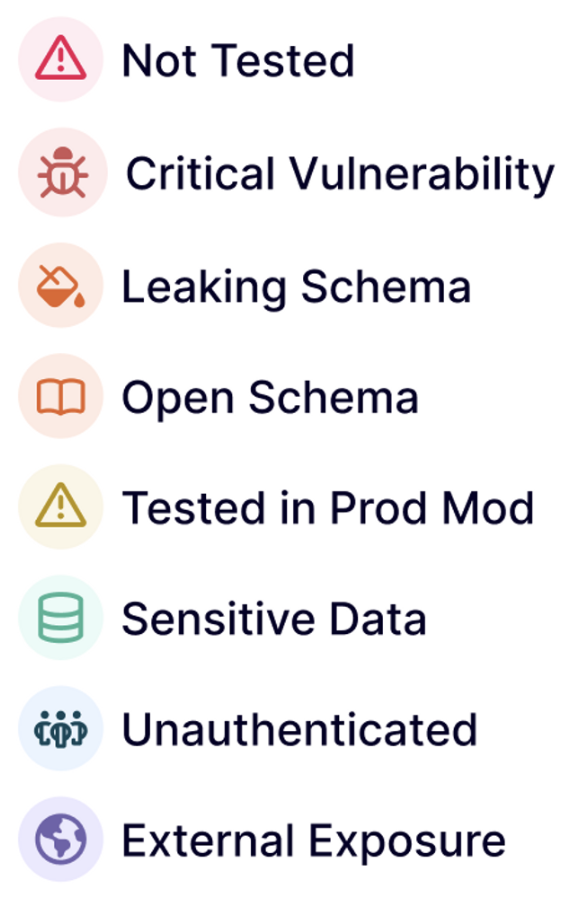
🚨 Risk Categories:

Navigating through risk becomes seamless with categorization that empowers you to identify and tackle vulnerabilities adeptly.

CleanShot 2023-10-03 at 11.57.25@2x.png

🔎 See it in Action:

Direct your attention and resources where it truly counts by honing in on critical, sensitive, and potentially exposed endpoints that could pose significant risks.

Let’s Continue Together:

Your security journey is our priority. With features designed to streamline your risk management, we're committed to offering a platform where your security endeavors are intuitive, strategic, and impactful. Share your experiences and let’s bolster our path towards sophisticated and accessible application security!

#25 · Escape for REST APIs in General Availability

🚀 REST API Scanning Now Available in Escape

We're thrilled to announce that Escape now supports GenAI-powered DAST Scanning in CI/CD, extending our capabilities to REST APIs alongside our existing GraphQL API offerings. Implementing security practices into your CI/CD pipeline has never been so straightforward!

⚙️ What's New:

  • 1. Extended API Support: Your REST APIs are now in safe hands with our advanced DAST scanning, which is now compatible with both REST and GraphQL APIs.
  • 2. Diverse Input Options: Catering to a variety of workflows, Escape accepts input from OpenAPI, Swagger, or Postman, with more options en route.
  • 3. Business Logic Testing: We're not just scanning - we're ensuring that your API's business logic and complex attack scenarios are thoroughly vetted.
  • 4. Comprehensive Security Tests: With more than 50+ security tests now supported, we're ensuring your APIs are fortified against vulnerabilities.

For a comprehensive view of our available security tests, check out our documentation.

🚗 Taking it for a Spin:

Dive right into your API scanning and start fortifying your REST APIs alongside your GraphQL APIs. Ensuring comprehensive API security has never been this accessible or thorough.

In Closing:

As we pave the path toward robust API security, your inputs are invaluable. We're here to support your API – REST or GraphQL, and provide a secure, resilient environment for your applications. Share your feedback and let's continue this journey toward impregnable API security together!

#24 · Custom Security Tests

🛠️ Advance Usage: Custom Security Tests (Beta)

Empower your security testing with our latest feature—custom security tests! This advanced utility enables you to create and send tailor-made requests to any URL within your organization, catering to your unique security concerns and needs.

⚙️ What's New:

  • 1. Tailored Security Assessments: Launch specialized dynamic security assessments on your web applications. This is invaluable for identifying regression bugs, conducting in-depth security checks, or probing in-house security concerns.
  • 2. Expert Tab Configuration: Set up your custom security assessments with ease via the Expert tab in your application settings.
  • 3. Dynamic Response Validation: Assess and verify server responses based on custom conditions, like a specific status code.
  • 4. Special Commands: Further customize your raw request with special commands to adjust the host, modify timeout durations, and more.
  • 5. API Configuration: Inspired by the Nuclei template engine, our API lets you seamlessly configure and manage your custom security checks.

For a more in-depth guide on how to use this feature and optimize your security testing, visit our technical documentation.

In Conclusion:

We're continuously striving to enhance the flexibility and depth of our platform. The introduction of custom security tests underpins our commitment to catering to your individual security needs. Your feedback fuels our improvements, and we're keen to hear your thoughts on this latest addition.

#23 · Advanced Authentication with Webdriver

🔐 Custom Authentication using Webdriver

We are excited to introduce our brand new feature—Custom Authentication using Webdriver. This advanced capability allows for even more tailored and secure authentication workflows, offering users the flexibility to authenticate in ways that best suit their individual or organizational needs.

⚙️ Parameters:

  • 1. Tech Parameter: Choose your preferred auth method using the tech parameter.
  • 2. Extract Location: Specify the location of the token to be extracted. Options include RequestURL, RequestHeader, RequestBody, ResponseHeader, and ResponseBody.
  • 3. Extract Regex: Utilize regular expressions to match your token, making it easier than ever to customize your authentication flow.
  • 4. Project Parameter: Assign the authentication workflow to a specific project using the project parameter.
📌 Optional Parameters:
  • Output Format: Configure the output format using a placeholder @token@.
  • Token Lifetime: Set the duration of the token's validity in seconds with the token_lifetime parameter.

For a more detailed guide on how to utilize this new feature, you can check our technical documentation.

In Conclusion:

This new feature aims to provide a flexible and secure way to authenticate within Escape. We believe these custom authentication capabilities will significantly enhance your user experience. As always, we welcome your feedback to improve further.

#22 · [Enterprise] SSO, Fine-grained Authentication & Identity Federation

We're thrilled to announce the enhancement of our authentication mechanisms. As part of our continuous efforts to bolster security and improve user experience, we have introduced Fine-grained Authentication, Identity Federation, SAML, and SSO capabilities into Escape.

⚙️ What's New:

  • 1. Fine-grained Authentication: Our advanced authentication system now offers detailed access controls, ensuring that users have appropriate permissions tailored to their roles and responsibilities.
  • 2. Identity Federation: Seamlessly integrate Escape with your organization's Identity Provider (IdP). This feature simplifies user management while maintaining the highest security standards.
  • 3. SAML (Security Assertion Markup Language) Support: Integrate Escape with any SAML 2.0 compliant Identity Provider. This ensures secure and streamlined single sign-on capabilities.
  • 4. Single Sign-On (SSO): A more seamless login experience. Users can now access Escape using a single set of credentials, reducing password fatigue and enhancing security.

Your data security and user experience are of paramount importance to us. This update epitomizes our dedication to ensuring you benefit from a seamless, secure, and efficient authentication process in Escape. We encourage you to check out our documentation for detailed information and setup guides.

In Conclusion:

With these enhancements, we aim to simplify your interaction with Escape while maintaining the highest security standards. As always, your feedback drives our progress, and we're eager to hear your thoughts on these updates.

#21 · Scan Internal APIs using Escape's Proxy

In our pursuit to enhance security and provide more accessibility, we've rolled out a feature allowing users to scan their internal APIs, which is especially beneficial for those who can't whitelist IPs. By leveraging a custom proxy, this process becomes a breeze.

⚙️ What's New:

  • Custom Proxy Deployment: If you're unable to whitelist IPs but can deploy a service and expose its IP, you now have the flexibility of a custom proxy. While you can choose any proxy, the Escape proxy is readily available for use. Ensure to allow incoming traffic to this proxy via your firewall settings.

  • Essential Setup Information: To get started, you'll need a few details:

    • User: The user permitted to connect to the proxy. If you're using the Escape proxy, this would be your organization ID.
    • Password: The password for the aforementioned user. For the Escape proxy users, this translates to your API key.
    • IP & Port: The IP address and port to connect to your proxy.
  • Configuration Guide: For a step-by-step guide on setting up the proxy and integrating it into your scan configuration, please refer to our detailed documentation.

With this update, we continue to simplify and fortify the security scanning process for our users. The ability to scan internal APIs using a proxy not only fills a pivotal gap in security testing but also caters to a broader range of user requirements. Your insights shape our journey, and we're eager for your feedback on this new addition.

#20 · Announcing Escape's Public Status Page

📢 Announcing Escape's Public Status Page

In our continued commitment to transparency and reliability, we're excited to introduce Escape's Public Status Page. This page serves as your go-to source for real-time insights into our platform's uptime and Service Level Agreement (SLA) adherence.

⚙️ What's New:

  • 1. Real-Time Uptime Monitoring: Keep track of our platform's operational status instantly. You'll now have visibility into our uptime performance, ensuring you're always in the know.
  • 2. SLA Insights: Transparency is key. With our public status page, you can gauge our adherence to the promised Service Level Agreement, ensuring we're upholding our commitment to you.
  • 3. Instant Notifications: No more guesswork. Should any interruptions occur, our status page provides immediate notifications using RSS Feed, keeping you informed every step of the way.

Your trust in Escape is paramount, and this update is a testament to our dedication to being open, accountable, and reliable. We invite you to visit our status page and stay updated on our platform's performance. Your continued feedback propels us forward, and we're excited to keep innovating for you. Here's to continuous transparency and improved reliability!