Skip to content

ASM

#146 · New Visualizations in Escape Attack Surface Management

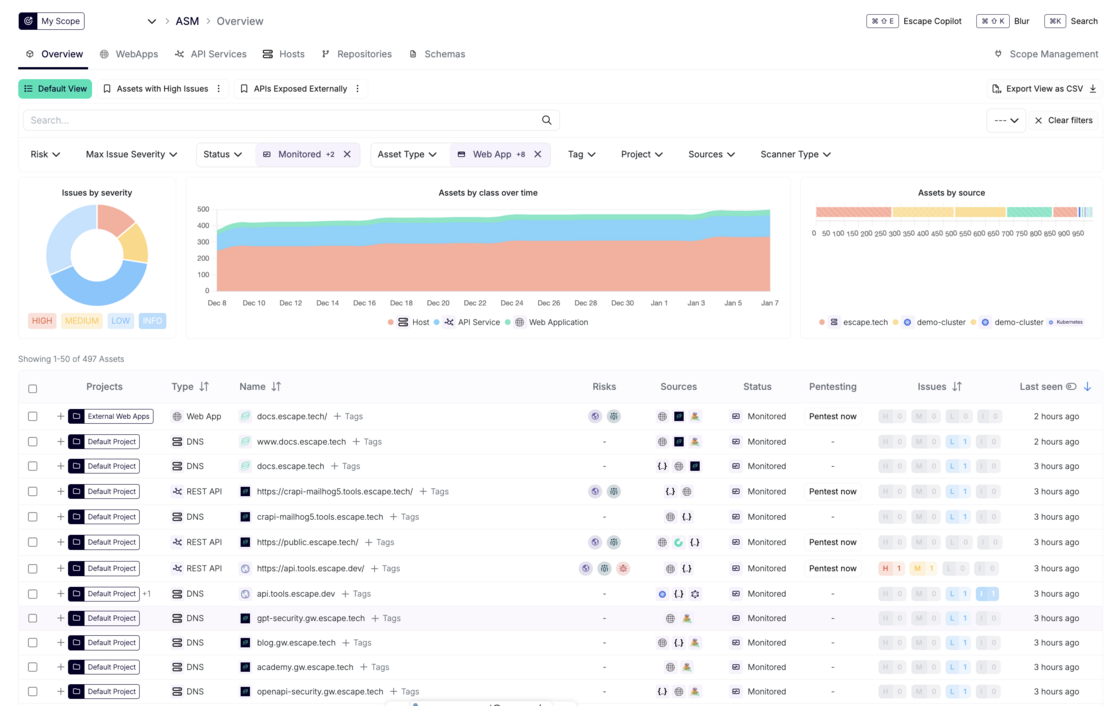
We’ve introduced new visualizations in Escape Attack Surface Management that provide structured visibility into discovered assets and identified issues.
new-asm-graphs.png

The new visualizations include:

  • Issues by Severity – A breakdown of identified issues across all discovered assets by severity level (High, Medium, Low, Informational).
  • Assets by Class Over Time – A time-based view showing changes in asset inventory over time, grouped by asset class (Host, API Service, Web Application).
  • Assets by Source – A breakdown of asset volumes by discovery source, such as domains, Kubernetes clusters, and other integrated sources.

These visualizations help teams quickly assess risk distribution, track how the attack surface evolves over time, and understand where assets are being discovered from, supporting more accurate risk prioritization.
#143 · New: MCP Endpoint Discovery & External Scanning in Escape ASM

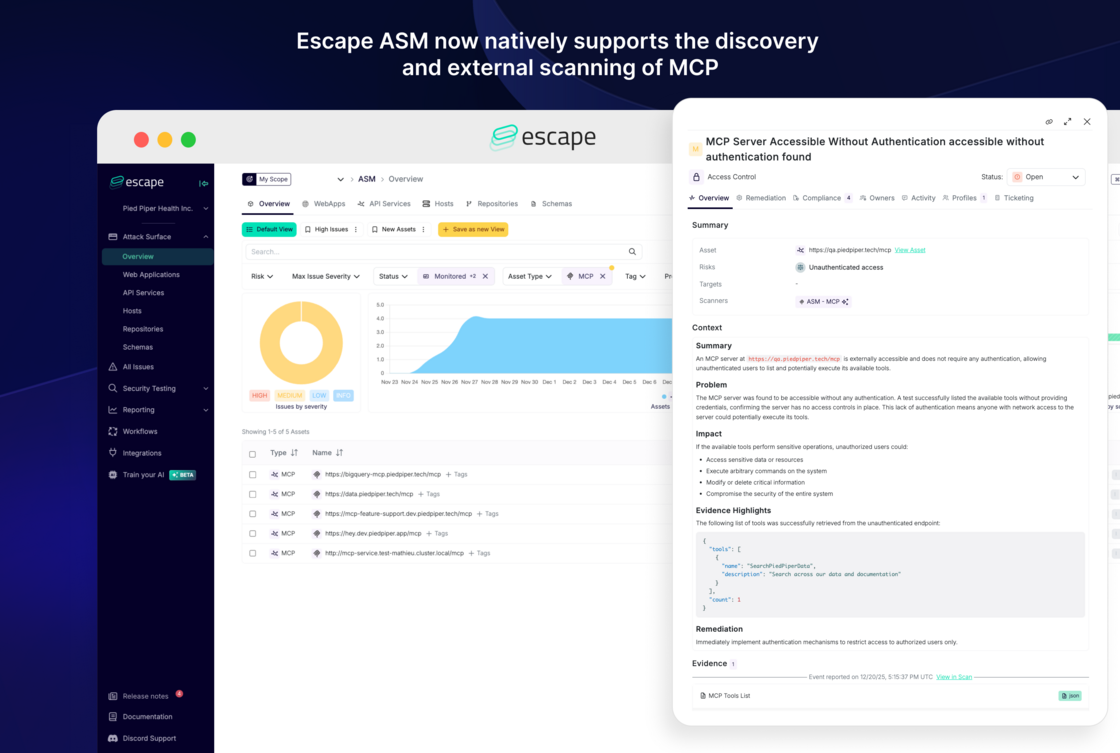
Escape ASM now natively supports the discovery and external scanning of unauthenticated MCP (Model Context Protocol) endpoints, extending coverage to a new generation of AI-native APIs.

Why this matters

As teams adopt MCP to connect LLMs with tools, data sources, and internal services, new externally exposed attack surfaces are emerging.

Security teams need to:

  • Know where MCP endpoints are exposed
  • Detect unauthenticated or misconfigured MCP servers
  • Reduce blind spots in AI-native infrastructure

This update brings MCP endpoints into Escape ASM’s continuous discovery and monitoring pipeline.

What’s included today

For this initial release, we focused on the ASM layer, fully integrated into existing scans.

Escape ASM now provides:

  • Automatic MCP discovery: MCP endpoints are detected automatically, just like any other internet-facing asset.

  • External surface scanning: Escape analyzes exposed MCP servers and configurations, including:

    • Detection of unauthenticated MCP endpoints
    • Identification of externally reachable MCP services that may present security risks

This helps teams quickly identify high-risk MCP exposures before attackers do.

MCP-discovery-smaller.png

Setup

No setup required. MCP discovery and scanning are enabled by default as part of Escape ASM.

If you’re already running ASM, MCP endpoints are automatically included.

Looking for design partners for next steps in security testing

This release marks the first step toward full ASM + Automated Security Testing coverage for MCP-based architectures. We’re actively looking for design partners using MCP in real-world environments to help shape the next phase of Escape’s security testing for MCPs.

Design partners will get:

  • Early access to authenticated MCP testing
  • Influence over attack scenarios and coverage
  • Direct collaboration with the Escape product team

Reach out to your dedicated Escape contact if you’d like to participate! 🙏

#126 · Improved Asset Scoping and Monitoring

We’ve introduced an important update to the way we control which assets belong to an organization and, consequently, which assets are scanned and monitored.

Now, with the new update, the scope leverages the “Status” field of Assets to improve asset tracking and monitoring.

Available Asset Statuses

This field reflects the status of the asset's relationship with your organization and allows you to review and determine whether an asset must be included in the Attack Surface Management (ASM).

You can modify the status of the asset using the drop-down menu in the Filters section.

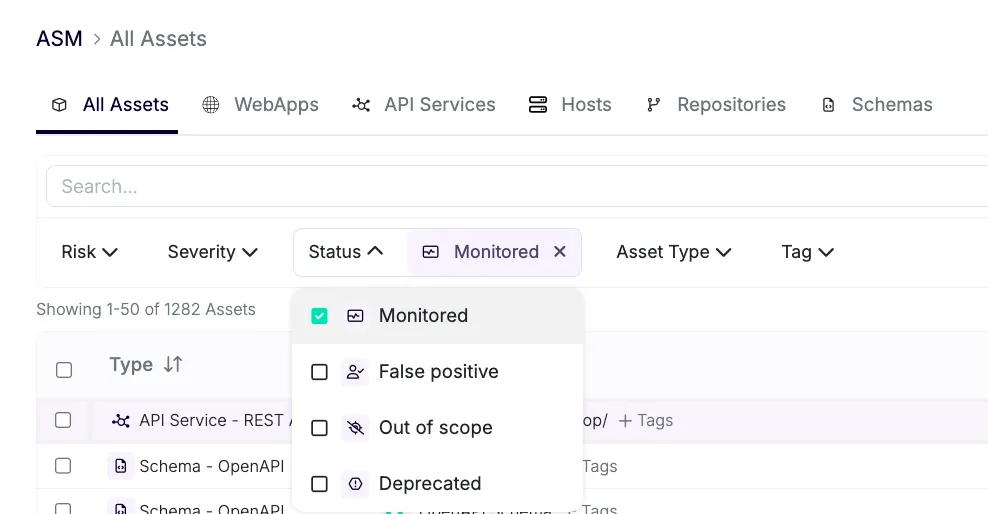
The following four statuses are supported for assets, and assets can be transitioned from one status to any other status depending on the requirements:

image.png

🟢 MONITORED: Indicates that the asset comes under the responsibility of your organization. Assets in this state are periodically scanned to update their inventory details and their connections are also scanned. This is the default status for all assets discovered by ASM.

🔴 FALSE POSITIVE: Indicates that the asset found by ASM does not belong to your organization. Assets in this state and their successive connections are removed from the scanning process, helping reduce the number of false positives over time and refine asset detection algorithms specific to your organization.

🟡 OUT OF SCOPE: The asset is currently outside the defined scope of monitoring (set manually or through scope rules). Scanning is suspended, and connections are not scanned. Requires review to determine whether it should be brought under monitoring.

⚪ **DEPRECATED:**The asset has been reviewed and is confirmed to be no longer relevant to your organization. Assets in this state and their successive connections are removed from the scanning process.

Default Asset Status Behavior

  • Default Behavior: All manually added domains/assets through DNS integration are set to MONITORED.
  • Monitored Hosts: Assets that belong to a MONITORED host (e.g., same domain or subdomain) are marked as MONITORED and scanned accordingly.
  • Out of Scope Assets: Assets not tied to a MONITORED host are automatically marked as OUT OF SCOPE. You can review them in ASM using filters and decide whether to include them.
  • Custom Statuses: Assets that shouldn’t be scanned can be set to FALSE POSITIVE or DEPRECATED statuses.

Understanding Host Assets and Scope

Here’s how this works in practice:

  • Create Host Assets: Add api.piedpiper.dev and staging.piedpiper.dev as MONITORED hosts. These hosts, and all of their subdomains, are considered in scope.
  • Scope Definition:
    • In Scope: Any subdomain of api.piedpiper.dev or staging.piedpiper.dev (e.g., domain.staging.piedpiper.dev) is now considered in scope and will be monitored.
    • Out of Scope: piedpiper.dev itself, or any domain that doesn't belong to the defined host assets, will be out of scope. For instance, domain.piedpiper.dev will not be monitored, as piedpiper.dev is broader than the defined scope of api.piedpiper.dev and staging.piedpiper.dev.
  • Frontend Assets: When you create a frontend asset like https://piedpiper.dev/, it will output the asset Host piedpiper.dev. Since piedpiper.dev is not a subdomain of api.piedpiper.dev or staging.piedpiper.dev, it will be automatically marked OUT OF SCOPE by default.

What This Means for You

  • Better Control: Now, you can manage your asset scope with greater visibility, review assets via filters, and edit their state to decide whether they should belong to your organization’s scope. You have more control over which assets belong to the organization via the platform.
  • Predictable Monitoring: No more surprise assets being monitored. You can filter by MONITORED assets (the default) and see exactly what’s in scope.
  • Simplified Reviews: OUT OF SCOPE assets are clearly separated, making it easy to decide whether to bring them under monitoring or leave them excluded.

This feature is just the beginning. As always, your feedback is essential in refining and improving the user experience. If you have suggestions or if you encounter any issues or unclear behaviors, please reach out to us!

#123 · ASM Documentation Update

We’ve made updates to the ASM documentation to address commonly asked questions and provide more clarity on key aspects of the ASM functionality. The following topics are now covered:

  1. How to restart ASM and ASM scans
  2. When and why asset X is scanned
  3. How to view ASM scans

You can find the updated documentation here.

#121 · Escape Public API v3 is now live!

We are excited to announce the release of the third version of the Escape Public API. This update reflects our current platform structure, following the introduction of Attack Surface Management (ASM). v3 brings improvements to alignment with the platform’s data organization, streamlining integrations, enhancing performance, and offering more flexibility for your security team.

What’s new in v3?

With the release of this version of our Public API, we’ve focused on optimizing your workflows and interactions with Escape.

Here’s a breakdown of the most significant changes:

1. Authentication Now Supports a Dedicated API key header

  • v2: Authentication was handled via the Authorization header: Authorization: Key YOUR_API_KEY
  • v3: We now also support using a dedicated X-ESCAPE-API-KEY header in addition to the Authorization header.

2. Applications Depreciated – Replaced by Profiles

  • Asset Management: You can now list, search, and manage assets across your organization.
  • Asset Details: Easily retrieve and update asset information by ID, including description, framework, owners, status, and tags.
  • Asset Creation: Create new assets across multiple types (DNS, IPv4, IPv6, GraphQL, REST, gRPC, Web Apps, Schemas, and more) and integrate with popular platforms (Wiz, Postman, Kubernetes, GitHub, GitLab, and more).
  • Asset Deletion: Remove assets by ID when no longer needed.

3. Profiles

  • Profile Management: Now you can list, search, get, and create different scan profiles for your organization. This new feature allows you to better organize and manage your scanning configurations. Check out the API docs for full details.

4. Issues

  • Issue Tracking: List, search, and update issues related to your organization.
  • Issue Details: Retrieve specific issue information by ID, and track activities related to each issue.

5. Events

  • Event Management: Easily list, search, and retrieve detailed information on events within your organization, providing better visibility and control.

6. Scans

  • Scan Management: Trigger, track, and access results for your scans.
  • Scan Control: List scans, start new ones, retrieve detailed scan information, cancel scans, or ignore specific scan runs as needed.

7. Tags

  • Tagging: List and search tags across your organization, and create new tags to better categorize and manage your assets.

Transitioning from v2 to v3

To ensure a smooth migration from v2 to v3, please follow these steps:

  1. Review Endpoint Changes:

    The structure of some endpoints has been adjusted in v3. Be sure to consult the v3 documentation to familiarize yourself with these changes.

  2. Update Your API Calls:

    Modify any existing API calls that may reference v2-specific endpoints or parameters. The new v3 structure is streamlined for better performance and flexibility.

  3. Thoroughly Test Integrations:

    Given the changes to endpoints and data structures, we highly recommend testing all integrations to ensure everything operates smoothly with the new API.

For detailed information on the new features and changes check out the following links:

If you have any questions or need further assistance, don’t hesitate to reach out to our team. We’re here to help!

#62 · New Kubernetes Integration: Discover APIs in Kubernetes

As organizations scale their Kubernetes deployments, the number of services and APIs grows rapidly. Maintaining visibility into these resources is critical for securing the API attack surface and ensuring compliance.

Escape now supports Kubernetes integration, enabling users to discover services running in their Kubernetes clusters.

This integration simplifies the process of discovering undocumented and shadow APIs within your clusters, reducing operational risks and improving governance.

How it works?

Escape will read the services and ingresses defined in your cluster, determine if they are APIs, and will make them visible in the Escape Inventory.

Getting started

Step 1: Set Up a Private Location

You need to configure a Private Location as a Kubernetes deployment for Escape to interact with your cluster.

Step 2: Create Service Account and ClusterRoleBinding

To allow this deployment to access resources in your Kubernetes cluster, you need to create a Service Account and a ClusterRoleBinding.

You can use the sample YAML from the Escape documentation to create these authorizations (replace default with the right namespace if needed).

Step 3: Bind the Service Account

Add the following line to the spec section of your deployment YAML to bind the Service Account to the pod: serviceAccountName: escape-repeater

Step 4: Monitor Discovered APIs

Once the integration is enabled, Escape will automatically identify and display APIs in the All Services section of your inventory, allowing you to take further actions like securing, auditing, or analyzing them.

Not sure if your Kubernetes clusters have APIs? Now's the perfect time to find out! Integrate your Kubernetes with Escape and enrich your API inventory.

#15 · Attack Surface Management with API Inventory

Escape is proud to announce the beginning of its brand new: API Inventory. Just input your company's domain, and Escape will detect exposed GraphQL endpoints and give you an overview of your Attack Surface, leveraging state-of-the-art scanning techniques.

🎊 Key highlights:

  • Endpoint discovery: Automatically identify every GraphQL endpoint exposed on your domains and subdomains.
  • Surface checks: Instantly identify open Introspections, leaking Schemas through Field Suggestions and public endpoints.

🛡 Benefits:

  • Comprehensive Security View: Security Engineers are equipped with an enhanced dashboard. This provides a 360° view of all exposed GraphQL applications, ensuring proactive management and mitigation of potential security threats.
  • Automated Refresh: Reduce manual oversight and error. Automated refresh ensures regular scanning of your attack surface.

🔜 Upcoming Enhancements:

  • We're always innovating! Our current methodology employs subdomain enumeration for the external attack surface. We're excited about expanding our capabilities. Expect richer features and broader scanning abilities in the forthcoming releases. Your security, our priority.