#126 · Improved Asset Scoping and Monitoring
We’ve introduced an important update to the way we control which assets belong to an organization and, consequently, which assets are scanned and monitored.
Now, with the new update, the scope leverages the “Status” field of Assets to improve asset tracking and monitoring.
Available Asset Statuses
This field reflects the status of the asset's relationship with your organization and allows you to review and determine whether an asset must be included in the Attack Surface Management (ASM).
You can modify the status of the asset using the drop-down menu in the Filters section.
The following four statuses are supported for assets, and assets can be transitioned from one status to any other status depending on the requirements:
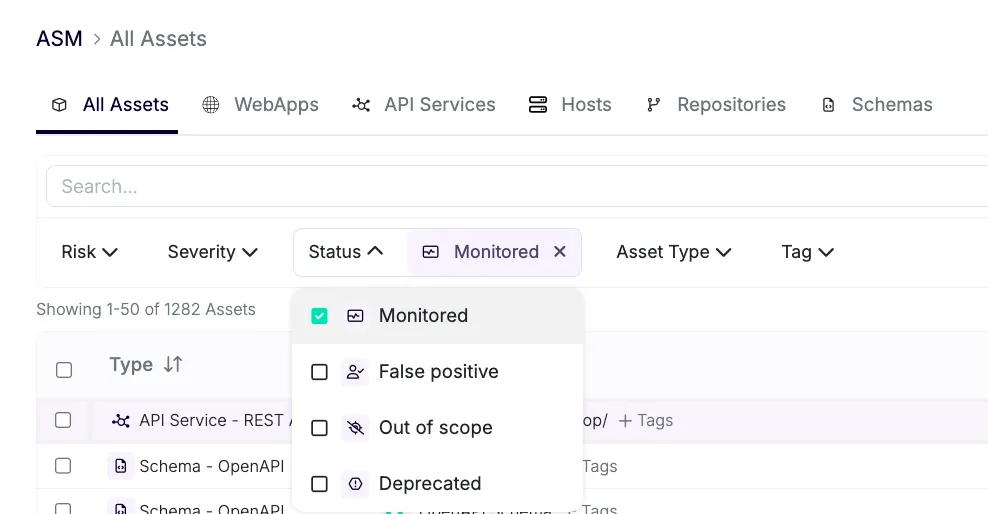
🟢 MONITORED: Indicates that the asset comes under the responsibility of your organization. Assets in this state are periodically scanned to update their inventory details and their connections are also scanned. This is the default status for all assets discovered by ASM.
🔴 FALSE POSITIVE: Indicates that the asset found by ASM does not belong to your organization. Assets in this state and their successive connections are removed from the scanning process, helping reduce the number of false positives over time and refine asset detection algorithms specific to your organization.
🟡 OUT OF SCOPE: The asset is currently outside the defined scope of monitoring (set manually or through scope rules). Scanning is suspended, and connections are not scanned. Requires review to determine whether it should be brought under monitoring.
⚪ **DEPRECATED:**The asset has been reviewed and is confirmed to be no longer relevant to your organization. Assets in this state and their successive connections are removed from the scanning process.
Default Asset Status Behavior
- Default Behavior: All manually added domains/assets through DNS integration are set to MONITORED.
- Monitored Hosts: Assets that belong to a MONITORED host (e.g., same domain or subdomain) are marked as MONITORED and scanned accordingly.
- Out of Scope Assets: Assets not tied to a MONITORED host are automatically marked as OUT OF SCOPE. You can review them in ASM using filters and decide whether to include them.
- Custom Statuses: Assets that shouldn’t be scanned can be set to FALSE POSITIVE or DEPRECATED statuses.
Understanding Host Assets and Scope
Here’s how this works in practice:
- Create Host Assets: Add
api.piedpiper.devandstaging.piedpiper.devas MONITORED hosts. These hosts, and all of their subdomains, are considered in scope. - Scope Definition:
- In Scope: Any subdomain of
api.piedpiper.devorstaging.piedpiper.dev(e.g.,domain.staging.piedpiper.dev) is now considered in scope and will be monitored. - Out of Scope:
piedpiper.devitself, or any domain that doesn't belong to the defined host assets, will be out of scope. For instance,domain.piedpiper.devwill not be monitored, aspiedpiper.devis broader than the defined scope ofapi.piedpiper.devandstaging.piedpiper.dev.
- In Scope: Any subdomain of
- Frontend Assets: When you create a frontend asset like
https://piedpiper.dev/, it will output the asset Hostpiedpiper.dev. Sincepiedpiper.devis not a subdomain ofapi.piedpiper.devorstaging.piedpiper.dev, it will be automatically marked OUT OF SCOPE by default.
What This Means for You
- Better Control: Now, you can manage your asset scope with greater visibility, review assets via filters, and edit their state to decide whether they should belong to your organization’s scope. You have more control over which assets belong to the organization via the platform.
- Predictable Monitoring: No more surprise assets being monitored. You can filter by MONITORED assets (the default) and see exactly what’s in scope.
- Simplified Reviews: OUT OF SCOPE assets are clearly separated, making it easy to decide whether to bring them under monitoring or leave them excluded.
This feature is just the beginning. As always, your feedback is essential in refining and improving the user experience. If you have suggestions or if you encounter any issues or unclear behaviors, please reach out to us!