#172 · ASM Port Scanning: Map Every Open Service on Your Attack Surface
Availability: General Availability
Every ASM host scan probes over 1,400 commonly observed TCP ports and feeds what it finds straight into your inventory. You see open ports on each host, the services behind them, and security issues before you dig into API endpoint mapping. Teams closing shadow IT gaps told us they need internet-facing port exposure visible up front, not buried behind extra clicks.
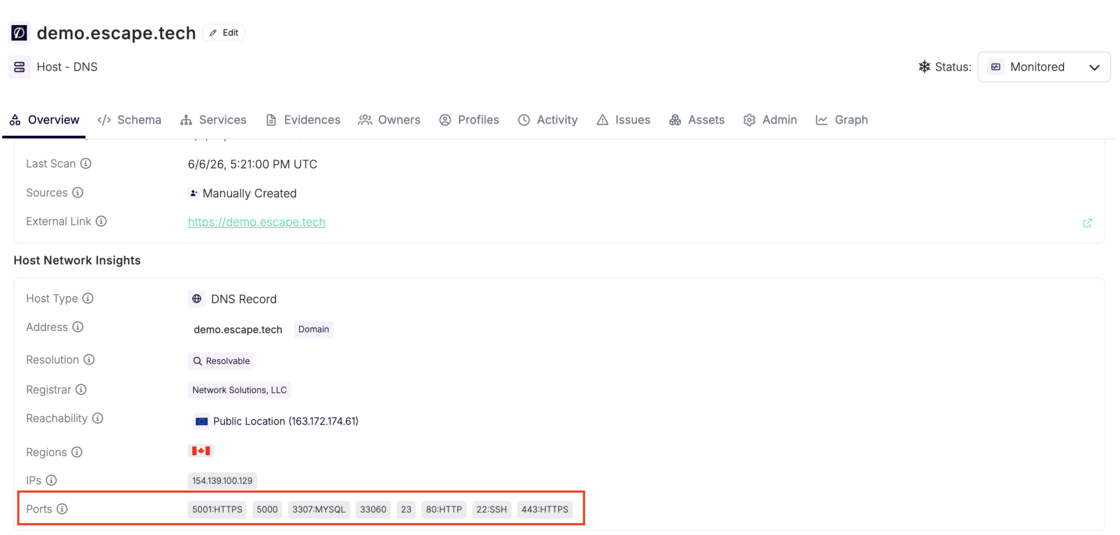 Open ports and detected protocols on a monitored DNS host.
What's new:
- Broad TCP coverage: when ASM scans a DNS, IPv4, or IPv6 host, Escape probes the default port set across web services, databases, remote access, message brokers, and more. Set
port_scanning.portsin Global Configuration to replace that default list:
- Service fingerprinting: confirmed open ports get protocol and technology fingerprinting, then land on the host asset before downstream discovery runs.
- Discovery pipeline: open ports feed service discovery that maps REST, GraphQL, gRPC, SOAP, web apps, and OpenAPI candidates.
- Insecure protocol detection: cleartext services like FTP and Telnet raise
insecure_technology_usedfindings with remediation guidance. - Default credential checks: active probes against detected services (FTP, Telnet, MongoDB, Redis, and others) raise
default_credentials_usedwhen authentication succeeds. - Exposure guardrails: the
unusually_high_open_portscheck flags hosts that expose more open ports than your threshold through a public Escape proxy (default: 5).
Network Scanning documentation →
Questions?
Have a question? Reach out on your dedicated support channel, or email us at support@escape.tech.