Skip to content

2025

#72 · New "Delete" Endpoint for Applications in Public API

We’ve just added a delete endpoint for applications in our public API, making it easier to manage your resources programmatically.

Key Highlights

  • Endpoint: https://public.escape.tech/v1/#tag/applications/DELETE/application/{id}
  • Functionality: Remove applications programmatically for greater control and flexibility.

#71 · Frontend SPAs Now Available in Inventory

We’re excited to introduce Frontend SPAs (Single Page Applications) as part of your Application Inventory. This enhancement allows you to track and manage your SPAs with the same level of detail and efficiency you expect from our platform.

If you have access to the DAST feature, this functionality is already available to you. For users without DAST access, reach out to your account manager to enable this feature.

How to access your Frontend SPAs inventory:

  1. Go to the Inventory section.
  2. Navigate to All Services.
  3. Go to Frontends tab:

Screenshot 2025-01-20 at 10.55.35.png

By providing better visibility into your frontend applications, we aim to enhance your ability to manage, secure, and monitor all your modern applications effectively!

#70 · Faster Page Load Times

A quick heads up: We’ve made significant optimizations to our platform, resulting in faster page load times across the board. Your workflows will now be more seamless, with less time spent waiting and more time focused on what matters most.

#69 · Automated API Schema Generation for C#

Automated API Schema Generation is now possible from C#!

Building APIs in C#? No need to worry about maintaining your API specifications anymore. You can effortlessly generate API specifications directly from your C# code.

Escape scans your codebase, analyzes your API's code, and generates precise specifications, saving you time and effort while ensuring accuracy.

To learn more about how automated API specification generation works, visit our documentation: Code to Cloud: API Schema Generation.

We look forward to seeing how this helps streamline your API development and security workflows. As always, your feedback is welcome!

#68 · Escape + Wiz: Unified Security for Modern, Cloud-Native Applications

We’re excited to announce our new integration with Wiz, bringing together Escape’s deep application-layer insights with Wiz’s unparalleled cloud security capabilities. This partnership empowers security teams with:

  • Practical Code-to-Cloud Security: Large organizations often struggle to bridge application-level exposures with cloud infrastructure insights. Now, they can see both in one place, track them back to the same responsible teams, and reduce friction between dev, ops, and security.
  • Immediate Assignment: The moment Escape flags a security issue, you know exactly which team needs to address it. No more guesswork, no more rummaging through outdated confluence pages or domain registries.
  • Acceleration of Remediation: When ownership data is at your fingertips, the gap between detection and remediation shrinks from weeks or months to days or even hours. It’s not just about finding vulnerabilities; it’s about fixing them fast. This empowers you to integrate security into applications early in the development lifecycle confidently.
  • Reduced Operational Overhead: Security Engineers spend less time “hunting” for who owns what. Instead, they can devote their energy to actually securing the organization. That leads to more strategic work, less administrative burden, and a meaningful drop in burnout.

How it works:

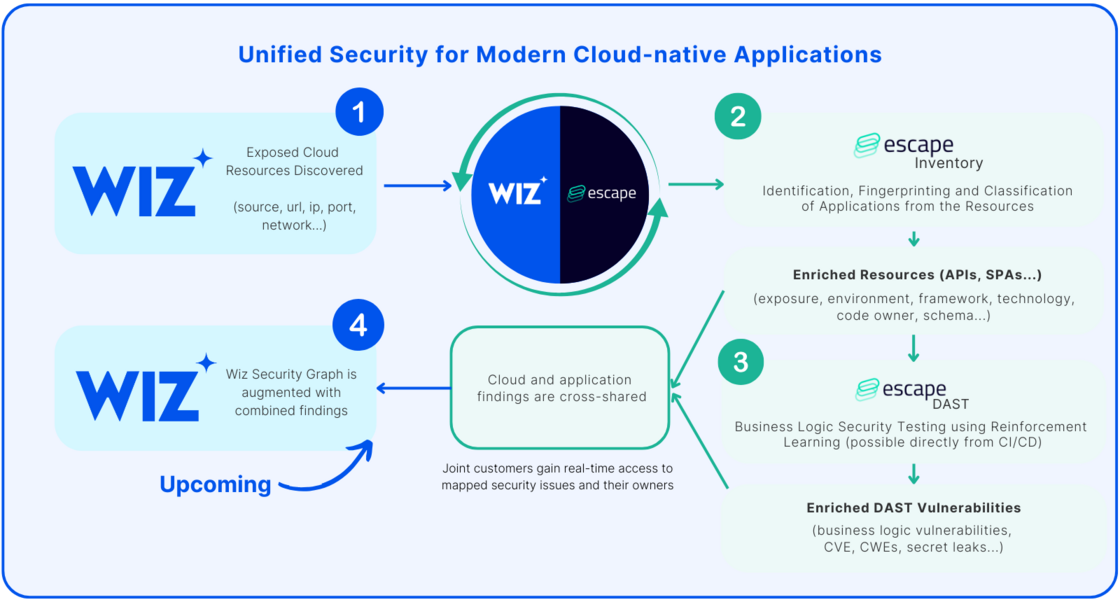
image.png

  1. Wiz External Attack Surface Management finds exposed cloud resources and hands them over to Escape.
  2. Escape Inventory then identifies, fingerprints, and classifies these resources as specific application assets—such as APIs, Single-Page Applications (SPAs), and more.

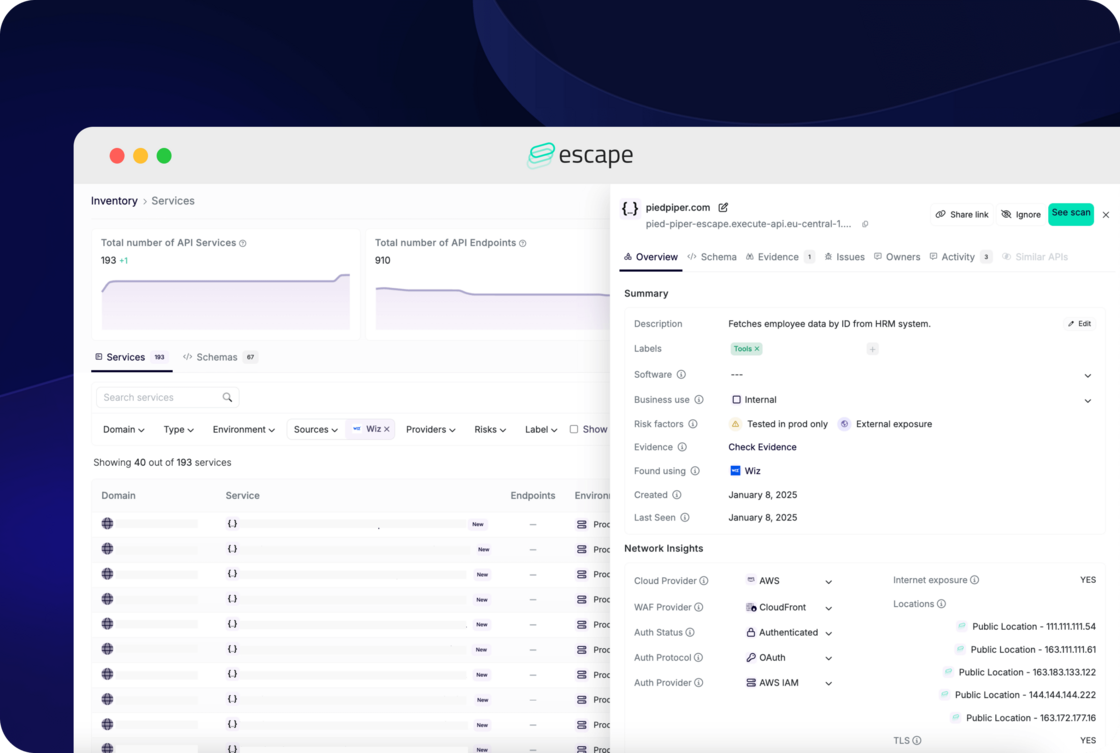
escape-interface-with-wiz.png

  1. With this enriched information, Escape DAST runs at scale on the identified applications, including APIs, without needing any network interception or agent installation.

💡 If you're a joint Wiz and Escape customer, you can find step-by-step instructions on how to set up Wiz integration in the Escape's official documentation. Feel free to set it up now 😉

#67 · Improved Postman Collections Support

We’ve drastically enhanced our support for Postman Collections!

Our DAST scanner now parses collections more effectively, even when they’re poorly implemented—a common issue we’ve addressed head-on. Postman Collections, by design, provide examples of API requests, and with this improvement, we ensure better accuracy and coverage for your scans, no matter the quality of the collection.

#66 · Enhanced Support for OpenAPI Specs with cURL Examples

We’re excited to announce that our DAST scanner now supports OpenAPI specifications with cURL traffic examples, including those built using extensions like Redocly. This enhancement leverages real-world examples to boost scan quality and simplify your security testing process.

What's new

OpenAPI specifications can include cURL traffic examples to demonstrate specific API requests and responses. With this update, our DAST scanner can now parse OpenAPI specs with embedded cURL examples and use them to initiate scans.

We’ve also added support for Redocly, a tool that simplifies creating OpenAPI specs enriched with cURL examples, ensuring seamless integration into your workflows.

How It Works

  1. Prepare Your OpenAPI Spec:

Use tools like Redocly to build your OpenAPI specification, embedding cURL examples to document API behavior and parameters.

  1. Upload the Spec to the DAST Scanner:

  2. Go to Security Scan and click New Application

  3. Select REST API
  4. Upload your OpenAPI spec with cURL examples

3.Run the Scan:

The scanner will parse the OpenAPI spec, leverage the cURL examples for precise API interactions, and begin testing for vulnerabilities!

#65 · Burp Suite Exports Support for REST API Scanning in DAST

We’re excited to introduce another great capability for our DAST scanner: support for Burp Suite exports as REST API schemas. This enhancement streamlines your workflow by allowing you to leverage Burp Suite traffic captures to define your API schema, ensuring more comprehensive and efficient vulnerability scans.

What are Burp Suite Exports, and why use them?

Burp Suite is a widely-used tool for security testing, and its exports provide detailed records of HTTP traffic captured during web application testing. With this update, our DAST scanner can now ingest Burp Suite exports to interpret and scan REST APIs.

How it works

  1. Capture Traffic with Burp Suite

Use Burp Suite to intercept and record API traffic during your testing session. Export the captured data in the supported format.

  1. Upload to DAST Scanner Configure your scan in a few easy steps:

  2. Go to Security Scan and click New Application.

  3. Select REST API.
  4. Configure your Network and Authentication settings (if required).
  5. Upload the Burp Suite export file to define your API schema.

3.Initiate the Scan

The scanner parses the Burp Suite export, identifying endpoints, HTTP methods, and other critical details. Start the scan to analyze your API for vulnerabilities.

We hope this new feature helps streamline your security testing workflow. And of course, we wish you not too many criticals found 😉

#64 · HAR File Support for REST API Scanning in DAST

We're excited to announce a new capability for our DAST scanner: support for HAR files as REST API schemas. This enhancement offers you greater flexibility when scanning your APIs for vulnerabilities, especially since generating a HAR file can be faster and easier than creating or maintaining a Swagger/OpenAPI specification.

What are HAR files?

HTTP Archive (HAR) files are JSON-formatted files that capture network activity, including requests and responses, between a client and a server during a browsing session. With this update, our DAST scanner can now ingest HAR files to interpret and scan REST APIs, simplifying the scanning process and expanding its capabilities.

What are the benefits?

HAR files capture actual API interactions, including dynamically generated requests and responses during runtime. This is particularly useful in scenarios such as:

  • Dynamic or undocumented APIs: When API behavior depends on real-time parameters or session states that aren’t fully documented in Swagger or OpenAPI.
  • Legacy or incomplete documentation: For APIs lacking comprehensive or up-to-date schemas. Additionally, HAR files reflect real-world usage, uncovering hidden or undocumented endpoints and specific request variations that static schemas might miss. This leads to more thorough scans and improved vulnerability detection.

How it Works?

  1. Generate a HAR file by capturing the API traffic using tools like browser developer tools or network monitoring software.
  2. Upload the HAR file to the DAST scanner via the API schema configuration interface:

  3. Go to Security scan and click on New Application

  4. Select REST API
  5. Configure your Network and Authentication (if needed)
  6. Upload the HAR file to define your API schema
3.Initiate the scan
Once uploaded, the scanner parses the HAR file, automatically identifying API endpoints, HTTP methods, parameters, and other details. Start the scan and let the DAST scanner analyze your API for vulnerabilities.

Start scanning smarter, not harder 😉