Skip to content

2025

#102 · Improved WIZ Integration

We’ve enhanced our Wiz integration to provide you with better visibility into exposed resources, making it easier to identify security risks in your environment.

We now extract more detailed information from WIZ, covering not only directly exposed resources but also those that may be exposed indirectly through services, machines, and other entry points.

What's new

Improved Visibility into Exposed Resources

We now extract more detailed information from WIZ, covering not only directly exposed resources but also those that may be exposed indirectly through services, machines, and other entry points.

Full Exposure Path Analysis

Escape also extracts information from the computed reachability path, which uncovers how resources might be exposed through services, ingresses, and other objects. This includes mappings such as Nginx ingress, Kubernetes services, and virtual machines, helping you spot indirect exposure points.

And then as before:

  • Escape has access to the code repositories and matches those Resources with code repositories (including owners)
  • Escape runs DAST at scale on those resources
  • All the vulnerabilities, exposed secrets, findings, and remediations are fed back into the Wiz using DAST & ASM Vulnerability Findings enrichment and Escape's workflows, merging both infrastructure and application-level insights into a single, unified view.

This update makes our WIZ integration more powerful, helping you spot and address exposure risks with greater confidence.
#101 · Sensitive Data Detection in Front-End Applications

We’re excited to roll out a new feature that helps you catch sensitive data leaks in your front-end applications. Now, it’s easier than ever to find and manage exposed secrets across all of your apps.

What’s New?

Detect Sensitive Data Leaks in Front-End Apps

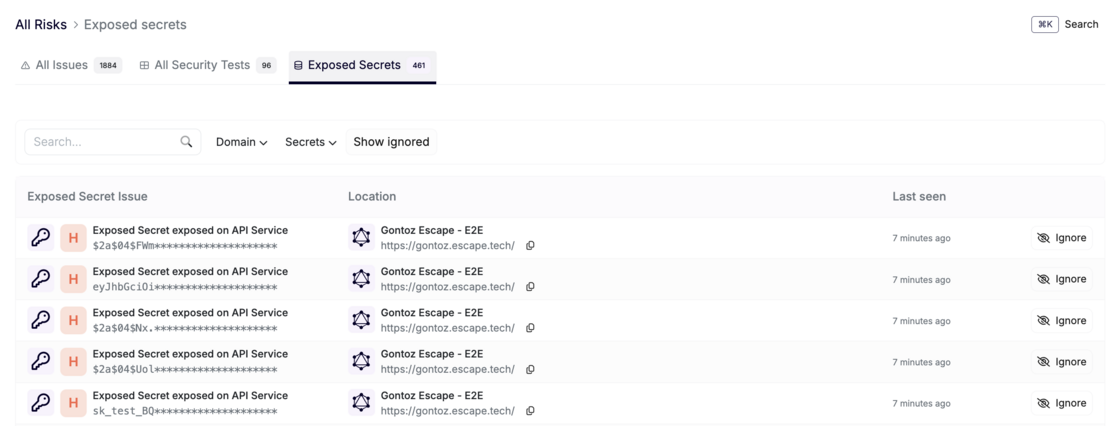
We’ve added the ability to scan front-end applications for any sensitive data leaks. This means you can now identify if secrets or credentials are unintentionally exposed in your apps.

View Exposed Secrets in One Place

All detected leaks will appear in the Exposed Secrets table, which you can find under the All Risks menu.

Screenshot 2025-04-10 at 11.47.20.png

Please note that this menu does not contain Personally Identifiable Information (PII) data. For a detailed view of exposed secrets and PII specific to each app, head to the Sensitive Data tab in the scanned application. This provides a more granular look at what’s been exposed and where.

With this update, we aim to help you catch sensitive data leaks early, so they don’t turn into bigger issues down the road!

#100 · We've Expanded Our SQL Injection Detection to More Frameworks!

We’re rolling out an exciting update: our platform now detects SQL injection vulnerabilities in more frameworks!

You’ll now get extra coverage for:

  • Propel
  • Illuminate
  • Doctrine
  • SQLAlchemy
  • MariaDB

This update makes it easier than ever to secure your apps across a broader range of technologies.

#99 · Enhanced Alert Justification with Screenshots and Code Snippets

We’re excited to announce a major enhancement to the justification process for detected vulnerabilities in our front-end DAST scanner!

Until now, you could only rely on HTTP requests to justify alerts — for example, looking at an HTTP request to demonstrate a vulnerability like an SQL injection. While this approach was effective, it had its limitations in conveying the full context of certain vulnerabilities.

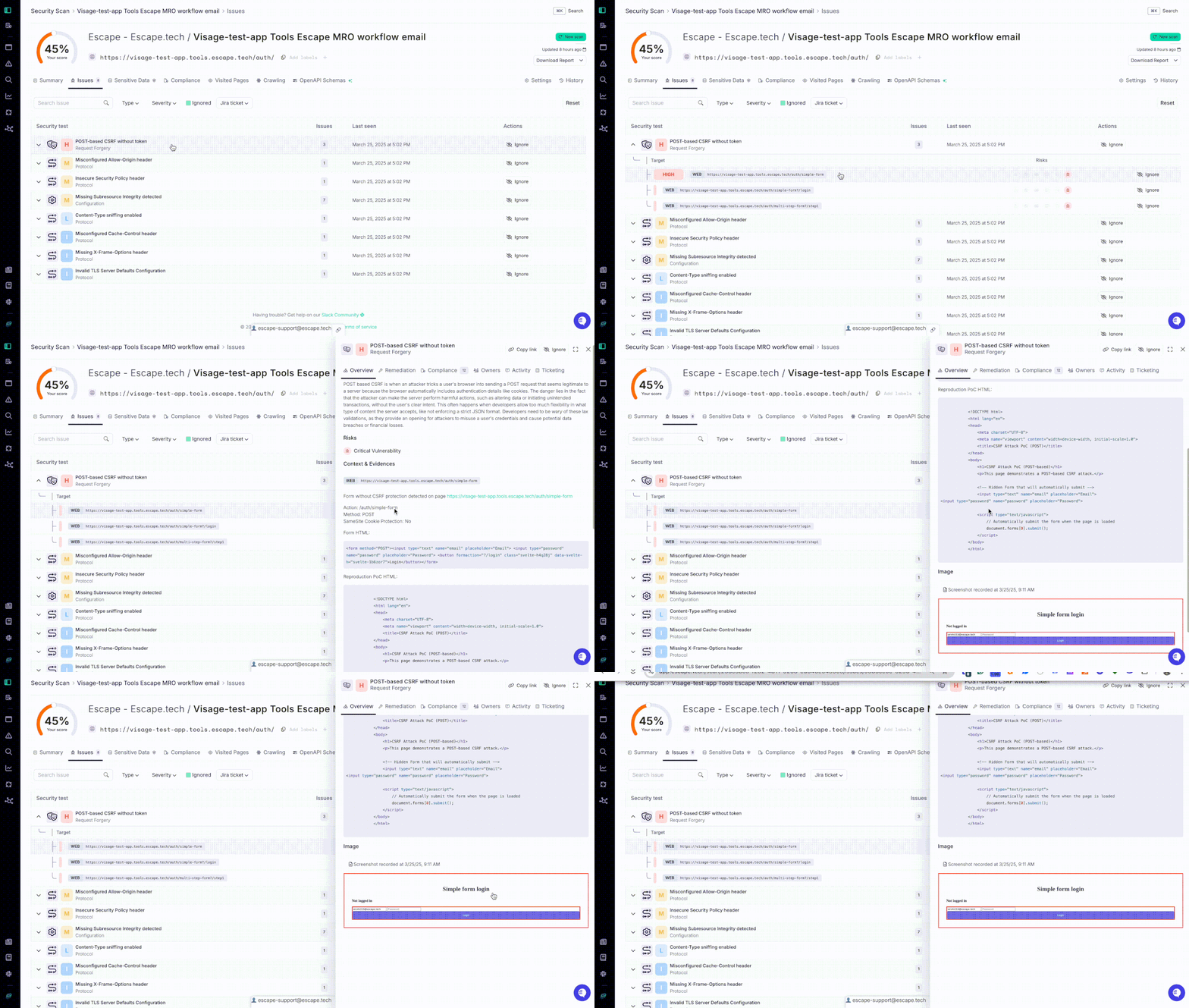
Now, you can also include screenshots and code snippets to better justify alerts!

Recording-new-reprodu (1).gif

This new capability adds a much-needed layer of clarity, providing additional context and evidence that makes understanding and addressing vulnerabilities much easier.

See it for yourself:

Key Benefits:

  • Better Context: With screenshots and code snippets, you can now offer clearer evidence and documentation, making vulnerabilities easier to analyze and resolve.
  • Major Improvement for Frontend DAST: Frontend vulnerabilities often involve complex UIs and dynamic behaviors, and this enhancement simplifies the validation and remediation process.

We hope that this update will help you resolve vulnerabilities more effectively and efficiently, providing better visibility and documentation throughout the remediation process.

#98 · Enhanced Remediation Framework Selection for Frontend Scanner

We’ve enhanced the remediation process in our front-end scanner to help your teams close critical issues faster.

Previously, the framework for generating remediation code snippets was set by default. Now, users have the ability to select their preferred API framework when addressing API-related vulnerabilities, providing more flexibility and control over the remediation of issues.

This update gives you the flexibility to choose the framework that works best for you, making it easier and faster to resolve issues!

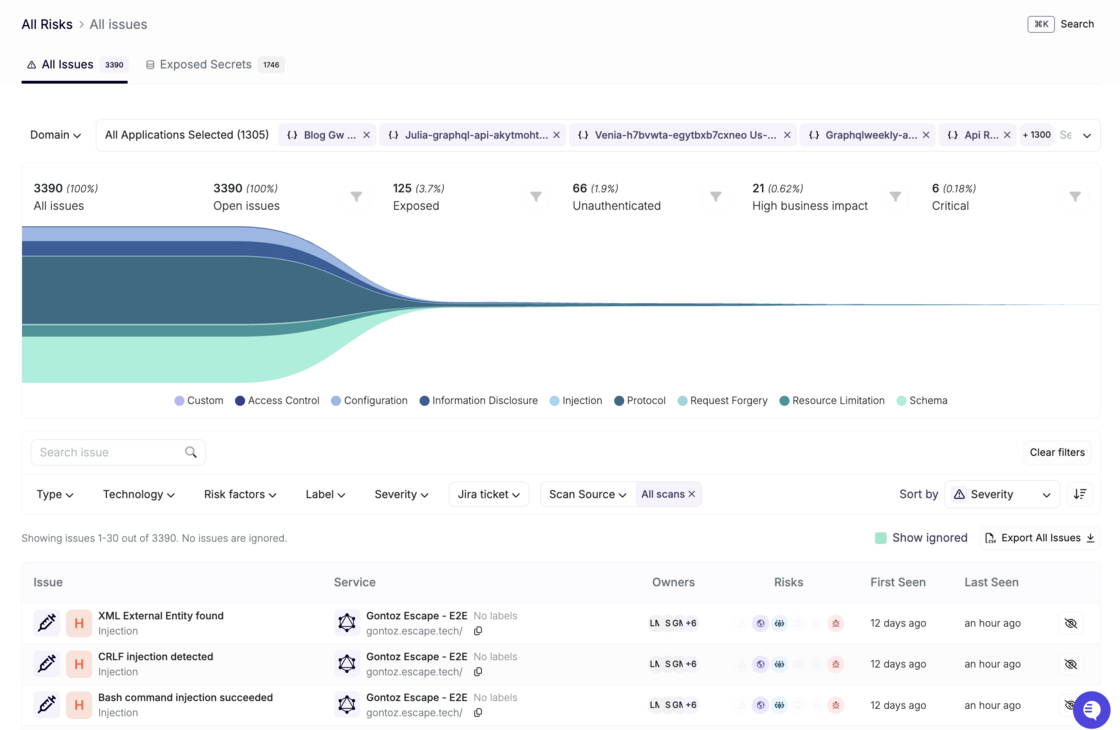
#97 · New Design for All Risks -> Issues Table

We’ve made several improvements to enhance the user experience with the All Risks -> Issues table. Here’s a breakdown of the new features:

  • Enhanced Application Selection: Users can now select applications either by label or individually, providing more flexibility in managing and viewing the issues per application type important for your business.
  • Jira Ticket Filter: We’ve added a filter for Jira tickets, allowing you to quickly and easily search and categorize issues linked to specific Jira tasks.
  • Sorting by Severity: The issues are sorted by default by severity, ensuring that the most critical issues are always prioritized and easily accessible.
  • Updated Funnel Stages: The stages for “High Business Impact” and “Critical” have been inverted in the funnel. Critical is now the most important stage, highlighting the highest priority issues.

Here is how your Issues Table will look now:

Screenshot 2025-03-25 at 16.49.36.png

We hope these updates help make navigating through issues faster and more efficient!

#94 · Long Scan Stability Improvement

Stability for extended scans has been significantly improved: We've resolved an issue caused by a Python bug that randomly interrupted and killed long scans. We’re confident this fix will ensure a smoother experience with Escape!

#93 · Authentication Improvements in DAST Scanning

We know how frustrating the authentication process in DAST scans can be, which is why we've made several key updates to streamline it! Our goal is to provide you with better flexibility and efficiency for your security testing needs.

Here's the full list:

1. Support for complex authentication scenarios

We now support more complex authentication processes through the new Browser Actions Authentication Preset. This is especially useful for scenarios where traditional authentication methods don’t work well. With Browser Actions, you can customize your authentication flow using browser actions rather than relying on Escape's AI agent. This is ideal for form-based authentication where inputs are provided directly by users.

The Browser Actions preset uses Playwright for browser automation actions, such as filling in forms and clicking buttons. By default, it extracts cookies, localStorage, and sessionStorage from the browser, injecting them into the scan engine for frontend scans. For API scans, only cookies are injected.

Key benefits:

  • Customize authentication flows using direct browser actions.
  • Automatically extract and inject cookies and storage (for frontend scans).
  • Configure extractions and injections for specific storage needs (e.g., local/session storage).

For detailed documentation and some examples of how you can set it up, visit: Browser Actions Authentication Preset.

2. Single Page Mode for Enterprise Applications

We’ve introduced a new Single Page Mode to handle use cases where enterprise applications allow only one user to be logged in at a time. This feature ensures that authentication is managed seamlessly in environments with strict session controls, eliminating the need for additional configurations or manual intervention. Once authenticated, the system will maintain that connection throughout the scan.

3. Automatic Reauthentication When the Tab Is Closed

For applications that automatically log users out when the tab is closed, our system now ensures that reauthentication is handled automatically. There's no need to reconfigure your DAST scan setup or manually log in again—everything is managed in the background, allowing for a smooth and uninterrupted scanning process.

4. Handling Applications with Single Tab Login Restrictions

In cases where applications do not allow multiple tabs to be logged in simultaneously, our updated DAST scanning process automatically manages reauthentication. This removes the hassle of managing tab states and ensures that your scan continues without the need to manually re-authenticate across multiple tabs.

The improvements we've made to our DAST scanning authentication process addressed the specific pain points our customers face, especially for complex or custom authentication systems! With these updates, you can now handle advanced authentication workflows, such as the one described above, without losing session continuity or compromising on scan effectiveness!