Skip to content

2025

#122 · Escape CLI – New Features with Escape Public API v3

We’re also excited to announce that the Escape CLI now fully supports all the new capabilities introduced in Public API v3. This brings enhanced functionality, making it easier for your team to interact with the platform directly from the command line.
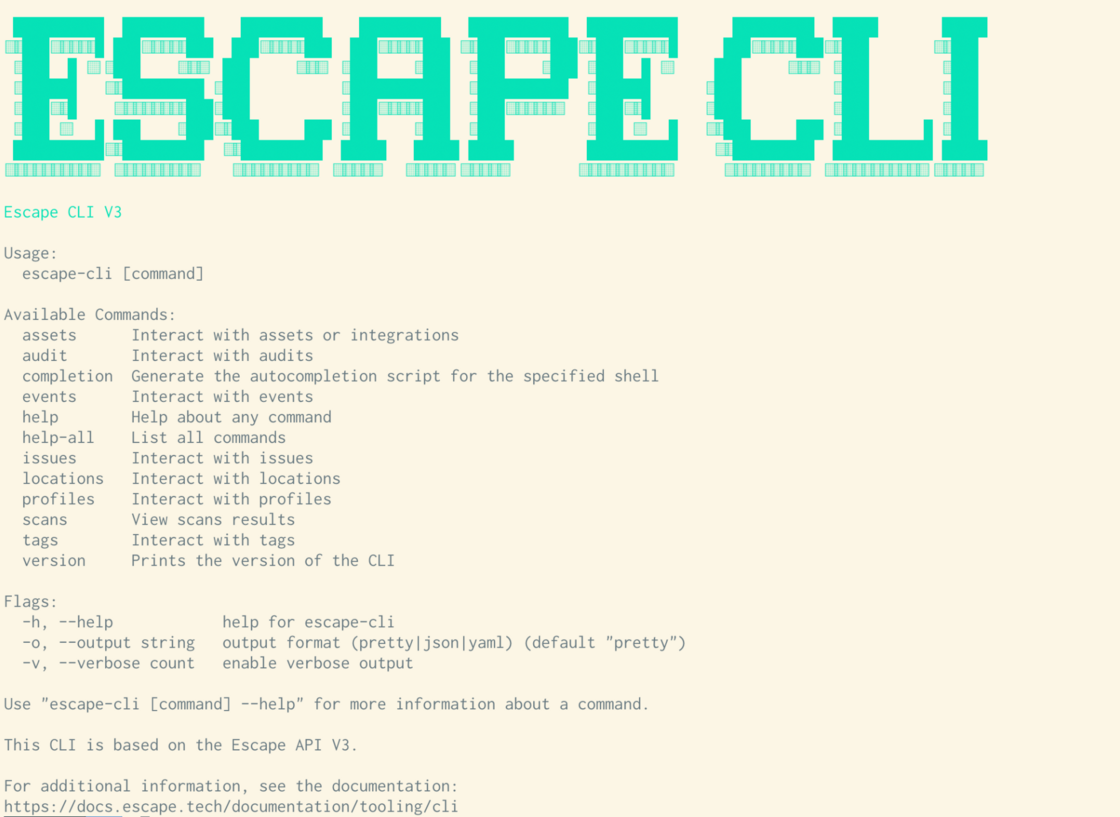
cli.png

What's New in the CLI?

  1. Full API v3 Support
    • The CLI now provides full access to all the new features in API v3, ensuring you can manage assets, profiles, issues, events, scans, and more directly from your terminal.
    • This brings a streamlined experience for users already familiar with the API, allowing for a unified interaction between the CLI and the API.
  2. Autocompletion Support
    • With the new CLI version, you can now generate autocompletion scripts for your shell (Bash, Zsh, Fish, etc.).
    • This saves time and reduces errors by providing suggestions as you type, improving productivity and helping your team navigate commands more efficiently.
  3. Colour-Coded Display
    • For better visibility and organization, the CLI now supports color coding of various lists (assets, profiles..) when displayed in the terminal.
    • This makes it easier to quickly differentiate between asset and scan types, statuses, and categories, enhancing the overall user experience, especially when managing large datasets.
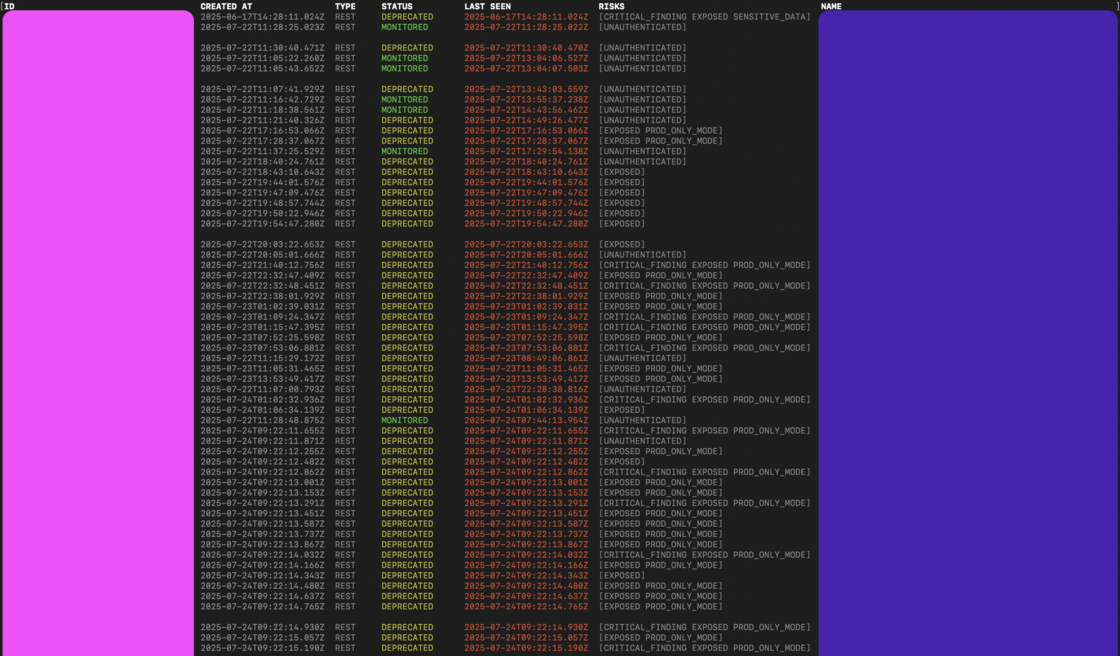
color-coded-cli.png

These updates will improve your team’s workflow, making the CLI more powerful and user-friendly. For more details on how to get started, check out the updated CLI documentation.
#121 · Escape Public API v3 is now live!

We are excited to announce the release of the third version of the Escape Public API. This update reflects our current platform structure, following the introduction of Attack Surface Management (ASM). v3 brings improvements to alignment with the platform’s data organization, streamlining integrations, enhancing performance, and offering more flexibility for your security team.

What’s new in v3?

With the release of this version of our Public API, we’ve focused on optimizing your workflows and interactions with Escape.

Here’s a breakdown of the most significant changes:

1. Authentication Now Supports a Dedicated API key header

  • v2: Authentication was handled via the Authorization header: Authorization: Key YOUR_API_KEY
  • v3: We now also support using a dedicated X-ESCAPE-API-KEY header in addition to the Authorization header.

2. Applications Depreciated – Replaced by Profiles

  • Asset Management: You can now list, search, and manage assets across your organization.
  • Asset Details: Easily retrieve and update asset information by ID, including description, framework, owners, status, and tags.
  • Asset Creation: Create new assets across multiple types (DNS, IPv4, IPv6, GraphQL, REST, gRPC, Web Apps, Schemas, and more) and integrate with popular platforms (Wiz, Postman, Kubernetes, GitHub, GitLab, and more).
  • Asset Deletion: Remove assets by ID when no longer needed.

3. Profiles

  • Profile Management: Now you can list, search, get, and create different scan profiles for your organization. This new feature allows you to better organize and manage your scanning configurations. Check out the API docs for full details.

4. Issues

  • Issue Tracking: List, search, and update issues related to your organization.
  • Issue Details: Retrieve specific issue information by ID, and track activities related to each issue.

5. Events

  • Event Management: Easily list, search, and retrieve detailed information on events within your organization, providing better visibility and control.

6. Scans

  • Scan Management: Trigger, track, and access results for your scans.
  • Scan Control: List scans, start new ones, retrieve detailed scan information, cancel scans, or ignore specific scan runs as needed.

7. Tags

  • Tagging: List and search tags across your organization, and create new tags to better categorize and manage your assets.

Transitioning from v2 to v3

To ensure a smooth migration from v2 to v3, please follow these steps:

  1. Review Endpoint Changes:

    The structure of some endpoints has been adjusted in v3. Be sure to consult the v3 documentation to familiarize yourself with these changes.

  2. Update Your API Calls:

    Modify any existing API calls that may reference v2-specific endpoints or parameters. The new v3 structure is streamlined for better performance and flexibility.

  3. Thoroughly Test Integrations:

    Given the changes to endpoints and data structures, we highly recommend testing all integrations to ensure everything operates smoothly with the new API.

For detailed information on the new features and changes check out the following links:

If you have any questions or need further assistance, don’t hesitate to reach out to our team. We’re here to help!

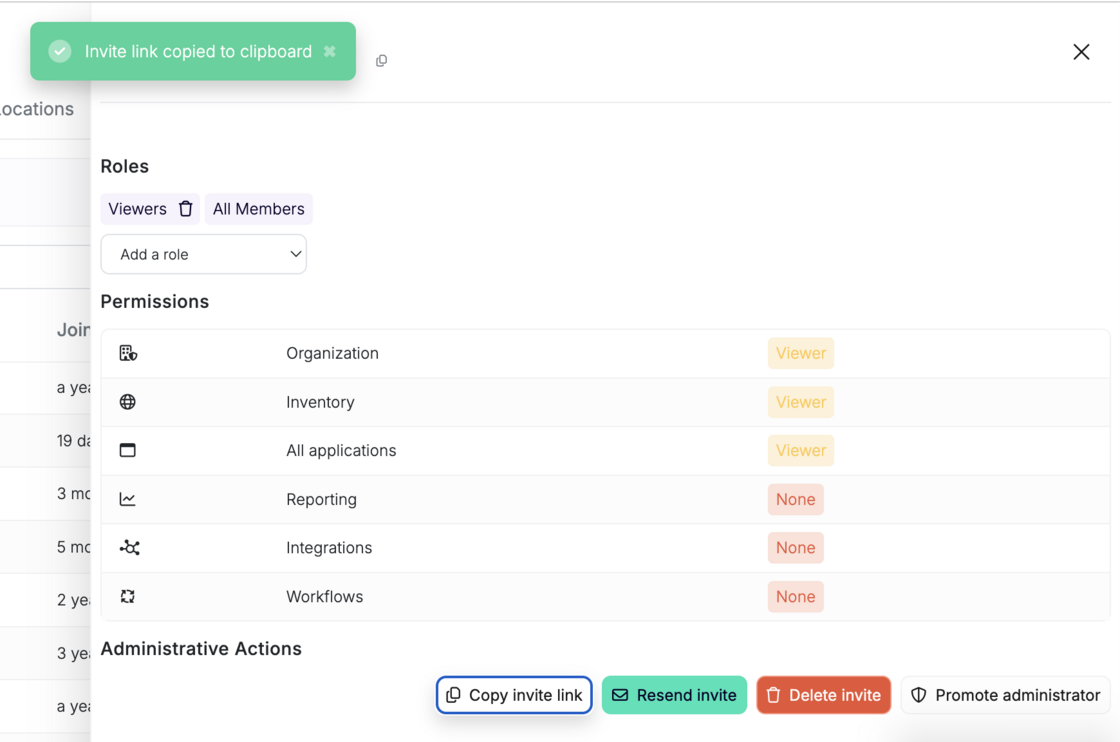
Admins can now invite teammates to their organization using a dedicated invite link, making onboarding faster and more flexible.

How it works:

  1. Go to Team Settings available at https://app.escape.tech/organization/team/
  2. Enter the email of your new team member and click “Invite”
  3. Once added, click the member's name in the team list
  4. Click “Copy Invite Link” from their profile

copy-invite-link-escape.png

Share the link directly—your teammate can join the organization with one click.

This makes it easier to onboard team members, especially in async or distributed environments.

#119 · Bulk Edit Assets, Issues and Profiles

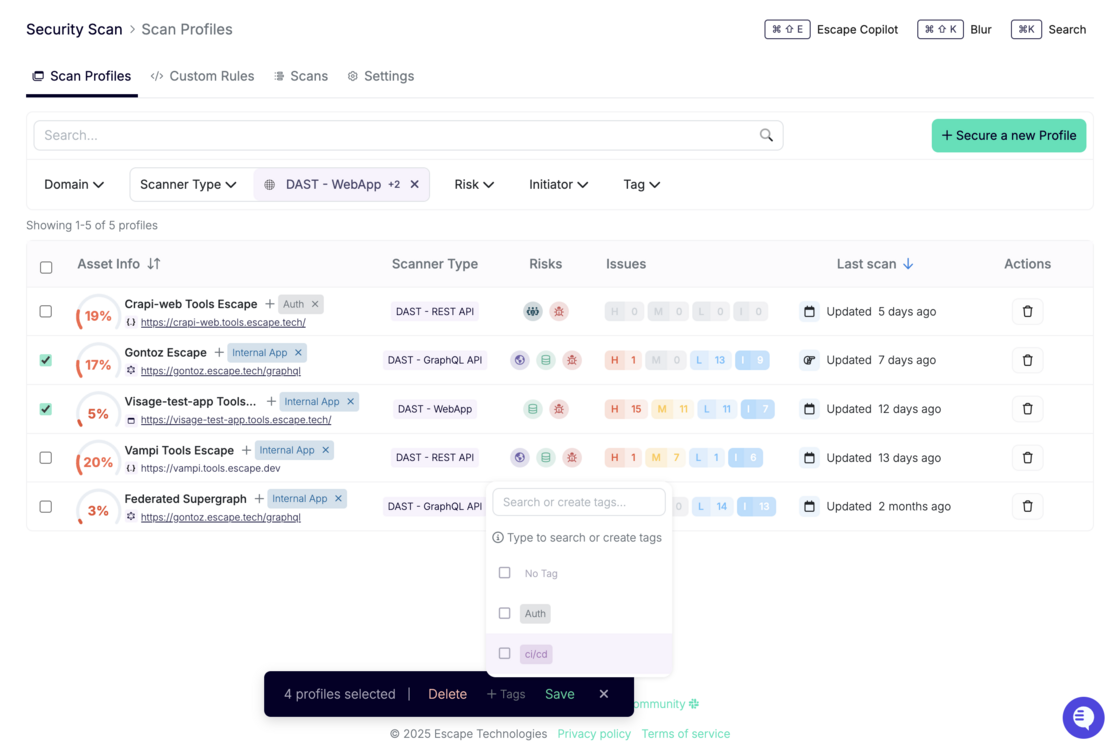
You can now perform bulk actions across assets, issues, and scan profiles directly from their respective pages. Apply tags, update statuses, and keep your inventory organized without repetitive manual work - built specifically for teams managing complex or high-volume environments.

What’s new

1.All Assets page:
  • Bulk assign tags: Organize assets more efficiently by applying relevant tags to multiple items at once.

  • Bulk update status: Quickly categorize assets as Monitored, False Positive, Out of Scope, or Deprecated with a single action.

    ![Screenshot 2025-07-30 at 14.02.04.png](320466-bulk-edit-assets-issues-and-profiles/03-185-8be8f491d8c260b4276d8e2843cb1c9ec2298f56.png)
    
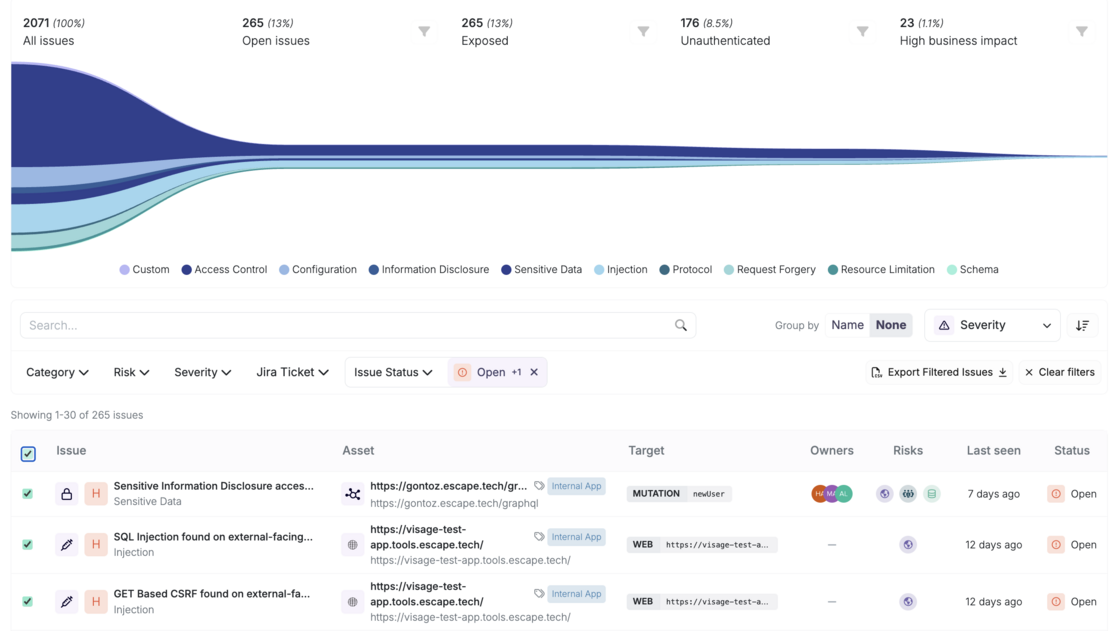
2.All Issues page (when grouped by None):

Easily update the status of multiple issues at once—set them as Open, Need Manual Review, Resolved, False Positive, or Ignored with a single click.

Screenshot 2025-07-30 at 13.20.45.png

3.Scan Profiles page:
  • Bulk assign tags: Organize assets more efficiently by applying relevant tags to multiple items at once.

new.png

These improvements are designed to streamline your workflow, especially in large-scale environments—so you can maintain a clean, structured inventory without the repetitive manual work.

It’s easy for our team to add more bulk actions if your AppSec team requires it. Got any feedback? Reach out to your dedicated Escape contact!

#118 · New Release: Frontend Custom Rules for Escape DAST

We’re excited to announce that Custom Rules are now available for Escape Frontend DAST.

With this release, you can go beyond Escape’s extensive built-in security tests and, in addition to handling complex authentication flows, define your own detection logic tailored to your applications and business requirements.

What this means for you

  • Adapt to your context: Build rules for specific workflows, sensitive pages, or custom attack scenarios.
  • Scale your governance: Apply your own security policies across multiple applications with a consistent, automated approach.
  • Leverage a simple, powerful language: Define rules in YAML while benefiting from Escape’s inference engine to detect issues dynamically as you navigate the application.

How it works

Custom Rules for Frontend DAST use the same YAML-based format as the Authentication action presets you may already be using. That means there’s no new syntax to learn and you can start defining rules right away.

Each rule is built from three main components:

  • Detectors: Specify the conditions that should trigger an alert, such as matching page content, evaluating JavaScript assertions, or other custom signals.
  • Alerts: Configure the severity, context, and category of the findings when a rule is triggered.
  • Seeders: Optionally guide the scan by pre-seeding it with navigation steps or requests.

You can now create rules for scenarios as simple as detecting a successful login message or as advanced as validating custom security controls in your frontend logic.

Documentation

Full documentation, including examples and YAML specifications, is available here:

Frontend Custom Rules Documentation

With Frontend Custom Rules, you now have the flexibility to extend Escape DAST to cover exactly what matters most to your applications and users.

#117 · AI-Powered Text CAPTCHA Solving is Now Supported

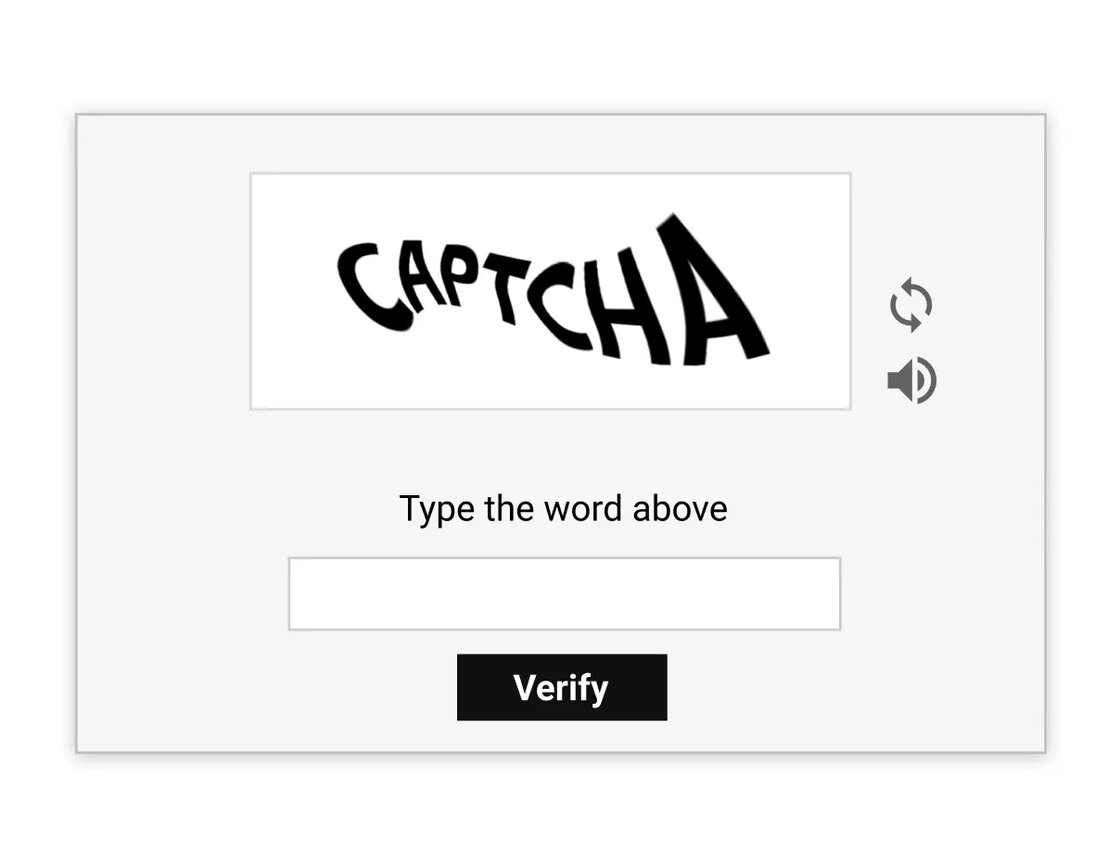
We are excited to announce that you can now automate text-based CAPTCHA solving for your web app testing with Escape!

Text CAPTCHAs with combinations of letters and numbers are widely used to prevent automated bots from accessing web applications.

text-based-captcha-example.webp

However, these CAPTCHAs often block automated security scanners from authenticating and testing protected areas of your application, requiring manual intervention to proceed with security testing.

With the new support for AI-powered text-based CAPTCHA solving, Escape’s DAST scanner is now fully equipped to handle these scenarios. You can securely automate testing for web applications protected by text-based CAPTCHAs without manual intervention during the scanning process.

Getting started is easy! Just configure the SolveCaptchaAction object variables under Browser Actions authentication preset or in post_login_actions in the BrowserAgent. Here's an example setup:

presets:
-   type: browser_actions
    login_url: https://example.com/login
    logged_in_detector_timeout: 10
    stealth_mode: false
    users:
    -   username: frontend-user@example.com
        actions:
        -   action: fill
            auto_submit: false
            locator: input[name="username"]
            value: user@escape.tech
        -   action: solve_captcha
            auto_submit: true
            locator: input[name="captcha-input-box"]

Learn how to configure this preset for your needs in our documentation:

#116 · MFA using Time-Based One-Time Passwords (TOTP) is now fully supported in our Web App Scanner

We are excited to announce that Multi-Factor Authentication (MFA) using Time-Based One-Time Passwords (TOTP) is now fully supported in our Web App Scanner!

The use of multi-factor authentication (MFA) significantly enhances identity security by introducing an additional layer of verification beyond traditional login credentials. While this strengthens protection against unauthorized access, it can present a challenge for most of the DAST tools since they are typically designed for unattended execution, where manual interaction – such as approving a sign-in request or entering a time-sensitive code – can disrupt the automation workflow.

With the new support for TOTP-based MFA, Escape’s DAST scanner is now fully equipped to handle these scenarios. You can securely test web applications protected by MFA without needing manual intervention during the scanning process. This means you can automate the security testing of applications that require MFA, ensuring comprehensive coverage while maintaining a streamlined workflow.

Getting started is easy! Just use the Browser Agent authentication preset. Here's an example setup:

presets:
-   type: browser_agent
    login_url: https://auth.example.com/login
    users:
    -   username: frontend-user-with-totp@example.com
        password: pass
        post_login_actions:
        -   action: fill_totp
            auto_submit: true
            locator: input[id="totp-input"]
            secret: '123456'

Learn how to configure this preset for your needs in our documentation!

#115 · Documentation Revamp – Built with Your Feedback

Over the past few weeks, we’ve taken a close look at how users navigate our Public Documentation — and thanks to insightful input of some of the customers and the features shipped since the beginning of the year, we’ve rolled out a major update.

What’s new:

  1. Clearer structure for Escape DAST capabilities

    The DAST section is now split into two distinct areas, so you can go straight to what matters to you: Frontend DAST and API DAST.

Each comes with its own set of detailed pages to help you get up and running fast:

Frontend DAST:

API DAST:

This update is all about reducing friction and helping teams to get value quickly. We’ll keep refining our documentation gradually, so keep the feedback coming!

#114 · Meet Escape Copilot: Automate App and Scan Management via MCP

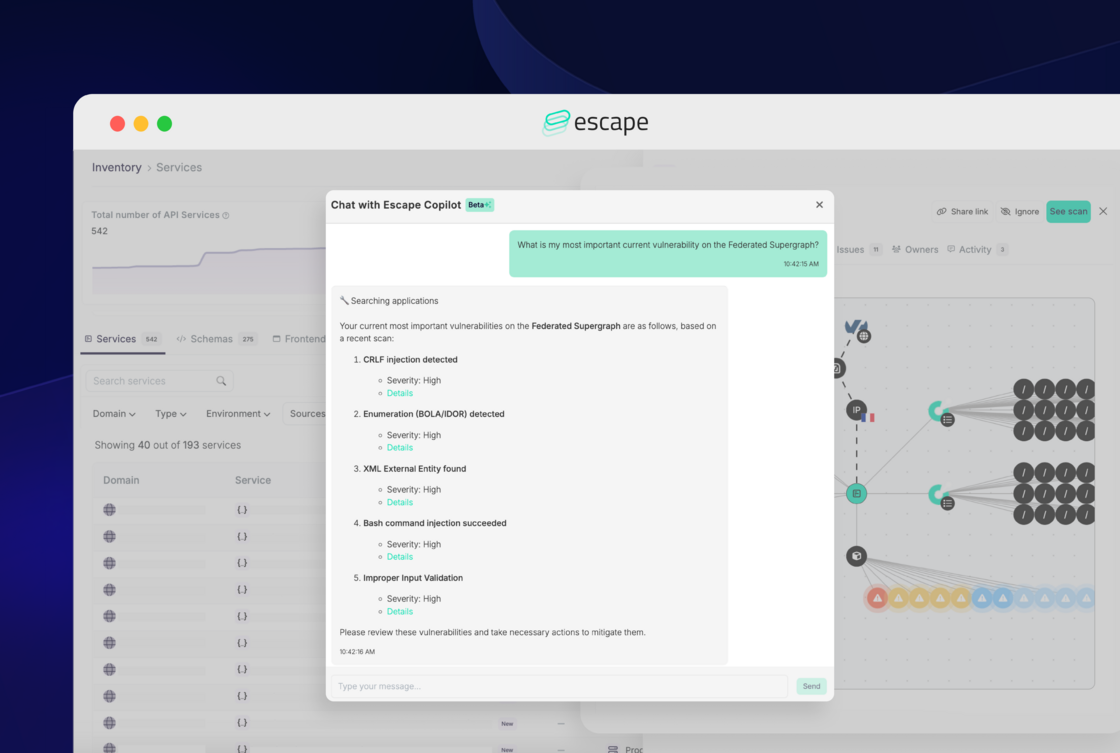
We’re introducing Escape Copilot (in Beta), a new AI-powered assistant designed to help your security team work more efficiently with the Escape platform.

Copilot-most-important-vuln.png

Powered by the Model Context Protocol (MCP) on the Escape Public API, Copilot understands your unique security setup and helps you get more done in less time by simplifying everyday workflows like managing scans and tracking assets.

It’s especially useful if you:

  • Juggle many services or microservices
  • Run regular scans across multiple apps and environments
  • Need instant access to domain, issue, or posture information

You can learn more about Escape Copilot and read answers to the most common questions (including data privacy and model training) in our official announcement.

What can Escape Copilot do today? (Beta)

Below are the core capabilities available in the beta release:

Application Management
  • Create Applications: Define new applications by specifying essential details such as name, URL, type (e.g., GraphQL, REST, Frontend), location, and configuration.
  • Update Applications: Easily update application details, including name, location, and scheduling options.
  • List Applications: Retrieve a complete list of all applications managed within your platform.
  • Get Application Details: Obtain specific details about any application using its unique ID or name.
Scan Management
  • Start Scans: Trigger scans to identify vulnerabilities.
  • Check Scan Status: Monitor ongoing or recent scans.
  • List Scan Issues: Access detailed reports highlighting vulnerabilities and security issues detected during scans.
  • List Scan Events:Review chronological events associated with scans, providing insights into the scanning processDomain Management
Domain Management
  • Create Domains: Register new domains (FQDNs) to be monitored.
  • Delete Domains: Remove unnecessary or outdated entries.
  • List Domains: View all domains under management.
  • Get Domain Details: Retrieve detailed information about specific domains using their IDs.
Access Scan Archives
  • Get Exchange Archive URLs: Retrieve access to scan exchange archives for further investigation.

Powered by the Model Context Protocol (MCP)

Escape Copilot runs on the Model Context Protocol (MCP) using the Escape Public API. This means every interaction is tightly scoped to your organization’s actual configuration and security data — no pre-training, no external inference, no guesswork.

Copilot only responds based on what’s accessible through your scoped Escape Public API access, ensuring:

  • No external data storage
  • No training on your data
  • Context-aware, action-ready results

It follows strict cybersecurity best practices and puts user privacy first. We recommend sharing only the data necessary for effective interaction.

Try Escape Copilot today

Escape Copilot is now available in beta to all customers!

Just press Cmd + Shift + E (or Ctrl + Shift + E on Windows) to activate Copilot in-app.

Feel free to play around, and we're looking forward to your feedback!

#113 · Updated Handling of Secrets & Sensitive Data in Escape

We’re rolling out a significant evolution in how we surface exposed secrets and sensitive data - laying the groundwork for a new era of AI-powered secret detection and prioritization that will change how you protect your most critical assets.

What’s new

We’ve retired the standalone Exposed Secrets tab in All Risks and the Sensitive Data tab from individual scan reports to unify these findings as standard issues within your risk ecosystem. This shift aligns sensitive data detection with the broader risk framework, making it easier for you to:

  • Understand and prioritize secrets and sensitive data exposures in the proper business context,
  • Quickly triage and remediate through familiar workflows,
  • Leverage powerful filtering and search — by test category, risk type, asset, and more.

How to access your secrets today:

  • Re-running scans will surface new true positives and previously undetected secret combinations.
  • At the application level, visit the Issues tab and filter by Category → Sensitive Data
  • Globally, use All Risks filtered by Risk Type → Sensitive Data

What’s Next: Bringing Inventory-Based Secrets Into the Fold

Currently, secrets discovered through Inventory, Inventory Frontends, and Inventory Integrations are temporarily hidden due to an ongoing migration effort. We’re actively working to restore full visibility here, seamlessly integrating these findings into the new sensitive data experience.

This migration is foundational, enabling us to introduce powerful AI capabilities soon — dramatically improving accuracy, context-awareness, and proactive remediation.

Our new approach will be more than a UI change, we want to genially improve how you handle sensitive data detection:

  • You’ll be able to distinguish what truly matters, differentiating public vs. private data, dev vs. production environments, and sensitive personal info vs. less critical disclosures. For example, leaking personal emails with SSNs is flagged with higher severity than a few generic professional emails.
  • Access validation: You’ll see whether exposed secrets can actually grant access (e.g., AWS keys, DB credentials), reducing false positives.
  • AI-driven prioritization: Leveraging a proprietary machine learning algorithm that is not trained on customer data, Escape will adapt over time, only surfacing sensitive data alerts that pose genuine risk in relevant contexts, learning from your feedback and historical issue handling.