Skip to content

2024

#53 · New way to prioritize issues: Focusing on Escape Severity

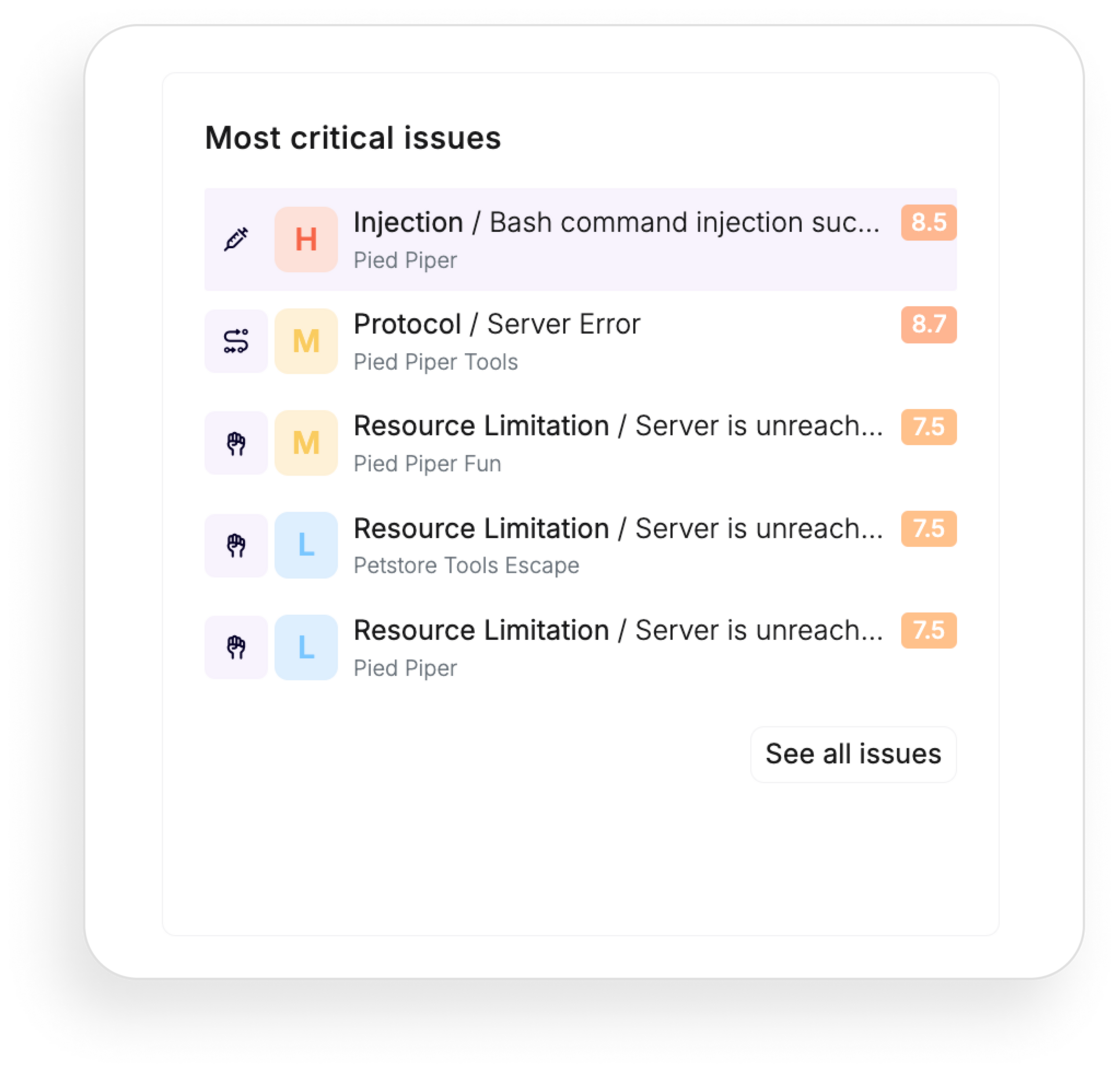
In your Reporting dashboard, you’ll notice an update in how we categorize critical issues. We’re moving away from the traditional CVSS score-based system and adopting a new approach that highlights Escape Severity, including context related to API services.

most-critical-issues-order.png

Why

We’re making this change to give you a more accurate, contextual, and actionable assessment of vulnerabilities. While CVSS scores provide a numerical risk measure, they don’t always capture the full picture. Escape Severity considers various factors such as the type of vulnerability, its exploitability, CVSS score, and other risk factors.

This comprehensive approach helps us better align issue prioritization with real-world risks and ensures you tackle the most critical issues more effectively.

Getting Started

To see this in action, go to the Reporting tab and select Overview.

You’ll now find that the most critical issues are arranged by Escape Severity!

#52 · Introducing "Software" in inventory: Differentiate self-hosted third-party services

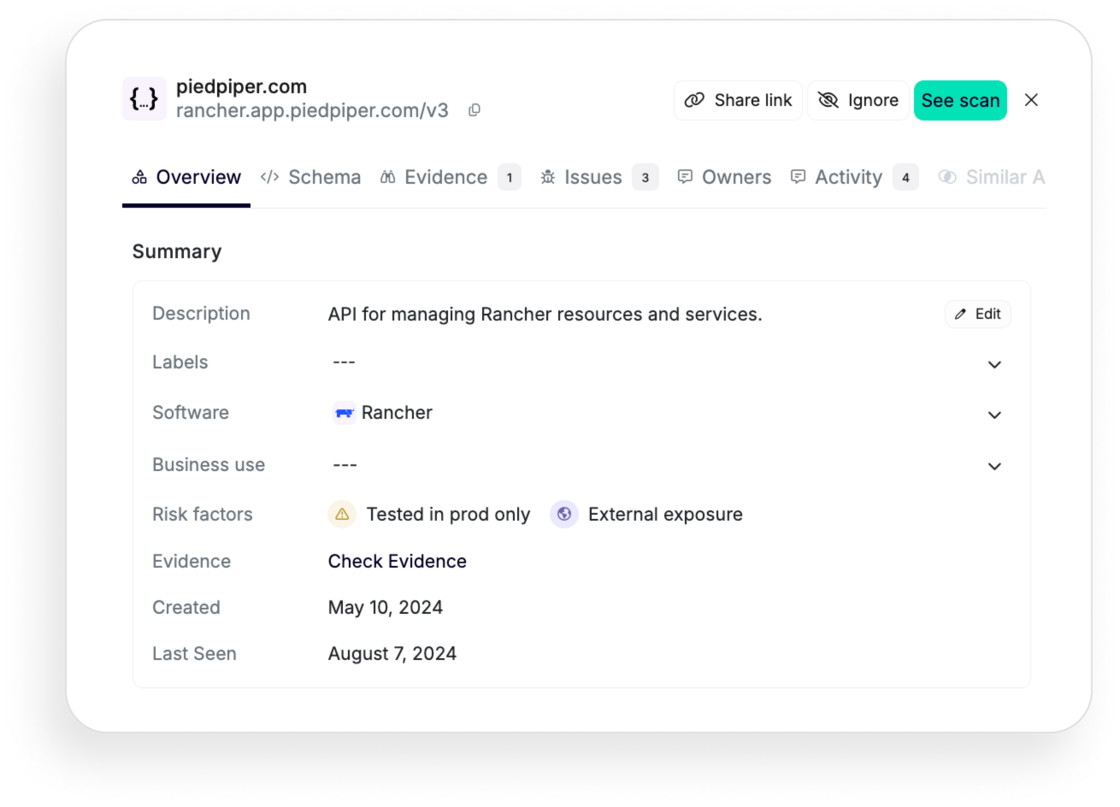
In each API service, you can now view the "Software" line, which helps you answer the question, "What are my self-hosted third-party services?" This enhancement marks the beginning of our journey towards supporting third-party services within the Escape platform.

Why

The inclusion of "Software" in our API inventory addresses a critical need: the ability to differentiate between first-party and third-party APIs. This distinction is crucial for various operational and security processes.

For instance, you can now choose to disable security scans on these self-hosted third-party services, focusing on what's most relevant to your unique setups.

Getting started

To get started, navigate to your API inventory and select a particular API service. You'll be able to view the associated software, such as this example API service for managing Rancher resources:

rancher-app-example.png

Some examples of software that can be listed include popular tools and platforms like:

  • MongoDB
  • PostgreSQL
  • Ghost
  • MySQL
  • Rancher
  • Portainer
  • Gluu Server
  • LemonLDAP
  • WireGuard
  • OpenVPN
  • ownCloud

…and many more.

Additionally, when you export your API inventory in CSV format, you'll be able to visualize all your associated self-hosted third-party services under the wellKnownService column, enabling simplified analysis. Give it a try!

#51 · Export your scan & all issues reports in CSV

You can now export your scan and issues reports in CSV format. This update includes the ability to export the following tables:

  • Inventory (available previously)
  • All Issues
  • Scan Report for a Particular App

Why?

Exporting reports in CSV format offers several significant benefits:

  • Ease of Analysis: CSV files can be easily opened and analyzed using various tools like Excel, Google Sheets, and data analysis software.
  • Custom Reporting: Create custom reports by filtering, sorting, and manipulating the data according to your needs.
  • Enhanced Accessibility: Share and collaborate with team members more effectively by distributing CSV files.

Getting Started

Here's a detailed look at what you can export and how you can use these CSV reports:

All Issues

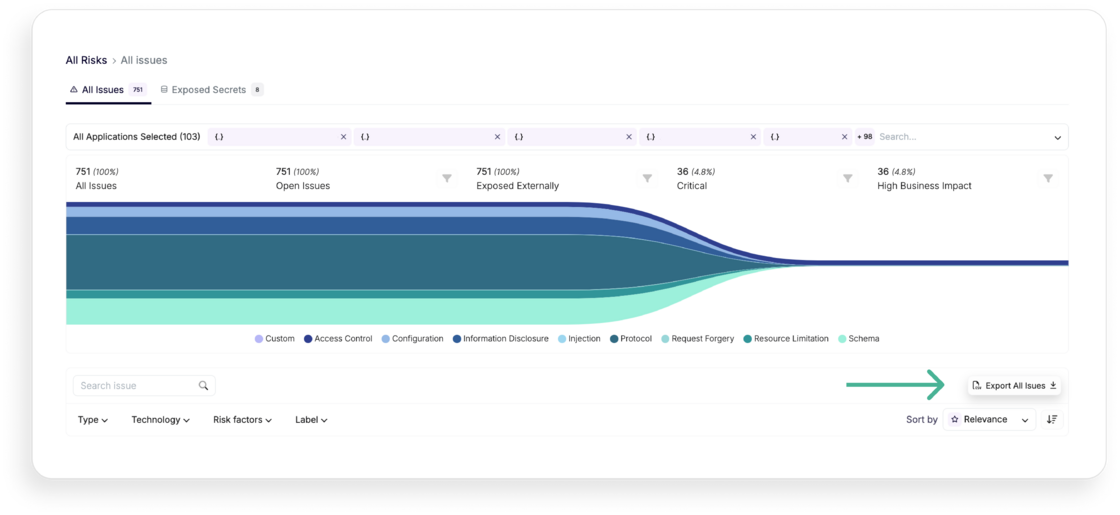
First, navigate to the All Risks tab, then click on "Export All issues". And that's it!

export-all-issues.png

The "All Issues" export allows you to view detailed information about every issue identified across your assets. The exported CSV will include the following columns:

  • FailureName: The name of the issue. For example, Enumeration (BOLA/IDOR) detected.
  • AlertDescription: A description of the alert. For example, "We performed a successful BOLA attack on the petId argument."
  • IssueId: The unique identifier for the issue.
  • Category: The category of the issue. For example, ACCESS_CONTROL.
  • Severity: The severity level of the issue, according to Escape Severity.
  • AlertLink: A link to the alert.
  • ScanId: The identifier for the scan that found the issue.
  • ScanLink: A link to the scan details.
  • Endpoint: The endpoint where the issue was found.
  • EndpointType: The type of endpoint (REST, GraphQL…).
  • FirstSeen: The first date the issue was seen.
  • LastSeen: The last date the issue was seen.
  • Remediation: Suggested remediation steps.
  • Ignored: Whether the issue is marked as ignored.
  • Cvss_score: The CVSS score indicating the severity of the vulnerability.

Scan Report for a Particular App

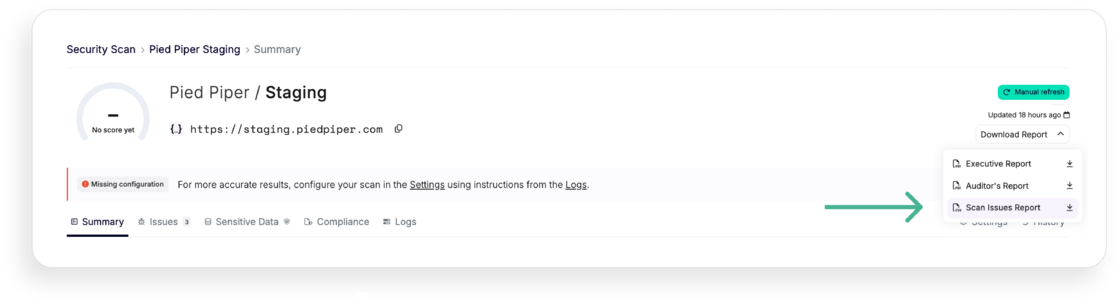
First, navigate to the can that you want to export, then click on "Download Report". Pick .csv file and that's it!

scan-csv-report.png

For a detailed scan report of a particular app, you can export data including:

  • AlertDescription: A description of the alert.
  • IssueId: The unique identifier for the issue.
  • Category: The category of the issue.
  • Severity: The severity level of the issue.
  • AlertLink: A link to the alert.
  • ScanLink: A link to the scan details.
  • Endpoint: The endpoint where the issue was found.
  • EndpointType: The type of endpoint (REST, GraphQL…).
  • FirstSeen: The first date the issue was seen.
  • LastSeen: The last date the issue was seen.
  • Remediation: Suggested remediation steps.
  • Ignored: Whether the issue is marked as ignored.

With these new export capabilities, you can streamline your workflow, enhance your reporting, and ensure that you have all the necessary data at your fingertips.

Understand what's most important for you and make informed decisions with ease.

#50 · Customize your compliance view

We are excited to announce a new feature designed to enhance your compliance management experience. It allows you to hide irrelevant compliance frameworks from your compliance matrix, tailoring it to your organization's specific needs.

Why?

Managing compliance can be overwhelming. You might often face an array of frameworks, many of which may not apply to your specific business operations. By enabling you to deactivate non-relevant compliance frameworks, Escape ensures that you can concentrate on the requirements that truly matter, making your compliance efforts more focused and efficient.

Getting started

Ready to tailor your compliance matrix? Follow these simple steps:

  1. Go to Your Organization Page: Simply click on your organization's name in the left-side bar.
  2. Select Compliance: Click on the "Compliance" tab to access your compliance settings.
  3. Deactivate Irrelevant Frameworks: In the compliance settings, you will see a list of compliance frameworks. Simply deactivate the ones that do not matter for your business.

And that's it! We're here to help you focus on what matters.

#49 · Automated schema generation

We are excited to introduce our latest feature: automated schema generation for all your discovered APIs.

This feature allows you to generate your API schema and start scanning vulnerabilities immediately, reducing the time it takes to derive full value from Escape.

Why?

With this feature, we aim to solve this issue and provide you with the following benefits:

  • Efficiency: Through the automated generation of API schemas, either directly or via Git integration, we streamline the setup process for scans. The process involves parsing the AST from the code to dynamically generate detailed and accurate API schemas. This is particularly useful for organizations that may not have formalized API documentation. This not only saves time and effort for both security and development teams but also enables development teams to redirect their focus towards higher-value tasks.
  • Scalability: Automated schema generation allows you to effortlessly expand your scanning efforts across a large number of APIs. This is especially advantageous in environments with numerous microservices or APIs, where manual configuration would be impractical or time-consuming.
  • Access to Business Context: Automatically generated schemas provide more context to the API service. API service properties are of better quality when API specifications are available, enabling developers and stakeholders to gain a deeper understanding of the API's purpose, functionality, and intended business use. This enriched context ensures more in-depth scanning and facilitates smoother collaboration between security, development, and business teams.
  • Real-time Updates: With automated schema generation, scan configurations can be updated in real-time as your APIs evolve or new endpoints are added. This ensures that scans always reflect the current state of your APIs, eliminating the need for manual intervention to update configurations.

Getting started

Here's how you can quickly benefit from the automated specifications:

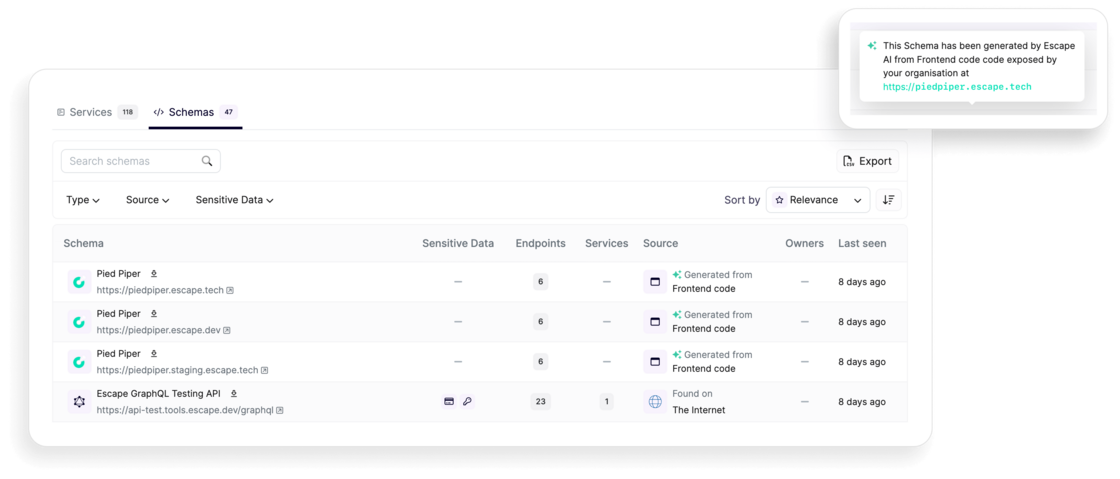
  1. If it's not yet done, add your new domain to your API inventory. For API services with a front-end, that's all there is to it! You'll see the following if your specification was generated automatically from the frontend code:

image.png

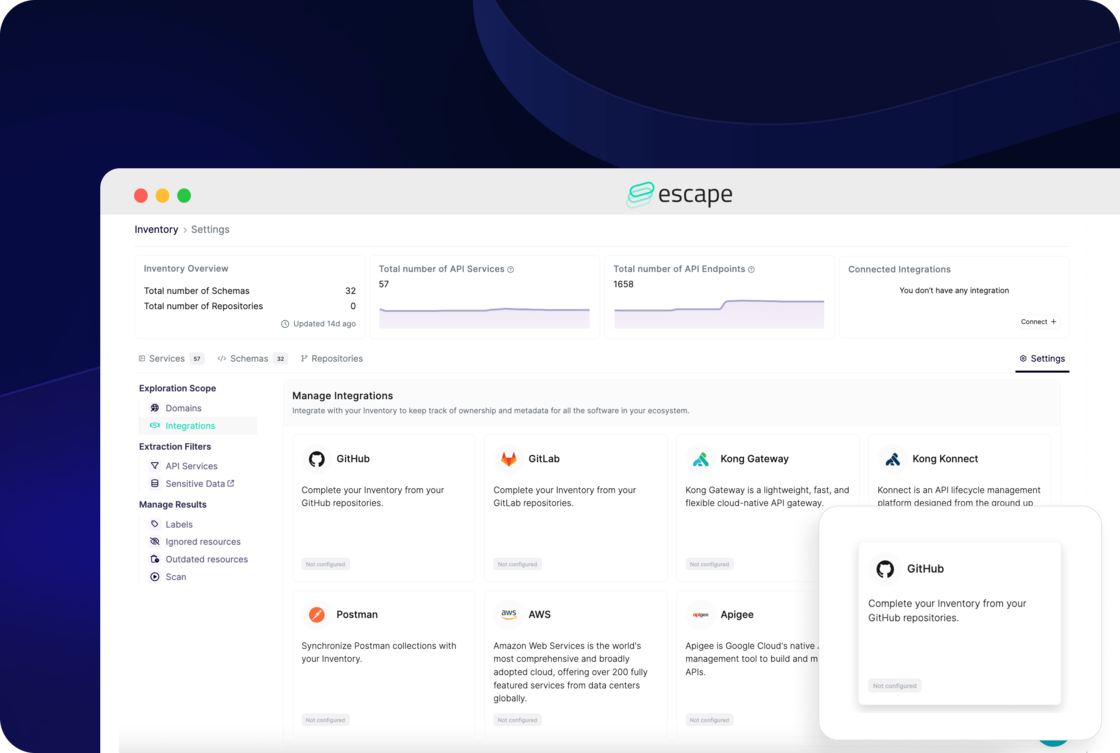
  1. For API services without a front-end, you need to set up integration with your GitHub, GitLab, or BitBucket. Navigate to your API inventory settings, then click on "Integrations" or simply select "Connect" from the "Connected Integrations" callout located in the top-right corner:

image.png

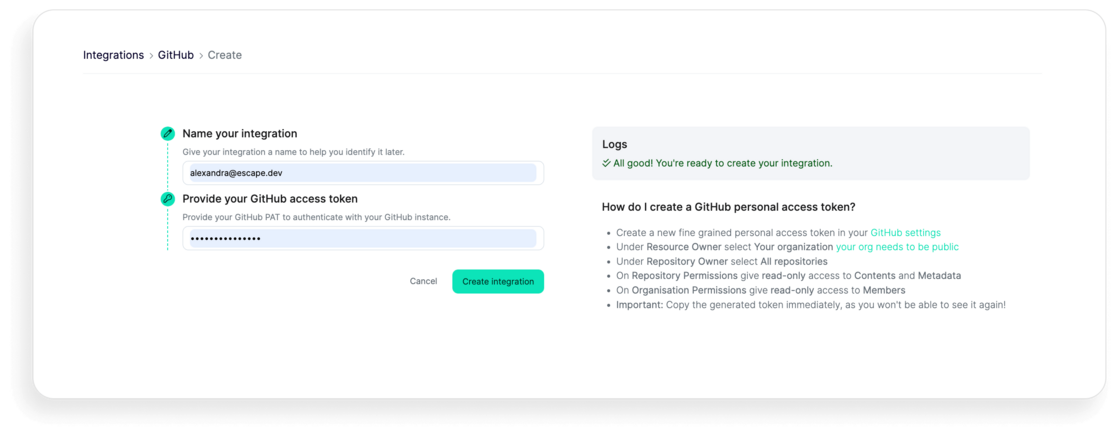
Then, enter the required information, like an access token for the integration of your choice. Below is example for GitHub:

image.png

With these new updates, you should be able to run your security scans automatically once API endpoints are discovered by Escape, without the need to upload your API specs. Try it out for yourself!

#48 · Enhanced User Interface and Expanded Gateway Integrations

We understand that our users need a seamless, intuitive, and efficient interface to maximize their productivity. That’s why we’ve been hard at work redesigning our user interface to better meet your needs. Our latest updates are designed to enhance your interaction with our platform, making it more user-friendly and visually appealing.

What's new

Streamlined Menu

New Menu Structure: We've reorganized the menu to provide quicker access to your most frequently used features and functions.

Inventory

The inventory menu now includes:

  • All Services
  • Schemas
  • Repositories
  • Settings - Direct access to add new domains, integrations, and other settings.

Inventory API and Endpoint Naming: We’ve improved the visibility and naming of APIs and corresponding endpoints. Find these updates under Inventory -> All Services Dashboard.

As a reminder,

  • API Service: An application that provides a set of API Endpoints.
  • API Endpoint: A specific path exposed by an API Service.

Evidence Tab: Your Inventory's API schemas side panel now includes an evidence tab with corresponding JSON files.

All Risks Menu

Business-Critical Risks: Quickly access business-critical risks with the new All Risks menu.

Vulnerability Prioritization Funnel: Now located under All Risks -> Issues.

Exposed Secrets Management

New Location: Exposed secrets are now found under All Risks instead of Inventory. Secrets are categorized into Inventory Secrets and Scan Secrets.

Custom rules

New Location: Now available under Security Scan -> Custom Rules.

Enhanced Security Scan Menu

Comprehensive Security Options: The security scan menu now includes:

  • Tested Applications
  • Custom Rules
  • CI/CD Scans

New Integrations

Axway Gateway Integration: Integrating Axway Gateway with Escape's Inventory enhances your API management capabilities. This integration allows for comprehensive synchronization of API data between Axway Gateway and Escape, ensuring enhanced visibility and advanced security monitoring of your APIs. View documentation for more.

Mulesoft Gateway Integration: Integrating Mulesoft Gateway with Escape's Inventory enhances your API management capabilities by leveraging the extensive API management features of Mulesoft. This integration allows for seamless synchronization of API data between Mulesoft Gateway and Escape.View documentation for more.
#47 · Vulnerabilities prioritization funnel: Focus on what matters

We are excited to announce updates to our vulnerability prioritization funnel, which will help you focus on vulnerabilities that pose a real danger to your business.

What's new

You can now track the number of issues at each stage as they progress up and down the priority funnel:

  • All security issues across your applications
  • Issues still pending resolution (i.e., not dismissed by your team)
  • Issues exposed externally
  • Issues discovered without implemented authentication
  • Critical issues
  • Issues with high business impact

For each stage, you'll find the vulnerability group and the corresponding number of issues. You can filter out each vulnerability and view the details of how it was found.

Why

Before we added this feature, security engineers had to manually filter out high, medium, and low vulnerabilities without enough visibility into what needed to be fixed in their business context. This process could have been time-consuming, and business-critical API security issues could have slipped through the cracks —where should you focus your attention first?

With this feature, we aim to solve this issue and provide you with the following benefits:

  1. Enhanced Focus: By visualizing the vulnerabilities at each stage of the prioritization funnel, your team can easily identify and prioritize critical issues that pose the greatest risk to your business.
  2. Streamlined Workflow: Instead of manually tracking vulnerabilities, the automated funnel enables your team to efficiently allocate resources towards resolving high-priority issues, optimizing workflow and response times.
  3. Improved Risk Management: With greater visibility into the types and quantities of vulnerabilities, you can make more informed decisions regarding risk mitigation strategies, ensuring better protection for your applications and sensitive data.
  4. Accountability and Transparency: By documenting the journey of each vulnerability through the prioritization stages and its owner, you foster accountability within your team and promote transparency in your security processes, facilitating collaboration and communication. Overall, this feature empowers your organization to address security threats efficiently!

Getting started

  • In the left-hand sidebar, click Reporting.
  • In the reporting view, click on the See all issues.

And that's it! You'll get a complete view of the total amount of all your vulnerabilities down and up the prioritization funnel. Try it for yourself!

#46 · API Inventory: New features and improvements

We are excited to announce our updates to API discovery and inventory, which will give you even more capabilities to achieve API governance with ease.

What's new

  • Now, you can discover not only the APIs and API schemas of your primary organizational domain but also those of all your subsidiaries automatically, thanks to the AI-powered domain suggestion feature.
  • Next, we've expanded the API characteristics available in the view associated with each endpoint. Now, Escape offers visibility and a comprehensive understanding of the following:

👉 The characteristics of the API and its environment, including:

  • Production, staging, or development API
  • API type and framework: REST, GraphQL, SOAP, WebSocket, gRPC…
  • Cloud hosting: AWS, Azure, OVH…
  • Associated firewall: Cloudflare, AWS ELB, Azure WAF…

👉 The risks associated with each exposed API:

  • Leakage of sensitive data
  • External exposure
  • Disclosure of API schema
  • Lack of authentication or authorization
  • Critical vulnerabilities

👉 The business logic of the API:

  • Automatic generation of the Schema (OpenAPI) by generative AI
  • Detection of API creation date, API versions, and schema changes
  • Detection of Shadow APIs, Zombie APIs, Legacy APIs
  • Detection of similar or duplicate APIs

👉 The API owner:

  • Business unit
  • Code owners

👉 The context of API usage, including:

  • Third-party services: Gitlab, Jira, Confluence, SQL Database, Keycloak…
  • Internal service, classified based on its usage

👉 The type of sensitive data exchanged, including:

  • Personally Identifiable Information (PII): Including but not limited to Social Security numbers, full names, and email addresses.
  • Financial Information: Such as credit card numbers, bank account details, and transaction histories.
  • Authentification tokens and Secrets: For example, API keys, JWT tokens, and encryption keys.

A complete list of supported data types can be found on the Advanced Usage/Data Types Reference page.

Why?

Here are the key benefits of new API discovery and inventory capabilities :

  • Streamlined oversight: By automatically uncovering APIs across multiple organizational domains and subsidiaries, you are now empowered with a simplified approach to ensuring comprehensive oversight without manual effort.
  • Business strategic analysis: You can now gain deeper insights into the context and business logic of APIs. Make strategic decisions based on comprehensive understanding and analysis and align those decisions with the organization's goals and objectives.
  • Proactive risk management: Identify and address potential risks associated with each API before they are released in production and escalate.
  • Enhanced accountability: With clear ownership of each API, responsibility can be assigned more effectively. It also helps you to promote a culture of accountability within the organization.

These features collectively provide comprehensive insights into API usage contexts, sensitive data exchanged, and associated risks, enabling your organization to make informed and timely strategic decisions.

#45 · DAST Scanner: New features and improvements

We are excited to announce the updates to our Business Logic Security Testing scanner, helping you achieve improved performance and obtain better results when testing your APIs.

What's new

  • Escape now supports 104 security checks! A complete list of supported tests can be found here.
  • OpenAPI specification merging: Escape now supports the merging of OpenAPI Specifications. This is especially handy for specs that utilize external component references or are divided into smaller segments, commonly found in micro-services architectures.
  • Simplified advanced settings: We’ve revamped the advanced configuration settings in Escape. The new user interface makes it easier to configure scan environment networks and authentication methods, complete with detailed validation logs.
  • New step-by-step coverage improvements: You can now understand how to improve the scan quality, step by step. Indeed, the health score of your scanned apps is only useful if the Scanner is properly configured.

Why?

Here are the key benefits of Escape's new testing features :

  1. Simplified API management: Security engineers often handle complex API architectures, especially in systems designed with microservices. Merging multiple OpenAPI specifications into a single, coherent spec reduces complexity and the risk of overlooking security loopholes.
  2. Improved security testing accuracy: By having a unified view of the APIs, security tests can be more comprehensive, covering interactions and dependencies that may be missed when specs are scattered.
  3. Optimized test configurations: Security engineers can now follow step-by-step guidance to configure Escape's Scanner more effectively, ensuring that the setup is optimal for detecting vulnerabilities.
  4. Enhanced control and visibility: The enhanced UI gives security engineers better control over the scanning process and clearer visibility into the configurations, which helps in maintaining high standards of security practices across the board.

Getting started

Specification merging: Go to your security scan -> Settings -> Schema and upload multiple OpenAPI files to merge them into a single specification.

Advanced configuration: To set up advanced configuration settings for your scans, go to your security scan -> Settings and choose a relevant tab.

You can learn more about expert usage in our documentation.

#44 · Introducing "Activity": A Timeline & Communication Hub for Your Security Management 🕒

We're excited to unveil a pivotal new feature within the Escape platform: Activity. This addition revolutionizes how you monitor and interact with elements like Security Issues, Sensitive Data Leaks, and Discovered API Endpoints. It's designed to enhance transparency and collaboration within your team, making security management more interactive and informed.

Key Features of the Activity Tab:

  • Comprehensive History Tracking: The Activity feature provides a detailed timeline that includes every action taken related to an issue—when it was first seen, last seen, ignored, and more. This historical insight ensures you're always informed of the status and evolution of each security concern.
  • Collaborative Commenting: An essential function of Activity is the ability to leave comments directly on an issue. This feature is particularly beneficial for actions like "Comment & Ignore," where context can be crucial for future reference or for team members who may revisit the issue.

Why the Activity Tab Matters:

  • Enhanced Visibility: By offering a detailed history of actions and interactions, Activity ensures that every team member is on the same page. This clarity eliminates confusion and enhances the decision-making process.
  • Improved Collaboration: Security is a team effort. The ability to comment and communicate within the context of specific issues or discoveries fosters a collaborative environment, making it easier to share insights, justify decisions, and coordinate actions.
  • Streamlined Security Workflow: Activity simplifies the workflow for managing security issues by centralizing communication and history in one accessible location. This consolidation helps in quickly understanding the story behind each issue and facilitates faster, more informed responses.

Take Control of Your Security Narrative:

With the introduction of Activity, you're not just tracking security issues; you're creating a narrative around them. This feature empowers your team to better manage and communicate around security concerns, turning isolated incidents into opportunities for learning and improvement. Dive into the Activity and discover how it can transform your approach to API security management.