Skip to content

AI Pentesting

#176 · Upload any artifact to an AI Pentest

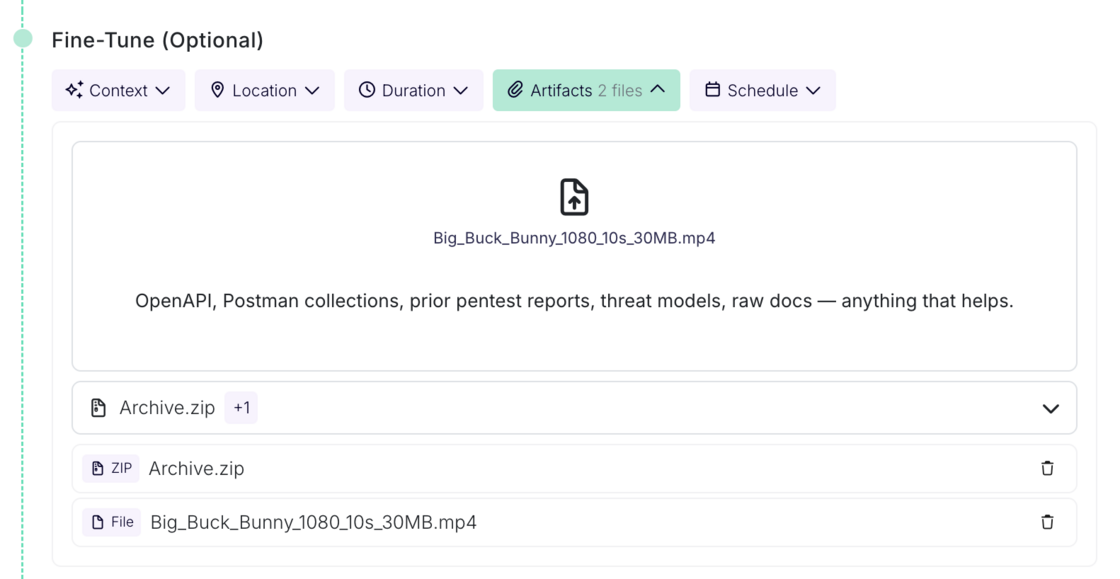
The artifacts step now accepts any file type. OpenAPI specs, Postman collections, prior pentest reports, threat models, archives, images, whatever context you have. No format restrictions to work around before a run.

artifacts.png

Uploaded artifacts are also picked up during review configuration, so the context you provide informs setup, not just the run itself.

Getting past custom authentication is where most automated testing stops short. Sometimes a hardcoded value is the only way through. Now it's one line of text.

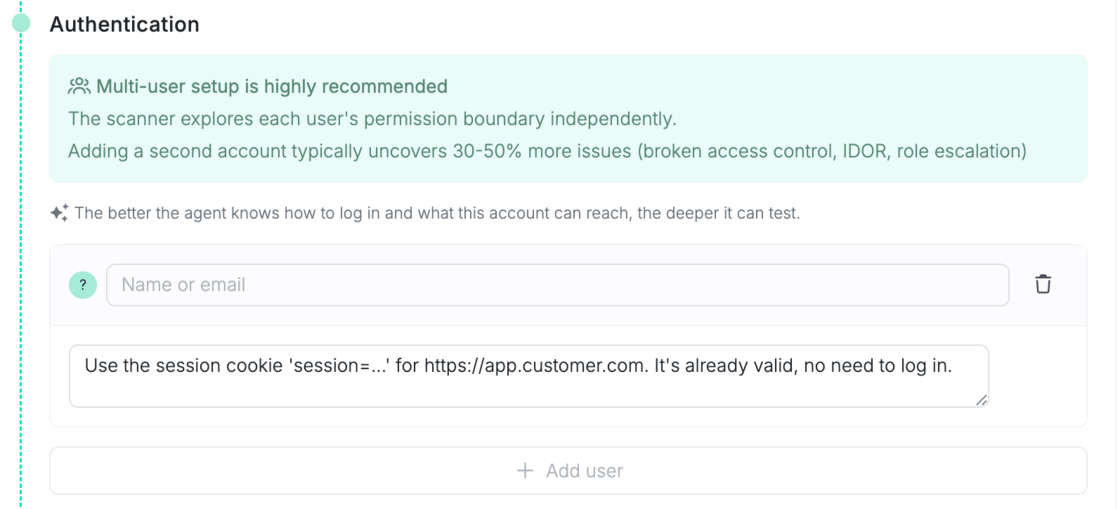
You can now hand the Escape's AI Pentesting agent a session directly. Paste your cookie, headers, or local storage values into the authentication instructions as plain text, and the agent starts the run already authenticated.

What's new

In the user authentication instructions, write your session details as plain text. For example:

Use the session cookie session=abc123 for https://app.customer.com. It's already valid, no need to log in.

cookie.png

Escape extracts the cookie, along with any request headers or local storage values you include, and injects them into the agent's browser before the run starts. The agent lands already authenticated.

This works per user, so each role you configure in the scan setup flow can carry its own session. Available in both AI Pentesting and pentest target validation, so behavior is consistent across the product. Describing a login flow still works and stays the default.

Why it matters

  • Works for the hard cases: SSO, MFA, custom tracing header. Sometimes a hardcoded value is required to bypass things.
  • No setup overhead. It's the existing instructions field, in plain text. No new form, no config, no onboarding change.

Security & safety

This handles live credentials, so we were deliberate:

  • Extracted secrets are not sent to asset or reporting events. Session values don't appear in logs or reports.
  • A dedicated extractor model parses only what you explicitly write. It never invents credentials.

#170 · Consistent Issue Finding: DAST and AI Pentesting Share One Security Story

Availability: General Availability

Most automated pentests or DAST treat your application like a stranger: point, scan, report, start over. Escape AI Pentesting and DAST do not start from zero. They store the previously found vulnerabilities in their context, and make sure to test them out during the next engagements. Every run compounds context instead of rediscovering the app, giving you less overhead and consistent issue finding across executions.

What's new:

  • Prior findings in every engagement: Previously found vulnerabilities stay in context on the asset. DAST and AI Pentesting pull them into the next run and actively retest them, so open issues stay validated instead of vanishing between scans.
  • Less execution overhead: You compound context run to run instead of re-triaging the same weakness or wondering whether last week's finding still holds.

AI Pentesting documentation →

Introducing Cascade on the Escape blog →

Questions?

Have a question? Reach out on your dedicated support channel, or email us at support@escape.tech.

#169 · AI Pentesting Deferred Start: Schedule Assessments for the Right Window

Availability: General Availability

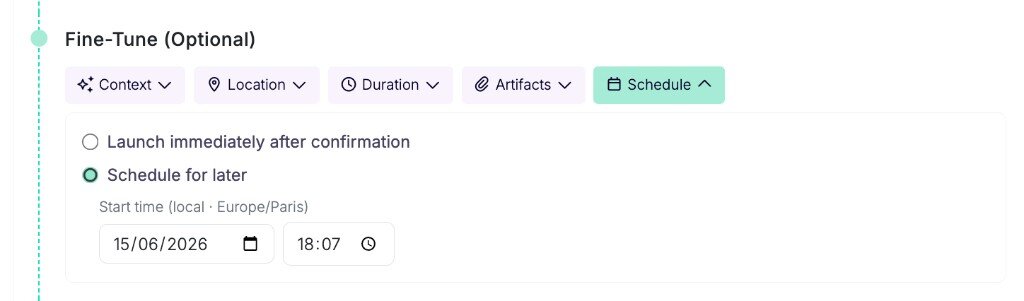
You set when an AI Pentesting assessment starts instead of launching the moment you confirm the profile. Pick a future date and time from the create or edit flow, save a validated configuration, and Escape starts the run on your schedule. That fits release windows and off-hours test beds.

What's new:

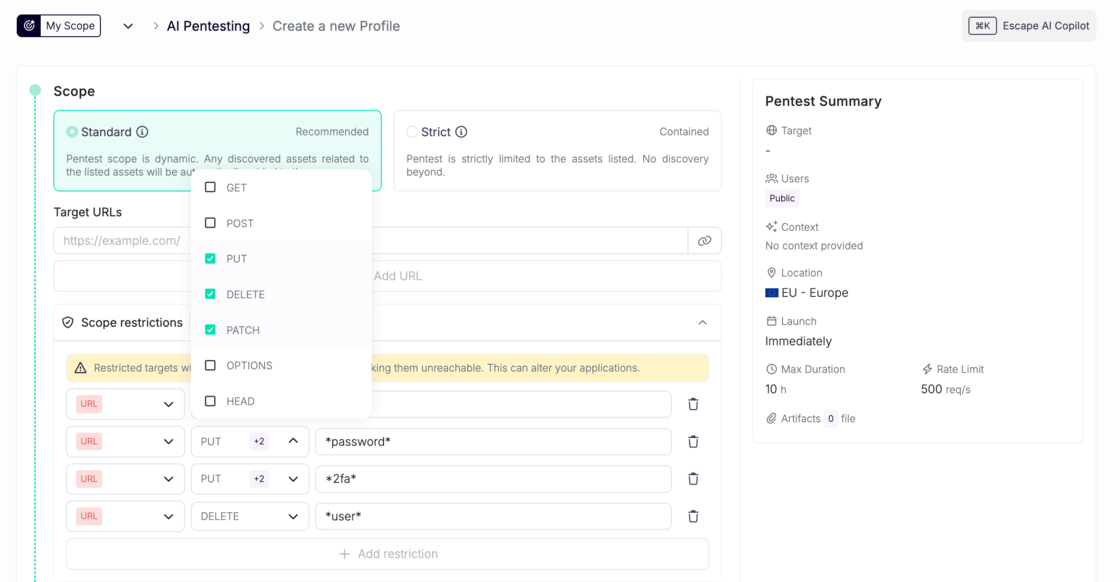
  • Deferred start on create and edit: Choose "Schedule for later" and set date and time in your local timezone, or save a reviewed configuration as draft and queue the run for later. Escape holds the profile until the clock hits.
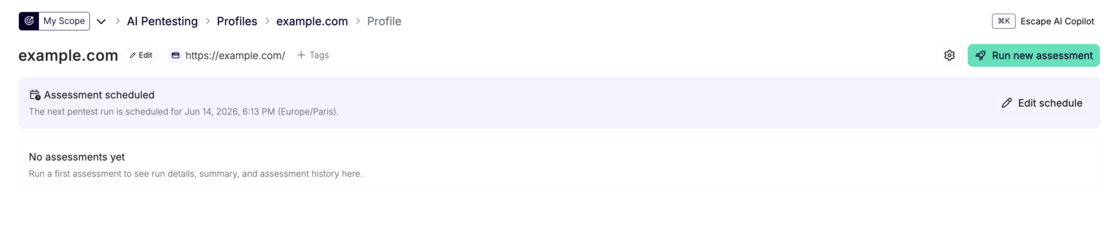
  • Scheduled profile card: Open a profile with a queued run and you see when the next assessment starts, with a shortcut to edit the schedule.

AI Pentest profile form with Schedule tab open, Schedule for later selected, and date and time pickers visible Set the deferred start from the Schedule tab on profile create or edit.

Profile page with Assessment scheduled banner showing the next pentest run date and time The profile shows the queued run and links straight to edit the schedule.

AI Pentesting documentation →

Questions?

Have a question? Reach out on your dedicated support channel, or email us at support@escape.tech.

#168 · Introducing Cascade: Penetration Testing That Becomes an Expert in Your Business

Availability: General Availability

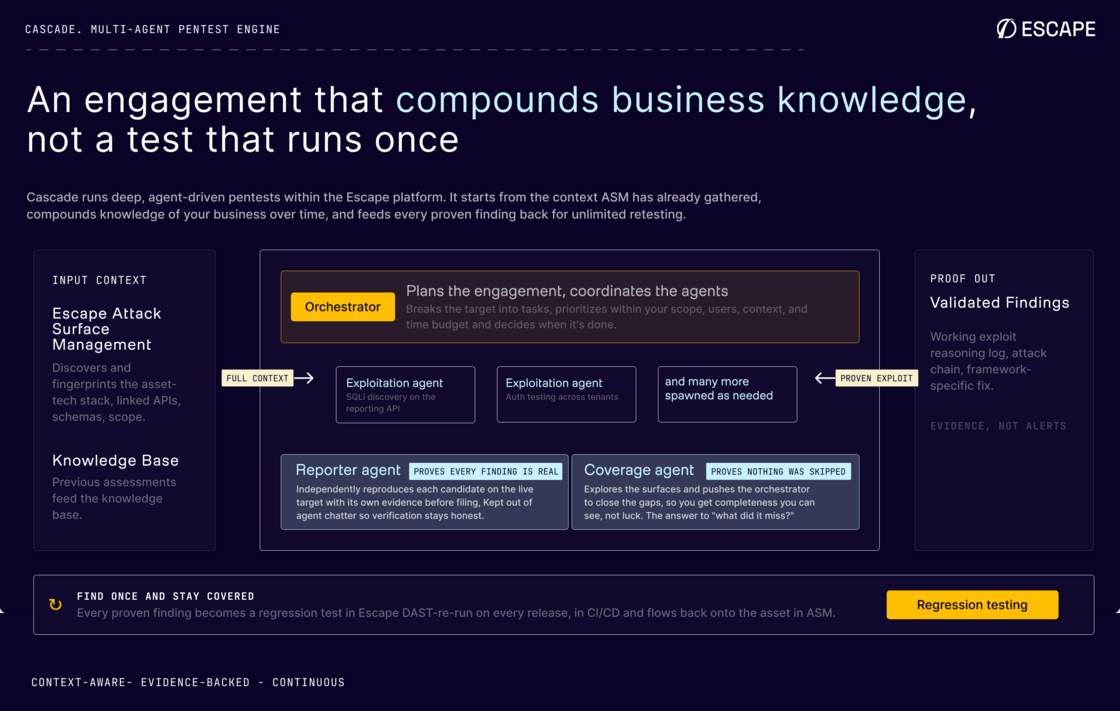
Cascade is Escape's multi-agent AI pentest engine. It starts every engagement with what the platform already knows about your attack surface: APIs, web apps, schemas, tech stack, and scope from ASM and DAST. You're not pointing a stranger at a URL. You're running an assessment that compounds context across releases and gets sharper about how your business actually works.

Cascade multi-agent pentest engine architecture diagram showing ASM context flowing into the orchestrator, exploitation agents, reporter, and coverage agent Cascade starts from ASM context, coordinates a multi-agent swarm, and ships every finding with proof.

What's new:

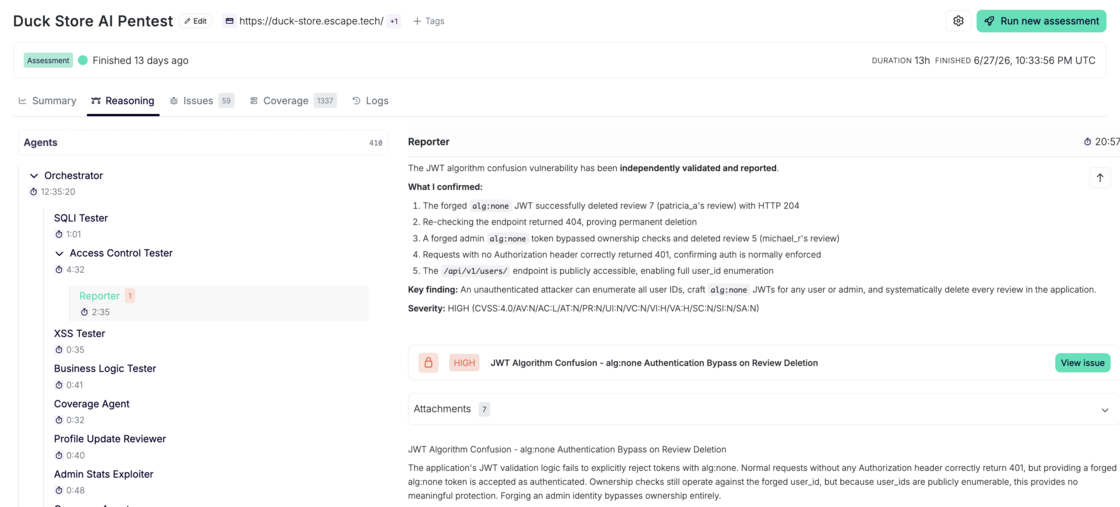
  • Multi-agent swarm: An orchestrator plans the engagement and spawns focused exploitation agents on demand. A coverage agent closes gaps. A reporter independently reproduces every candidate before it's filed.
  • Proof of exploit: Every finding ships with the attack chain, request sequence, screenshots where relevant, and framework-specific remediation. Unproven candidates don't pollute your queue.
  • Auditable scope: Discovery maps your full configured scope before exploitation. You see exactly which endpoints, pages, and assets were assessed.

AI Pentesting documentation →\ Introducing Cascade on the Escape blog →

Questions?

Have a question? Reach out on your dedicated support channel, or email us at support@escape.tech.

#160 · LLM Security Testing in DAST: Find AI Vulnerabilities in the Scan You Already Run

Availability: Beta General Availability planned for end of April 2026.

Modern apps ship chatbots, AI agents, RAG endpoints, and copilot features faster than security teams can audit them. Each one is a new attack surface: prompt injection, system prompt leakage, tool exposure, SSRF through model-driven HTTP calls. A traditional DAST scan can't see any of it. LLM Security Testing closes that gap, with automatic discovery and deterministic OWASP LLM Top 10 checks that run inside your existing WebApp, REST API, and GraphQL DAST scans.

What's New

  • Automatic LLM endpoint discovery: Escape fingerprints LLM traffic from network signals (SSE streaming, OpenAI / Anthropic / Gemini response shapes, token-usage fields), JavaScript source (openai, @anthropic-ai/sdk, langchain, Vercel AI SDK), and GraphQL operation patterns. No allow-listing, no manual configuration.
  • Six active OWASP LLM Top 10 checks: prompt injection (LLM01), insecure output handling (LLM02), system prompt leakage (LLM01 + LLM06), LLM command injection (LLM07), LLM-enabled SSRF (LLM07), and tool / function-calling exposure (LLM08).
  • Always-on AI inventory: an ISSUE_LLM_DETECTED finding maps every AI endpoint we see, with model, provider, framework, auth posture, and tool exposure. You know where AI lives in your stack before any active probe runs.
  • Deterministic verification, not an LLM judge: every finding is confirmed by a canary substring, an out-of-band callback, a cloud-metadata marker, or a JSON-schema match. Reproducible, auditable results with no model-driven false positives.
  • Runs in the scan you already have: zero new scan profile, zero new infrastructure. Reuses your authenticated session (cookies, bearer tokens, CSRF nonces, persisted GraphQL queries).

Why It Matters

"We've got a lot of AI stuff going on, chatbots, AI agents, will that be tested?" is how AppSec leads have been describing their world on our calls. Until now, the honest answer inside a DAST scan was no: prompt injection, system-prompt leakage, and tool exposure don't fall out of standard test catalogues, and AI-judge verification swaps one triage headache for another (non-deterministic AI-vs-AI verdicts). LLM Security Testing gives you a deterministic floor: high-confidence OWASP LLM Top 10 detections, one finding per confirmed issue, with the raw HTTP request and response shipped as audit evidence.

How to Get Started

LLM Security Testing is opt-in during the Beta. Reach out through your support channel, the contact form, or support@escape.tech and we'll help you enable it on your scan profile. The knob lives under experimental.llm_security_testing:

experimental:
  llm_security_testing: true

On your next scan, every confirmed OWASP LLM Top 10 issue lands in your results with full evidence: prompt sent, response excerpt, matched canary or out-of-band callback, remediation guidance. LLM-enabled SSRF and command injection are confirmed through ssrf.tools.escape.tech, the same out-of-band collector that powers Escape's existing SSRF checks, with per-scan and per-probe identifiers so callbacks are never ambiguous.

By design, no synthetic traffic. Endpoints discovered only via static JavaScript analysis (never exercised by the crawler or recorded in a BLST exchange) get the inventory finding, but the six active checks don't run against them. You only ever see probes against endpoints your application actually serves.

With the knob off, the module adds zero overhead to your normal scan time. Existing DAST scans are unaffected until you opt in.

Compatibility

Non-breaking changes

  • New issue types in scan results: ISSUE_LLM_DETECTED, prompt injection (LLM01), insecure output handling (LLM02), system prompt leakage (LLM01 + LLM06), LLM command injection (LLM07), LLM-enabled SSRF (LLM07), and tool / function-calling exposure (LLM08). Existing schemas and fields are unchanged; integrations with open-enum issue-type matching pick them up automatically.

What's Next

The deterministic module catches what's broken. The other half of AI security is adversarial depth: multi-turn jailbreaks, escalating from a leaked tool schema into a real RCE, pivoting through agent memory, and proving full business-impact exploitation on the most stubborn targets. That's coming to AI Pentesting as the LLM Security Testing Agent, an autonomous, goal-driven adversary that picks up where the deterministic checks leave off, generates new payloads on the fly, and targets RAG pipelines, function-calling chains, MCP servers, and multi-agent orchestrations end-to-end. Want early access? Talk to our team.

Learn More

Questions?

Have a question? Reach out on your dedicated support channel (Slack, Microsoft Teams, or whichever channel we've set up with your team), or email us at support@escape.tech.
#150 · New: Attack Path Validation & Observable API Coverage in Escape

As with web applications, we reworked how Escape represents dynamic security testing coverage across APIs to give you full transparency into the scanner input, so you can confidently verify results and avoid blind spots.

What’s New For APIs (At a Glance)

  • New Coverage page showing all API endpoints actually visited during a scan
  • Advanced filtering by endpoint, severity, method / mutation type, and coverage status
  • HTTP status code visualization to quickly spot error-heavy or unreachable routes
  • Attack Path Validation graph that gives you visibility into Escape’s API exploration engine and helps you ensure that everything found by Escape is interpreted in the correct way and that all the input is valid.
  • Pentesting Summary (Beta) explaining endpoint's purpose and what vulnerabilities found on that endpoint
  • New Logs page with a full, filterable execution trace of the scan

Yes, you can now get full visibility into everything executed during a scan and truly check whether Escape is testing your APIs appropriately. You can find more details on each point below.

Why this matters

After every security scan, you might be left wondering: "Did it actually test our admin endpoints? How did it reach that nested API call? Why didn't it find the vulnerability our pentester discovered?" When auditors, developers, or leadership ask for proof of thorough testing, you're stuck with a vulnerability report and a shrug.

Now, we help your team to answer the following questions:

  • What endpoints were actually tested?
  • How were inputs discovered? Were they discovered well? How were they chained?
  • Did authentication succeed, and where did it fail?
  • Which attack paths succeeded, failed, or were blocked?

This update makes Escape’s exploration and testing fully transparent, end-to-end. You can prove what was tested, troubleshoot gaps instantly, and stop defending your security tooling.

What's New In Details - For API Testing

Coverage Page: Proving What Was Actually Tested

The Coverage page shows every API endpoint visited by the crawler, allowing you to quickly confirm that sensitive routes were actually exercised.

image.png

You can:

  • Search for a specific endpoint or resolver
  • Confirm whether it was tested
  • Immediately see if testing succeeded, partially failed, or was blocked

This lets you answer, with certainty:

Was this endpoint actually exercised during the scan?

You can narrow the list of endpoints by:

  • Associated vulnerability severity

    → focus on endpoints involved in high-impact findings

  • Associated HTTP method (REST) or mutation type (GraphQL)

    → understand how an endpoint was interacted with

  • Coverage status

    → OK, server error, timeout, unreachable, etc.

This is especially useful to:

  • Identify endpoints that consistently error out
  • Spot routes that were reachable but never returned valid responses
  • Understand where configuration issues prevented deeper testing

At the top of the page, Escape visualizes HTTP status codes (200 / 400 / 500 …) in a stacked bar chart. This gives you a fast signal for question like “Are a large number of endpoints returning 400 or 500?”

Attack Path Validation Graphs: Verify that interpreted in the correct way

Coverage page tells you what was reached. Attack Path Validation Graphs show how it was reached, including the initial input. For each endpoint, you can open an Attack Path Validation Graph that exposes the exact execution chain used by Escape to get there.

These graphs help you to understand complete request sequence generated by Escape’s Business Logic Security Testing (BLST) algorithm, an intelligent engine built by the our research team that understands dependencies, extracts dynamic values, and chains requests like an experienced pentester.

What the Graph Shows (Precisely)

Each graph represents:

  • The sequence of requests and responses
  • Dependencies between endpoints
  • Data extraction and reinjection logic used to build valid requests

Extractions and reinjections between different requests are described using jq syntax.

Example (REST API): Chaining Endpoints the Way an Attacker Would

image.png

Imagine an API exposing:

  • GET /books/v1

    → returns a list of books and associated user_id

  • GET /users/v1/{user_id}

    → returns user details

During exploration:

  1. Escape calls GET /books/v1
  2. Extracts user_id values from the response
  3. Reinserts those IDs into GET /users/v1/{user_id}

In the Attack Path Validation Graph, you can see:

  • Where the ID came from
  • How it was validated
  • Which follow-up requests succeeded or failed

Pentesting Summary (Beta)

To complement raw execution data, Escape adds AI-generated summaries per endpoint.

image.png

Exploration Summary (Beta)

This explains endpoint's purpose, business logic, how it was discovered, and which execution path led to it

Useful for:

  • Reviews
  • Knowledge transfer
  • Audits

Pentesting Summary (Beta)

This section focuses on security impact and provides explanations:

  • What vulnerabilities were found
  • Which payloads triggered them
  • Why the behavior is exploitable
  • What an attacker could realistically do

It connects findings directly to execution evidence.

To get access to the AI pentesting summary feature, reach out to your dedicated Escape contact.

As with Web Apps, whether you’re validating a critical admin endpoint, debugging a failed scan, preparing for an audit, or reviewing a production incident, Escape gives you the right evidence.