Skip to content

DAST

#141 · New Prerequisites Before Testing Scan Profile Configuration

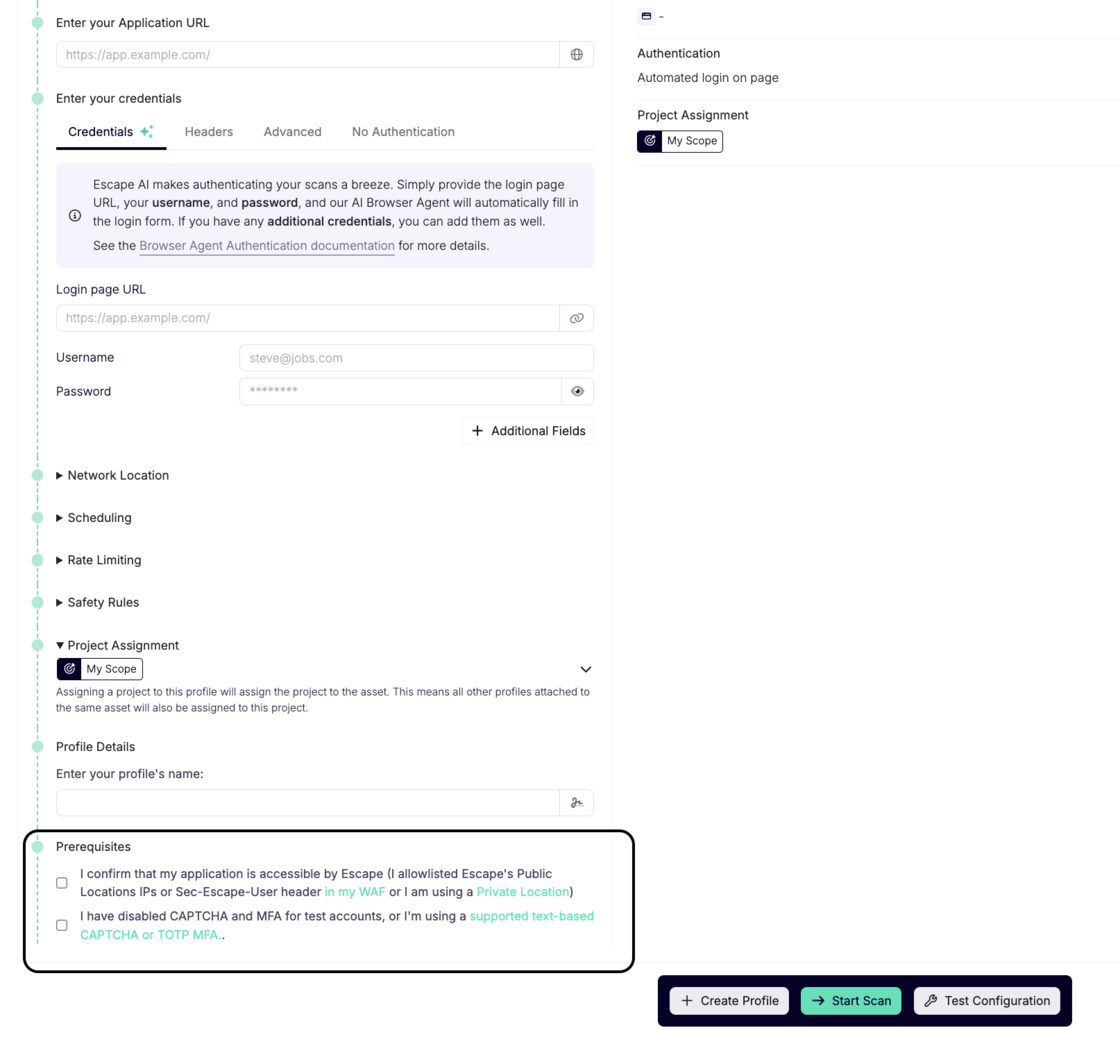
To ensure smoother and more efficient scan profile configurations, we’ve introduced new prerequisites that must be met before testing your scan profile (including testing authentication).

These steps will help prevent issues during testing your configuration and ensure a successful scan:

Screenshot 2025-12-24 at 13.39.42.png

  1. Application Accessibility

    I confirm that my application is accessible by Escape. This means either:

    Why this is required: Ensuring your application is accessible to Escape is essential for accurate scanning. If the application cannot be accessed due to IP restrictions or incorrect network settings, the scan will not run properly.

  2. Authentication Configuration

    I have either:

    Why this is required: CAPTCHA and MFA can block automated scanning tools. To prevent interruptions during testing, we require these features to be disabled or configured in a supported way for test accounts. This allows the scanning process to proceed without authentication issues.

Important Note: If these prerequisites are not met, the scan configuration will be blocked, preventing the testing from proceeding. By ensuring these conditions are in place, we can offer a smoother and more reliable scanning experience.

#140 · Escape now detects React2Shell exposure across your entire application surface with two dedicated checks

The recently disclosed React2Shell (CVE-2025-55182) vulnerability is already being exploited in the wild, with over 30 organizations breached and more than 77,000 Internet-facing IP addresses confirmed vulnerable.

Because React2Shell is actively exploited and can appear across many applications and environments, you need a way to identify exposure quickly and at scale.

Over the weekend, we added support for this vulnerability.

Escape DAST now provides continuous, automated detection of React2Shell at scale across all your applications and environments.

To give teams complete visibility into both vulnerability presence and real-world exploitability, we’ve introduced two dedicated checks:

1. React2Shell CVE-2025-55182 – JavaScript RCE

This check identifies whether the underlying JavaScript runtime is vulnerable to the core React2Shell issue.

Benefit: Quickly determine which assets are at risk of the vulnerability itself

2. React2Shell CVE-2025-55182 – Shell RCE

This simulates a full server compromise by testing whether remote command execution (system-level shell access) is achievable.

Benefit: Confirms whether an attacker could escalate to total server takeover
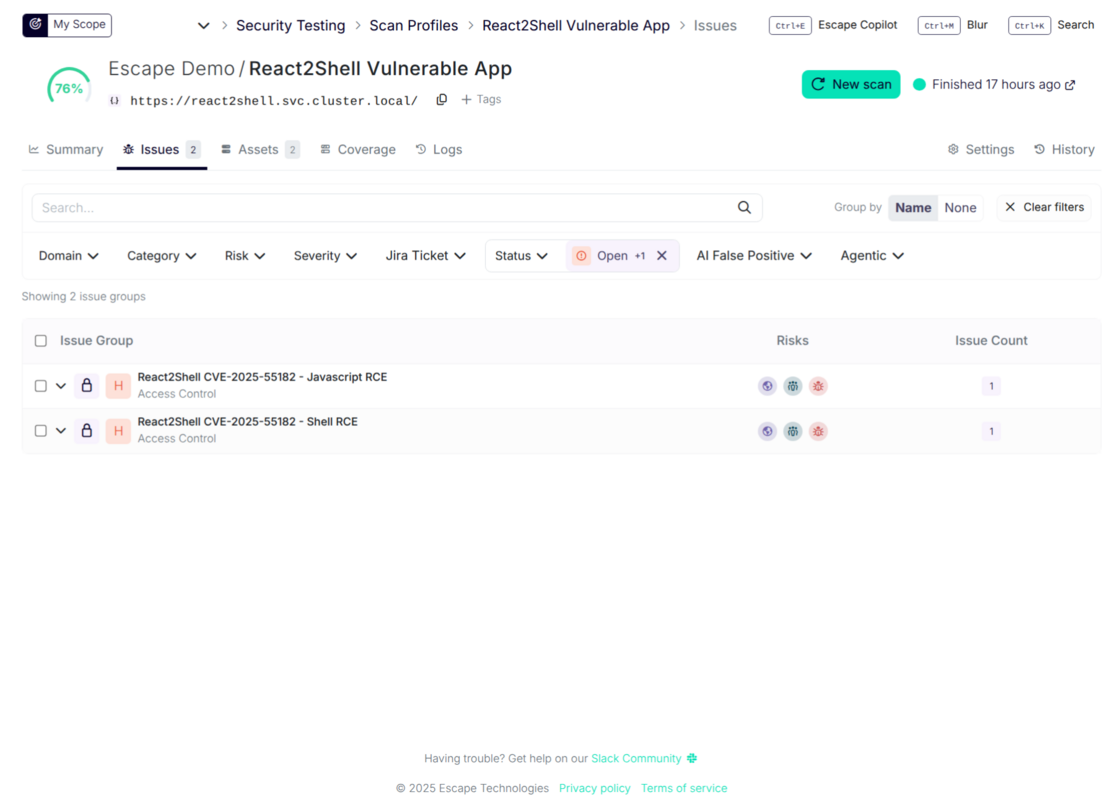
react2shell2.png

To safely and reliably confirm RCE, Escape uses controlled payloads that spawn a subprocess executing a harmless expression, for example:

echo $numberA + $numberB

Escape then inspects the application’s response for the computed result, proving whether arbitrary commands can execute without performing any destructive action. This ensures both zero-risk validation and high-confidence detection.

Escape’s detection is designed to be safe and non-destructive. Some environments may block or filter subprocess calls, which can lead to false negatives. To reduce this, Escape runs multiple payload variants and provides two separate checks—one for vulnerability presence and one for full Shell RCE—offering high-confidence detection across diverse environments.

Two complementary checks (JS RCE + Shell RCE) reduce the chance of missing exploitable cases.

Proof of exploitation

Escape provides clear, reproducible evidence whenever React2Shell is exploitable.

By using safe, controlled payloads that trigger the server to execute a harmless command, Escape can confirm whether remote code execution actually occurred. The result is shown directly in the scan findings, giving teams:

  • High-confidence confirmation of real RCE
  • A precise payload/response pair demonstrating the exploit
  • Clear separation between vulnerability present and vulnerability exploitable

This allows security teams to triage React2Shell based on verified impact:
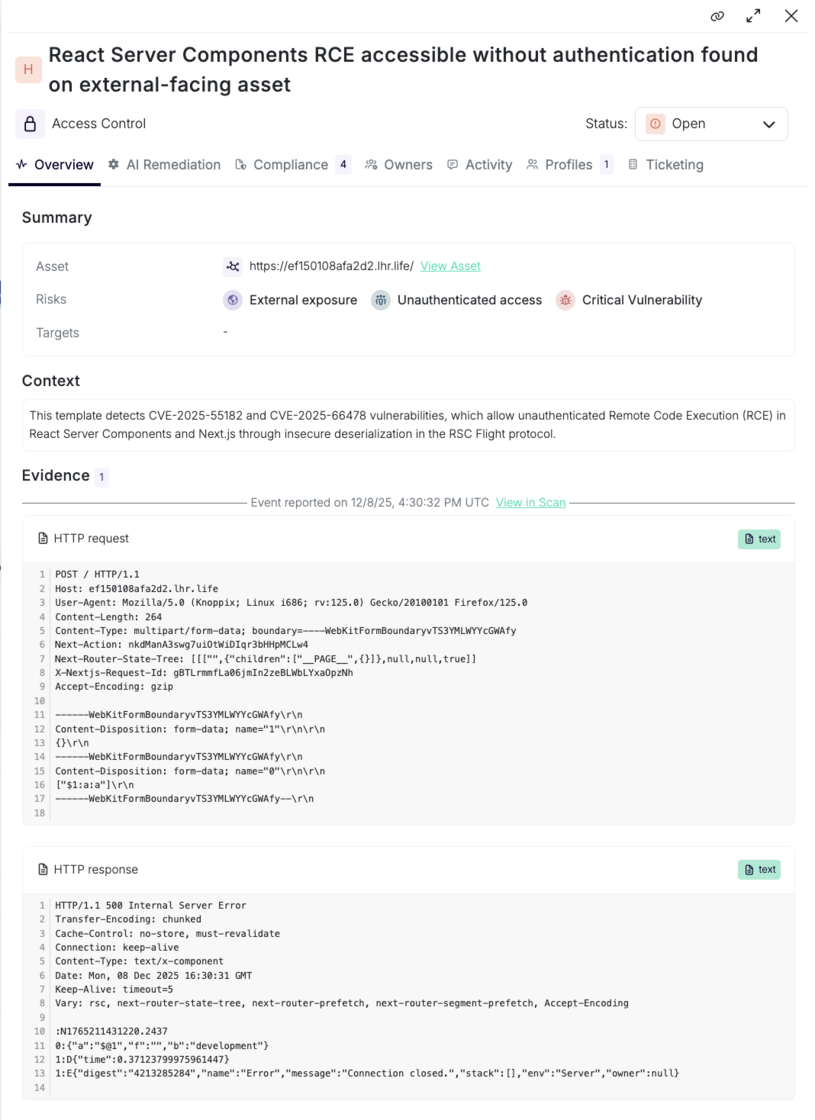
evidence.png

Guided remediation

Each finding includes detailed remediation guidance tailored to your environment. Escape highlights:

  • How to validate and reproduce the vulnerability associated with the React2Shell CVE-2025-55182
  • Recommended remediation steps

For all organizations, we recommend implementing a WAF rule to block exploitation immediately (if not already done) and updating the React versions in use to 19.0.1, 19.1.2, and 19.2.1, which are not vulnerable.


With these new checks, organizations can immediately:

  • Detect React2Shell vulnerabilities anywhere in their environment
  • Understand which systems are merely exposed versus fully exploitable
  • Prioritize patching and mitigation based on true attacker impact
  • Maintain continuous monitoring as environments change

By combining proof of exploitation with actionable fixes, Escape enables security and engineering teams to prioritize and remediate React2Shell quickly and confidently—across all applications and environments.
#137 · Reproduce Complex Exploits in Escape: Multi-Step Custom Rules Are Here

Until now, custom rules in Escape were limited to single-request vulnerabilities. You could only define and test one request at a time.

This meant that more complex vulnerabilities, such as those requiring multiple chained steps (e.g., creating a user, then editing that user to escalate privileges), couldn’t be implemented.

That changes today.

Introducing Multi-Step Custom Rules

You can now chain multiple requests together in a single custom rule, allowing you to simulate complex attack flows, just like a pentester would.

With multi-step rules, you can:

  • Extract data from one request (e.g., a token, user ID, or session key)
  • Modify and reinject it into subsequent requests
  • Recreate full exploitation chains that were previously impossible to model in Escape

Plus, you can now learn from bug-bounty and external reports: when a report (for example, a HackerOne finding) describes a multi-step exploit, you can implement it directly in Escape to validate, triage, and create reproducible test cases.

This unlocks the ability to implement virtually **any vulnerability scenario (**even the most advanced ones) directly inside Escape.

Get started: this is available now in our API scanner. See the docs and specific examples here.

#133 · Scan Visualization by Time Period

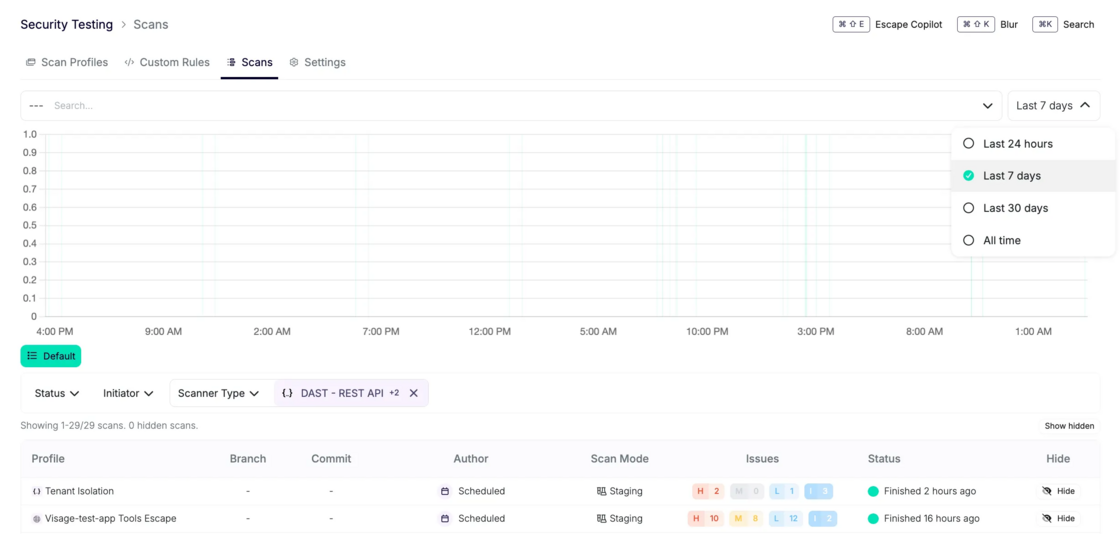
We’ve introduced a new improvement that allows you to visualize scans finished within a selected time period. You can now filter and view scans run within specific timeframes, such as 24 hours, 7 days, 30 days, or all time. By default, the scan data will be displayed for the last 24 hours.

This improvement gives full transparency and audit capabilities of all ASM and DAST scans and makes it easy to track scan activity over different time periods.

image.png

#131 · Support for Pre-Login Actions in Browser Agent

Web apps with cookie consent popups or buttons to access the login page often require manual intervention or can break the testing process.

Now, the Escape scanner can automatically handle these pre-login actions when configured in the Browser Agent settings, just like it does with post-login actions. Say goodbye to pre-login hurdles—the scanner takes care of it for you, ensuring a smoother testing experience.

Here is an example of how you can set this up:

presets:
  - type: browser_agent
    users:
      - username: test@test.test
        password: testtest
        pre_login_actions: 
          - action: click
            locator: Dismiss
    login_url: https://shop.escape.tech/#/login

For more information, check out the Browser Agent documentation.

#130 · Multi-user testing is now available for Web Apps

We’re thrilled to announce the availability of multi-user testing for Web Apps, enabling you to run symmetric and asymmetric permission testing to ensure your multi-tenant environments are properly isolated and secure.

These new capabilities extend our previous update, including the ability to configure tenant isolation rules with natural language and implement custom detection rules for precision targeting of vulnerabilities. Together, these features provide a more tailored and effective solution for securing your system.

Why is Multi-User Testing Important?

For multi-tenant SaaS applications, ensuring proper tenant isolation and access control is essential. Vulnerabilities like Broken Access Control (BAC) or Cross-User Data Breaches can arise when tenants or users with the same or different permissions inadvertently access unauthorized data. Our new multi-user testing capabilities are designed to help you detect these vulnerabilities before they become security risks.

What’s New?

We’ve introduced two powerful multi-user testing approaches to Web Apps that ensure both symmetric and asymmetric permission scenarios are tested and validated for tenant isolation:

1. Symmetric Permission Tenant Isolation Testing

With symmetric permission testing, you can validate that users with identical roles or permission levels across tenants cannot access each other’s data. This approach is critical for applications where users across different tenants have the same privileges but should still be properly isolated.

When This Applies:

  • Multi-Tenant SaaS Applications: Ensure that, for example, Company A’s sales reps can’t access Company B’s customer data, even though both have identical "Sales Rep" permissions.
  • Financial Services Platforms: Prevent standard account holders from accessing each other’s transaction histories.
  • Educational Platforms: Ensure students in different courses cannot view each other’s grades, submissions, or personal information.

How It Works:

A single scan profile is configured with a primary user for exploration and secondary users as exploitation targets. Escape tests for Broken Access Control, Tenant Isolation, and Cross-User Data Breaches by attempting to replay the primary user’s requests using secondary users’ credentials. Since permission levels are symmetric, this approach ensures violations are automatically detected in both directions.

2. Asymmetric Permission Bidirectional Testing

Asymmetric permission testing is designed for scenarios where users have different privilege levels, such as admins, standard users, or privileged roles in different domains. This type of testing validates that unauthorized access is prevented in both directions between users of different permission levels.

When This Applies:

  • Enterprise Applications with RBAC: Ensure that standard users cannot access admin endpoints, while admins cannot access standard user data.
  • Healthcare Systems: Ensure that physicians cannot access admin records, while admins cannot view sensitive clinical data.
  • Financial Platforms: Verify that portfolio managers can’t access compliance officer audit trails and vice versa.

How It Works:

This testing requires two separate scan profiles to test both directions of authorization:

  • Scan Profile A: Primary user is configured for exploration, secondary user as the target.
  • Scan Profile B: Secondary user becomes the primary user, with the first user as the target.

This bidirectional approach captures vulnerabilities from both perspectives, ensuring all potential weaknesses are identified.

Integration with Natural Language Processing (NLP) Queries and Custom Detection Rules

We’ve made it simpler than ever to configure tenant isolation rules with Escape’s agentic system. Now, whether you are configuring symmetric or asymmetric permission tests, you can define tenant isolation rules using natural language as mentioned in the previous note—without needing to write complex code.

For complex scenarios where user-specific variations (e.g., timestamps, metadata, or localized data) need to remain tenant-isolated, custom detection rules allow you to precisely target authorization boundaries. This ensures that even complex, nuanced data—such as user-specific metadata—remains securely isolated across tenants.

More Information

For a detailed guide on configuring multi-user testing, tenant isolation with natural language rule generation, and custom detection rules, visit our full documentation:

This update gives you greater control, flexibility, and the ability to proactively enforce tenant isolation and authorization boundaries across your web applications and APIs.

And as always, stay secure! :)

#129 · Enhancing Tenant Isolation Testing: Generate Rules with Natural Language in Escape DAST

We’re excited to announce a new improvement to tenant isolation testing: configuration of tenant isolation testing is now available for both APIs and Web Apps and you get the ability to generate tenant isolation detection rules using natural language!

We’ve been working hard to give our customers more precise control over their configurations, making it easier to manage and enforce tenant isolation in your environment.

Why is Tenant Isolation Testing Important?

Most of today’s SaaS structures are multi-tenant environments. Making sure that each tenant’s data and resources are securely isolated from others is critical. Weaknesses or misconfigurations in tenant isolation can lead to unauthorized access or data leaks between tenants, compromising the security of the entire system. That’s why we’ve focused on providing you with the tools to maintain strict isolation and prevent any potential risks.

What’s New?

We’ve extended the ability for tenant isolation checks to both APis and web apps, allowing you to perform more granular inspections. With these improvements, you can be confident that your environment is fully isolated and secure.

Natural Language Rule Generation

One of the standout features we’re introducing is the ability to use natural language to generate tenant isolation detection rules. With the integration of LLMs, Escape customers can now write detection rules in plain language, without needing to know complex syntax or code. This makes creating custom detection rules more accessible and intuitive than ever before.

How does it work?

  1. Write a natural language query describing the tenant isolation rule you want to create. Here is a configuration example (Identification issue):
security_tests:
tenant_isolation:
main_user: 'user1' # Primary user for exploration and baseline establishment
natural_language_rule: |
Ensure that a user's notes cannot be accessed by other users.
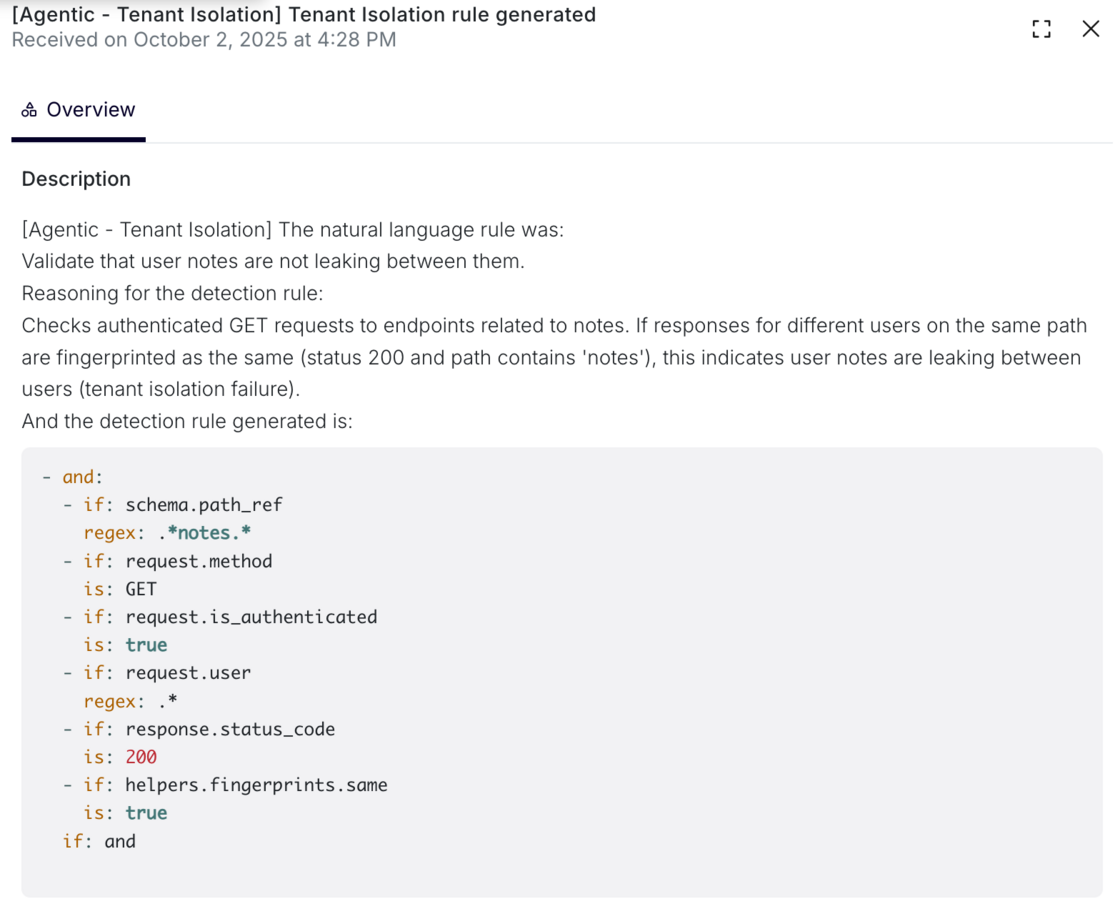
  1. The natural language description is then processed by Escape's agentic system, which generates a set of detection rules that validate the specified authorization boundary. The AI-generated detection logic is transparently displayed during scan execution:

nlp-scan.png

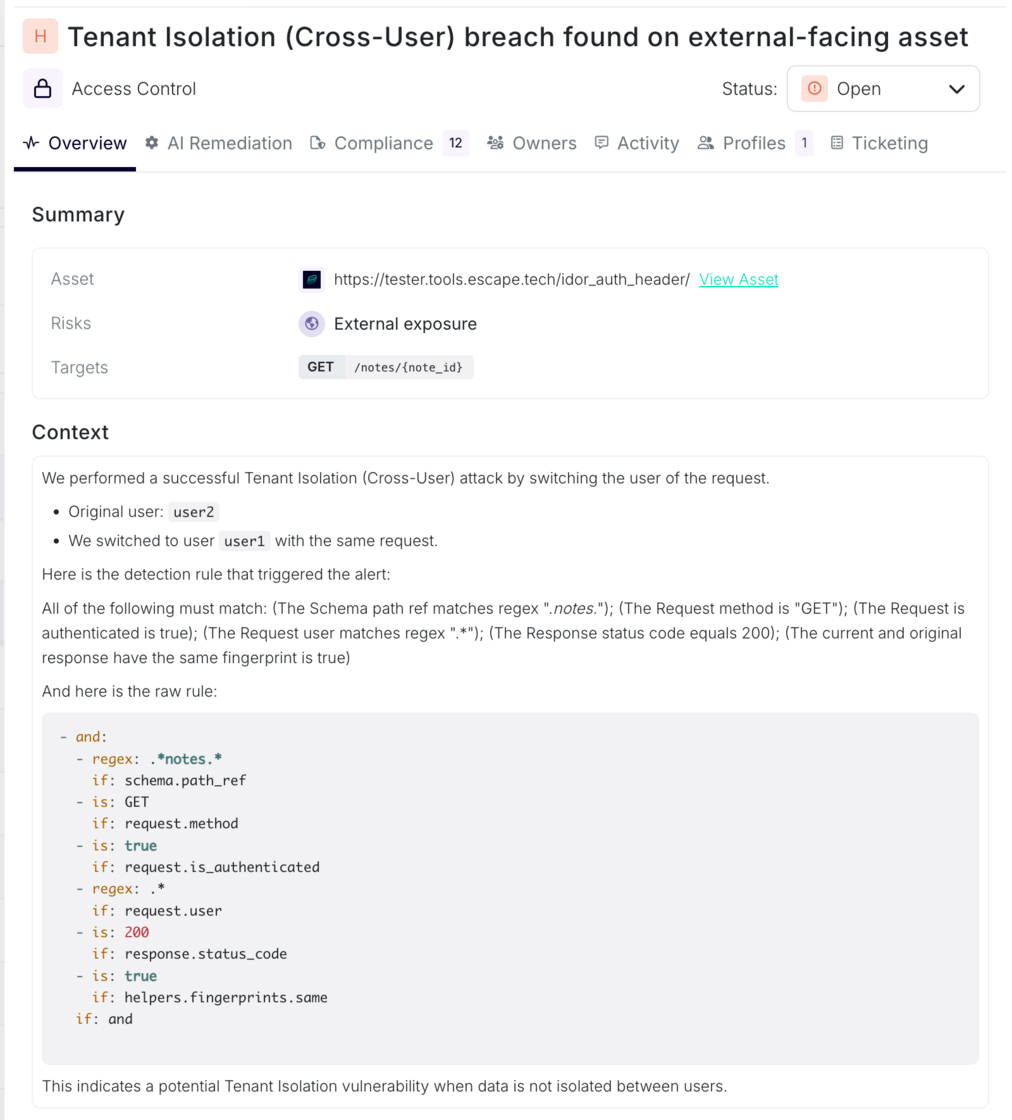
  1. When a tenant isolation violation is detected, the specific rule that triggered the finding is displayed alongside the vulnerability details: nlp-2.png

Log Search and Rule Alerts

Once the detection rule is generated, you can easily track its activity through the logs. To monitor the generated detection rule:

  1. Search the logs for: [Agentic - Tenant Isolation]

agentic-search.png

  1. You’ll find the logs detailing the generation of the tenant isolation rule.

Additionally, any relevant alerts will now contain the generated rule, making it even easier to manage and respond to potential isolation violations in your environment.

When to Use This Approach:

This method is recommended when authorization boundaries can be clearly articulated in business logic terms, and when rapid configuration without deep technical rule definition is desired. It is particularly effective for domain-specific isolation requirements that would be cumbersome to express in low-level detection predicates.

More Information

For a detailed overview and step-by-step guide on configuring and using the tenant isolation detection rules, check out our documentation:

Multi-User Testing and Tenant Isolation Documentation

This update brings greater control and flexibility to our customers, enabling you to take proactive steps in ensuring that tenant isolation is properly enforced across your systems.

#124 · Global Configuration for Scan Profiles

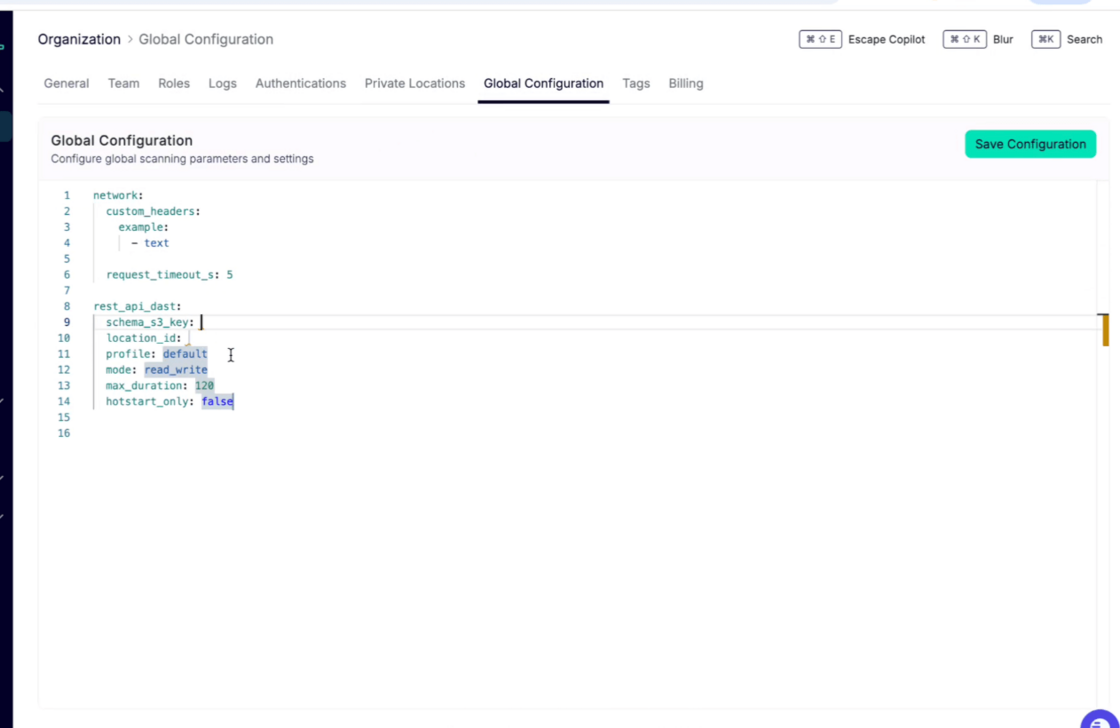
Escape now allows you to define global configurations that apply to all your scan profiles, streamlining the setup process across your organization. These configurations can be set at the organizational level, providing consistency and ease of management for repeated scan types.

Key Features of Global Configurations:

  1. Apply Defaults Across Scan Profiles

    For example, you can define what custom data types (named scalars) should be internal to your company and should never be exposed by any APIs by default and raise an issue if the scalar is found in a git repository in every scan.

  2. Network Configuration: Custom Headers & Timeouts

    On the network side, you can now define custom headers and timeouts globally. This provides better control over request configurations across your scans.

  3. Rate Limiting for APIs

    Rate limiting for APIs is now configurable at the global level. The way it is defined, however, has changed. Now you need to use the following variables to define the required parameters:

    max_duration in s

  4. Override Settings in Individual Scan Profiles

    For enhanced flexibility, you can override global configurations within specific scan profiles. This means:

    • If you need to set a different request timeout for a particular scan, you can now do so.
    • If you need to block specific routes during a scan, you can now easily blacklist pages (e.g., we’re blocking crawling of the "logout" page by default which you can override, or you can customize avoiding other specific routes).

How to Set Up Global Configurations:

To configure these settings, navigate to your Organization Page > General Settings and open the Global Configuration tab. From there, you can define, adjust, and manage your global scan settings.

global-config-example2.png

For more information on how to set Global Configurations up, check out our documentation:

#118 · New Release: Frontend Custom Rules for Escape DAST

We’re excited to announce that Custom Rules are now available for Escape Frontend DAST.

With this release, you can go beyond Escape’s extensive built-in security tests and, in addition to handling complex authentication flows, define your own detection logic tailored to your applications and business requirements.

What this means for you

  • Adapt to your context: Build rules for specific workflows, sensitive pages, or custom attack scenarios.
  • Scale your governance: Apply your own security policies across multiple applications with a consistent, automated approach.
  • Leverage a simple, powerful language: Define rules in YAML while benefiting from Escape’s inference engine to detect issues dynamically as you navigate the application.

How it works

Custom Rules for Frontend DAST use the same YAML-based format as the Authentication action presets you may already be using. That means there’s no new syntax to learn and you can start defining rules right away.

Each rule is built from three main components:

  • Detectors: Specify the conditions that should trigger an alert, such as matching page content, evaluating JavaScript assertions, or other custom signals.
  • Alerts: Configure the severity, context, and category of the findings when a rule is triggered.
  • Seeders: Optionally guide the scan by pre-seeding it with navigation steps or requests.

You can now create rules for scenarios as simple as detecting a successful login message or as advanced as validating custom security controls in your frontend logic.

Documentation

Full documentation, including examples and YAML specifications, is available here:

Frontend Custom Rules Documentation

With Frontend Custom Rules, you now have the flexibility to extend Escape DAST to cover exactly what matters most to your applications and users.

#117 · AI-Powered Text CAPTCHA Solving is Now Supported

We are excited to announce that you can now automate text-based CAPTCHA solving for your web app testing with Escape!

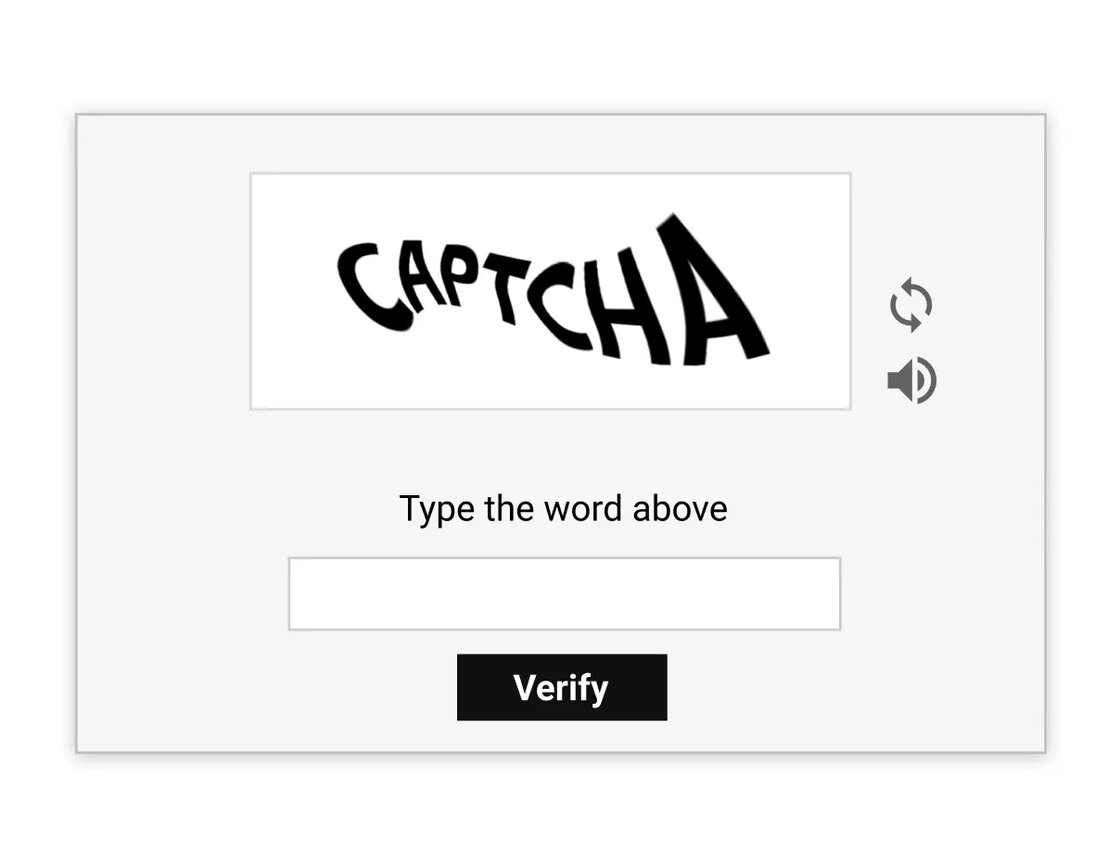
Text CAPTCHAs with combinations of letters and numbers are widely used to prevent automated bots from accessing web applications.

text-based-captcha-example.webp

However, these CAPTCHAs often block automated security scanners from authenticating and testing protected areas of your application, requiring manual intervention to proceed with security testing.

With the new support for AI-powered text-based CAPTCHA solving, Escape’s DAST scanner is now fully equipped to handle these scenarios. You can securely automate testing for web applications protected by text-based CAPTCHAs without manual intervention during the scanning process.

Getting started is easy! Just configure the SolveCaptchaAction object variables under Browser Actions authentication preset or in post_login_actions in the BrowserAgent. Here's an example setup:

presets:
-   type: browser_actions
    login_url: https://example.com/login
    logged_in_detector_timeout: 10
    stealth_mode: false
    users:
    -   username: frontend-user@example.com
        actions:
        -   action: fill
            auto_submit: false
            locator: input[name="username"]
            value: user@escape.tech
        -   action: solve_captcha
            auto_submit: true
            locator: input[name="captcha-input-box"]

Learn how to configure this preset for your needs in our documentation: