Skip to content

DAST

#91 · Advanced Configuration: Configure Headers in Playwright Authentication

We’ve added the PlaywrightUserPreset option to the advanced configuration settings. This allows you to inject optional headers during the authentication process and for authenticated requests, giving you more flexibility when setting up tests.

How to Set It Up:

  1. Go to the settings of the relevant app.
  2. Navigate to Scan configuration → Expert.
  3. Under presets,

use the following structure:

 presets: type: playwright
 type: playwright
 login_url: https://auth.example.com/login`
 users:
   header:

Benefits:

  • The preset feature makes it easier to configure authentication in Playwright-based testing, saving time and improving accuracy.
  • It allows you to inject custom headers, making it easier to handle complex authentication flows.
  • With the ability to configure headers, you can fine-tune authentication behavior to match your exact requirements.
  • Ensures that authenticated requests during scanning will include the necessary headers, reducing the chance of skipped or incorrect tests.
#86 · REST APIs & Front-end Apps: Enhanced Business Logic Vulnerability Detection

We’ve improved Escape’s DAST scanner with better coverage and detection of business logic vulnerabilities.

This improvement focuses on REST APIs or front-end applications. Whether you’re scanning one or the other, our enhanced scanner now provides deeper insights and more accurate detection, helping you to identify and address even more complex vulnerabilities.

#85 · Bi-directional Integration with Wiz

Our bi-directional integration with Wiz is now live!

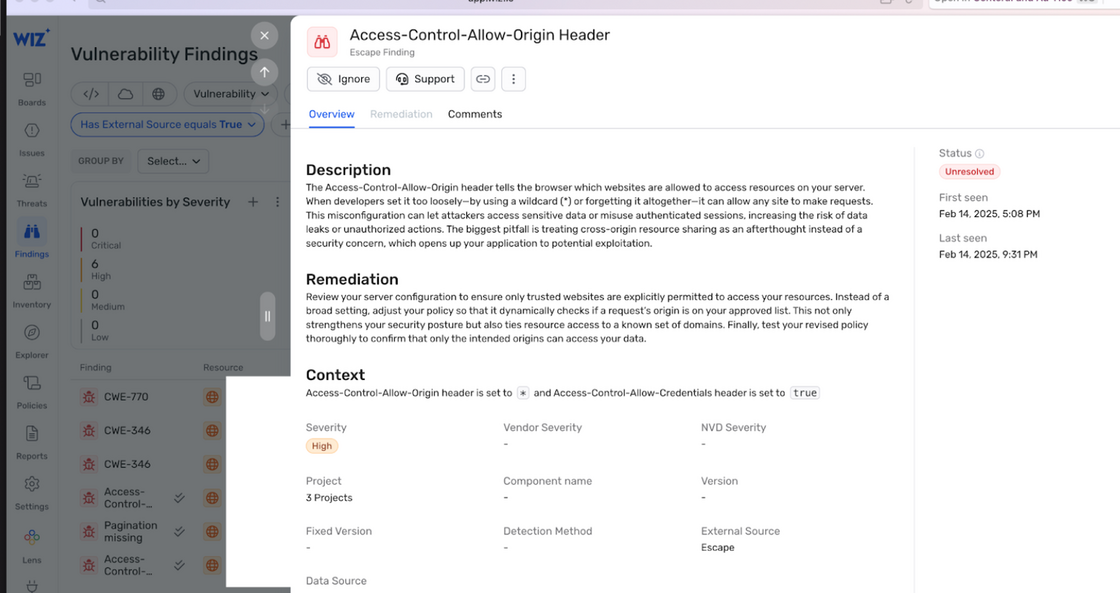
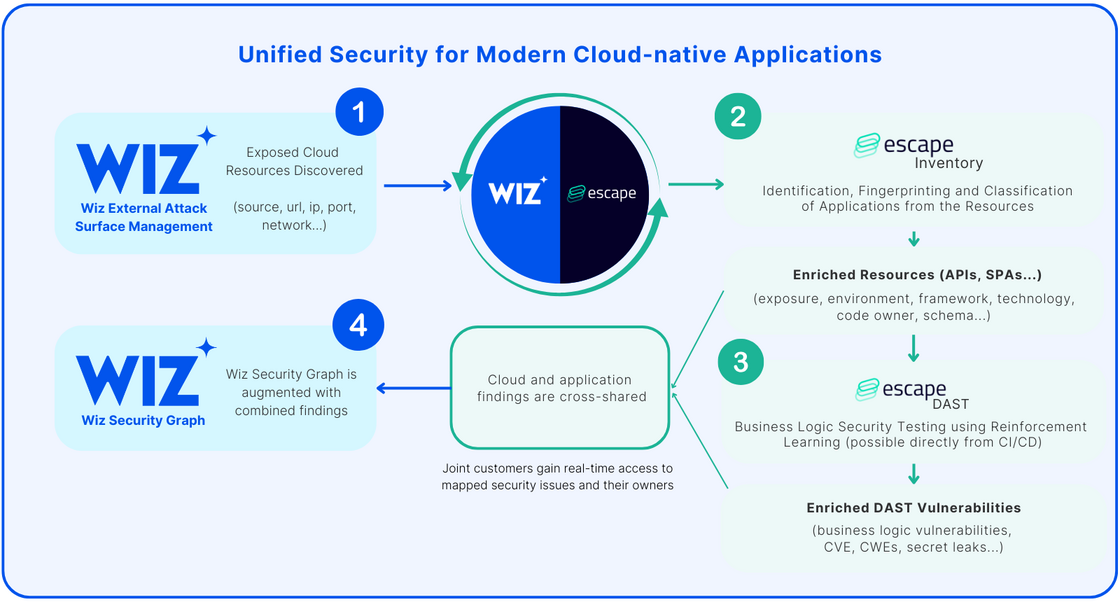
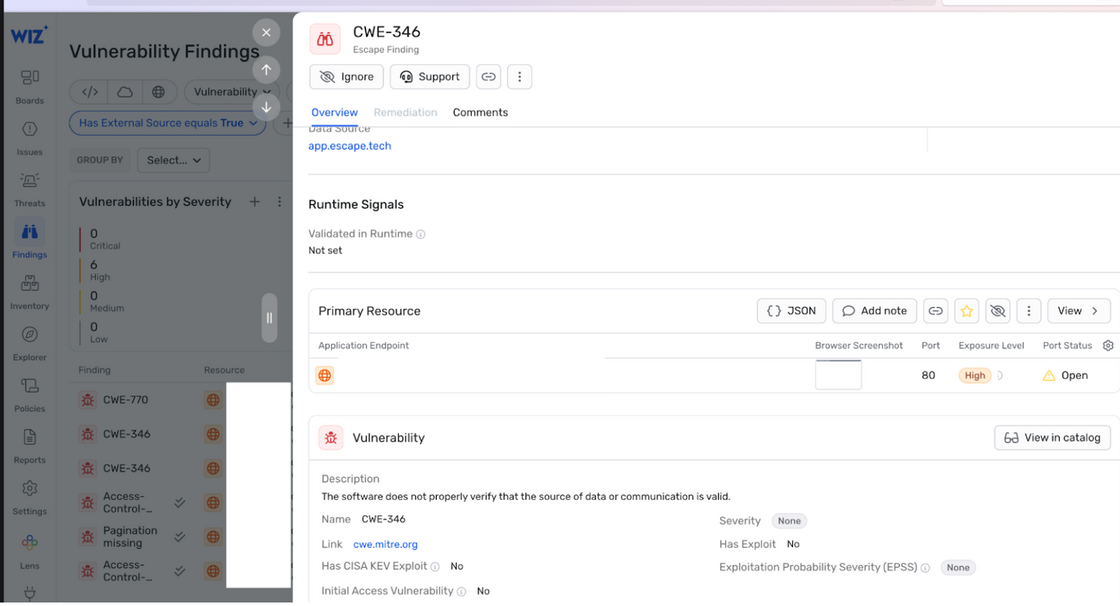
Using previously ingested and enriched Wiz resources, Escape DAST identifies business logic vulnerabilities, API misconfigurations, and sensitive data leaks, then feeds these findings—including CWE classifications and remediations—directly into Wiz.

This integration enriches security teams with valuable context and ownership data, enabling them to prioritize and remediate vulnerabilities more effectively. With this unified solution, organizations can detect risks quickly, gain clear ownership insights, and confidently embed security early in the development lifecycle.

Here's how it works:

image.png

  1. Wiz's Dynamic Scanner finds exposed cloud resources and hands them over to Escape.
  2. Escape Inventory then identifies, fingerprints, and classifies these resources as specific application assets—such as APIs, Single-Page Applications (SPAs), and more.
  3. With this enriched information, Escape DAST runs at scale on the identified applications, including APIs, without needing any network interception or agent installation. If you're a joint Wiz and Escape customer, you can find step-by-step instructions on how to set up Wiz integration in Escape's official documentation
  4. All the vulnerabilities, exposed secrets, findings, and remediations are fed back into the Wiz using DAST & ASM Vulnerability Findings enrichment and Escape's workflows, merging both infrastructure and application-level insights into a single, unified view:

image.png

image.png

Want to benefit from the integration?Learn here how to set it up.

#84 · Enhanced Private Locations: WebSocket & CLI Support

We’ve released a new version of our Private Locations feature, now supporting testing of internal APIs with more protocols, including WebSocket, which was previously unsupported.

Additionally, Private Locations are now available through the Escape CLI for a smoother experience. Learn more here.

Key benefits:

1. Single Pane of Glass

All Escape tooling (CLI for API interactions and Private Location management) is now unified into one binary, reducing complexity and making deployment easier.

2. Improved Stability & Scalability

  • More stable and scalable, especially for frontend DAST
  • More reliable health checks for uninterrupted operation

3. Simplified Setup & Usage

  • No more manual repeater ID creation
  • Support for WebSocket protocols for better API testing
  • No Node.js installation required (binary format)

4. Enhanced Transparency & Monitoring

  • Open-source & auditable for security and transparency
  • Direct log access from the Escape front-end
  • New workflow indicating when a repeater is unhealthy

Migration from Legacy Repeater

If you're using the old repeater image, follow the migration guide below to switch to the new CLI-based approach.

The new escapetech/cli image simplifies setup—no need to manually create a repeater or copy-paste its ID.

Steps to migrate:

  1. Retrieve your API key from your profile page
  2. Update your configuration:
    • Remove the ESCAPE_REPEATER_ID environment variable
    • Add the ESCAPE_API_KEY environment variable
  3. Update the startup command:\ locations start -v location-name where location-name is your desired location name
  4. Switch from the escapetech/repeater image to the escapetech/cli:latest image

#83 · Advanced: Extend DAST Exploration for Deeper Security Testing

Escape's DAST exploration runs for 30 minutes by default, striking a balance between speed and depth to identify business-critical vulnerabilities quickly. However, for even more comprehensive coverage, you can extend the exploration time in the Expert Settings, allowing the algorithm to analyze your application more thoroughly.

How to extend exploration time:

Go to Scan → Expert → Set max_duration to your desired duration.

Learn more about expert settings here.

#82 · New Security Test: Stack Trace Disclosure Detection

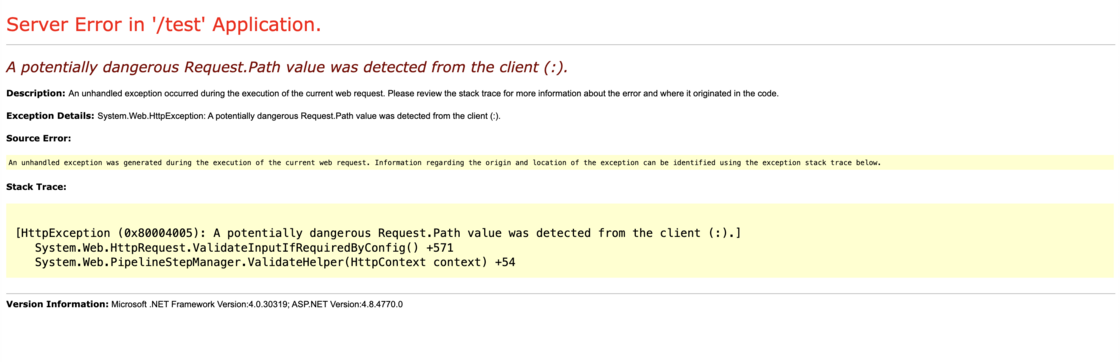
We've added a new security test to detect detailed error messages and stack trace disclosures, which can expose sensitive system details such as file paths, code snippets, and internal IPs. This test is now included by default in Escape's DAST.

When you return clear technical error information in a response, attackers might use that information to identify the specific technologies you're using, making it easier for them to target known vulnerabilities in those systems.

Here you can find an example:

Screenshot 2025-02-28 at 16.33.17.png

It's important to sanitize or hide these detailed errors and only log them internally so that you protect your application's inner workings from potential exploitation.

Learn more in our documentation.

#81 · Instant Resource Access with Ctrl+K / Cmd+K

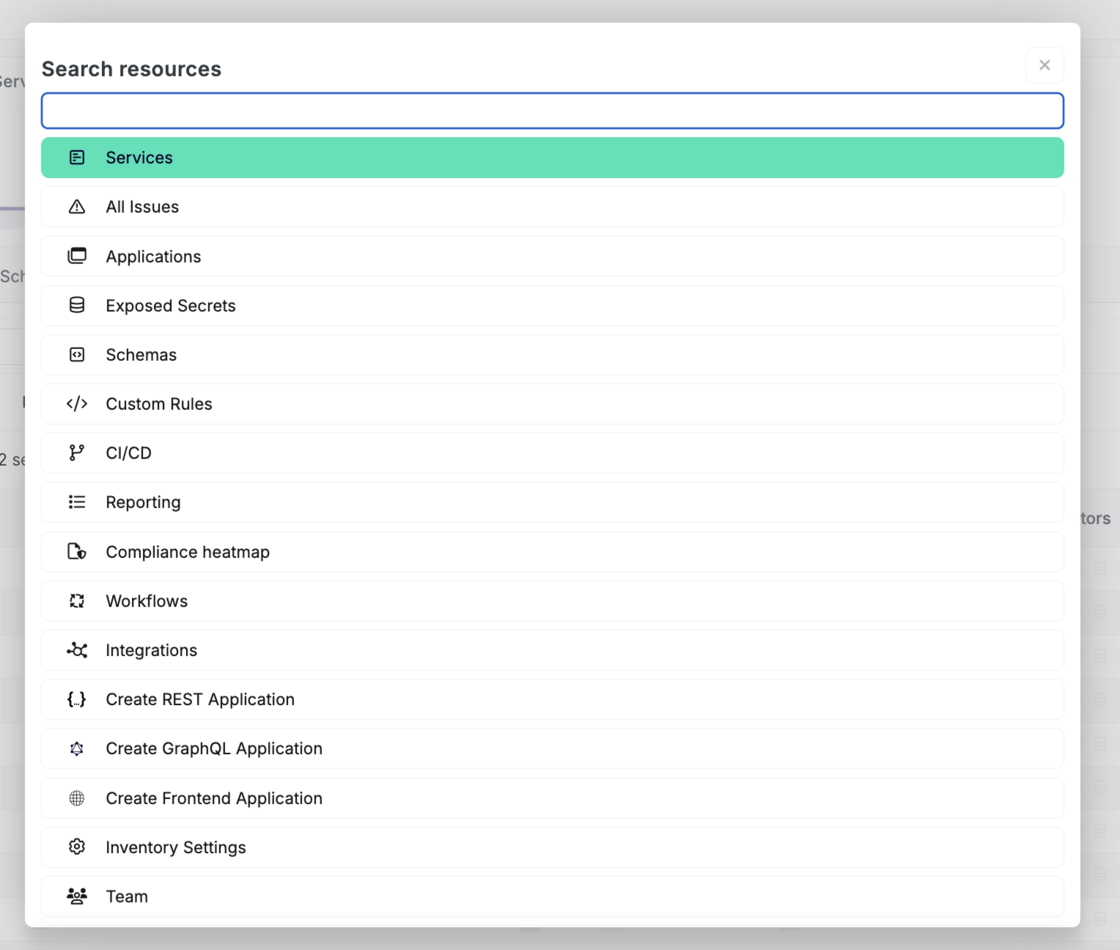
You can now quickly jump to any resource within the Escape app or create a new app DAST scan — whether for REST, GraphQL APIs, or frontends — instantly using the Ctrl+K or Cmd+K (Mac) keyboard shortcut.

Screenshot 2025-02-25 at 12.47.26.png

How to use

  • Press Ctrl+K (Windows) or Cmd+K (Mac) anytime within the Escape app.
  • Type to search for the resource you need, or choose from the list.
  • Select your desired option from the search results to navigate directly to it.

We hope this feature will help you improve your efficiency!

#79 · Playwright Authentication Improved

The Playwright authentication preset is designed for scenarios where traditional authentication methods fall short, leveraging browser automation to handle logins seamlessly.

Instead of manually opening your app’s login window and entering credentials, Escape’s proprietary AI agent detects login fields, fills them in automatically, and logs in for you—enabling fully authenticated DAST scans without extra steps.

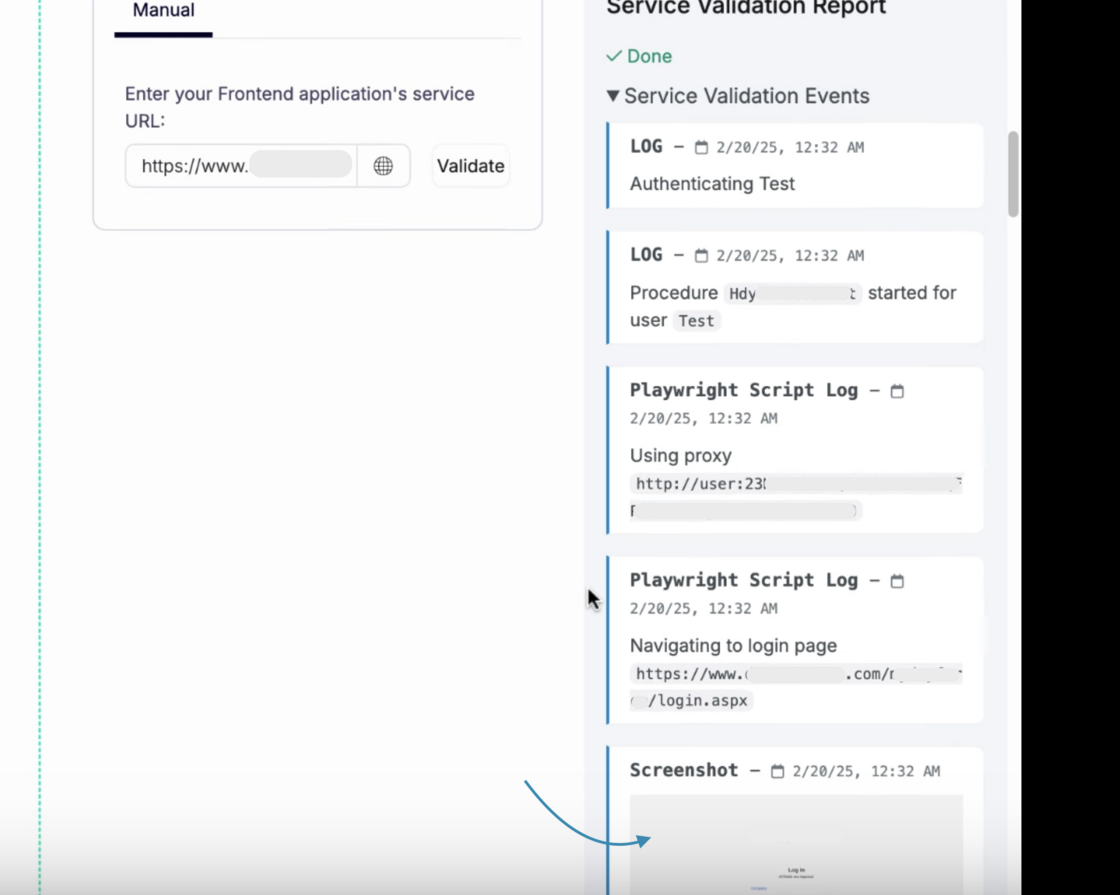
Once the login process is complete, you can now view screenshots at each step, helping you verify success or quickly troubleshoot any issues:

playwright.png

Be certain — with this internal and secure technology, credentials are never sent to any external AI provider, ensuring complete privacy.

This is an exciting step forward in making authenticated DAST scans more seamless and efficient!

Learn more about Playwright authentication here 🚀

#78 · Frontend DAST Improvements

We've made several improvements to Escape's Frontend DAST to enhance its accuracy and reliability. One key update is the addition of an HTML injection check that helps identify vulnerabilities where an attacker can inject malicious HTML code into a web application.

Usually, this can lead to issues like:

  • Content Manipulation – Attackers can modify the page’s content, affecting how it looks and functions.
  • Phishing Attacks – Malicious forms or fake login pages can be injected to steal user credentials.
  • Session Hijacking – Attackers can insert scripts that steal session cookies.

By adding an HTML injection check to Frontend DAST, the scanner can now detect these vulnerabilities before they become a real threat, helping you secure your applications more effectively.

#71 · Frontend SPAs Now Available in Inventory

We’re excited to introduce Frontend SPAs (Single Page Applications) as part of your Application Inventory. This enhancement allows you to track and manage your SPAs with the same level of detail and efficiency you expect from our platform.

If you have access to the DAST feature, this functionality is already available to you. For users without DAST access, reach out to your account manager to enable this feature.

How to access your Frontend SPAs inventory:

  1. Go to the Inventory section.
  2. Navigate to All Services.
  3. Go to Frontends tab:

Screenshot 2025-01-20 at 10.55.35.png

By providing better visibility into your frontend applications, we aim to enhance your ability to manage, secure, and monitor all your modern applications effectively!