Skip to content

DAST

#116 · MFA using Time-Based One-Time Passwords (TOTP) is now fully supported in our Web App Scanner

We are excited to announce that Multi-Factor Authentication (MFA) using Time-Based One-Time Passwords (TOTP) is now fully supported in our Web App Scanner!

The use of multi-factor authentication (MFA) significantly enhances identity security by introducing an additional layer of verification beyond traditional login credentials. While this strengthens protection against unauthorized access, it can present a challenge for most of the DAST tools since they are typically designed for unattended execution, where manual interaction – such as approving a sign-in request or entering a time-sensitive code – can disrupt the automation workflow.

With the new support for TOTP-based MFA, Escape’s DAST scanner is now fully equipped to handle these scenarios. You can securely test web applications protected by MFA without needing manual intervention during the scanning process. This means you can automate the security testing of applications that require MFA, ensuring comprehensive coverage while maintaining a streamlined workflow.

Getting started is easy! Just use the Browser Agent authentication preset. Here's an example setup:

presets:
-   type: browser_agent
    login_url: https://auth.example.com/login
    users:
    -   username: frontend-user-with-totp@example.com
        password: pass
        post_login_actions:
        -   action: fill_totp
            auto_submit: true
            locator: input[id="totp-input"]
            secret: '123456'

Learn how to configure this preset for your needs in our documentation!
#115 · Documentation Revamp – Built with Your Feedback

Over the past few weeks, we’ve taken a close look at how users navigate our Public Documentation — and thanks to insightful input of some of the customers and the features shipped since the beginning of the year, we’ve rolled out a major update.

What’s new:

  1. Clearer structure for Escape DAST capabilities

    The DAST section is now split into two distinct areas, so you can go straight to what matters to you: Frontend DAST and API DAST.

Each comes with its own set of detailed pages to help you get up and running fast:

Frontend DAST:

API DAST:

This update is all about reducing friction and helping teams to get value quickly. We’ll keep refining our documentation gradually, so keep the feedback coming!

#112 · New Escape CLI Now Available

The Escape CLI has been fully upgraded to provide AppSec teams with greater flexibility and control over security testing workflows using Escape DAST. The Escape CLI streamlines how you manage applications, integrations, scan locations, and run scans — all directly from the command line, enabling faster, automated security validation and easier integration into your existing toolchain.

It is now powered by the second version of Escape’s public API and is fully open source, so your team can audit, extend, and contribute with confidence. We carefully review every merge request to ensure contributions are secure and high-quality.

You also don’t have to worry about installing Node.js or juggling dependencies. Just download a single binary, and you’re good to go. Built in Go, the Escape CLI is robust, scalable, and fast even under heavy CI workloads. It’s quick to set up and bundles all the core components you need into a single tool - the CLI plus built-in support for managing private scanning locations and Kubernetes integration.

Available Command Categories:

  • applications – View and update application configurations and schemas
  • integrations – Apply, retrieve, or delete integration settings
  • locations – Manage private scanning locations
  • scans – Launch scans, track status, list issues, and download results
  • version – Check the installed CLI version

For a full list of commands, use the escape-cli help-all command. Usage examples and detailed documentation are available at the Escape CLI documentation.

CI Integration

The CLI can be seamlessly integrated into your CI/CD pipelines, helping automate security testing and ensure continuous validation throughout your development lifecycle. GitLab users can add the recommended configuration to their .gitlab-ci.yml file: GitLab CI Integration Guide

Bitbucket users can refer to the integration guide here: Bitbucket CI Integration Guide

For other CI/CD platforms, please see our general CI/CD documentation.

Once set up, Escape scans will run automatically after each merge request, with results visible directly in your CI environment—helping you catch and address vulnerabilities earlier and more efficiently!

#111 · Customizable Security Test Settings Now Available for API and Frontend DAST

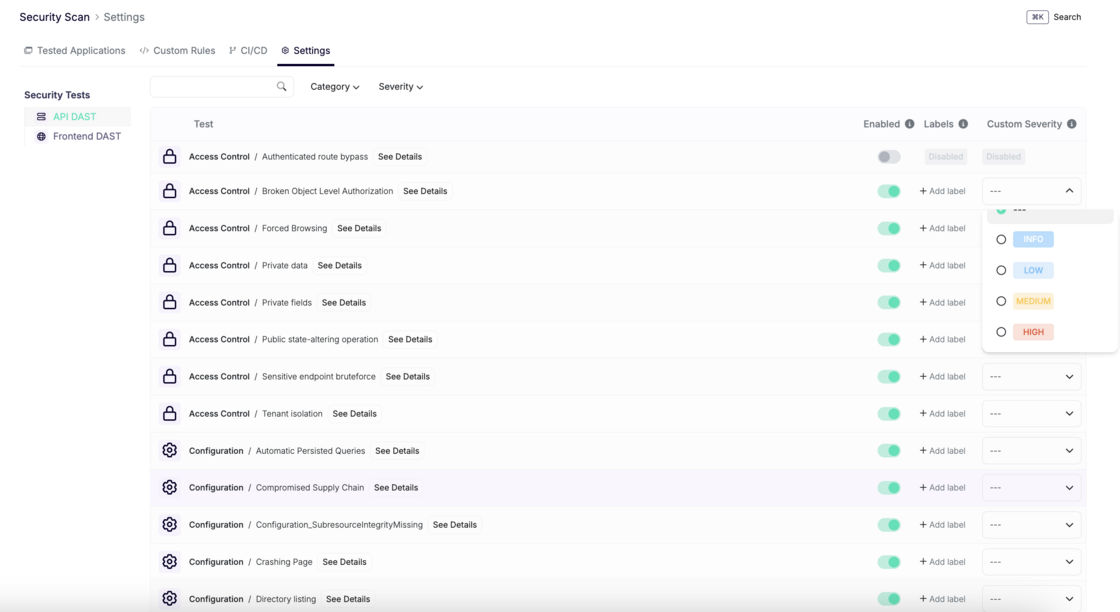
Different organizations have different risk tolerances and prioritization needs. To support this, Escape now lets you configure which security tests are enabled—and how they're prioritized by severity—across your entire organization.

priority-custom-tests-escape.png

What’s new:

  • A new Test Configuration page is now available for both API DAST and Frontend DAST.
  • It provides a full list of security tests, where you can:
    • Enable or disable each test.
    • Assign a custom severity level: Info, Low, Medium, or High.

How it works:

  • Custom severities override Escape’s default severity scoring, which is based on exploitability, CVSS score, vulnerability type, and other risk factors.
  • These settings apply at the organization level, ensuring consistency across all scans.

What you’ll gain

  • Tailor testing to your specific compliance and internal needs.
  • Reduce noise by disabling less relevant tests or deprioritizing less critical findings
  • Establish consistent prioritization logic across teams and applications

#109 · New Security Test: Alert on High Volume of Exposed PII

We’ve introduced a new security test in the Escape scanner for GraphQL and REST APIs to identify excessive exposure of Personally Identifiable Information (PII) - a common sign of broken or missing access controls.

When multiple PII elements are returned in a single response, it often indicates that sensitive data is accessible without proper authentication or authorization, increasing the risk of:

  • Data breaches
  • Compliance violations (e.g., GDPR, CCPA)
  • Reputational and financial damage

By default, the test raises an alert when 4 or more PII fields are detected (pii_threshold: 4). This threshold can be customized to match your organization’s risk tolerance.

Learn more about how this test works and how to customize it in Escape’s documentation.

#106 · Improved IDOR Detection in Our DAST Scanner

We’ve made some great improvements to our DAST scanner, focusing on more accurate IDOR (Insecure Direct Object References) vulnerability detection.

Why we split the IDOR check into two categories:

We’ve separated the IDOR check into two distinct categories—IDOR and IDOR User—for several important reasons:

  • General IDOR vs. User IDOR: A general IDOR vulnerability might allow unauthorized access to various types of resources (like files or records) based on their IDs. User IDOR, however, focuses on situations where one user can access another user’s private data (e.g., viewing someone else's account details). By splitting these into two categories, we can detect and address these issues more precisely.
  • Varying Severity: The severity of IDOR vulnerabilities often depends on the type of access. User-specific vulnerabilities often pose higher security risks and need to be prioritized differently. Splitting the checks ensures that each vulnerability is better contextualized, allowing for more appropriate risk management.
  • More Accurate Detection: With separate checks, we can fine-tune the detection for each scenario. For example, IDOR refers to broader object access problems, while User IDOR is focused on user-specific security risks. This leads to more accurate identification and clearer, more actionable results.

Additional Improvements:

These changes have allowed us to enhance the detection in the following areas:

Improved User-Based IDOR Detection (User1 Accessed User2’s Data):

It’s now easier to detect when one user (e.g., User1) can access another user’s data (e.g., User2) without permission. The scanner now checks that the response fingerprint (how the data is displayed or structured) remains the same when accessed by both users. If there's a mismatch, it flags this as a potential issue.

Improved ID-Based/Email-Based IDOR Detection:

For ID- and email-based vulnerabilities, the scanner now checks that responses have distinct fingerprints for each different user or account. Specifically, it requires at least three different fingerprints to ensure that responses aren’t the same for multiple users, making it easier to spot unauthorized data access.

Improved UUID-Based Fuzzing for Unsafe Generators:

UUIDs (Unique User Identifiers) are used to uniquely identify resources or users. If they are generated in an unsafe or predictable way, attackers could exploit them. We’ve improved our fuzzing process to better test UUID generation, ensuring that weak or predictable UUIDs are detected before they can be exploited.

These updates make the scanner more precise, ensuring that vulnerabilities are identified faster and more accurately!

#104 · Smarter, More Reliable Browser Authentication

We’ve just released a set of improvements that make browser-based authentication flows more powerful, more reliable, and easier to configure. Here’s what’s new:

1. Automatic API token extraction during authentication

Our browser agent authentication got even more powerful. This preset uses an AI Agent to automatically perform the actions to log you in with the provided credentials.

It is now capable of automatically extracting API tokens from API requests made during the authentication process. This means your scans can kick off with the right tokens without any extra steps.

You can learn more about Browser Agent authentication and how to set it up in Escape's documentation.

2. Smarter logged-in detection with logged_in_detector_text

You can now use the logged_in_detector_text field in both Browser Agent and Browser Actions presets.

This configuration option lets the scanner know to wait for a specific piece of visible text that only appears after a successful login, ensuring that your authentication is reliable before scanning begins.

Learn how to set it up

3. New wait text step in Browser Actions Authentication preset

We’ve added a new wait_text action to the Browser Actions Authentication preset, allowing you to explicitly wait for certain text to appear on the page before moving on to the next step.

Use it to:

  • Wait for the page to finish loading
  • Confirm that the form is ready before filling it

It's pratical if one page is slow and you want to wait before filling a field. All of these have configurable timeouts in seconds.

Here's an example for both wait text and logged_in_detector_text presets:

presets:
  - type: browser_actions
    users:
      - username: piedpiper@escape.tech
        actions:
          - action: fill
            locator: input[name='username']
            value: piedpiper@escape.tech
            auto_submit: true
          - action: wait_text
            value: Forgot password
            timeout: 15
          - action: fill
            locator: input[name='password']
            value: xxxx
            auto_submit: true
    login_url: https://app.staging.escape.tech
    logged_in_detector_text: 'Connected Integrations'
    logged_in_detector_timeout: 1
  - type: browser_agent
    users:
      - username: piedpiper@escape.tech
        password: xxxx
    login_url: https://app.staging.escape.tech
    logged_in_detector_text: 'Connected Integrations'
    logged_in_detector_timeout: 15

4. Fewer CAPTCHAs, smoother logins

We’ve improved the default user-agent used during authentication to make it more stealthy and less likely to trigger bot protection systems. That means fewer CAPTCHAs and faster, more reliable logins.

These updates make it easier than ever to build robust, reliable browser-based authentication flows in Escape DAST!

#102 · Improved WIZ Integration

We’ve enhanced our Wiz integration to provide you with better visibility into exposed resources, making it easier to identify security risks in your environment.

We now extract more detailed information from WIZ, covering not only directly exposed resources but also those that may be exposed indirectly through services, machines, and other entry points.

What's new

Improved Visibility into Exposed Resources

We now extract more detailed information from WIZ, covering not only directly exposed resources but also those that may be exposed indirectly through services, machines, and other entry points.

Full Exposure Path Analysis

Escape also extracts information from the computed reachability path, which uncovers how resources might be exposed through services, ingresses, and other objects. This includes mappings such as Nginx ingress, Kubernetes services, and virtual machines, helping you spot indirect exposure points.

And then as before:

  • Escape has access to the code repositories and matches those Resources with code repositories (including owners)
  • Escape runs DAST at scale on those resources
  • All the vulnerabilities, exposed secrets, findings, and remediations are fed back into the Wiz using DAST & ASM Vulnerability Findings enrichment and Escape's workflows, merging both infrastructure and application-level insights into a single, unified view.

This update makes our WIZ integration more powerful, helping you spot and address exposure risks with greater confidence.

#99 · Enhanced Alert Justification with Screenshots and Code Snippets

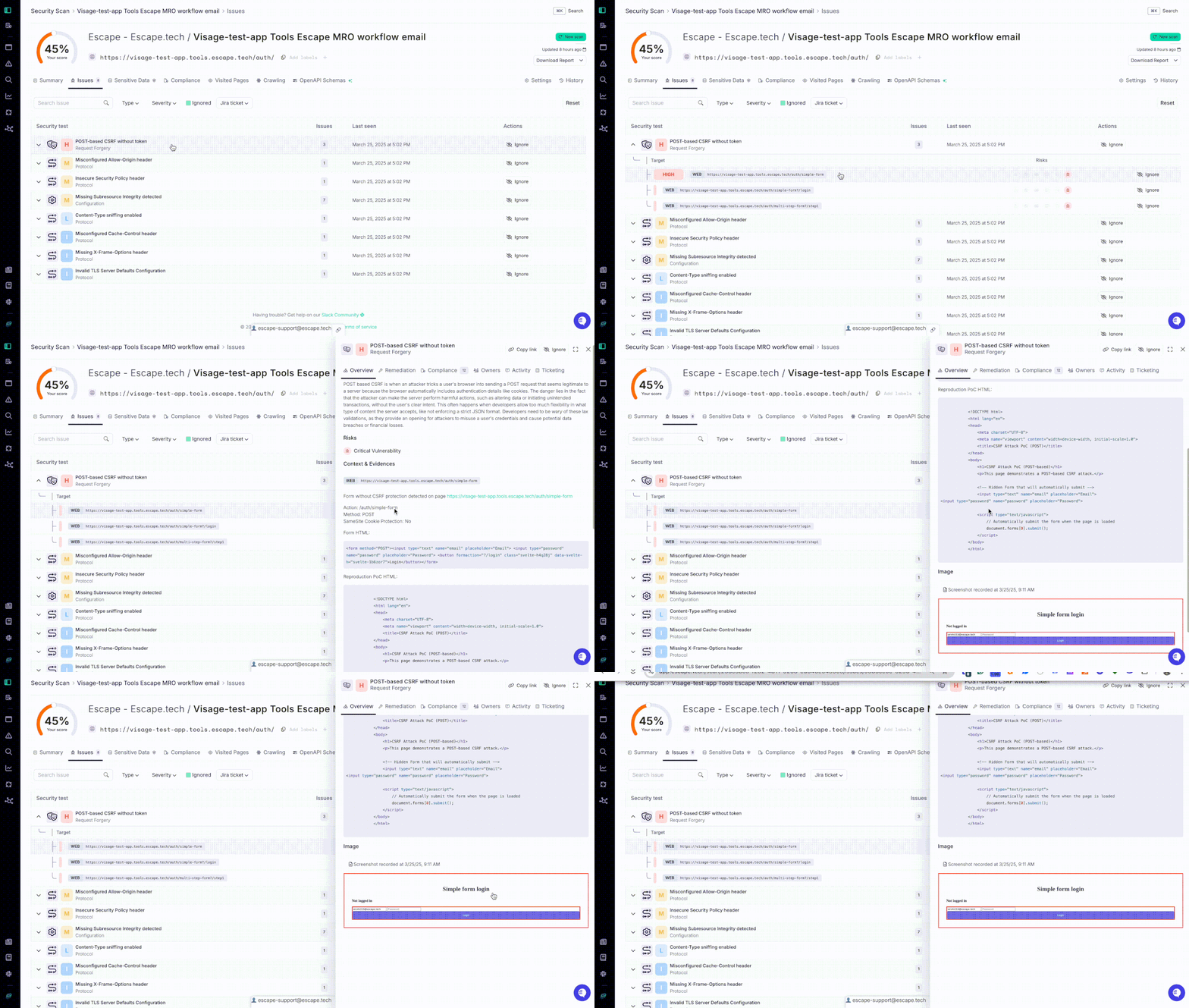
We’re excited to announce a major enhancement to the justification process for detected vulnerabilities in our front-end DAST scanner!

Until now, you could only rely on HTTP requests to justify alerts — for example, looking at an HTTP request to demonstrate a vulnerability like an SQL injection. While this approach was effective, it had its limitations in conveying the full context of certain vulnerabilities.

Now, you can also include screenshots and code snippets to better justify alerts!

Recording-new-reprodu (1).gif

This new capability adds a much-needed layer of clarity, providing additional context and evidence that makes understanding and addressing vulnerabilities much easier.

See it for yourself:

Key Benefits:

  • Better Context: With screenshots and code snippets, you can now offer clearer evidence and documentation, making vulnerabilities easier to analyze and resolve.
  • Major Improvement for Frontend DAST: Frontend vulnerabilities often involve complex UIs and dynamic behaviors, and this enhancement simplifies the validation and remediation process.

We hope that this update will help you resolve vulnerabilities more effectively and efficiently, providing better visibility and documentation throughout the remediation process.

#93 · Authentication Improvements in DAST Scanning

We know how frustrating the authentication process in DAST scans can be, which is why we've made several key updates to streamline it! Our goal is to provide you with better flexibility and efficiency for your security testing needs.

Here's the full list:

1. Support for complex authentication scenarios

We now support more complex authentication processes through the new Browser Actions Authentication Preset. This is especially useful for scenarios where traditional authentication methods don’t work well. With Browser Actions, you can customize your authentication flow using browser actions rather than relying on Escape's AI agent. This is ideal for form-based authentication where inputs are provided directly by users.

The Browser Actions preset uses Playwright for browser automation actions, such as filling in forms and clicking buttons. By default, it extracts cookies, localStorage, and sessionStorage from the browser, injecting them into the scan engine for frontend scans. For API scans, only cookies are injected.

Key benefits:

  • Customize authentication flows using direct browser actions.
  • Automatically extract and inject cookies and storage (for frontend scans).
  • Configure extractions and injections for specific storage needs (e.g., local/session storage).

For detailed documentation and some examples of how you can set it up, visit: Browser Actions Authentication Preset.

2. Single Page Mode for Enterprise Applications

We’ve introduced a new Single Page Mode to handle use cases where enterprise applications allow only one user to be logged in at a time. This feature ensures that authentication is managed seamlessly in environments with strict session controls, eliminating the need for additional configurations or manual intervention. Once authenticated, the system will maintain that connection throughout the scan.

3. Automatic Reauthentication When the Tab Is Closed

For applications that automatically log users out when the tab is closed, our system now ensures that reauthentication is handled automatically. There's no need to reconfigure your DAST scan setup or manually log in again—everything is managed in the background, allowing for a smooth and uninterrupted scanning process.

4. Handling Applications with Single Tab Login Restrictions

In cases where applications do not allow multiple tabs to be logged in simultaneously, our updated DAST scanning process automatically manages reauthentication. This removes the hassle of managing tab states and ensures that your scan continues without the need to manually re-authenticate across multiple tabs.

The improvements we've made to our DAST scanning authentication process addressed the specific pain points our customers face, especially for complex or custom authentication systems! With these updates, you can now handle advanced authentication workflows, such as the one described above, without losing session continuity or compromising on scan effectiveness!