Skip to content

DAST

#68 · Escape + Wiz: Unified Security for Modern, Cloud-Native Applications

We’re excited to announce our new integration with Wiz, bringing together Escape’s deep application-layer insights with Wiz’s unparalleled cloud security capabilities. This partnership empowers security teams with:

  • Practical Code-to-Cloud Security: Large organizations often struggle to bridge application-level exposures with cloud infrastructure insights. Now, they can see both in one place, track them back to the same responsible teams, and reduce friction between dev, ops, and security.
  • Immediate Assignment: The moment Escape flags a security issue, you know exactly which team needs to address it. No more guesswork, no more rummaging through outdated confluence pages or domain registries.
  • Acceleration of Remediation: When ownership data is at your fingertips, the gap between detection and remediation shrinks from weeks or months to days or even hours. It’s not just about finding vulnerabilities; it’s about fixing them fast. This empowers you to integrate security into applications early in the development lifecycle confidently.
  • Reduced Operational Overhead: Security Engineers spend less time “hunting” for who owns what. Instead, they can devote their energy to actually securing the organization. That leads to more strategic work, less administrative burden, and a meaningful drop in burnout.

How it works:
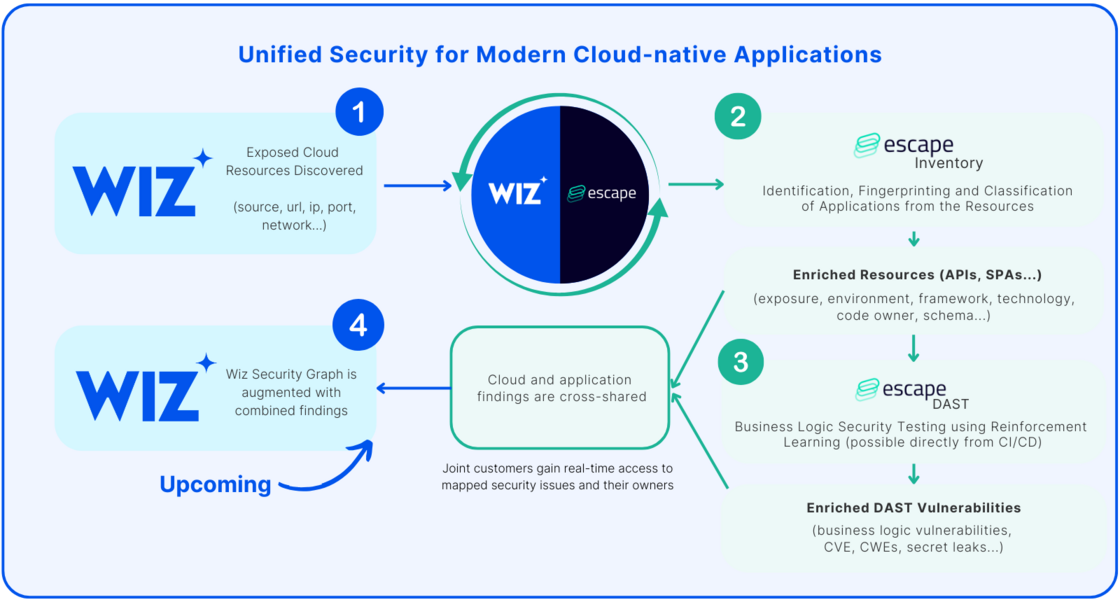
image.png

  1. Wiz External Attack Surface Management finds exposed cloud resources and hands them over to Escape.
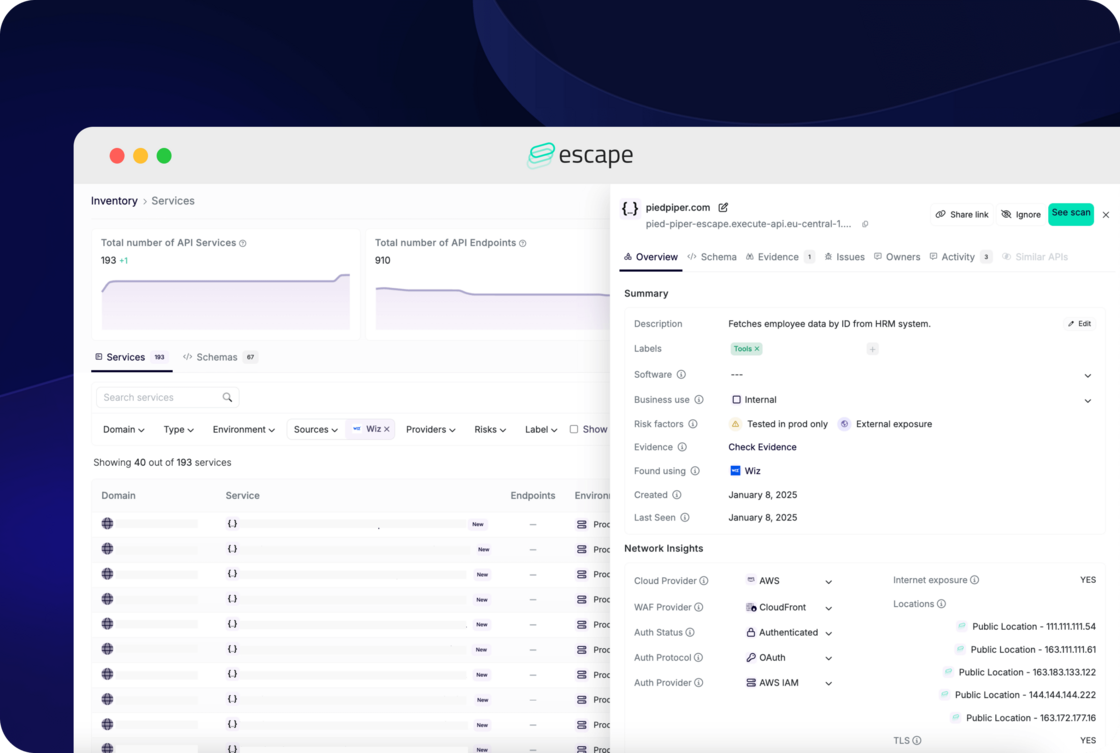
  2. Escape Inventory then identifies, fingerprints, and classifies these resources as specific application assets—such as APIs, Single-Page Applications (SPAs), and more.
escape-interface-with-wiz.png

  1. With this enriched information, Escape DAST runs at scale on the identified applications, including APIs, without needing any network interception or agent installation.

💡 If you're a joint Wiz and Escape customer, you can find step-by-step instructions on how to set up Wiz integration in the Escape's official documentation. Feel free to set it up now 😉
#67 · Improved Postman Collections Support

We’ve drastically enhanced our support for Postman Collections!

Our DAST scanner now parses collections more effectively, even when they’re poorly implemented—a common issue we’ve addressed head-on. Postman Collections, by design, provide examples of API requests, and with this improvement, we ensure better accuracy and coverage for your scans, no matter the quality of the collection.

#66 · Enhanced Support for OpenAPI Specs with cURL Examples

We’re excited to announce that our DAST scanner now supports OpenAPI specifications with cURL traffic examples, including those built using extensions like Redocly. This enhancement leverages real-world examples to boost scan quality and simplify your security testing process.

What's new

OpenAPI specifications can include cURL traffic examples to demonstrate specific API requests and responses. With this update, our DAST scanner can now parse OpenAPI specs with embedded cURL examples and use them to initiate scans.

We’ve also added support for Redocly, a tool that simplifies creating OpenAPI specs enriched with cURL examples, ensuring seamless integration into your workflows.

How It Works

  1. Prepare Your OpenAPI Spec:

Use tools like Redocly to build your OpenAPI specification, embedding cURL examples to document API behavior and parameters.

  1. Upload the Spec to the DAST Scanner:

  2. Go to Security Scan and click New Application

  3. Select REST API
  4. Upload your OpenAPI spec with cURL examples

3.Run the Scan:

The scanner will parse the OpenAPI spec, leverage the cURL examples for precise API interactions, and begin testing for vulnerabilities!

#65 · Burp Suite Exports Support for REST API Scanning in DAST

We’re excited to introduce another great capability for our DAST scanner: support for Burp Suite exports as REST API schemas. This enhancement streamlines your workflow by allowing you to leverage Burp Suite traffic captures to define your API schema, ensuring more comprehensive and efficient vulnerability scans.

What are Burp Suite Exports, and why use them?

Burp Suite is a widely-used tool for security testing, and its exports provide detailed records of HTTP traffic captured during web application testing. With this update, our DAST scanner can now ingest Burp Suite exports to interpret and scan REST APIs.

How it works

  1. Capture Traffic with Burp Suite

Use Burp Suite to intercept and record API traffic during your testing session. Export the captured data in the supported format.

  1. Upload to DAST Scanner Configure your scan in a few easy steps:

  2. Go to Security Scan and click New Application.

  3. Select REST API.
  4. Configure your Network and Authentication settings (if required).
  5. Upload the Burp Suite export file to define your API schema.

3.Initiate the Scan

The scanner parses the Burp Suite export, identifying endpoints, HTTP methods, and other critical details. Start the scan to analyze your API for vulnerabilities.

We hope this new feature helps streamline your security testing workflow. And of course, we wish you not too many criticals found 😉

#64 · HAR File Support for REST API Scanning in DAST

We're excited to announce a new capability for our DAST scanner: support for HAR files as REST API schemas. This enhancement offers you greater flexibility when scanning your APIs for vulnerabilities, especially since generating a HAR file can be faster and easier than creating or maintaining a Swagger/OpenAPI specification.

What are HAR files?

HTTP Archive (HAR) files are JSON-formatted files that capture network activity, including requests and responses, between a client and a server during a browsing session. With this update, our DAST scanner can now ingest HAR files to interpret and scan REST APIs, simplifying the scanning process and expanding its capabilities.

What are the benefits?

HAR files capture actual API interactions, including dynamically generated requests and responses during runtime. This is particularly useful in scenarios such as:

  • Dynamic or undocumented APIs: When API behavior depends on real-time parameters or session states that aren’t fully documented in Swagger or OpenAPI.
  • Legacy or incomplete documentation: For APIs lacking comprehensive or up-to-date schemas. Additionally, HAR files reflect real-world usage, uncovering hidden or undocumented endpoints and specific request variations that static schemas might miss. This leads to more thorough scans and improved vulnerability detection.

How it Works?

  1. Generate a HAR file by capturing the API traffic using tools like browser developer tools or network monitoring software.
  2. Upload the HAR file to the DAST scanner via the API schema configuration interface:

  3. Go to Security scan and click on New Application

  4. Select REST API
  5. Configure your Network and Authentication (if needed)
  6. Upload the HAR file to define your API schema
3.Initiate the scan
Once uploaded, the scanner parses the HAR file, automatically identifying API endpoints, HTTP methods, parameters, and other details. Start the scan and let the DAST scanner analyze your API for vulnerabilities.

Start scanning smarter, not harder 😉

#61 · Escape SPA DAST Now in Beta

Modern web applications demand modern security solutions. That’s why we’re excited to announce Escape’s security platform expansion into single-page application (SPA) security testing.

We're now in closed beta. We're looking for additional users to test it out and provide feedback.

🔗 Sign up here for the closed beta

What we built

In addition to its unique, feedback-driven DAST for APIs, Escape now offers Dynamic Application Security Testing (DAST) for SPAs. This is more than just an incremental feature—it’s a powerful extension of our API security platform. Our new front-end DAST is specifically designed to detect vulnerabilities in single page applications and highlight business logic errors.

With Escape’s DAST, you'll be able to identify common static vulnerabilities, CVEs, secret leaks, and outdated or vulnerable dependencies while automatically detecting the APIs consumed by your applications (both internal and third-party) and seamlessly syncing with your existing API security workflows. The tool reinforces our API DAST capabilities by accessing more context and user stories.

What makes Escape's DAST for SPAs stand out

  • Automated Authentication: Simply enter your credentials, and the front end handles the rest. Custom manual authentication is still available.
  • Schema-Driven Precision: Your application schema can be programmatically updated to keep Escape synced with your endpoint’s evolving structure. No manual maintenance required.
  • Tailored for Front-End: While still evolving, Escape leverages our proprietary business logic algorithm, initially designed for APIs, to gain a deeper understanding of single-page applications. This allows us to detect vulnerabilities where traditional tools often struggle, with continuous improvements as we learn more about the unique challenges of front-end security.
  • Automatic API Detection, Mapping, and Security: Escape automatically detects and maps the APIs consumed by your front-end application, including both internal and third-party APIs. We generate specifications for each API and test them for vulnerabilities immediately.
  • Unified Security Insights: Vulnerability data is linked to API insights, giving you a comprehensive view of your attack surface.

Next step - Remediations: As with our DAST for APIs, we plan to customize each remediation code snippet to align with specific frameworks in the near future.

Want to help us make Escape DAST better?

🔗 Sign up here for the closed beta

With this new front-end testing feature, we’re delivering a solution that doesn’t just work but works smarter, helping teams focus on fixing vulnerabilities rather than fighting with tools.

#59 · Private Locations: Securely scan your internal applications

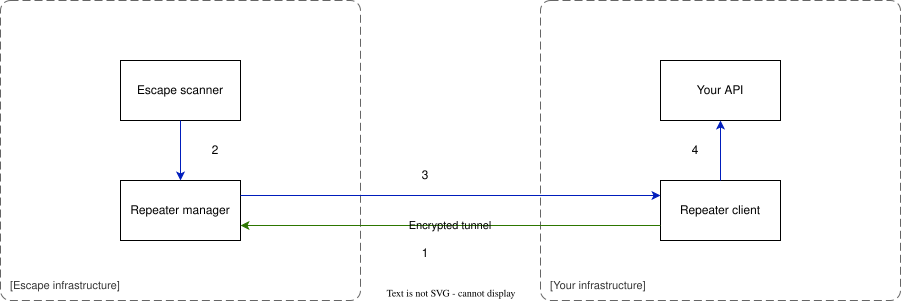
Private Locations let you detect, fingerprint, and scan your internal applications securely—no matter if they’re behind a firewall, VPN, or in a private network. Using the Escape Repeater, you can establish a reverse tunnel between Escape and your internal network. This setup provides a secure channel for performing scans and retrieving results.

Why?

Many organizations operate internal applications that are not exposed to the public internet, making them challenging to assess for security vulnerabilities. Private Locations address this challenge by enabling comprehensive security scanning of these internal apps without compromising your network's security perimeter.

Infrastructure Workflow

  • The locally deployed Repeater connects to the Repeater manager.
  • When a scan is initiated, Escape sends requests to the Repeater manager rather than directly to your servers.
  • The Repeater manager forwards the requests to the local Repeater, which relays them to your internal applications.
  • Scan results are then returned to Escape for reporting and analysis.

Diagram of Private Location Infrastructure:

repeater.drawio-fe5325e7951a6119eca68f733c11cdb7.svg

Getting started

  1. Configure your Private Location:

    • Head over to the Private Location Configuration page located under Organization -> Network
    • Create a new Repeater by assigning the desired name. Keep your ESCAPE-REPEATER_ID
  2. Configure Firewall Settings: Allow outgoing traffic to repeater.escape.tech on TCP port 443. Need the specific IPs? Run nslookup repeater.escape.tech to get the latest ones.

  3. Deploy the Escape Repeater\ Use the ESCAPE_REPEATER_ID environment variable to configure the repeater in your environment. You can deploy it using any of the following methods:

    • Docker CLI: Pull the Escape Repeater image and run it using Docker commands.
    • Docker Compose: Use a simple YAML file to manage the deployment process.
    • Kubernetes: Deploy in your Kubernetes cluster for scalable and integrated management.

For more details and step-by-step guidance, check out our Private Locations documentation.

If you're among our DAST alpha testers, you can also set up private locations with Escape's DAST.

With Private Locations, you can bring the power of Escape to your entire application landscape—no application left behind! 🚀

#45 · DAST Scanner: New features and improvements

We are excited to announce the updates to our Business Logic Security Testing scanner, helping you achieve improved performance and obtain better results when testing your APIs.

What's new

  • Escape now supports 104 security checks! A complete list of supported tests can be found here.
  • OpenAPI specification merging: Escape now supports the merging of OpenAPI Specifications. This is especially handy for specs that utilize external component references or are divided into smaller segments, commonly found in micro-services architectures.
  • Simplified advanced settings: We’ve revamped the advanced configuration settings in Escape. The new user interface makes it easier to configure scan environment networks and authentication methods, complete with detailed validation logs.
  • New step-by-step coverage improvements: You can now understand how to improve the scan quality, step by step. Indeed, the health score of your scanned apps is only useful if the Scanner is properly configured.

Why?

Here are the key benefits of Escape's new testing features :

  1. Simplified API management: Security engineers often handle complex API architectures, especially in systems designed with microservices. Merging multiple OpenAPI specifications into a single, coherent spec reduces complexity and the risk of overlooking security loopholes.
  2. Improved security testing accuracy: By having a unified view of the APIs, security tests can be more comprehensive, covering interactions and dependencies that may be missed when specs are scattered.
  3. Optimized test configurations: Security engineers can now follow step-by-step guidance to configure Escape's Scanner more effectively, ensuring that the setup is optimal for detecting vulnerabilities.
  4. Enhanced control and visibility: The enhanced UI gives security engineers better control over the scanning process and clearer visibility into the configurations, which helps in maintaining high standards of security practices across the board.

Getting started

Specification merging: Go to your security scan -> Settings -> Schema and upload multiple OpenAPI files to merge them into a single specification.

Advanced configuration: To set up advanced configuration settings for your scans, go to your security scan -> Settings and choose a relevant tab.

You can learn more about expert usage in our documentation.

#38 · Simplify Your Security with Our New Configuration Stepper for Business Logic Testing 🌟

We're rolling out a groundbreaking update that makes Business Logic Dynamic Application Security Testing (DAST) more accessible and efficient than ever. Introducing our Brand New Configuration Stepper - your gateway to simplified, yet powerful security scans.

Quick and Easy Starts 🚀

  • Straightforward Scanning: Start your Business Logic DAST scans in just a few seconds with our intuitive Configuration Stepper. It's designed to guide you smoothly through the setup process, with pre-filled fields to save you time.
  • Comprehensive Configuration Options: Tailor your scans with precision. Choose your network, including Static IP and Internal Networks, configure authentication effortlessly, and upload schemas for REST (OpenAPI, Swagger, WP-JSON, Postman, Insomnia) or GraphQL Schema/Introspection for GraphQL.
  • Debugging Made Simple with Innovative Logging: The killer feature? Detailed logs that not only help you debug with ease but also guide you every step of the way. Troubleshooting has never been this straightforward.

Power in Your Hands ✨

Our new Configuration Stepper demystifies the complexity of Business Logic DAST, making thorough business logic security testing accessible to everyone. It’s not just about ease of use; it’s about empowering you with a tool that’s both incredibly simple and remarkably powerful.

Leap into the Future of DAST 🌈

Gone are the days of cumbersome setup processes. With our latest update, beginning a scan is a matter of a few clicks and seconds. We’re putting the power of comprehensive security testing in the hands of developers and security engineers alike. Start exploring the full potential of your API security with Escape today, and step into a world where thorough security testing is within everyone’s reach.

#36 · Elevate Your DAST Scans with Dynamic Authentication Token Generation! 🌟🔒

Exciting news for all Escape users! We're rolling out a game-changing enhancement on the scan authentication feature: Dynamic Authentication Token Generation for DAST scans. This feature is about empowering your scans with real-world authentication scenarios.

What's New?

  • Generate Authentication Credentials Automatically: Start every DAST scan with fresh, automatically generated credentials. Whether it's tokens or other forms of authentication, we've got you covered.
  • Run Scans with Multiple User Profiles: Simulate different user levels in your scans - from admins to standard users. This allows you to comprehensively test your APIs from various security standpoints.
  • Effortless Authentication for Any API: With our versatile framework, authenticate against any type of API – REST, GraphQL, or anything else.

Key Enhancements:

  • Workflow-Driven Authentication: Tailored to fit a variety of server interactions, ensuring seamless token generation and application.
  • Credential Management: Efficient extraction and injection of authentication data into your scans.
  • Detailed Logging: Track every step of the authentication process with our comprehensive logs.
  • Session Management and Refresh: Manage and automatically refresh tokens based on their TTL, or configure manually if needed.

Supported Authentication Methods:

  • AWS Cognito
  • Basic
  • cURL & cURL Sequence
  • Digest
  • GraphQL
  • Headers
  • HTTP
  • OAuth (Client Credentials, User Password)
  • Webdriver
  • Custom Workflows involving multiple HTTP Requests and Webdriver actions

Dive Into Action:

This update opens up a new realm of possibilities for your API security testing. By incorporating real-world authentication scenarios, your DAST scans are now more thorough and realistic than ever. Get ready to unleash the full potential of your API security with Escape!