Skip to content

Platform

#138 · Verify and Filter API Scans for Method-Specific Coverage (GET, PUT, POST, DELETE)

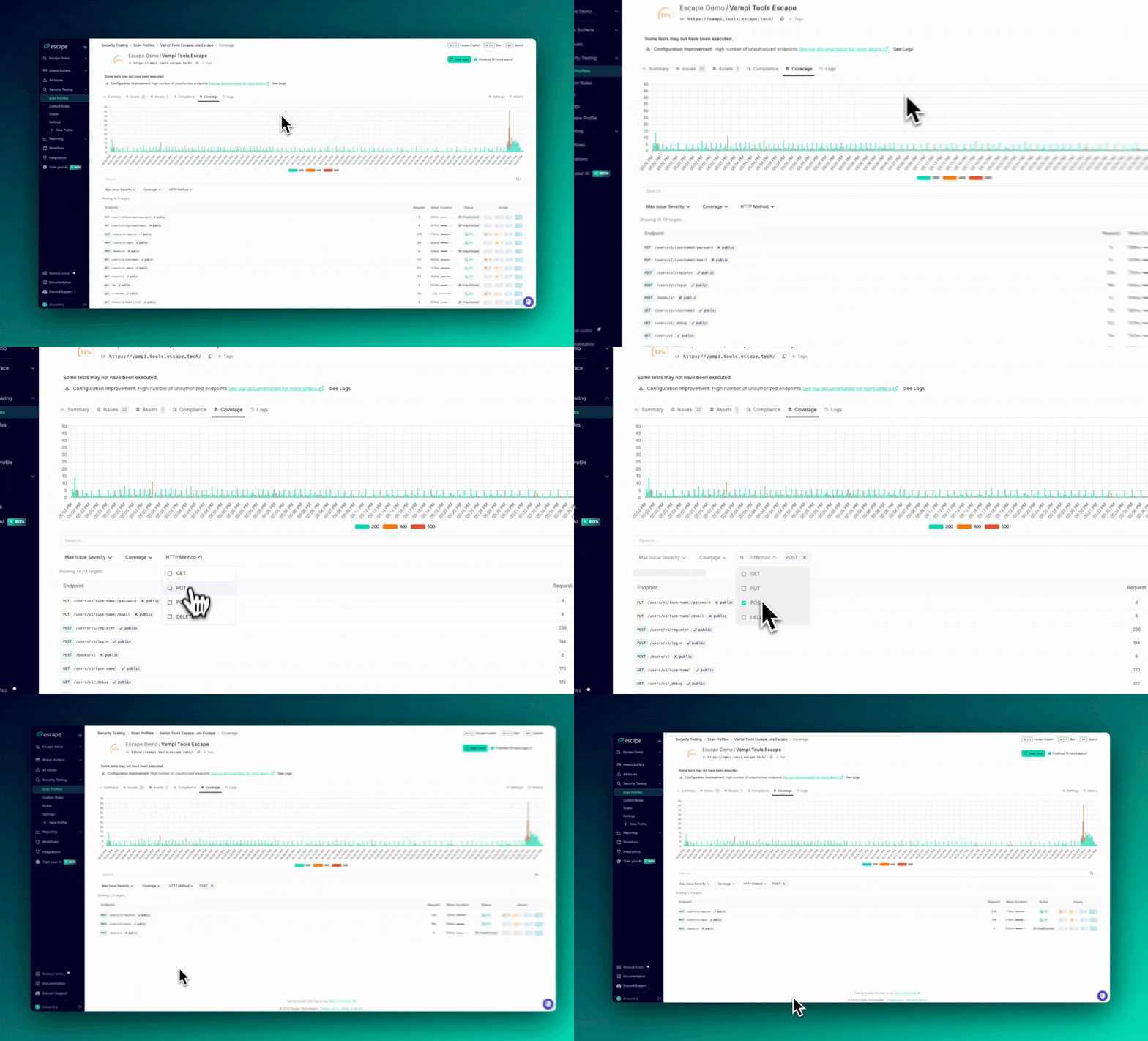
As a security engineer, you need to ensure thorough testing of all API request methods. With our new HTTP Method filter, you can now easily focus on verifying whether specific request methods (GET, PUT, POST, DELETE) were tested when reviewing your scan coverage.

Why This Matters :

Different HTTP methods can introduce different types of vulnerabilities. For example:

  • PUT requests might enable file uploads or modifications, increasing the risk of improper access control.
  • POST requests often involve sensitive data, making them prime targets for attacks.
  • GET requests could expose information, putting data security at risk.
  • DELETE requests introduce the potential for data loss or accidental deletions.

By filtering targets by HTTP method, you can ensure that each method was thoroughly tested for vulnerabilities. This also provides a clear view of your scan coverage, making it easier to demonstrate to leadership that all critical methods have been properly tested.

filter.gif

Key Benefits:

  • Focused Vulnerability Testing: Easily check that the most sensitive request methods (PUT, POST, DELETE) have been adequately tested.
  • Improved Efficiency: Filter out unnecessary data and concentrate on the most relevant request methods to save time.
  • Comprehensive Coverage: Make sure no high-risk request methods are overlooked in your security reviews.

How to Use:

  1. Go to your Scan Profiles.
  2. Navigate to the Coverage tab for a specific scan.
  3. Apply the HTTP Method filter and choose GET, PUT, POST, or DELETE to refine your targets.

This update helps you stay focused and ensures that your API security testing is comprehensive and efficient.

#136 · New Escape's Public Locations available

We’ve added three new Escape Public locations to the platform, located on West Coast, USA, along with their associated IPs. If you want to allow incoming traffic from these locations, you'll need to enable them.

Previously, Escape locations were available only in Europe and Canada. You can find the complete list of public Escape locations and their corresponding regions in our available on our documentation.

To enable these locations, go to Settings → Private Locations and activate the "United States" locations. While these locations are accessible to all organizations, they are disabled by default.

#135 · Quickly Validate and Streamline Scan Profile Configuration Before Launch

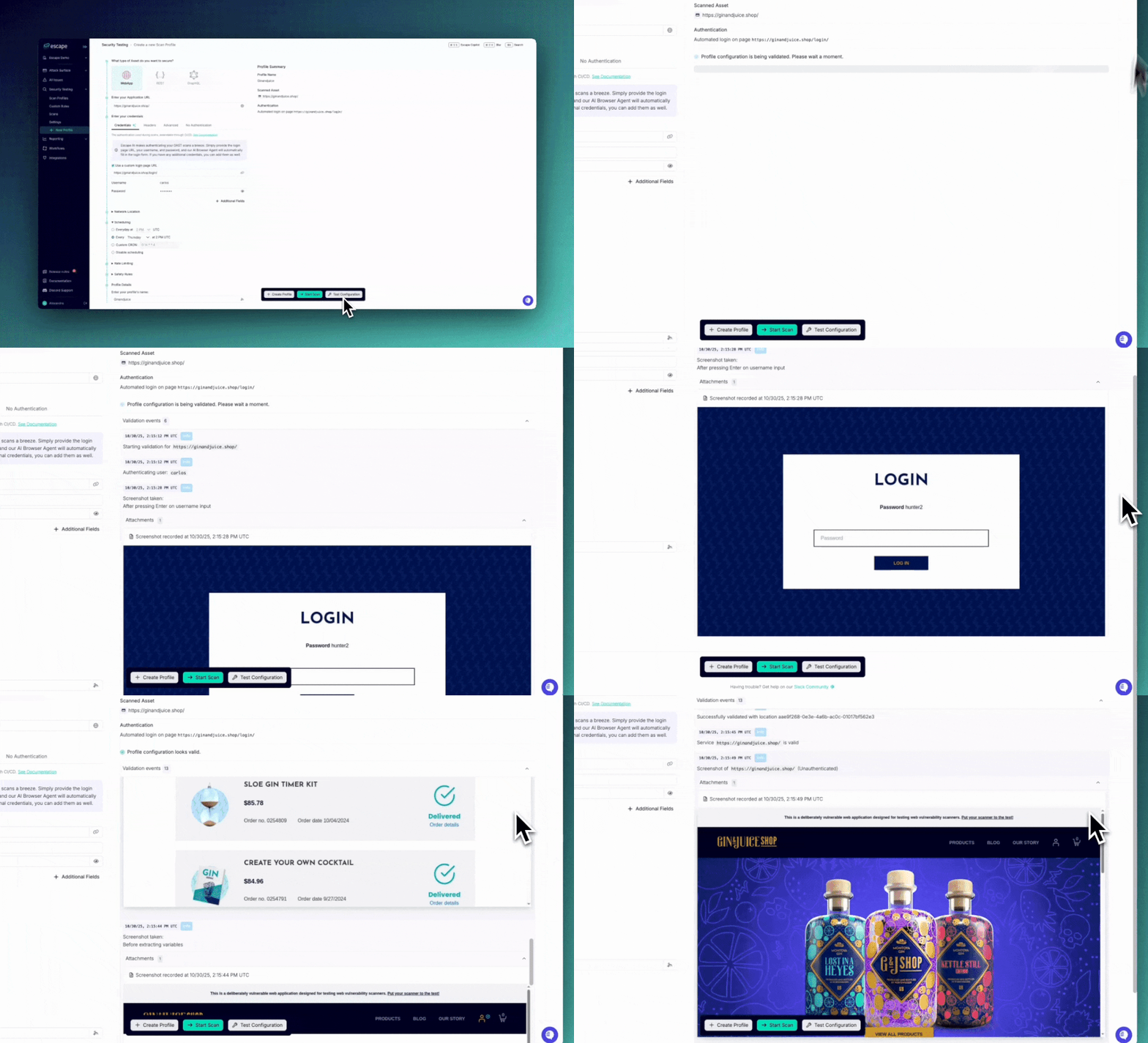
We’ve improved our Test Configuration feature in the scan profile creation form that allows you to quickly validate your settings and ensure your scan profile is correctly set up before launching. This enhancement helps you save time and avoid potential errors by allowing you to review all your settings in real-time. Clipboard-20251030-145314-667.gif

What’s New:

  • Streamed Validation: When validating configurations, such as Browser Authentication, screenshots and results are now streamed progressively. This means you can see feedback in real-time, rather than waiting for the entire process to finish, giving you quicker insights and enabling adjustments on the fly.
  • Validate Before Profile Creation: You can now validate your settings before creating a scan profile or integrating it with other systems. This ensures that everything is properly configured, reducing the likelihood of issues when the scan starts.

How to Use:

Once you’ve set up your new scan profile, simply click on the Test Configuration button. This will trigger the validation process, allowing you to review and adjust key settings such as authentication, scheduling, rate limits, and more before finalizing your scan setup.

image.png

#134 · New "Create New Scan Profile" Form

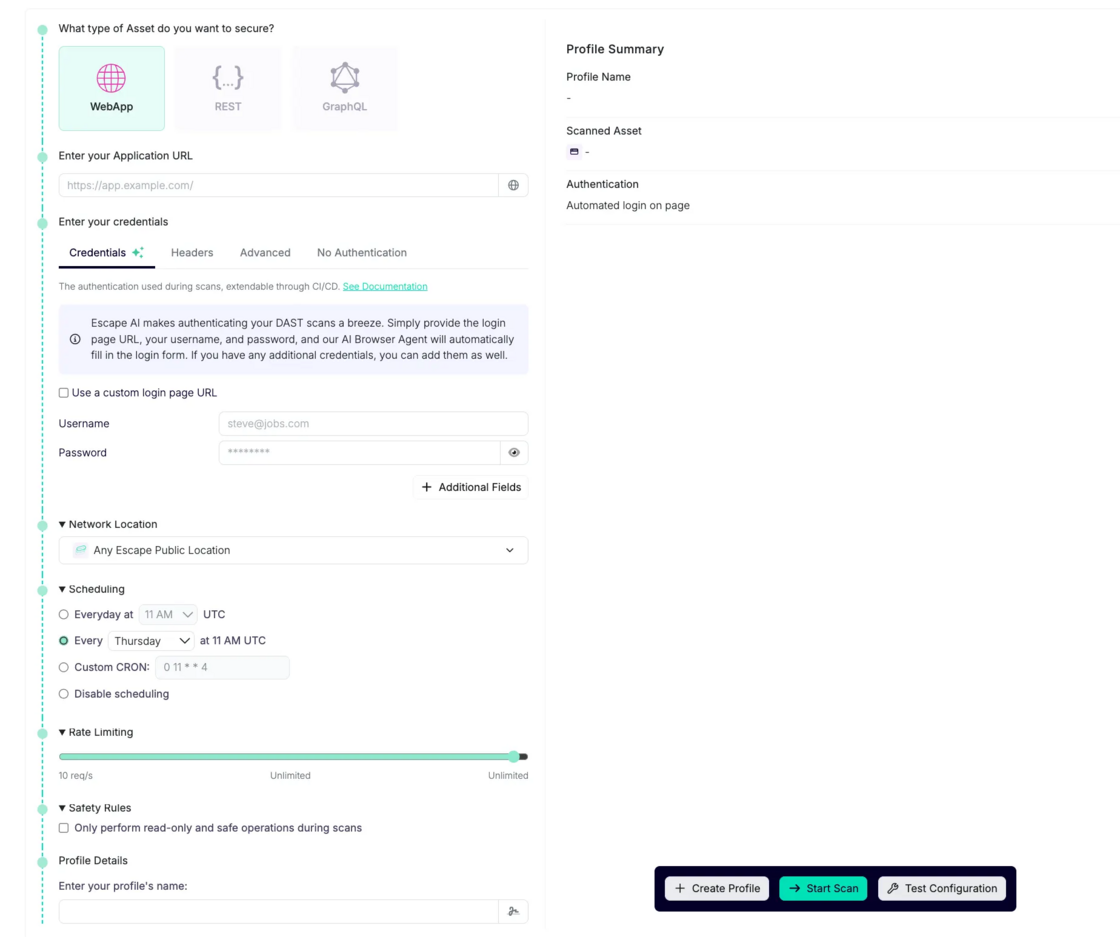
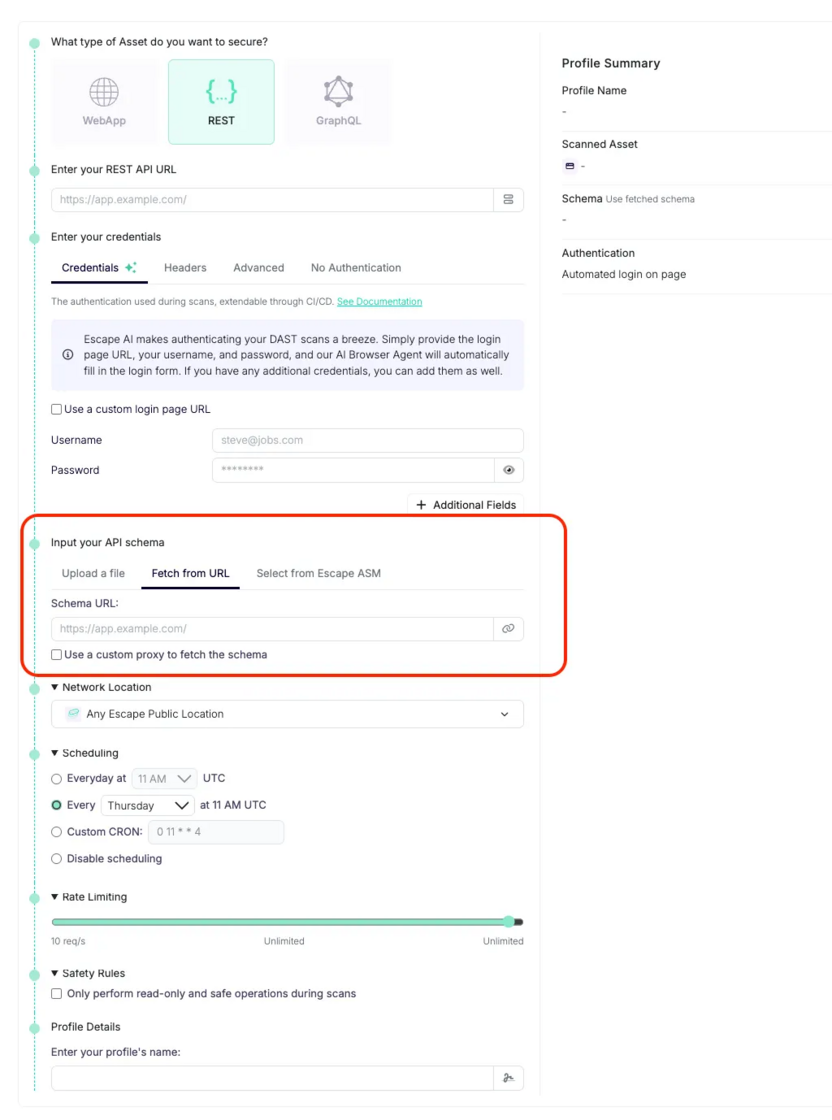
We’re excited to introduce an improved "Create New Scan Profile" form that addresses several key customer pain points. Users previously had to navigate through settings after creating an app to configure their scans, but now, this process is simplified, allowing for a much more in-depth setup right from the start.

image.png

Addressing Your Pain Points

Many of our users requested a more comprehensive way to set up their scans when creating a new scan profile, instead of configuring them separately through the settings later on. Here are the key features that were previously lacking but are now included in the new workflow:

  • Configure Advanced Authentication: Set up advanced authentication configurations during profile creation, including custom login page URLs, usernames, and passwords.
  • Create Profiles Without Starting the Scan: Scan profiles can be created without automatically starting the scan.
  • Configure Safety Rules: Check the box during scan profile setup to only perform read-only and safe operations during scans
  • Rate Limiting and Scheduling During Profile Creation: Configure scan rate limiting and set scheduling preferences directly while creating the profile, saving time and making setup smoother.
  • Fetch API Schema from Different Locations: Fetch API schemas from locations other than the app’s schema—useful if the API schema is stored separately.

All of these new creation steps are available via Escape API.

image.png

This new form simplifies and streamlines the process of creating and configuring scan profiles, ensuring that you can set up your scans with all necessary parameters from the start.

#132 · Enhanced Scan Failure Visibility

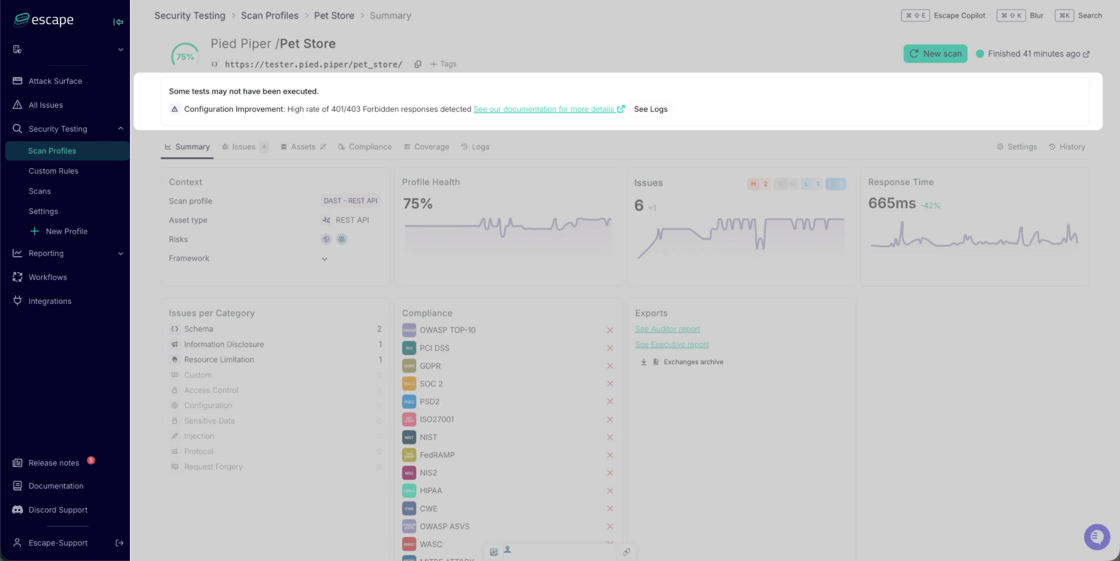
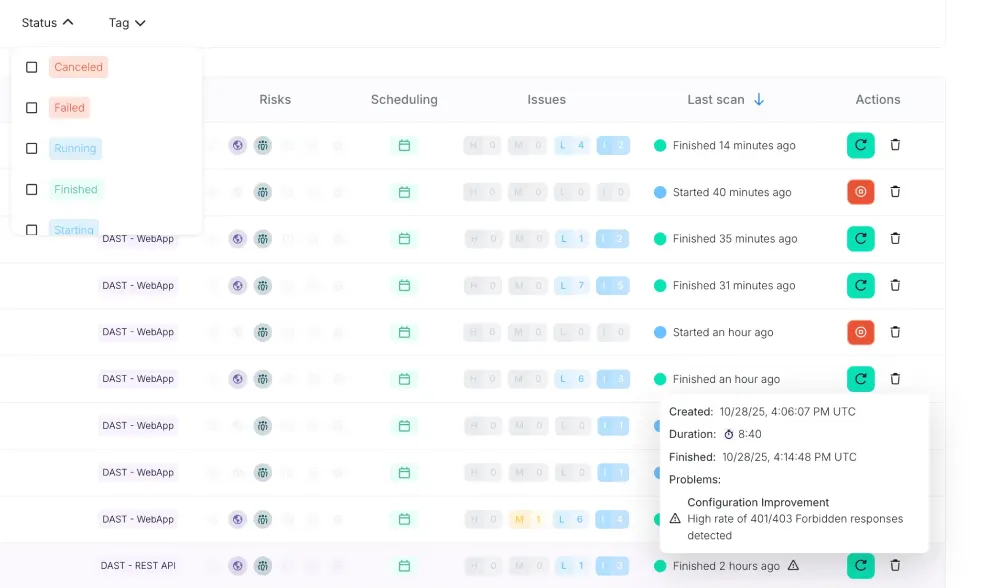
We are excited to introduce a new feature that brings instant visibility into scan failures. This feature allows you to easily identify which scans have failed and understand the reasons behind these failures.

Historically, when a scan failed, it was often unclear why, forcing users to dive deep into logs for answers. This new feature provides clear, actionable insights directly from the scan results, saving time and reducing frustration.

image.png

Key Benefits:

  1. Instant Visibility on Failures: Immediately see which scan profiles have failed, enabling you to prioritize troubleshooting efforts and reduce downtime.
  2. Actionable Insights for Faster Investigation: View detailed failure information, including direct links to event logs, to help you investigate the root causes quickly and efficiently.
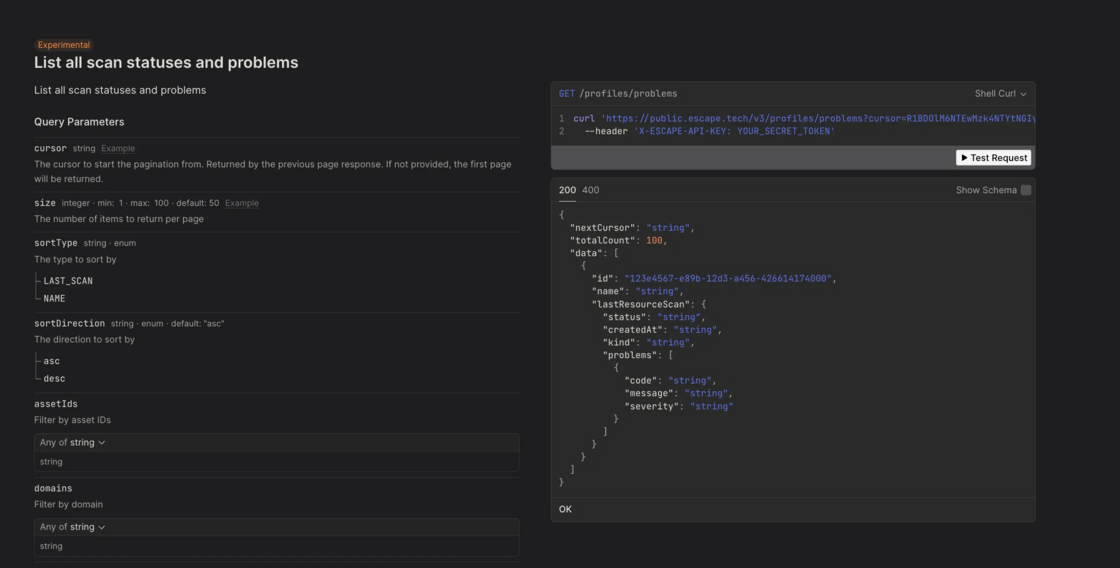
  3. Accessible Through API or within the Escape Platform: All failure feedback is available via our public API, making it easy to integrate into your existing tools and workflows. You can also view failure details either on a summary page or as alerts on a list of scan profiles.

image.png

image.png

  1. Smarter Configuration Management: Detect misconfigurations or incomplete scan setups early, saving time for both users and support teams in preventing recurring issues.

Types of Issues Flagged

With the new scan failure visibility, users will now see failures categorized by key areas, including:

  • Private Location Failures (e.g., unreachable proxies or locations)
  • Authentication Failures (e.g., configuration errors, invalid credentials)
  • Configuration Issues (e.g., rate limits, invalid patterns, permission errors)
  • Schema and Service Unreachability (e.g., invalid GraphQL/OpenAPI schemas, unreachable assets)
  • Timeout and Integration Errors (e.g., scan duration limits, CAPTCHA or security blocks)

These categories will help you quickly identify the nature of the problem, so you can act swiftly to resolve the issue.

Next Steps

  1. Provide Feedback

    We encourage all Escape users to provide feedback on the errors being reported to help us refine and improve the feedback mechanism. This ensures that the issues flagged are helpful and relevant! Feel free to reach out to your dedicated Escape contact via in-app chat, email, or on Slack/Teams channels.

  2. Upcoming Feature - Automated Notifications

    In November, we’ll be introducing automated outbound notifications for specific scan failures. This will allow users to receive immediate alerts when a scan encounters an issue, streamlining the debugging process.

    Stay tuned for more updates! And for now, stay secure! Your Escape team

#128 · Save and Share Your Favorite Scan Profile Filters as Views

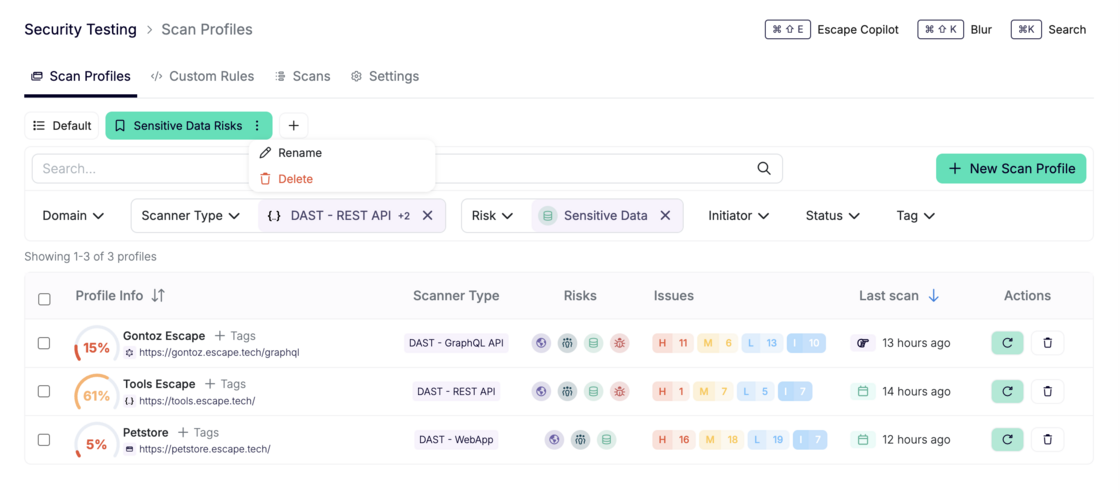
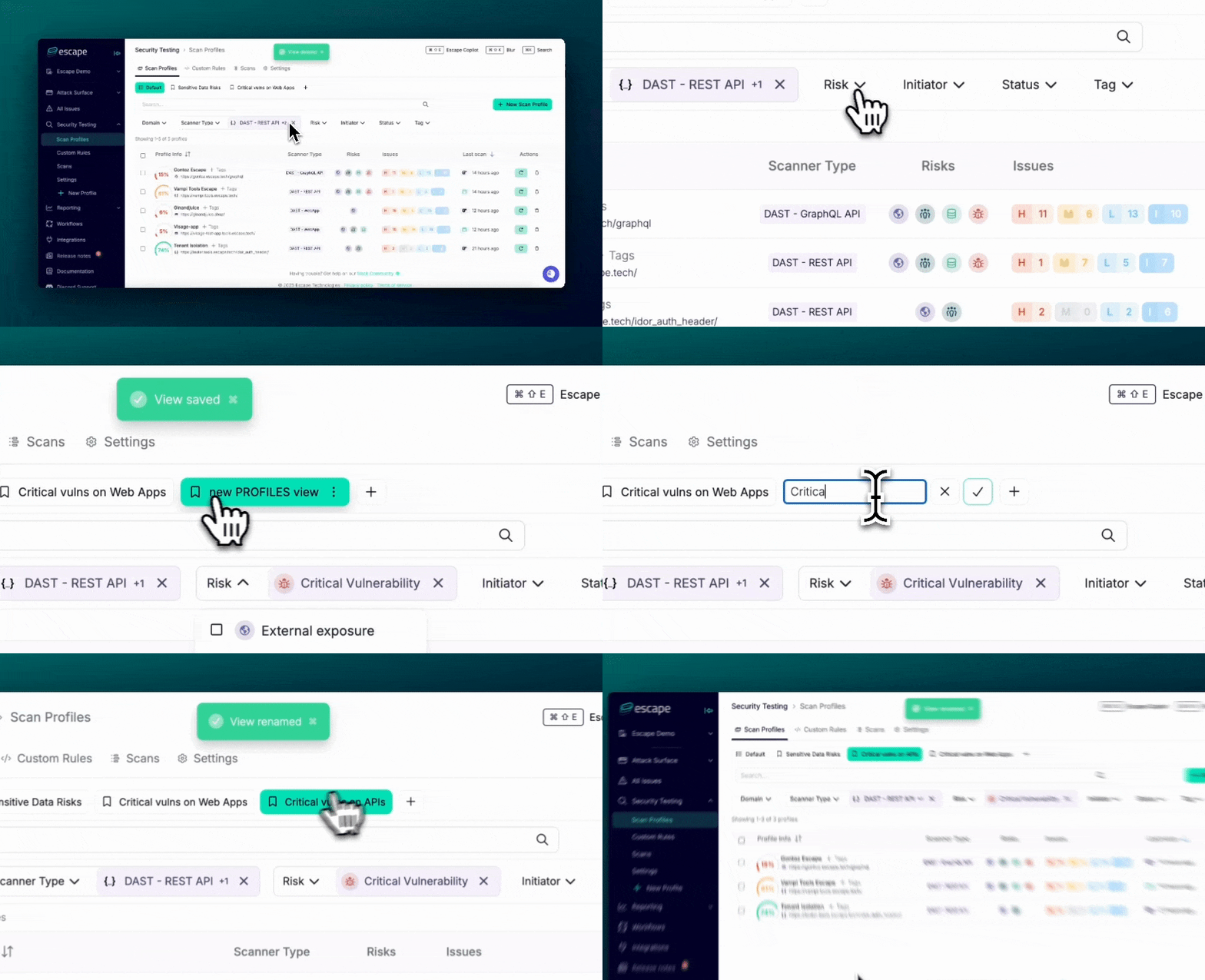
We’ve just rolled out a new feature that lets you save your favorite scan profile filter combinations as custom views for quick access and easy sharing! Now, you can tailor your workflow to fit your needs and interact with your scan data more efficiently. Screenshot 2025-10-21 at 10.16.58.png

Key Features:

  • Save Your Favorite Filters: You can now save filter combinations (e.g., scanner type, risk level, initiator, status, tag, etc.) as views, making it easy to access your personalized scan tables at any time.
  • Share Links with Pre-filled Filters: Want to share your specific view with others? Simply build a filter and copy your link, and it will include all your filter settings as URL parameters—allowing others to see exactly what you see, no setup required.
  • Reorder Views: Organize your saved views with drag-and-drop functionality. Rearrange them to match your preferred order and keep your workflow seamless.

How to Access:

  1. Go to: app.escape.tech/profiles
  2. Create and save your custom views based on the filter combinations you use most.
  3. Share the link with your team or stakeholders, and drag-and-drop your views for easy customization!

Clipboard-20251021-084204-155.gif

We hope that this update will help you and your team work faster and more collaboratively by streamlining access to your favorite scan profiles.

What’s next?

And this is just the beginning! In the future, these saved views will be integrated into workflows and reporting, allowing you to apply them in even more areas of your process for enhanced efficiency and consistency.

#127 · New Compliance Frameworks, Standards, and Resources Support

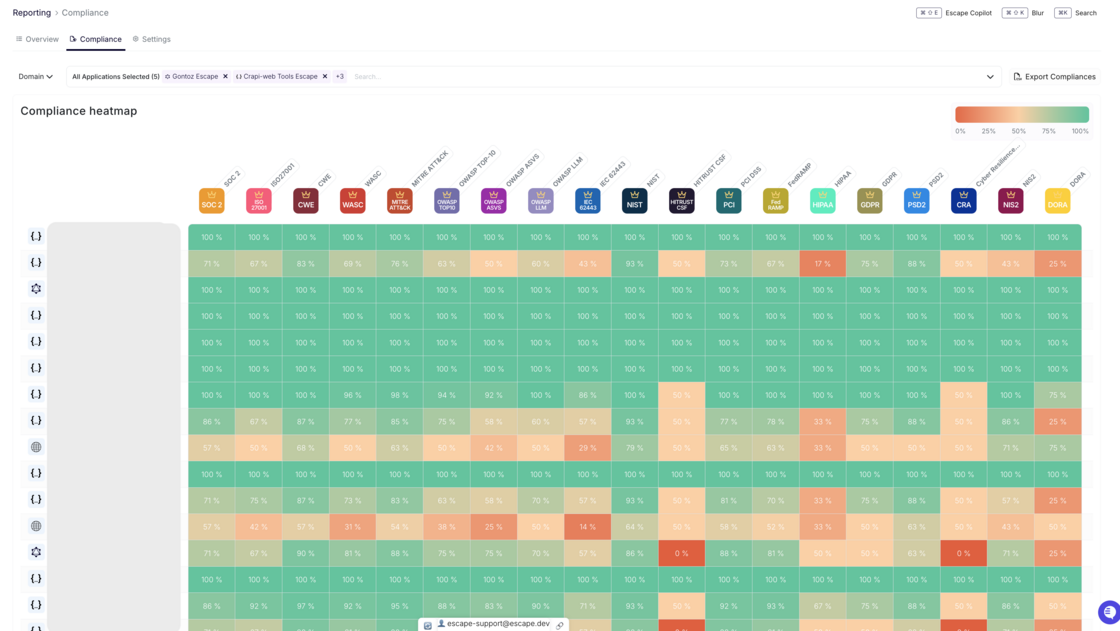
We are excited to announce the addition of 7 new compliance frameworks, standards and resources to our platform! This update helps ensure you have even more options to meet various regulatory and security requirements - whether you’re based in the US or the EU or working internationally.

What's New?

We’ve added support for the following compliance frameworks and resources:

  1. OWASP ASVS - Application Security Verification Standard with requirements for secure development.
  2. WASC - Best-practice security standards for web application security.
  3. MITRE ATT&CK - A knowledge base of adversary tactics, techniques, and procedures (TTPs), helping you understand and defend against cyber threats.
  4. IEC 62443 - Industrial automation and control systems security standards.
  5. HITRUST CSF - A framework for regulatory compliance and risk management in healthcare and beyond.
  6. CRA - EU Cyber Resilience Act, establishing cybersecurity requirements for products with digital elements.
  7. DORA - Digital Operational Resilience Act, ensuring that financial entities can withstand ICT-related disruptions.

7 new compliance.png

Important Notes:

Some of these frameworks are OFF by default to keep your matrix manageable. You can enable them manually from the Reporting Settings page.

A full list of supported compliance standards can be found here.

We hope this update helps streamline your compliance and security efforts. Happy securing!

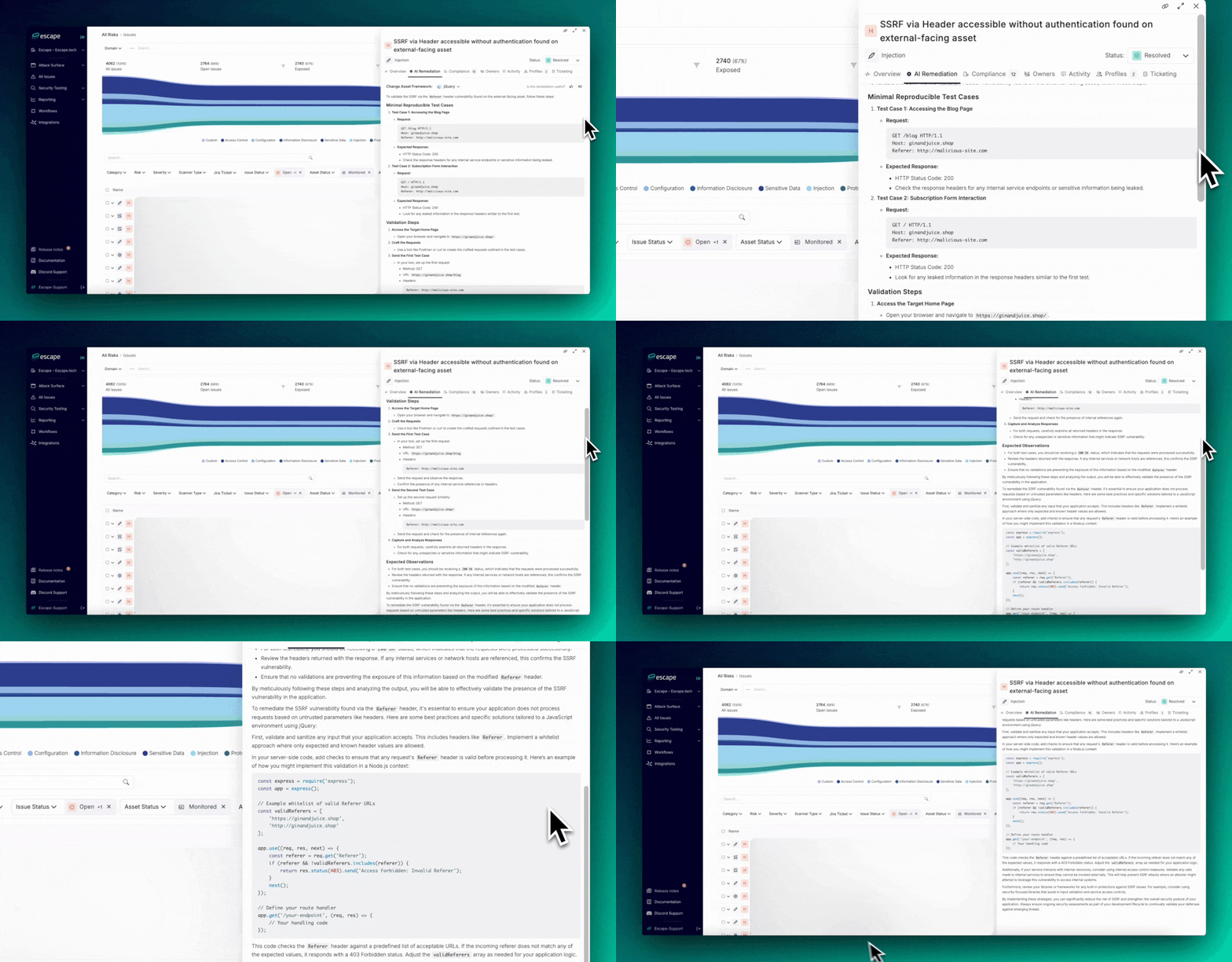
#125 · AI-Powered Exploit Validation and Remediation Guidelines

We’re excited to introduce a significant enhancement to help you validate discovered vulnerabilities and remediate them.

Area.gif

With our AI-powered proof of exploit and remediation guidelines, we’ve evolved from static code snippets tailored to specific frameworks to dynamic, context-aware solutions generated by a specially trained Large Language Model (LLM).

This update puts intelligent remediation and validation front and center, giving teams precise, actionable guidance with proof that the vulnerability can be exploited.

What’s Included:

  • Minimal Reproducible Test Cases: Clear, concise test cases to validate the vulnerability and remediation.
  • Validation Steps: Step-by-step guidance to ensure remediation is correctly implemented.
  • Expected Observations: Key things to expect after remediation to confirm effectiveness.
  • Actionable Remediation Instructions: Contextual, tailored fixes that go beyond generic advice.

Key Benefit:

By leveraging AI, we generate remediation actions tailored to your environment and the specific vulnerability, backed by proof of exploit. This significantly reduces guesswork and ensures that the provided fixes are both effective and applicable. You can apply these solutions with confidence, knowing that the vulnerability has been thoroughly validated and addressed.

For instance, when addressing an SSRF vulnerability triggered by the Referer header in a JavaScript (jQuery) environment, the new guidelines show how this vulnerability can be exploited and will:

  1. Help you whitelist valid Referer headers
  2. Guide you in server-side validation to reject invalid requests
  3. Ensure internal access control to limit exposure to unauthorized service calls

Why This Matters:

These updates streamline remediation and validation, ensuring accuracy, efficiency, and confidence in your security fixes. Teams can spend less time guessing and more time building, while knowing vulnerabilities are effectively mitigated.

Try it out for yourself!

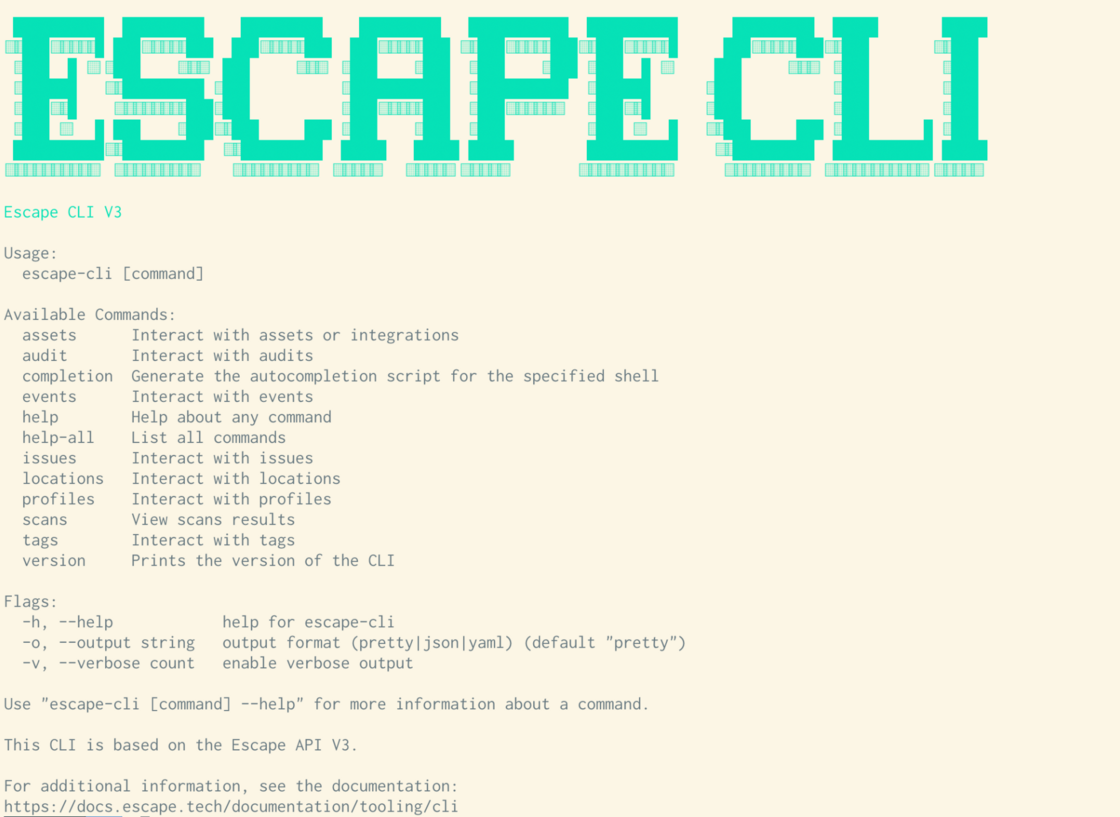
#122 · Escape CLI – New Features with Escape Public API v3

We’re also excited to announce that the Escape CLI now fully supports all the new capabilities introduced in Public API v3. This brings enhanced functionality, making it easier for your team to interact with the platform directly from the command line.

cli.png

What's New in the CLI?

  1. Full API v3 Support
    • The CLI now provides full access to all the new features in API v3, ensuring you can manage assets, profiles, issues, events, scans, and more directly from your terminal.
    • This brings a streamlined experience for users already familiar with the API, allowing for a unified interaction between the CLI and the API.
  2. Autocompletion Support
    • With the new CLI version, you can now generate autocompletion scripts for your shell (Bash, Zsh, Fish, etc.).
    • This saves time and reduces errors by providing suggestions as you type, improving productivity and helping your team navigate commands more efficiently.
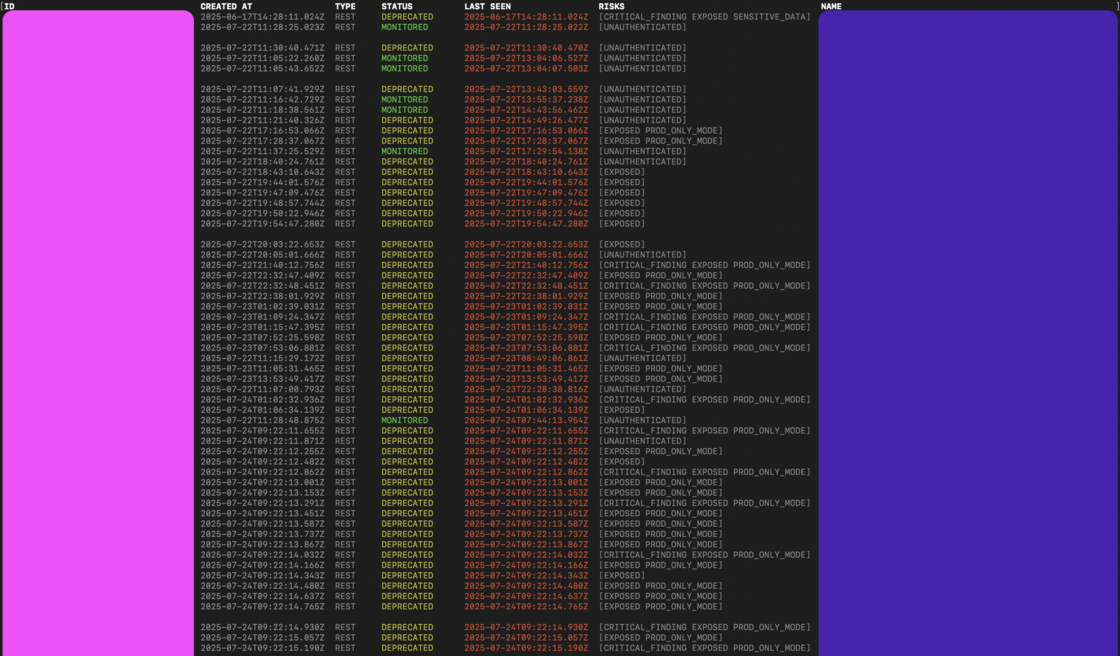
  3. Colour-Coded Display
    • For better visibility and organization, the CLI now supports color coding of various lists (assets, profiles..) when displayed in the terminal.
    • This makes it easier to quickly differentiate between asset and scan types, statuses, and categories, enhancing the overall user experience, especially when managing large datasets.

color-coded-cli.png

These updates will improve your team’s workflow, making the CLI more powerful and user-friendly. For more details on how to get started, check out the updated CLI documentation.

Admins can now invite teammates to their organization using a dedicated invite link, making onboarding faster and more flexible.

How it works:

  1. Go to Team Settings available at https://app.escape.tech/organization/team/
  2. Enter the email of your new team member and click “Invite”
  3. Once added, click the member's name in the team list
  4. Click “Copy Invite Link” from their profile

copy-invite-link-escape.png

Share the link directly—your teammate can join the organization with one click.

This makes it easier to onboard team members, especially in async or distributed environments.